1. හැඳින්වීම
Thank you for choosing the Losei D65 Wireless Earbuds. These earbuds are designed to provide a high-quality audio experience with advanced features such as environmental noise canceling (ENC), individual power display, wireless charging, and IPX7 waterproofing. This manual will guide you through the setup, operation, and maintenance of your new earbuds.
2. පෙට්ටියේ ඇති දේ
- Wireless Sport Earbuds (1 Pair)
- Charging Case (1 PC)
- Type-C Charging Cable (1 PC)
- Original Ear Caps (1 Pair)
- Spare Ear Caps (6 Pairs)
- පරිශීලක අත්පොත (මෙම ලේඛනය)
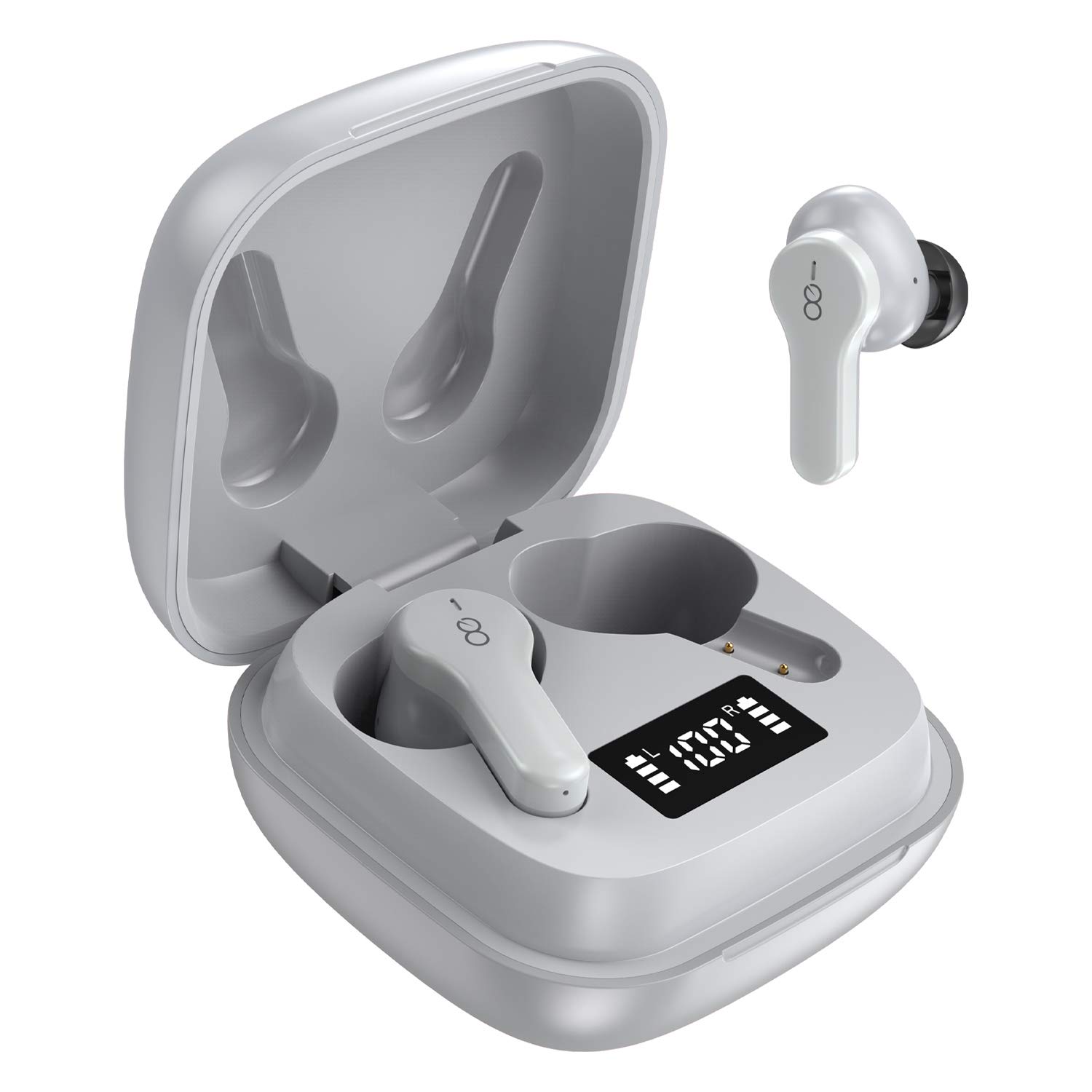
3. නිෂ්පාදන අවසන්view
The Losei D65 earbuds feature a compact, in-ear design with touch controls. The accompanying charging case provides portable power and includes a digital display to show battery levels for both the case and individual earbuds.
ප්රධාන ලක්ෂණ:
- Clear Call with 4-Mics Noise Reduction: Built-in 4 microphones with Environmental Noise Canceling (ENC) technology for clear calls.
- Individual Power Display: Digital display on the charging case shows battery percentage for the case and charging status for each earbud.
- Wireless Charging & Extended Playtime: Supports wireless charging and provides up to 30 hours of total playtime with the charging case.
- Comfortable Fit & IPX7 Waterproof: Ergonomic design with multiple ear tip sizes and IPX7 water resistance for sports and daily use.
- Auto Pairing & Smart Touch Control: Automatic connection to the last paired device and intuitive touch controls for various functions.
4. පිහිටුවීම
4.1 ඉයර්බඩ් සහ කේස් ආරෝපණය කිරීම
පළමු භාවිතයට පෙර, ඉයර්බඩ් සහ ආරෝපණ පෙට්ටිය සම්පූර්ණයෙන්ම ආරෝපණය කරන්න.
- ඉයර්බඩ් ආරෝපණය කිරීම: Place the earbuds into the charging case. The marquee lights on the case will indicate charging. They will stop when fully charged.
- Charging the Case (Wired): Connect the provided Type-C charging cable to the charging port on the case and to a USB power source. The digital display will show the battery percentagවැඩි වීමasing. A full charge takes approximately 1.5-2 hours.
- Charging the Case (Wireless): Place the charging case on a compatible wireless charging pad (not included). The digital display will indicate charging status.
The charging case's digital display shows the battery percentage (1-100%). The individual earbud power consumption indicators show 4 grids, each representing 25% battery.
4.2 ඔබගේ උපාංගය සමඟ යුගල කිරීම
The Losei D65 earbuds feature automatic pairing.
- ඔබගේ උපාංගයේ බ්ලූටූත් සක්රිය කර ඇති බවට වග බලා ගන්න.
- ආරෝපණ පෙට්ටිය විවෘත කරන්න. ඉයර්බඩ් ස්වයංක්රීයව ක්රියාත්මක වී යුගල කිරීමේ ප්රකාරයට ඇතුළු වේ.
- On your device, search for Bluetooth devices and select "Losei-D65" from the list.
- සම්බන්ධ වූ පසු, ඔබට තහවුරු කිරීමේ විමසුමක් ඇසෙනු ඇති අතර, ඉයර්බඩ් භාවිතයට සූදානම් වනු ඇත.
The earbuds will automatically reconnect to the last paired device when taken out of the charging case.
5. මෙහෙයුම් උපදෙස්
5.1 ස්මාර්ට් ස්පර්ශ පාලන
The Losei D65 earbuds utilize touch controls for various functions. The sensor area is typically located on the outer surface of each earbud.
- වාදනය/විරාමය: ඉයර්බඩ් දෙකෙන් එකක් මත එක තට්ටු කරන්න.
- ඊළඟ ධාවන පථය: දකුණු ඉයර්බඩ් එක දෙවරක් තට්ටු කරන්න.
- පෙර ධාවන පථය: වම් ඉයර්බඩ් එක දෙවරක් තට්ටු කරන්න.
- පරිමාව: දකුණු ඉයර්බඩ් එක තුන් වරක් තට්ටු කරන්න.
- ශබ්දය පහළට: වම් ඉයර්බඩ් එක තුන් වරක් තට්ටු කරන්න.
- පිළිතුර/අවසන් ඇමතුම: ලැබෙන ඇමතුමක් අතරතුර ඉයර්බඩ් දෙකෙන් එකක් මත එක් වරක් තට්ටු කරන්න.
- ඇමතුම ප්රතික්ෂේප කරන්න: ලැබෙන ඇමතුමක් අතරතුර ඉයර්බඩ් දෙකෙන් එකක් තත්පර 2ක් ඔබාගෙන සිටින්න.
- හ oice සහකාර සක්රිය කරන්න: (ඇමතුමක නොමැති විට) ඉයර්බඩ් දෙකෙන් එකක් තත්පර 3ක් ඔබාගෙන සිටින්න.
5.2 Multi-Using Modes
The earbuds support different usage scenarios:
- මොනෝ ප්රකාරය: Each earbud can be used independently. This is ideal for driving or when you need to be aware of your surroundings. Simply take one earbud out of the case and connect it.
- බෙදාගැනීමේ මාදිලිය: You can share one earbud with another person to listen to the same audio content.
- ස්ටීරියෝ ප්රකාරය: Use both earbuds together for a full, immersive stereo sound experience.
6. නඩත්තු කිරීම
6.1 පිරිසිදු කිරීම
නිතිපතා පිරිසිදු කිරීම ශබ්දයේ ගුණාත්මකභාවය සහ සනීපාරක්ෂාව පවත්වා ගැනීමට උපකාරී වේ.
- ඉයර්බඩ් සහ ආරෝපණ පෙට්ටිය පිස දැමීමට මෘදු, වියලි, ලින්ට් රහිත රෙද්දක් භාවිතා කරන්න.
- කන් ඉඟි සඳහා, ඒවා ඉයර්බඩ් වලින් ඉවත් කර අවශ්ය නම් මෘදු සබන් ද්රාවණයකින් පිරිසිදු කරන්න, පසුව හොඳින් සෝදා නැවත සවි කිරීමට පෙර සම්පූර්ණයෙන්ම වියළා ගන්න.
- උල්ෙල්ඛ පිරිසිදු කරන්නන්, මධ්යසාර හෝ රසායනික ද්රාවක භාවිතා නොකරන්න.
6.2 ගබඩා කිරීම
භාවිතයේ නොමැති විට, ඉයර්බඩ් ආරක්ෂා කර ගැනීමට සහ ආරෝපණය කර තබා ගැනීමට ඒවායේ ආරෝපණ පෙට්ටියේ ගබඩා කරන්න.
- අධික උෂ්ණත්වයන්ගෙන් ඈත්ව සිසිල් වියළි ස්ථානයක ගබඩා කරන්න.
- සෘජු හිරු එළිය දිගු කලක් නිරාවරණය වීමෙන් වළකින්න.
6.3 ජල ප්රතිරෝධය (IPX7)
The Losei D65 earbuds are IPX7 waterproof, meaning they can withstand immersion in water up to 1 meter for 30 minutes. This makes them suitable for sports and protection against sweat and rain. However, they are not designed for swimming or prolonged submersion. Ensure the earbuds are dry before placing them back in the charging case to prevent damage.
7. දෝශ නිරාකරණය
If you encounter issues with your Losei D65 earbuds, refer to the following common solutions:
- යුගලනය නොවන හෝ සම්බන්ධ නොවන ඉයර්බඩ්:
- ඉයර්බඩ් දෙකම ආරෝපණය කර ඇති බව සහතික කර ගන්න.
- ඔබගේ උපාංගයේ බ්ලූටූත් ක්රියාවිරහිත කරන්න, ඉන්පසු එය නැවත ක්රියාත්මක කරන්න.
- Forget/delete "Losei-D65" from your device's Bluetooth list and attempt to pair again.
- Place both earbuds back into the charging case, close the lid, wait a few seconds, then open the lid to reset.
- එක් ඉයර්බඩ් එකක් පමණක් ක්රියා කරයි:
- ඉයර්බඩ් දෙකම ආරෝපණය කර ඇති බව සහතික කර ගන්න.
- Place both earbuds back into the charging case, close the lid, wait a few seconds, then open the lid. They should reconnect to each other automatically.
- If the issue persists, try resetting the earbuds as described in the pairing section.
- දුර්වල ශබ්ද ගුණාත්මකභාවය හෝ අඩු පරිමාව:
- ඔබගේ උපාංගයේ සහ ඉයර්බඩ් දෙකෙහිම ශබ්දය සකසන්න.
- Ensure the ear tips are properly sealed in your ear canal. Try different sized ear tips for a better fit.
- ඉයර්බඩ් ස්පීකර් සහ කන් ඉඟි වලින් ඕනෑම සුන්බුන් පිරිසිදු කරන්න.
- ඔබගේ උපාංගය සහ ඉයර්බඩ් අතර කිසිදු බාධාවක් නොමැති බවට වග බලා ගන්න.
- ආරෝපණ නඩුව ආරෝපණය නොවේ:
- Check the charging cable and power adapter for damage.
- Type-C කේබලය නඩුවට සහ බල ප්රභවයට ආරක්ෂිතව සම්බන්ධ කර ඇති බවට වග බලා ගන්න.
- If using wireless charging, ensure the case is correctly positioned on a compatible wireless charging pad.
8. පිරිවිතර
| මාදිලියේ නම | Losei-D65 |
| සම්බන්ධතා තාක්ෂණය | රැහැන් රහිත (බ්ලූටූත් 5.0) |
| කන් ස්ථානගත කිරීම | කනේ |
| ශබ්ද පාලනය | Sound Isolation, Environmental Noise Canceling (ENC) |
| ජල ප්රතිරෝධක මට්ටම | IPX7 (ජල ආරක්ෂිත) |
| පාලන වර්ගය | ස්පර්ශ පාලනය |
| බැටරි ආයු කාලය (ඉයර්බඩ්) | එක් ආරෝපණයකින් පැය 5ක් දක්වා |
| මුළු ක්රීඩා කාලය (නඩුව සමඟ) | පැය 30 දක්වා |
| ආරෝපණ කාලය (නඩුව) | ආසන්න වශයෙන්. පැය 1.5-2 |
| ආරෝපණ අතුරුමුහුණත | Type-C, Wireless Charging |
| ගැළපෙන උපාංග | Most Bluetooth-enabled devices (Android, iOS, PC, etc.) |
| අයිතමයේ බර | අවුන්ස 0.176 (ඉයර්බඩ් එකකට) |
| නිෂ්පාදන මානයන් | 1.18 x 1.54 x 1.85 අඟල් (ආරෝපණ පෙට්ටිය) |
9. වගකීම් සහ සහාය
9.1 වගකීම් තොරතුරු
The Losei D65 Wireless Earbuds come with a මාස 12ක ආදේශන වගකීම. Additionally, returns are accepted within 30 days for a full refund. This warranty covers manufacturing defects and ensures customer satisfaction.
9.2 පාරිභෝගික සහාය
For any questions, issues, or support needs, please contact Losei customer service. Quick-response professional customer service is available to assist you.
Please refer to the product packaging or the official Losei webනිශ්චිත සම්බන්ධතා තොරතුරු සඳහා අඩවිය.


