1. වැදගත් ආරක්ෂක උපදෙස්
මෙම උපකරණය භාවිතා කිරීමට පෙර කරුණාකර සියලු උපදෙස් හොඳින් කියවා අනාගත යොමුව සඳහා ඒවා තබා ගන්න. මෙම උපදෙස් අනුගමනය කිරීමට අපොහොසත් වීමෙන් විදුලි කම්පනය, ගින්න හෝ බරපතල පුද්ගලික තුවාල සිදුවිය හැක.
- සෑම විටම ඒකකය භූගත විදුලිබල අලෙවිසැලකට සම්බන්ධ කරන්න.
- හානියට පත් ලණුවකින් හෝ ප්ලග් එකකින් ඒකකය ක්රියාත්මක නොකරන්න.
- ඒකකය දැවෙන ද්රව්යවලින් සහ විවෘත ගිනිදැල්වලින් ඈත් කර තබන්න.
- ක්රියාත්මක වන අතරතුර ඒකකය වටා නිසි වාතාශ්රය සහතික කරන්න.
- වාතය ඇතුල් වන ස්ථානයට හෝ පිටවන ස්ථානයට වස්තූන් ඇතුල් නොකරන්න.
- පිරිසිදු කිරීමට හෝ නඩත්තු කිරීමට පෙර ඒකකය විසන්ධි කරන්න.
- මෙම උපකරණය ඔවුන්ගේ ආරක්ෂාව සඳහා වගකිව යුතු පුද්ගලයෙකු විසින් උපාංගය භාවිතා කිරීම සම්බන්ධයෙන් අධීක්ෂණය හෝ උපදෙස් ලබා දී ඇත්නම් මිස, අඩු ශාරීරික, සංවේදී හෝ මානසික හැකියාවන් හෝ අත්දැකීම් සහ දැනුම නොමැති පුද්ගලයින් (ළමයින් ඇතුළුව) භාවිතා කිරීමට අදහස් නොකෙරේ.
2. නිෂ්පාදන අවසන්view
The FlinQ Mobile Air Conditioner is a versatile unit designed to provide cooling, dehumidification, and fan functions for your living space. It is equipped with an energy-efficient design and comes with a window kit for easy installation.

රූපය 2.1: ඉදිරිපස view of the FlinQ Mobile Air Conditioner, showing the main air outlet and control panel area.

Figure 2.2: The mobile air conditioner unit, displaying its energy efficiency label (Class A) and the included remote control for convenient operation.
3. සංරචක සහ කොටස්
Familiarize yourself with the main components of your mobile air conditioner:
- Main Unit (with control panel)
- පිටවන හෝස්
- Window Sealing Kit (adjustable window slider/plate)
- දුරස්ථ පාලකය
- Drain Hose (for continuous drainage in dehumidification mode)
- Air Filters (located on the back/side)
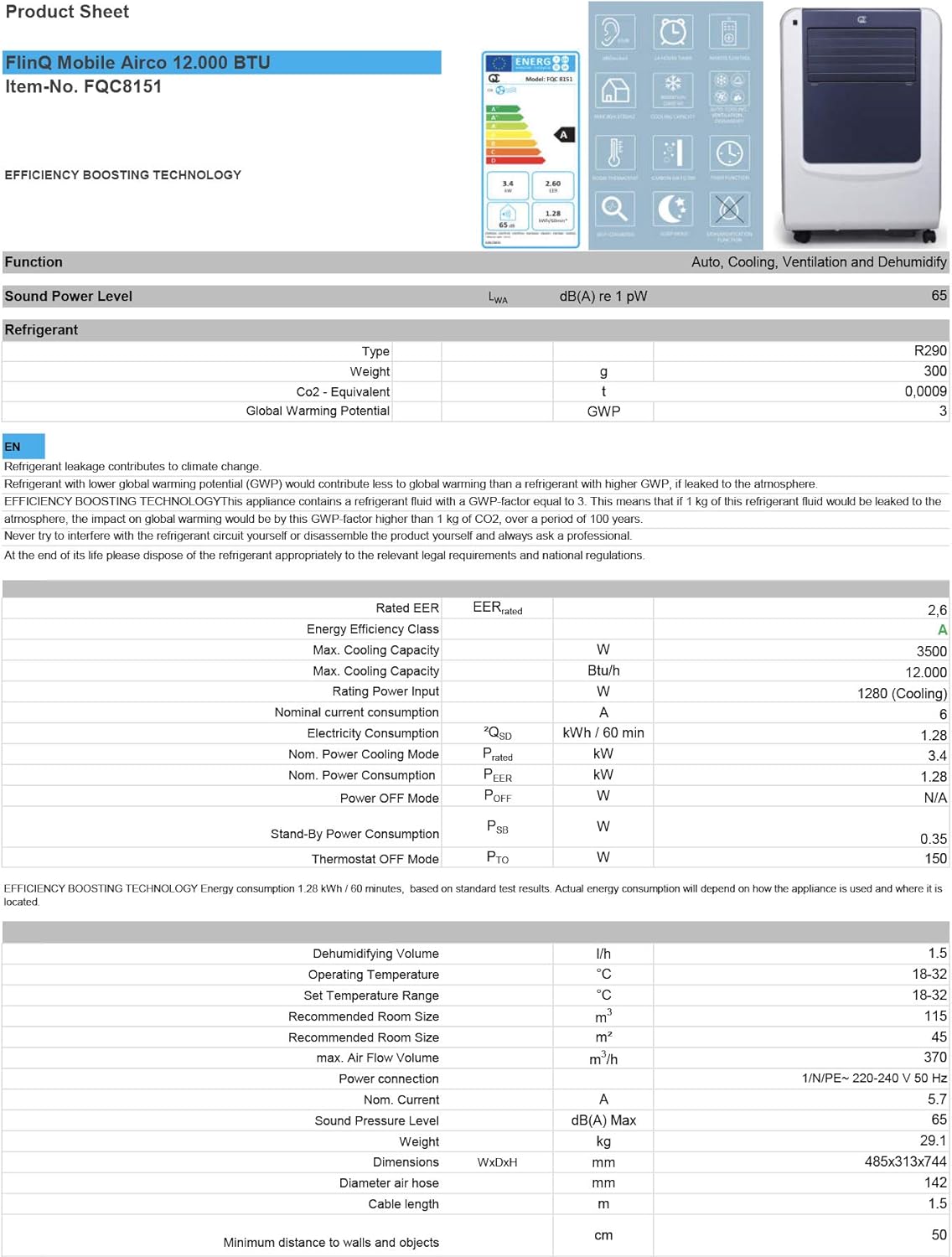
Figure 3.1: The remote control and a visual representation of the unit's key features, including noise level (65dB), 24-hour timer, cooling capacity (12000 BTU/h), room thermostat, carbon air filter, self-diagnosis, sleep mode, remote control function, timer function, auto cooling/fan/dehumidification, and dehumidification function.
4. පිහිටුවීම සහ ස්ථාපනය
4.1 ඇසිරීම
Carefully remove the air conditioner and all accessories from the packaging. Inspect for any damage during transit. Keep the original packaging for future storage or transport.
4.2 ස්ථානගත කිරීම
Place the unit on a flat, stable surface. Ensure there is at least 30 cm (12 inches) of clear space around the unit for proper airflow. Do not place it near heat sources or in direct sunlight.
4.3 කවුළු කට්ටල ස්ථාපනය
To ensure efficient cooling, the hot air extracted by the unit must be vented outside. Use the provided window sealing kit for this purpose.
- ඒකකයේ පිටුපස ඇති වායු පිටවන ස්ථානයට පිටාර හෝස් සම්බන්ධකය අමුණන්න.
- පිටාර නළය දිගු කර කවුළු ඇඩැප්ටරය අනෙක් කෙළවරට සවි කරන්න.
- Adjust the window slider/plate to fit your window opening.
- Insert the window adapter into the opening of the window slider/plate.
- Close the window as much as possible to seal the opening around the kit, minimizing air leakage.

රූපය 4.1: පැත්ත view of the mobile air conditioner, illustrating the connection point for the exhaust hose, which expels hot air from the room.
5. මෙහෙයුම් උපදෙස්
5.1 පාලන පැනලය
The control panel is located on the top of the unit and features various buttons and an LED display for setting modes, temperature, and timer functions.
5.2 දුරස්ථ පාලනය
The remote control allows you to operate all functions of the air conditioner from a distance. Ensure the remote control batteries are inserted correctly.
5.3 මෙහෙයුම් ආකාර
Press the 'Mode' button to cycle through the available operating modes:
- සිසිලන මාදිලිය: For cooling the room. Set your desired temperature using the temperature adjustment buttons.
- විජලනය කිරීමේ මාදිලිය: Removes excess moisture from the air. The fan speed is typically fixed in this mode. Consider connecting a drain hose for continuous drainage.
- පංකා ප්රකාරය: Circulates air without cooling. You can adjust the fan speed (Low, Medium, High).

රූපය 5.1: සමීප රූපය view of the adjustable louvers on the air conditioner's front panel, which direct the airflow.
6. නඩත්තු කිරීම
නිතිපතා නඩත්තු කිරීම ප්රශස්ත ක්රියාකාරිත්වය සහතික කරන අතර ඔබේ වායු සමීකරණ යන්ත්රයේ ආයු කාලය දීර්ඝ කරයි.
6.1 වායු පෙරහන් පිරිසිදු කිරීම
The air filters should be cleaned every two weeks or more frequently depending on usage and air quality. Dirty filters reduce efficiency and can damage the unit.
- වායු සමීකරණ යන්ත්රය බල සැපයුමෙන් විසන්ධි කරන්න.
- Locate and remove the air filters (usually on the back or side of the unit).
- Wash the filters under running water (warm, not hot) or use a vacuum cleaner to remove dust.
- Allow the filters to air dry completely before reinserting them. Do not expose them to direct sunlight.

Figure 6.1: Illustration of how to remove the air filter from the mobile air conditioner for cleaning, highlighting the accessible filter panel.
6.2 ජලය බැස යාම
The unit collects condensed water during cooling and dehumidification. The internal tank will fill up, and the unit may stop operating when full. Drain the water regularly.
- Place a shallow pan or tray under the drain port (usually at the bottom rear of the unit).
- ජලය පිටතට ගලා යාමට ඉඩ දීම සඳහා කාණු ප්ලග් එක ඉවත් කරන්න.
- For continuous drainage in dehumidification mode, attach the provided drain hose to the drain port.
6.3 ගබඩා කිරීම
ඒකකය දිගු කාලයක් ගබඩා කිරීමේදී:
- ඒකකයෙන් සියලු ජලය ඉවතට ගන්න.
- වායු පෙරහන් පිරිසිදු කරන්න.
- විදුලි රැහැන ගලවා පිළිවෙලට දඟර දමන්න.
- ඒකකය වියළි සිසිල් ස්ථානයක, වඩාත් සුදුසු වන්නේ එහි මුල් ඇසුරුම්වල ගබඩා කිරීමයි.
7. දෝශ නිරාකරණය
පාරිභෝගික සහාය සම්බන්ධ කර ගැනීමට පෙර, පොදු ගැටළු සහ ඒවායේ විසඳුම් සඳහා පහත වගුව බලන්න:
| ගැටලුව | විය හැකි හේතුව | විසඳුම |
|---|---|---|
| ඒකකය සක්රිය නොවේ | විදුලිය නැත; විදුලි රැහැන සම්බන්ධ කර නැත; වතුර ටැංකිය පිරී ඇත. | බල සැපයුම පරීක්ෂා කරන්න; විදුලි රැහැන සම්බන්ධ කරන්න; ජල ටැංකිය ඉවතට ගන්න. |
| Unit cools insufficiently | Dirty air filters; Exhaust hose blocked/leaking; Room too large; Doors/windows open | Clean filters; Check hose for blockages/proper sealing; Ensure room size is within capacity; Close doors/windows |
| ඒකකය ඝෝෂාකාරී ය | Unit not on a flat surface; Air filters dirty | Place on flat surface; Clean air filters |
| ඒකකයෙන් ජලය කාන්දු වීම | Drain plug not properly sealed; Unit tilted | Ensure drain plug is secure; Place unit on a level surface |
8. පිරිවිතර
Technical details for the FlinQ Mobile Air Conditioner:
| විශේෂාංගය | වටිනාකම |
|---|---|
| ආදර්ශ අංකය | 8720168680396 |
| නිෂ්පාදන මානයන් | 74 x 48 x 31 සෙ.මී |
| අයිතමයේ බර | 29 g (Note: This weight seems unusually low for an AC unit, please refer to product packaging for accurate weight) |
| ශබ්ද මට්ටම | 65 dB |
| සිසිලන ධාරිතාව | 12000 BTU/h |
| නිර්දේශිත කාමර ප්රමාණය | 45 m² දක්වා |
| විශේෂ ලක්ෂණ | දුරස්ථ පාලකය |
| බලශක්ති පන්තිය | A |

Figure 8.1: Official product sheet detailing technical specifications, energy consumption, cooling capacity, and dimensions of the FlinQ Mobile Air Conditioner.
9. වගකීම් සහ සහාය
This FlinQ Mobile Air Conditioner comes with a limited warranty. Please refer to the warranty card included with your purchase for specific terms and conditions.
For technical support, service, or warranty claims, please contact your retailer or the manufacturer directly. Keep your proof of purchase for warranty validation.
සබඳතා තොරතුරු:
- වෙළඳ නාමය: FLINQ
- Webඅඩවිය: www.flinq.nl (උදාample, please refer to actual product documentation for correct webඅඩවිය)
- විද්යුත් තැපෑල: support@flinq.nl (උදාample, please refer to actual product documentation for correct email)


