1. නිෂ්පාදන අවසන්view
The TP-Link Archer TX50E is a high-performance AX3000 Wi-Fi 6 Bluetooth 5.3 PCIe Adapter designed for desktop PCs. It leverages the latest Wi-Fi 6 standard to deliver extreme speeds, ultra-low latency, and uninterrupted connectivity, making it suitable for demanding applications like immersive gaming and VR. The adapter features a customized heat sink and gold-plated contactors for enhanced stability and longevity.
ප්රධාන ලක්ෂණ:
- Wi-Fi 6 Performance: Delivers speeds up to 2.4 Gbps (2402 Mbps on 5 GHz + 574 Mbps on 2.4 GHz) with 1024-QAM and 160 MHz bandwidth.
- Ultra-Low Latency: Revolutionary OFDMA and MU-MIMO technologies reduce lag for responsive gaming and VR experiences.
- බ්ලූටූත් 5.3: Achieves 2× faster speeds and 4× broader coverage than Bluetooth 4.2, enabling seamless connection with various peripherals.
- පුළුල් ආවරණය: Equipped with two high-gain antennas to extend Wi-Fi range.
- වාරික ගොඩනැගීම: Features a customized heat sink for efficient thermal dissipation and gold-plated contactors for improved stability and oxidation resistance.
- උසස් ආරක්ෂාව: Supports WPA3, the latest network security standard, for enhanced network protection.
2. පැකේජ අන්තර්ගතය
ඔබගේ පැකේජයේ සියලුම අයිතම ඇති බව තහවුරු කරගන්න:

Image: TP-Link Archer TX50E retail box showing the adapter and included accessories.
- TP-Link Archer TX50E Wi-Fi 6 Bluetooth 5.3 PCIe Adapter
- ඉහළ ලාභ ඇන්ටනා දෙකක්
- බ්ලූටූත් USB කේබලය
- සම්පත් සංයුක්ත තැටිය
- ඉක්මන් ස්ථාපන මාර්ගෝපදේශය
- අඩු-ප්රෝfile වරහන
3 දෘඪාංග ස්ථාපනය
ඔබ ආරම්භ කිරීමට පෙර:
- ඔබේ පරිගණකය විදුලිය විසන්ධි කර ඇති බවත් බල ප්රභවයෙන් විසන්ධි කර ඇති බවත් සහතික කර ගන්න.
- Ground yourself to discharge any static electricity before handling components.
- Refer to your computer's manual for specific instructions on opening the case.
පියවරෙන් පියවර ස්ථාපනය:
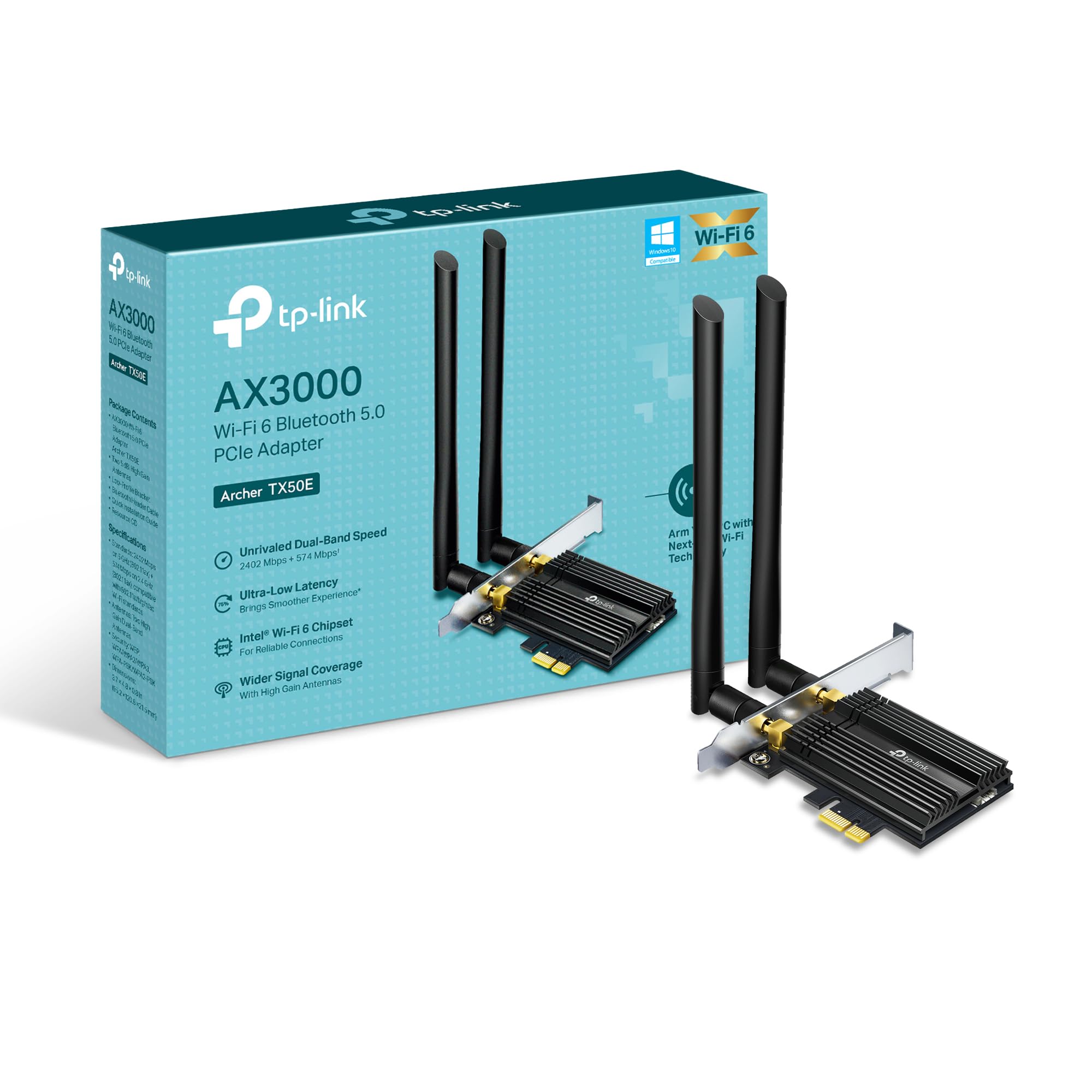
රූපය: ඉදිරිපස view of the TP-Link Archer TX50E adapter with antennas.
- විදුලිය විසන්ධි කිරීම සහ විසන්ධි කිරීම: ඔබේ පරිගණකය ක්රියා විරහිත කර බිත්ති අලෙවිසැලෙන් බල කේබලය විසන්ධි කරන්න.
- පරිගණක කවරය විවෘත කරන්න: මවු පුවරුවට ප්රවේශ වීම සඳහා ඔබේ පරිගණක ආවරණයේ පැති පුවරුව ඉවත් කරන්න.
- Connect Bluetooth USB Cable: Connect the provided Bluetooth USB cable to the adapter's Bluetooth header.
- Locate Slots: Identify an available PCI Express X1 slot on your motherboard and an F_USB connector (usually labeled USB910 or similar).
- ඇඩැප්ටරය ඇතුළු කරන්න: Carefully insert the Archer TX50E adapter into the chosen PCIe X1 slot. Ensure it is seated firmly.
- USB කේබලය සම්බන්ධ කරන්න: Connect the other end of the Bluetooth USB cable to the F_USB connector on your motherboard. This connection is essential for Bluetooth functionality.
- Secure Adapter and Antennas: Secure the adapter with a screw to the computer case. Then, connect the two high-gain antennas to the adapter's connectors. Adjust their position for optimal signal reception.
- පරිගණක කවරය වසන්න: ඔබේ පරිගණක ආවරණයේ පැති පුවරුව ප්රතිස්ථාපනය කරන්න.
- බල ගැන්වීම: Plug the power cable back into the wall outlet and turn on your computer.
Visual Installation Guide:
Video: A step-by-step guide demonstrating the physical installation of the TP-Link Archer TX50E PCIe adapter into a desktop computer.
4. ධාවක ස්ථාපනය
After hardware installation, you need to install the Wi-Fi and Bluetooth drivers for the adapter to function correctly. සටහන: Do NOT run the Bluetooth and Wi-Fi driver installers at the same time.
Step-by-Step Driver Installation:
- Insert CD or Download Drivers: Insert the provided resource CD into your computer's CD/DVD drive. If your computer does not have a CD/DVD drive, download the latest drivers from the official TP-Link website (search for Archer TX50E).
- Run Autorun: Once the CD is inserted, an Autorun window should appear. Click to run `Autorun.exe`. If it doesn't appear, navigate to 'This PC' or 'My Computer', open your CD/DVD drive, and manually run `Autorun.exe`.
- Install Wi-Fi Drivers: In the TP-Link driver installation utility, select the option to install the Wi-Fi drivers. Follow the on-screen instructions to complete the installation. You may need to restart your computer after this step.
- Install Bluetooth Drivers: After the Wi-Fi drivers are installed and your computer has restarted (if prompted), run the `Autorun.exe` again or manually launch the Bluetooth driver installer. Follow the on-screen instructions to complete the Bluetooth driver installation. Another restart may be required.
For a visual guide on driver installation, please refer to the setup video provided in the Hardware Installation section.
5. මෙහෙයුම් උපදෙස්
Wi-Fi වෙත සම්බන්ධ වෙමින්:
- After successful driver installation, click the Wi-Fi icon in your system tray (usually in the bottom-right corner of your screen).
- පවතින රැහැන් රහිත ජාල ලැයිස්තුවක් දිස්වනු ඇත. ඔබට අවශ්ය ජාලය තෝරන්න.
- 'සම්බන්ධ කරන්න' ක්ලික් කර විමසන්නේ නම් ජාල ආරක්ෂක යතුර (මුරපදය) ඇතුළත් කරන්න.
- දැන් ඔබේ පරිගණකය Wi-Fi ජාලයට සම්බන්ධ වී තිබිය යුතුය.
බ්ලූටූත් උපාංග යුගල කිරීම:
- ඔබගේ බ්ලූටූත් උපාංගය යුගල කිරීමේ මාදිලියේ ඇති බවට වග බලා ගන්න (ඔබගේ උපාංගයේ අත්පොත බලන්න).
- On your computer, go to 'Settings' > 'Devices' > 'Bluetooth & other devices'.
- Turn on Bluetooth if it's not already enabled.
- 'බ්ලූටූත් හෝ වෙනත් උපාංගයක් එක් කරන්න' ක්ලික් කර 'බ්ලූටූත්' තෝරන්න.
- ලැයිස්තුවෙන් ඔබගේ උපාංගය තෝරා යුගල කිරීමේ ක්රියාවලිය සම්පූර්ණ කිරීමට තිරයේ ඇති ඕනෑම විමසීමක් අනුගමනය කරන්න.
6. දෝශ නිරාකරණය
If you encounter issues with your Archer TX50E adapter, try the following common troubleshooting steps:
- Wi-Fi සම්බන්ධතාවයක් නැත:
- ඇඩැප්ටරය PCIe ස්ලොට් එකේ නිවැරදිව සවි කර ඇති බවට වග බලා ගන්න.
- Verify that the antennas are securely connected.
- Check Device Manager to ensure Wi-Fi drivers are installed and the device is recognized without errors.
- Try updating or reinstalling the Wi-Fi drivers.
- ඔබේ පරිගණකය සහ රැහැන් රහිත රවුටරය නැවත ආරම්භ කරන්න.
- බ්ලූටූත් ක්රියා නොකරයි:
- Confirm the Bluetooth USB cable is properly connected to both the adapter and the motherboard's F_USB header.
- Check Device Manager to ensure Bluetooth drivers are installed and the device is recognized without errors.
- Verify that Bluetooth is enabled in your computer's settings.
- Try updating or reinstalling the Bluetooth drivers.
- Slow Speeds or Intermittent Connection:
- Ensure your router supports Wi-Fi 6 (802.11ax) for optimal performance.
- Adjust the position of the antennas for better signal reception.
- Move your computer closer to the router or reduce obstacles between them.
- වෙනත් ඉලෙක්ට්රොනික උපාංගවලින් බාධා ඇත්දැයි පරීක්ෂා කරන්න.
- ඔබගේ රවුටරයේ ස්ථිරාංග යාවත්කාලීන කරන්න.
If these steps do not resolve your issue, please contact TP-Link Technical Support.
7. තාක්ෂණික පිරිවිතර
| විශේෂාංගය | පිරිවිතර |
|---|---|
| ආකෘතිය | දුනුවායා TX50E |
| රැහැන් රහිත ප්රමිතිය | Wi-Fi 6 (802.11ax/ac/b/g/n) |
| බ්ලූටූත් අනුවාදය | බ්ලූටූත් 5.3 |
| අතුරු මුහුණත | PCI Express |
| දත්ත හුවමාරු අනුපාතය | 2402 Mbps (5 GHz) දක්වා, 574 Mbps (2.4 GHz) දක්වා |
| මෙහෙයුම් පද්ධති සහාය | Windows 11, 10 (64-bit) |
| ආරක්ෂාව | WPA3 |
| මානයන් (L x W x H) | 9.53 x 12.09 x 2.16 සෙ.මී |
| අයිතමයේ බර | ග්රෑම් 90.72 (රාත්තල් 0.2) |
| දෘඩාංග අතුරුමුහුණත | බ්ලූටූත් |
| ගැළපෙන උපාංග | ඩෙස්ක්ටොප්, ලැප්ටොප් |
8. වගකීම් සහ තාක්ෂණික සහාය
TP-Link offers a වසර 2ක වගකීමක් for this product. Additionally, free 24/7 තාක්ෂණික සහාය is available to assist you with any questions or issues you may encounter.
වැඩිදුර සහාය සඳහා, කරුණාකර නිල TP-Link සහාය වෙත පිවිසෙන්න. webවෙබ් අඩවියට හෝ ඔවුන්ගේ පාරිභෝගික සේවයට සෘජුවම සම්බන්ධ වන්න.


