1. හැඳින්වීම
Thank you for choosing the Lepro WL4000 Solar Motion Sensor Wall Light. This product is designed to provide efficient and reliable outdoor illumination using solar power. Featuring adjustable heads and a motion-activated sensor, it enhances security and convenience for various outdoor spaces.
2 ආරක්ෂිත තොරතුරු
- ස්ථාපනය කිරීමට සහ භාවිතා කිරීමට පෙර සියලුම උපදෙස් කියවන්න.
- Do not disassemble, repair, or modify the product. This may cause electric shock, fire, or damage.
- ප්රශස්ත ආරෝපණය සඳහා සූර්ය පැනලය සෘජු හිරු එළියට නිරාවරණය වන බවට වග බලා ගන්න. සෙවන සහිත ප්රදේශ වළක්වා ගන්න.
- Keep the product away from fire or high temperatures.
- This product is IP65 waterproof, suitable for outdoor use, but do not immerse it in water.
- දේශීය රෙගුලාසි වලට අනුව බැටරි බැහැර කරන්න. පුළුස්සා නොදැමිය යුතුය.
3. පැකේජ අන්තර්ගතය
සියලුම සංරචක පැකේජයේ ඇති බව තහවුරු කර ගන්න:
- Solar Light (2 units)
- Wall Plug (4 units)
- සවි කිරීමේ ඉස්කුරුප්පු (ඒකක 4)
- Wall Bracket (2 units)
- උපදෙස් අත්පොත (ඒකකය 1)
Image: Contents of the product package, showing two solar lights, mounting hardware, and the user manual.
4. නිෂ්පාදන අවසන්view
4.1 විශේෂාංග
- සූර්ය බලයෙන් ක්රියාත්මක වන කාර්යක්ෂමතාව: Charges during the day using sunlight for nighttime illumination.
- සකස් කළ හැකි 3-හිස් නිර්මාණය: Three independently adjustable panels provide a wide 270° lighting angle.
- චලන-සක්රිය සංවේදකය: Automatically activates when motion is detected within a 16-26 feet range.
- IP65 ජල ආරක්ෂිත ශ්රේණිගත කිරීම: විවිධ එළිමහන් කාලගුණික තත්ත්වයන්ට ඔරොත්තු දෙන පරිදි නිර්මාණය කර ඇත.
- නම්යශීලී ස්ථාපනය: Includes a 16-foot connecting cable for optimal solar panel placement.
4.2 සංරචක

රූපය: විස්තරාත්මක view of the solar light components, including the solar panel, motion sensor, and three adjustable LED light heads with their dimensions.
- සූර්ය පැනලය: අභ්යන්තර බැටරිය ආරෝපණය කිරීම සඳහා හිරු එළිය විද්යුත් ශක්තිය බවට පරිවර්තනය කරයි.
- LED Light Heads (3): Provide bright illumination and can be adjusted to direct light.
- චලන සංවේදකය: Detects movement to activate the lights automatically.
- සක්රිය / අක්රිය ස්විචය: Located on the unit for manual control.
5. පිහිටුවීම සහ ස්ථාපනය
Follow these steps to properly set up and install your solar motion sensor wall light:
- ස්ථාපන ස්ථානයක් තෝරන්න: Select a location that receives direct sunlight for at least 6-8 hours daily to ensure optimal charging of the solar panel. The recommended installation height is 1.5-3.5 meters (5-12 feet).
- බිත්ති වරහන සවි කරන්න: Use the provided mounting screws and wall plugs to securely fix the wall bracket to your desired surface.
- ආලෝකය සක්රිය කරන්න: Locate the ON/OFF switch on the underside of the solar light unit. Slide the switch to the 'ON' position.
- Attach the Solar Light: Carefully slide the solar light unit onto the fixed wall bracket until it clicks securely into place.
- ආලෝක ශීර්ෂ සකසන්න: Adjust the three light heads and the solar panel to your preferred angles to maximize light coverage and solar exposure. The light heads offer a 270° wide lighting angle.
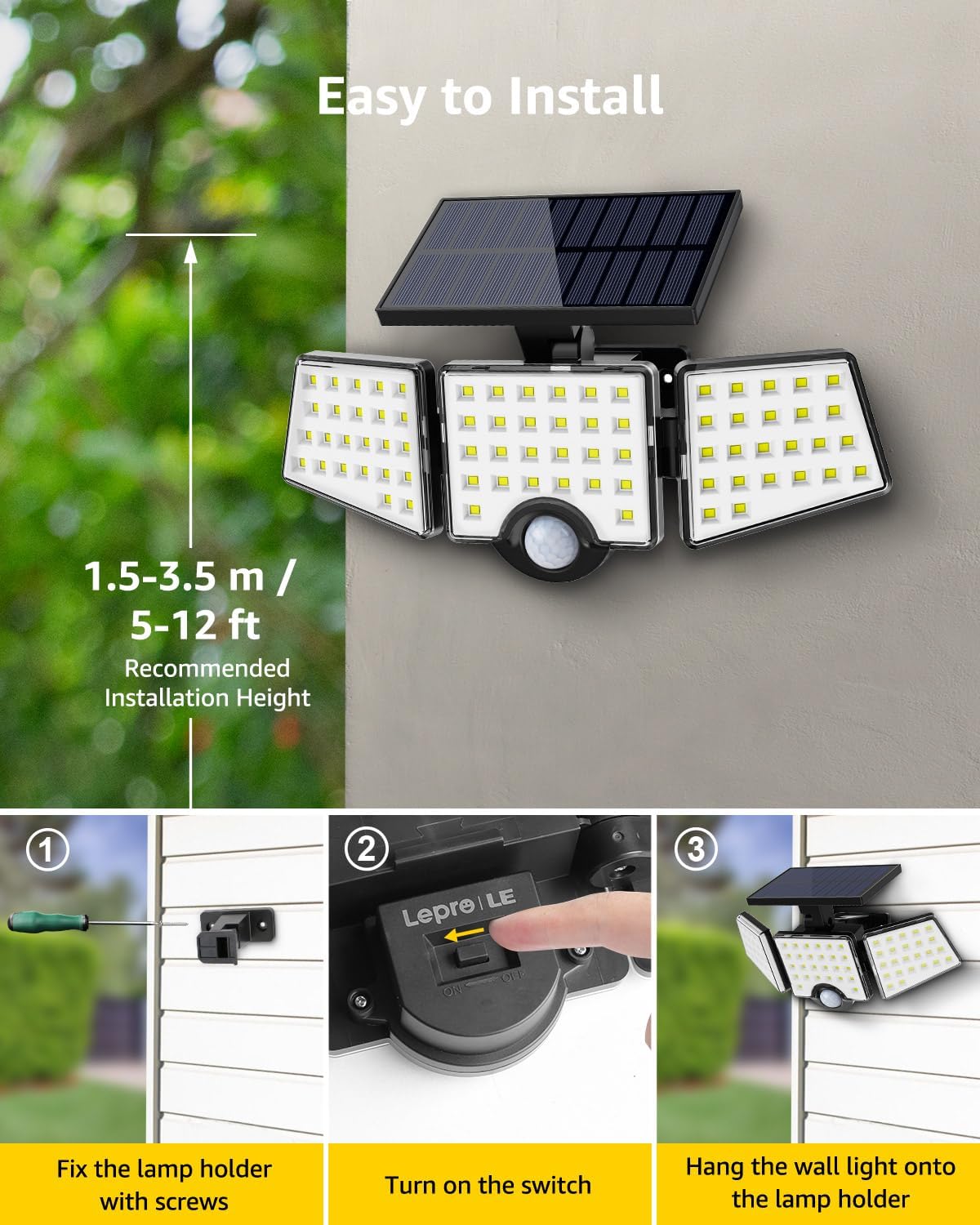
Image: Visual guide for installation, illustrating the steps of securing the bracket, activating the light, and attaching it to the wall.
6. මෙහෙයුම් උපදෙස්
The Lepro WL4000 Solar Motion Sensor Wall Light operates automatically once installed and activated:
- දිවා කාලයේ මෙහෙයුම: The solar panel charges the internal lithium-ion battery during daylight hours. The light will remain off.
- රාත්රී මෙහෙයුම: At dusk, the light will enter standby mode. When motion is detected within its 16-26 feet range, the light will automatically turn on at full brightness.
- ස්වයංක්රීය අක්රිය කාර්යය: The light will remain on as long as motion is detected. After approximately 20 seconds of no detected motion, the light will automatically turn off to conserve battery power.

Image: Visual representation of the light's operational cycle: charging in daylight, activating with motion at night, and automatically turning off.
7. නඩත්තු කිරීම
To ensure the longevity and optimal performance of your solar light, follow these maintenance tips:
- සූර්ය පැනලය පිරිසිදු කරන්න: නිතිපතා සූර්ය පැනලය මෘදු, d රෙදි කඩකින් පිස දමන්න.amp දූවිලි, අපිරිසිදුකම් හෝ සුන්බුන් ඉවත් කිරීමට රෙදි. පිරිසිදු පැනලයක් කාර්යක්ෂම ආරෝපණය සහතික කරයි.
- හානිය සඳහා පරීක්ෂා කරන්න: Periodically check the light unit and wiring for any signs of damage. If damage is found, contact customer support.
- පැහැදිලි බාධා: නව බාධා (උදා: වැඩෙන අතු, නව ව්යුහයන්) සූර්ය පැනලයට සෘජු හිරු එළිය පැමිණීම වළක්වන බවට වග බලා ගන්න.
8. දෝශ නිරාකරණය
If your solar light is not functioning as expected, refer to the following common issues and solutions:
| ගැටලුව | විය හැකි හේතුව | විසඳුම |
|---|---|---|
| රාත්රියේදී ආලෝකය දැල්වෙන්නේ නැත. | ප්රමාණවත් සූර්ය ආරෝපණයක් නොමැත. | දිනපතා පැය 6-8 අතර කාලයක් සූර්ය පැනලය සෘජු හිරු එළියේ තබා ගන්න. සූර්ය පැනලය පිරිසිදු කරන්න. |
| Light is dim or stays on for a short period. | අඩු බැටරි ආරෝපණය. | සෘජු හිරු එළිය යටතේ ආලෝකය සම්පූර්ණ දවසක් ආරෝපණය කිරීමට ඉඩ දෙන්න. |
| චලන සංවේදකය චලනය හඳුනා නොගනී. | Sensor is obstructed or dirty. | Clear any obstructions from the sensor. Wipe the sensor clean. Ensure the light is installed within the recommended height and detection range. |
| දිවා කාලයේදී ආලෝකය දැල්වෙයි. | Light sensor malfunction or external light interference. | Ensure the solar panel is not covered or in a dark area during the day. If the problem persists, contact customer support. |
9. පිරිවිතර
| වෙළඳ නාමය | ලාදුරු |
| ආදර්ශ අංකය | 640003-DW |
| වර්ණය | කළු, සුදු |
| ද්රව්ය | ඇක්රිලෝනයිට්රයිල් බියුඩඩීන් ස්ටයිරීන්, පොලිකාබනේට් |
| ආලෝක සවිකිරීම් ආකෘතිය | ගංවතුර ආලෝකය |
| නිෂ්පාදන මානයන් | 11.1"අඟල් x 4.65"අඟල් x 5.87"උ |
| ගෘහස්ථ / එළිමහන් භාවිතය | එළිමහන් |
| බලශක්ති ප්රභවය | සූර්ය බලශක්තිය |
| විශේෂ ලක්ෂණය | Motion Sensor, Waterproof |
| ආලෝක ප්රභවයේ වර්ගය | LED |
| ආලෝක ප්රභවයන් සංඛ්යාව | 3 |
| වෙළුමtage | 3.7 Volts (DC) |
| සැහැල්ලු වර්ණය | සුදු |
| අයිතමයේ බර | පවුම් 1.1ක් |
| වට්tage | වොට් 14 යි |
| මාරු වර්ගය | චලන සංවේදකය |
| ජල ප්රතිරෝධක මට්ටම | IP65 ජල ආරක්ෂිත |
| දීප්තිය | 1000 Lumen |
| බැටරි | ලිතියම් අයන බැටරි 1ක් අවශ්යයි (ඇතුළත්) |
10. වගකීම් සහ සහාය
For warranty information or technical support, please refer to the contact details provided with your purchase documentation or visit the official Lepro webවෙබ් අඩවිය. මිලදී ගැනීම පිළිබඳ සාක්ෂියක් ලෙස ඔබේ මිලදී ගැනීමේ රිසිට්පත තබා ගන්න.


