1. හැඳින්වීම
This manual provides detailed instructions for the installation, operation, and troubleshooting of your Aideepen 2-Port PCI-E to USB 3.0 Expansion Card. This card is designed to add two high-speed USB 3.0 ports to your computer system, enhancing connectivity and data transfer capabilities. Please read this manual thoroughly before installation and retain it for future reference.
2 ආරක්ෂිත තොරතුරු
- Always disconnect your computer from the power source before opening the case or installing any internal components.
- Wear an anti-static wrist strap or frequently touch a grounded metal object (like the computer case) to discharge static electricity before handling the expansion card. Static discharge can damage electronic components.
- Handle the expansion card by its edges to avoid touching the gold connectors or components on the circuit board.
- Ensure proper ventilation inside your computer case to prevent overheating.
- Do not attempt to modify or repair the card yourself. Refer to qualified service personnel if issues arise.
3. පැකේජ අන්තර්ගතය
කරුණාකර ඔබගේ පැකේජයේ සියලුම අයිතම ඇති බව තහවුරු කරගන්න:
- Aideepen 2-Port PCI-E to USB 3.0 Expansion Card
- අඩු-ප්රෝfile bracket (for small form factor cases)

රූපය 3.1: The Aideepen 2-Port PCI-E to USB 3.0 Expansion Card, shown with both the standard and optional low-profile සවි කිරීම් වරහන්.
4. පිහිටුවීම සහ ස්ථාපනය
4.1 භෞතික ස්ථාපනය
- ඔබේ පරිගණකය සූදානම් කරන්න: Power off your computer completely and unplug the power cord from the wall outlet.
- පරිගණක ආවරණය විවෘත කරන්න: මවු පුවරුවට ප්රවේශ වීම සඳහා ඔබේ පරිගණක ආවරණයේ පැති පුවරුව ඉවත් කරන්න.
- Locate an available PCI-E slot: Identify an empty PCI-E x1, x4, x8, or x16 slot on your motherboard. This card is compatible with various PCI-E slot sizes.
- තව් කවරය ඉවත් කරන්න: Unscrew and remove the metal slot cover corresponding to the chosen PCI-E slot on the back of your computer case.
- Insert the expansion card: Carefully align the gold connectors of the expansion card with the PCI-E slot. Press down firmly and evenly until the card is securely seated in the slot.
- කාඩ්පත සුරක්ෂිත කරන්න: Fasten the expansion card to the computer case using the screw from the removed slot cover.
- බලය සම්බන්ධ කරන්න: Connect a 4-pin Molex power connector from your power supply unit (PSU) to the corresponding port on the expansion card. This connection is essential for stable operation and sufficient power delivery to the USB ports.
- පරිගණක ආවරණය වසා දමන්න: ඔබේ පරිගණක නඩුවේ පැති පුවරුව ප්රතිස්ථාපනය කර විදුලි රැහැන නැවත සම්බන්ධ කරන්න.
- බලය සක්රිය කරන්න: ඔබේ පරිගණකය සක්රිය කරන්න.

රූපය 4.1: The expansion card is compatible with PCI-E x1, x4, x8, and x16 slots. Ensure you select an available slot on your motherboard.

රූපය 4.2: The 4-pin Molex power connector (white) on the expansion card must be connected to your power supply for proper functionality. The blue connector is a 20-pin USB 3.0 header for front panel USB ports.
4.2 ධාවක ස්ථාපනය
For optimal performance and compatibility, especially with Windows operating systems, driver installation may be required. While some operating systems may detect the card automatically, manual driver installation ensures full functionality.
- ධාවක බාගන්න: Access the latest drivers from the following link: Google Drive Driver Folder.
- උපුටා ගැනීම Files: බාගත කර ඇත්නම් file is compressed (e.g., .zip), extract its contents to a temporary folder on your computer.
- ධාවක ස්ථාපනය කරන්න: Follow the instructions provided within the driver package. This typically involves running a setup executable or manually updating the driver through Device Manager.
- පරිගණකය නැවත ආරම්භ කරන්න: After successful driver installation, restart your computer to apply the changes.
ගැළපුම පිළිබඳ සටහන: This card is compatible with Windows XP, Vista, 7, 8, 8.1, Server 2003, and Server 2008. For Windows 10 and newer versions, drivers may be automatically detected, but manual installation using the provided link is recommended if issues occur.
5. Operating the Expansion Card
Once the Aideepen 2-Port PCI-E to USB 3.0 Expansion Card is installed and its drivers are configured, the two external USB 3.0 ports and the internal 20-pin header will be ready for use.
- සම්බන්ධක උපාංග: Plug your USB 3.0 compatible devices (e.g., external hard drives, flash drives, cameras, printers) into the available USB 3.0 ports on the back of the card.
- අධිවේගී දත්ත හුවමාරුව: The USB 3.0 ports support a maximum data transfer speed of 5Gbps, significantly faster than USB 2.0, ideal for large file transfers and high-bandwidth devices.
- Internal Header: The 20-pin internal USB 3.0 header allows you to connect front panel USB 3.0 ports from your computer case, providing convenient access.
- Hot-Swap Support: The card supports hot-swapping, meaning you can connect and disconnect USB devices while the computer is running without needing to restart.
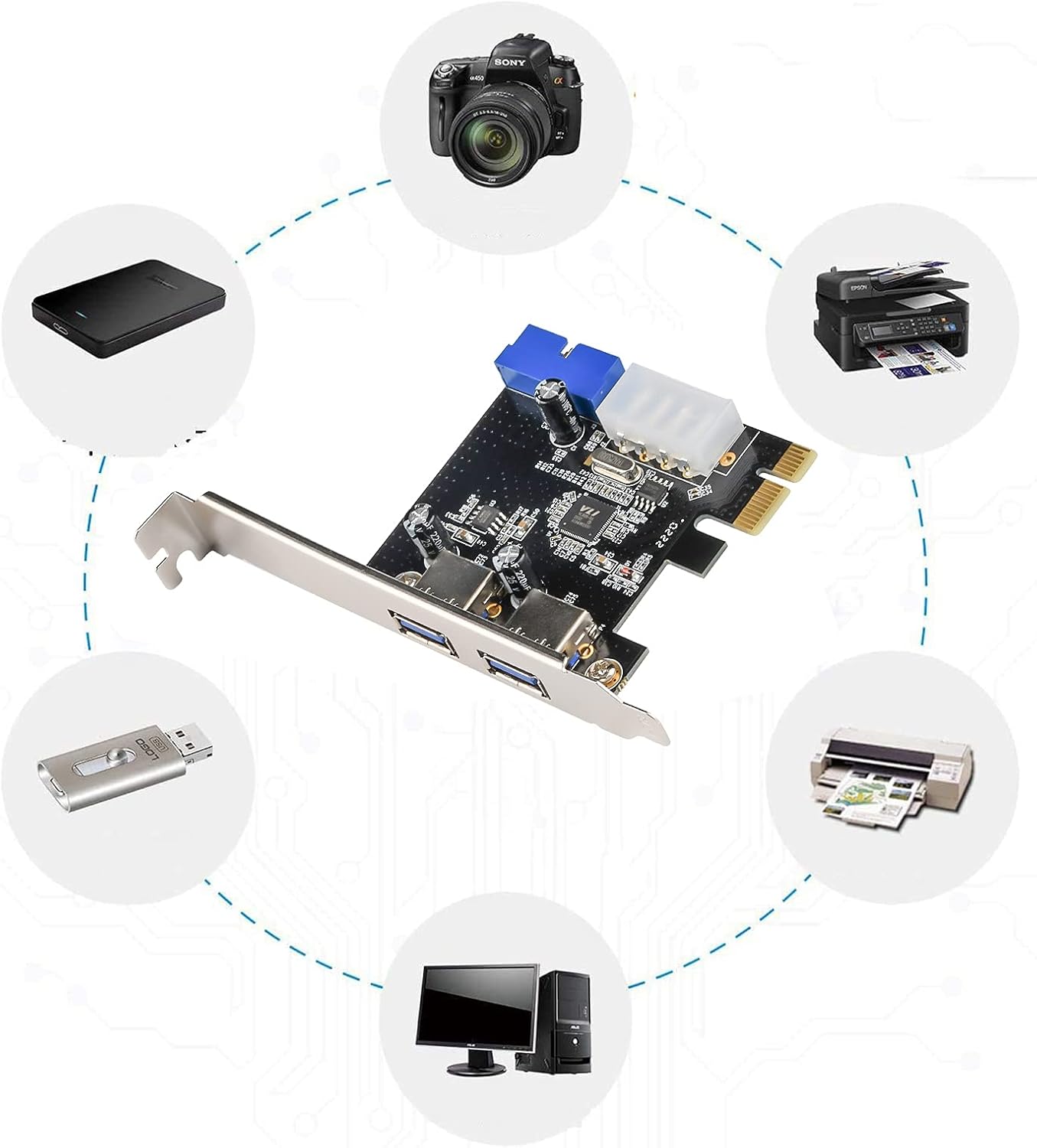
රූපය 5.1: Examples of devices that can be connected to the USB 3.0 expansion card, including external hard drives, cameras, printers, and USB flash drives.
6. නඩත්තු කිරීම
The Aideepen 2-Port PCI-E to USB 3.0 Expansion Card requires minimal maintenance. Follow these guidelines to ensure its longevity:
- එය පිරිසිදුව තබා ගන්න: Periodically open your computer case (after disconnecting power) and use compressed air to gently remove dust accumulation from the expansion card and surrounding components. Dust can impede airflow and lead to overheating.
- ශාරීරික ආතතියෙන් වළකින්න: Ensure that no cables or other components are putting undue stress on the card or its connectors.
- පාරිසරික තත්ත්වයන්: Operate your computer in a clean, dry environment with stable temperatures to prevent damage to electronic components.
7. දෝශ නිරාකරණය
If you encounter issues with your expansion card, refer to the following troubleshooting steps:
- Card not detected / No power:
- Ensure the 4-pin Molex power connector is securely attached to the card and your PSU. This is a common cause of non-detection or unstable operation.
- Verify the card is fully seated in the PCI-E slot.
- Try installing the card in a different PCI-E slot if available.
- USB devices not working:
- Confirm that the necessary drivers have been installed (refer to Section 4.2). Check Device Manager for any yellow exclamation marks next to USB controllers.
- Test the USB device on another port or computer to ensure the device itself is functional.
- Ensure the 4-pin Molex power connector is providing power to the card.
- මන්දගාමී හුවමාරු වේගය:
- Ensure you are using USB 3.0 compatible devices and cables. USB 2.0 devices will operate at USB 2.0 speeds.
- Verify that the drivers are correctly installed and up to date.
- "Device Not Migrated" error (Windows):
- This error often indicates a driver issue. Reinstall the drivers from the provided Google Drive link (Section 4.2).
- වින්ඩෝස් සම්පූර්ණයෙන්ම යාවත්කාලීන කර ඇති බවට වග බලා ගන්න.
8. පිරිවිතර
| වෙළඳ නාමය | අයිදීපන් |
| ආදර්ශ අංකය | 2_051040US |
| දෘඩාංග අතුරුමුහුණත | PCI Express (PCI-E), USB 3.0 |
| වරායන් ගණන | 2 x External USB 3.0 Type-A, 1 x Internal 20-Pin USB 3.0 Header |
| දත්ත හුවමාරු අනුපාතය | 5 Gbps දක්වා (USB 3.0 සුපිරි වේගය) |
| බල සම්බන්ධකය | 1 x 4-Pin Molex |
| මෙහෙයුම් පද්ධති අනුකූලතාව | Windows XP / Vista / 7 / 8 / 8.1 / Server 2003 / Server 2008 (and newer Windows versions with appropriate drivers) |
| අයිතමයේ බර | අවුන්ස 1.76 (කිලෝග්රෑම් 0.05) |
| පැකේජ මානයන් | අඟල් 6.34 x 3.9 x 1.34 |

රූපය 8.1: Physical dimensions of the expansion card for reference.
9. වගකීම් සහ සහාය
For warranty information or technical support, please refer to the retailer where you purchased the Aideepen 2-Port PCI-E to USB 3.0 Expansion Card. You may also visit the official Aideepen store on Amazon for product updates and additional resources: Aideepen Amazon Store.


