හැඳින්වීම
Thank you for choosing LEVOIT Air Purifiers. This manual provides detailed instructions for the safe and efficient use of your Vital 100 and Core P350 air purifiers. Please read this manual thoroughly before operation and retain it for future reference.
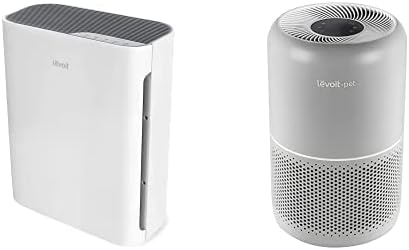
Image: The LEVOIT Vital 100 (left, white, rectangular) and Core P350 (right, gray, cylindrical) air purifiers.
වැදගත් ආරක්ෂක උපදෙස්
ගින්න, විදුලි කම්පනය හෝ තුවාල ඇතිවීමේ අවදානම අවම කිරීම සඳහා, සෑම විටම මෙම මූලික පූර්වාරක්ෂාවන් අනුගමනය කරන්න:
- Operate the air purifier only as described in this manual.
- බල සැපයුම පරිමාවට ගැලපෙන බව සහතික කර ගන්නtage specified on the air purifier.
- වායු පවිතකාරකය ජලයේ හෝ වෙනත් දියර වල ගිල්වන්න එපා.
- වායු පවිතකාරකය තාප ප්රභවයන්ගෙන් සහ සෘජු හිරු එළියෙන් ඈත් කර තබන්න.
- Do not block air openings or place the unit on a soft surface where openings may be blocked.
- පෙරහන් චලනය කිරීමට, පිරිසිදු කිරීමට හෝ ප්රතිස්ථාපනය කිරීමට පෙර සෑම විටම වායු පවිතකාරකය විසන්ධි කරන්න.
- Do not use the air purifier in areas with high humidity, such as bathrooms.
- මෙම උපකරණය ඔවුන්ගේ ආරක්ෂාව සඳහා වගකිව යුතු පුද්ගලයෙකු විසින් උපාංගය භාවිතා කිරීම සම්බන්ධයෙන් අධීක්ෂණය හෝ උපදෙස් ලබා දී ඇත්නම් මිස, අඩු ශාරීරික, සංවේදී හෝ මානසික හැකියාවන් හෝ අත්දැකීම් සහ දැනුම නොමැති පුද්ගලයින් (ළමයින් ඇතුළුව) භාවිතා කිරීමට අදහස් නොකෙරේ. .
නිෂ්පාදනය අවසන්view
LEVOIT Vital 100 Air Purifier
The LEVOIT Vital 100 is designed to improve air quality in your home, featuring an H13 True HEPA filter system. It effectively captures 99.97% of airborne contaminants as small as 0.3 microns, including pollen, dust, mold spores, pet dander, and smoke particles.

Image: A white, rectangular LEVOIT Vital 100 air purifier shown from an angled perspective.
This model is particularly beneficial for pet owners, as its washable pre-filter captures large particles like pet hair, fur, and lint, helping to maintain a cleaner environment.

Image: The LEVOIT Vital 100 air purifier positioned in a home environment with dogs, highlighting its effectiveness for pet owners by showing airborne particles being drawn into the unit.
The Vital 100 targets a wide range of microscopic allergens and irritants, contributing to reduced allergy symptoms.

Image: The LEVOIT Vital 100 air purifier with a graphic illustrating its ability to capture pollen, dust, mold, dust mites, smoke, pet dander, VOCs, bacteria, and viruses.
LEVOIT Core P350 Air Purifier
The LEVOIT Core P350 is engineered for quiet and efficient air purification, especially beneficial for homes with pets and allergy sufferers. It features an H13 True HEPA filter with a 3-stage filtration system, including a non-woven fabric pre-filter, H13-grade True HEPA filter, and an activated carbon filter with ARC Formula.

Image: A gray, cylindrical LEVOIT Core P350 air purifier shown from an angled perspective.
The Core P350 operates at a low noise level of 24dB in sleep mode and utilizes 360° air inlet technology to circulate and purify air rapidly, achieving 5 air changes per hour in its coverage area.

Image: The LEVOIT Core P350 air purifier in a living room setting with children and a dog, illustrating its pet-friendly design and ability to capture pet dander, dust mites, bacteria, mold, and viruses.
Its advanced filtration system is designed to remove 99.97% of odors, smoke, dust, mold, and pollen, ensuring cleaner air for you and your pets.

Image: A visual comparison showing a new, clean air purifier filter next to a filter after 6 months of use, demonstrating the accumulation of captured particles like pet fur, dust, and lint.
සැලසුම
Unpacking and Filter Installation
- වායු පවිතකාරකය එහි ඇසුරුම්වලින් ප්රවේශමෙන් ඉවත් කරන්න.
- Open the filter compartment. For Vital 100, this is typically a back panel. For Core P350, twist the base to unlock.
- Remove the plastic packaging from the filter(s). The Core P350 comes with a 3-stagඊ පෙරහන.
- Insert the filter(s) into the air purifier, ensuring correct orientation.
- Close and secure the filter compartment.
ස්ථානගත කිරීම
- ස්ථිර, මට්ටමේ මතුපිටක් මත වායු පවිතකාරකය තබන්න.
- Ensure there is at least 15 inches (38 cm) of clearance on all sides of the unit for optimal airflow.
- Avoid placing the unit near curtains, furniture, or other objects that could block the air intake or outlet.
- Keep the air purifier away from direct heat sources or areas with excessive moisture.
මෙහෙයුම් උපදෙස්
Both the Vital 100 and Core P350 models feature intuitive button controls for ease of use.
බලය සක්රිය / අක්රිය
- විදුලි රැහැන භූගත විදුලි අලෙවිසැලකට සම්බන්ධ කරන්න.
- ඔබන්න බල බොත්තම වායු පවිතකාරකය සක්රිය හෝ අක්රිය කිරීමට.
විදුලි පංකා වේග ගැලපුම්
- ඔබන්න විදුලි පංකාවේ වේගය බොත්තම (often indicated by fan icon) to cycle through different fan speeds (e.g., Low, Medium, High).
- Select a higher speed for faster air purification or a lower speed for quieter operation.
Sleep Mode
- Many LEVOIT models, including the Core P350, feature a Sleep Mode button. Press this button to enter a quiet operating mode, often with dimmed display lights, ideal for nighttime use.
ටයිමර් කාර්යය
- If your model includes a ටයිමර් බොත්තම, press it to set the air purifier to operate for a specific duration (e.g., 2, 4, 8 hours) before automatically turning off.
නඩත්තු කිරීම
පෙරහන් ප්රතිස්ථාපනය
Filters should be replaced every 6–8 months, depending on usage and air quality. The filter indicator light on your unit will illuminate when it's time for a replacement.
- For Vital 100: Genuine LEVOIT replacement filters are available. ඒ සඳහා සොයන්න "B07VGQ8L1V" on Amazon.
- For Core P350: Use the 3-Stage Original Filter designed for the Core P350.
ආදේශන පියවර:
- වායු පවිතකාරකය විසන්ධි කරන්න.
- Open the filter cover/base.
- පැරණි පෙරහන (ය) ඉවත් කර ඒවා නිසි ලෙස බැහැර කරන්න.
- Unwrap the new filter(s) and insert them into the unit.
- Close the filter cover/base.
- වායු පවිතකාරකය පේනුගත කරන්න.
- Reset the filter indicator light by pressing and holding the appropriate button (refer to your unit's specific controls, often the filter reset button or power button for 3-5 seconds).
පිරිසිදු කිරීම
- බාහිර: මෘදු වියළි රෙද්දකින් වායු පවිතකාරකයේ බාහිර කොටස පිස දමන්න. උල්ෙල්ඛ පිරිසිදු කරන්නන් හෝ ද්රාවක භාවිතා නොකරන්න.
- Pre-filter (Vital 100): The Vital 100 features a washable pre-filter. Remove it and rinse under running water. Allow it to air dry completely before reinstalling.
- අභ්යන්තර: Use a dry cloth or a vacuum cleaner hose to gently clean the interior of the unit, especially around the air intake and outlet vents.
දෝෂගවේෂණය
| ගැටලුව | විය හැකි හේතුව | විසඳුම |
|---|---|---|
| වායු පවිතකාරකය ක්රියාත්මක නොවේ. | සම්බන්ධ කර නැත; බලය හෝtage; පෙරහන නිවැරදිව ස්ථාපනය කර නොමැත. | Check power cord connection; check circuit breaker; ensure filter is unwrapped and installed correctly. |
| අඩු වායු ප්රවාහය හෝ දුර්වල පිරිසිදු කිරීම. | Blocked air intake/outlet; dirty filter; filter needs replacement. | Clear obstructions; clean pre-filter; replace main filter. |
| අසාමාන්ය ශබ්දය. | Filter not seated correctly; foreign object inside; unit on uneven surface. | Reinstall filter; unplug and check for obstructions; place on a stable surface. |
| ප්රතිස්ථාපනය කිරීමෙන් පසුවද පෙරහන් දර්ශක ආලෝකය දැල්වෙමින් පවතී. | පෙරහන් යළි පිහිටුවීම සිදු කර නොමැත. | Press and hold the filter reset button (or power button) for 3-5 seconds until the light turns off. |
පිරිවිතර
LEVOIT Core P350
| පිරිවිතර | වටිනාකම |
|---|---|
| ආවරණ ප්රදේශය | 219 sq ft / 20 ㎥ |
| ශබ්ද මට්ටම | 24-50 dB |
| CADR (පිරිසිදු වාතය ලබා දීමේ අනුපාතය) | 240 m³/h |
| මානයන් | අඟල් 8.7 x 8.7 x 14.2 |
| බල සැපයුම | AC 120V / 60 Hz (USA and Canada) |
| පෙරීම | 3-එස්tage (Pre-filter, H13 True HEPA, Activated Carbon with ARC Formula) |
LEVOIT Vital 100
The Vital 100 also features H13 True HEPA filtration. Specific detailed specifications like CADR and exact dimensions are available in its dedicated product documentation. It is designed for effective air purification in bedrooms and similar sized rooms.
වගකීම් සහ සහාය
LEVOIT products are designed for reliability and performance. For warranty information, please refer to the warranty card included with your product or visit the official LEVOIT webඅඩවිය.
If you encounter any issues or have questions regarding your LEVOIT air purifier, please contact customer support:
- LEVOIT Customer Support: Refer to the contact information provided in your product packaging or on the official LEVOIT webඅඩවිය.
- Amazon සහාය: If your product was purchased from Amazon.com and you find it damaged or used upon receipt, please contact Amazon Support directly for assistance.


