1. හැඳින්වීම
The Autopilot APCET2 is a versatile temperature controller designed for both cooling and heating applications. It features automatic day and night set points, detected by a built-in photocell, allowing for precise temperature management. Easy-to-use knobs facilitate setting adjustments, and a Memory-lock feature ensures consistent performance by preventing accidental changes to set points.
ප්රධාන ලක්ෂණ:
- Controls heating or cooling equipment with both day/night set points.
- Includes a 20-foot remote precision temperature sensor.
- Temperature control differential of +/- 3°F.
- Built-in photocell for automatic day/night detection.
- Temperature control range: 50°F–100°F (10°C–38°C).
- Electric power source.
2 ආරක්ෂිත තොරතුරු
Please read and understand all safety instructions before operating this device. Failure to follow these instructions may result in electric shock, fire, or serious injury.
- ගෘහස්ථ භාවිතය පමණි: This device is intended for indoor use in dry locations. Do not expose to water or high humidity.
- විදුලි ශ්රේණිගත කිරීම: Ensure the connected device's electrical rating does not exceed the thermostat's maximum load (1800 watts, 15 amps at 120V AC).
- නිසි පදනම: Always plug the thermostat into a properly grounded 3-prong outlet.
- අධික බර පැටවීමෙන් වළකින්න: Do not plug multiple high-power devices into the thermostat using a power strip or adapter.
- සංවේදක ස්ථානගත කිරීම: Position the temperature sensor away from direct heat sources, cold drafts, or direct sunlight to ensure accurate readings.
- පිරිසිදු කිරීම: Disconnect power before cleaning. Use a dry cloth; do not use liquid cleaners.
- ළමුන් සහ සුරතල් සතුන්: උපාංගය ළමයින්ට සහ සුරතල් සතුන්ට ළඟාවිය නොහැකි ලෙස තබා ගන්න.
3. නිෂ්පාදන අවසන්view
The Autopilot APCET2 thermostat features a user-friendly design with clearly labeled controls and indicators.
ඉදිරිපස View:
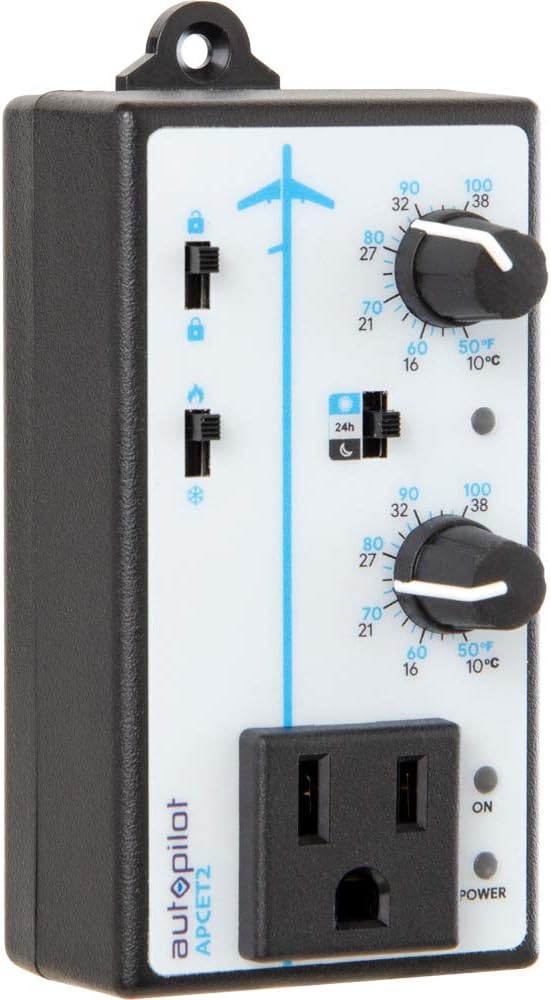
රූපය 3.1: ඉදිරිපස view of the Autopilot APCET2 thermostat. This image displays the main control panel, including the two temperature setting knobs, the day/night mode switch, the heating/cooling mode switch, and the integrated power outlet for connecting your device. The "ON" and "POWER" indicator lights are also visible.
- Day/Night Temperature Knobs: Two separate knobs for setting desired temperatures for day and night cycles.
- Day/Night Mode Switch: Toggles between 24-hour operation or automatic day/night detection via photocell.
- Heating/Cooling Mode Switch: Selects whether the thermostat controls a heating or cooling device.
- Integrated Power Outlet: Where the controlled device is plugged in.
- බල දර්ශක ආලෝකය: Illuminates when the unit is receiving power.
- Output Indicator Light: Illuminates when power is being supplied to the connected device.
ආපසු View:

රූපය 3.2: ආපසු view of the Autopilot APCET2 thermostat. This image shows the standard 3-prong power plug for connecting the thermostat to a wall outlet, along with the screws for potential wall mounting.
- බල ප්ලග්: Standard 3-prong plug for connecting to a 120V AC wall outlet.
- සවි කිරීම් සිදුරු: විකල්ප බිත්ති සවි කිරීම සඳහා.
මානයන්:
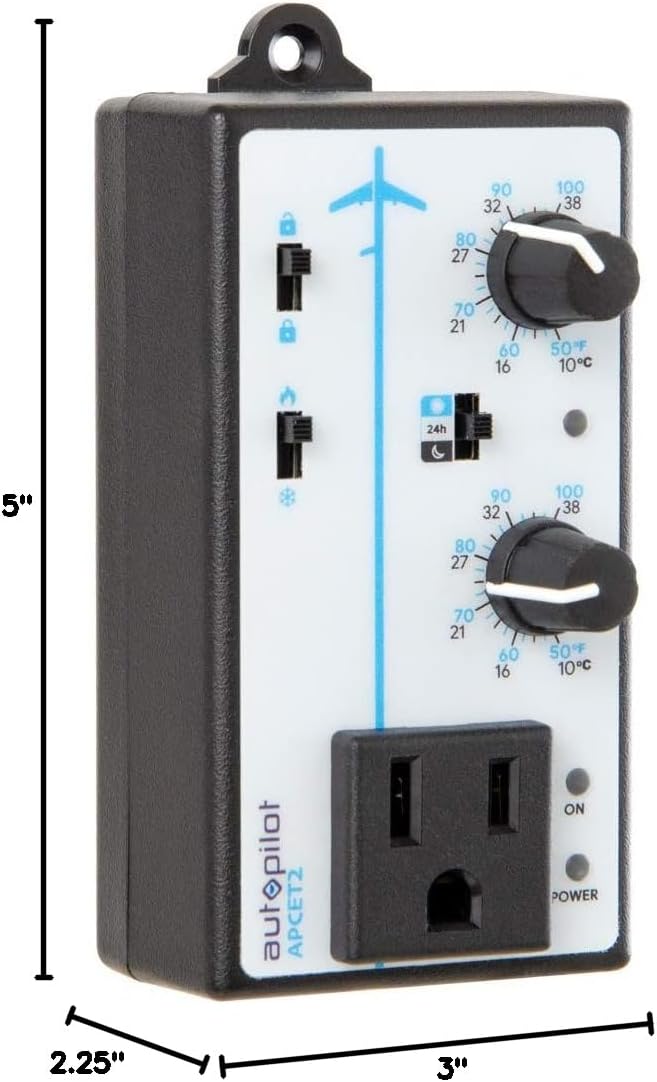
රූපය 3.3: Dimensions of the Autopilot APCET2 thermostat. The image indicates the device measures approximately 3 inches deep, 2.25 inches wide, and 5 inches high.
4. සැකසුම් උපදෙස්
- උපාංගය ඉවත් කරන්න: Carefully remove the Autopilot APCET2 thermostat and its components from the packaging.
- උෂ්ණත්ව සංවේදකය සම්බන්ධ කරන්න: Plug the 20-foot remote precision temperature sensor into the designated port on the side of the thermostat. Ensure a secure connection.
- සංවේදකය ස්ථානගත කරන්න: Place the temperature sensor in the area where you want to monitor and control the temperature. Avoid placing it in direct sunlight, near heat sources, or in drafts, as this can affect accuracy.
- Plug in the Thermostat: Insert the 3-prong plug of the Autopilot APCET2 thermostat into a standard 120V AC grounded wall outlet. The Power indicator light should illuminate.
- ඔබගේ උපාංගය සම්බන්ධ කරන්න: Plug the heating or cooling device you wish to control into the integrated power outlet on the front of the thermostat.
- මූලික පරීක්ෂාව: Ensure all connections are secure before proceeding to operation.
5. මෙහෙයුම් උපදෙස්
The Autopilot APCET2 offers flexible temperature control with day and night settings and heating/cooling modes.
5.1 Selecting Operating Mode (Heating or Cooling)
- සොයා ගන්න Heating/Cooling Mode Switch on the front panel (typically marked with flame and snowflake icons).
- වෙත ස්විචය තල්ලු කරන්න ගිනි නිරූපකය සඳහා තාපන මාදිලිය. In this mode, the connected device will turn ON when the temperature drops below the set point and turn OFF when it rises above the set point (considering the +/- 3°F differential).
- වෙත ස්විචය තල්ලු කරන්න හිම පියලි නිරූපකය සඳහා සිසිලන මාදිලිය. In this mode, the connected device will turn ON when the temperature rises above the set point and turn OFF when it drops below the set point (considering the +/- 3°F differential).
5.2 Setting Day and Night Temperatures
The thermostat allows for distinct day and night temperature settings.
- Day Temperature Setting: භාවිතා කරන්න upper knob (associated with the sun icon) to set your desired daytime temperature. Rotate the knob clockwise to increase the temperature and counter-clockwise to decrease it. The range is 50°F–100°F (10°C–38°C).
- Night Temperature Setting: භාවිතා කරන්න lower knob (associated with the moon icon) to set your desired nighttime temperature. Rotate the knob clockwise to increase the temperature and counter-clockwise to decrease it. The range is 50°F–100°F (10°C–38°C).
5.3 Day/Night Detection Mode
The thermostat can automatically switch between day and night settings using its built-in photocell.
- සොයා ගන්න Day/Night Mode Switch (typically marked with a 24h icon and sun/moon icons).
- වෙත ස්විචය තල්ලු කරන්න sun/moon icon සඳහා ස්වයංක්රීය දිවා/රාත්රී හඳුනාගැනීම. The built-in photocell will detect ambient light levels and automatically switch between your set day and night temperatures.
- වෙත ස්විචය තල්ලු කරන්න 24h icon සඳහා 24-Hour Operation. In this mode, the thermostat will continuously use the Day Temperature Setting, regardless of light conditions.
5.4 Memory-Lock Feature
The Memory-lock feature prevents accidental changes to your set points.
- වෙත අගුල the settings, slide the small switch next to the padlock icon to the අගුලු දැමූ ස්ථානය. This will prevent the temperature knobs from being accidentally adjusted.
- වෙත unlock the settings, slide the switch to the අගුළු හරින ලද ස්ථානය.
6. නඩත්තු කිරීම
Regular maintenance ensures optimal performance and longevity of your Autopilot APCET2 thermostat.
- පිරිසිදු කිරීම: Disconnect the thermostat from the power outlet before cleaning. Use a soft, dry cloth to wipe the exterior. Do not use abrasive cleaners, solvents, or immerse the unit in water.
- සංවේදක සත්කාරය: Keep the temperature sensor clean and free from dust or debris. Ensure the sensor cable is not pinched or damaged.
- ගබඩා: උපාංගය දිගු කාලයක් ගබඩා කරන්නේ නම්, එය බල සැපයුමෙන් විසන්ධි කර, පිරිසිදු කර, සිසිල් වියළි ස්ථානයක ගබඩා කරන්න.
7. දෝශ නිරාකරණය
If you encounter issues with your Autopilot APCET2 thermostat, refer to the following common problems and solutions:
| ගැටලුව | විය හැකි හේතුව | විසඳුම |
|---|---|---|
| Device not turning ON/OFF at set temperature. | Incorrect mode selected (Heating/Cooling). Temperature differential not met. Thermostat not receiving power. Connected device is faulty or not powered. | Verify the Heating/Cooling switch is in the correct position. Allow for the +/- 3°F temperature differential. Check if the thermostat is securely plugged into a live outlet and the Power indicator is ON. Test the connected device by plugging it directly into a wall outlet. |
| Temperature settings cannot be adjusted. | Memory-lock feature is engaged. | Slide the Memory-lock switch to the unlocked position. |
| Day/Night mode not switching automatically. | Photocell mode not selected. Photocell is obstructed or in constant light/darkness. | Ensure the Day/Night Mode switch is set to the sun/moon icon. Check that the photocell (small sensor on the front) is not covered and is exposed to natural light changes. |
| සාවද්ය උෂ්ණත්ව කියවීම්. | Temperature sensor improperly placed or damaged. | Relocate the sensor away from direct heat, cold drafts, or sunlight. Inspect the sensor and cable for damage. |
මෙම විසඳුම් උත්සාහ කිරීමෙන් පසුවත් ගැටලුව පවතින්නේ නම්, කරුණාකර පාරිභෝගික සහාය අමතන්න.
8. පිරිවිතර
| වෙළඳ නාමය | ස්වයංක්රීය නියමු |
| මාදිලියේ නම | Advanced Day & Night Cooling or Heating |
| ආදර්ශ අංකය | APCET2 |
| නිෂ්පාදන මානයන් | 3"D x 2.25"W x 5"H |
| පාලක වර්ගය | Knob & Push Button |
| විශේෂ ලක්ෂණය | Lockable (Memory-lock) |
| වර්ණය | කළු |
| විශේෂිත භාවිතයන් | Temperature Control in Grow Rooms, Controlling Heating and Cooling Equipment |
| උෂ්ණත්ව පාලන වර්ගය | වැඩසටහන්ගත කළ හැකි |
| ඇතුළත් සංරචක | 20' remote precision temperature sensor |
| බලශක්ති ප්රභවය | විදුලි |
| වෙළුමtage | වෝල්ට් 120 |
| වට්tage | වොට් 1800 යි |
| අයිතමයේ බර | අවුන්ස 8.1 කි |
| උෂ්ණත්ව පාලන පරාසය | 50°F–100°F (10°C-38°C) |
| උෂ්ණත්ව අවකලනය | +/- 3 ° F. |
| සංදර්ශක වර්ගය | LCD |
| පසුතල ආලෝකය | ඔව් |
| සවිකිරීමේ වර්ගය | වෝල් මවුන්ට් |
9. වගකීම් සහ පාරිභෝගික සහාය
For warranty information or technical assistance, please contact Autopilot customer support. Refer to the product packaging or the official Autopilot webනවතම සම්බන්ධතා තොරතුරු සඳහා අඩවිය.
When contacting support, please have your product model number (APCET2) and purchase information readily available.


