1. නිෂ්පාදන අවසන්view
The Baseus Heyo Rotation Countdown Timer is a versatile digital timer designed for various scenarios, including kitchen cooking, study, work, and exercise. It features an intuitive rotary adjustment, a clear LCD display, and intelligent energy-saving functions.

රූපය 1.1: ඉදිරිපස view of the Baseus Heyo Rotation Countdown Timer, showcasing its sleek design and clear digital display.
2 ප්රධාන ලක්ෂණ
- Intuitive Rotary Adjustment: Easily set time by rotating the outer ring, supporting both countdown and count-up functions.
- Clear LCD Digital Display: Large, easy-to-read numbers for minutes and seconds.
- වෙනස් කළ හැකි පරිමාව: Three volume settings (Loud, Low, Mute) to suit different environments.
- Intelligent Energy Saving: The display dims after 5 seconds of inactivity and shuts down after another 5 seconds to conserve battery life.
- චුම්බක පිටුබලය: Allows for convenient placement on metallic surfaces like refrigerators or whiteboards.
- කල් පවතින ද්රව්ය: Constructed from Acrylonitrile Butadiene Styrene for longevity.
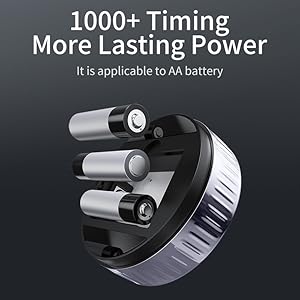
Image 2.1: Demonstrates the easy rotation mechanism for efficient timing adjustments.

Image 2.2: Illustrates the adjustable volume settings located on the back of the timer.
3. පිහිටුවීම
3.1. පැකේජ අන්තර්ගතය
- Baseus Heyo Rotation Countdown Timer (1 unit)
- පරිශීලක අත්පොත (මෙම ලේඛනය)
- සටහන: AAA බැටරි ඇතුළත් නොවන අතර වෙන වෙනම මිලදී ගත යුතුය.
3.2. බැටරි ස්ථාපනය
- ටයිමරයේ පිටුපස බැටරි මැදිරිය සොයා ගන්න.
- බැටරි කවරය විවෘත කරන්න.
- නිවැරදි ධ්රැවීයතාව (+/-) සහතික කරමින්, AAA බැටරි තුනක් (3) ඇතුළු කරන්න.
- Close the battery cover securely. The LCD display will light up, indicating successful installation.

රූපය 3.1: View of the battery compartment, showing where to insert three AAA batteries.
4. මෙහෙයුම් උපදෙස්
4.1. බලය සක්රිය / අක්රිය කරන්න
The timer automatically powers on when batteries are installed. It enters an energy-saving mode after 5 seconds of inactivity and fully shuts down after another 5 seconds of no operation. To reactivate, simply rotate the dial or press the "O" button.
4.2. Setting the Timer (Countdown)
- ගැලපුම් කාලය: Rotate the outer ring clockwise to increase the time (minutes and seconds) and counter-clockwise to decrease it. The adjustable range is 00:00 to 99:55.
- Start Countdown: Once the desired time is set, press the "O" button on the front of the timer to begin the countdown.
- විරාම/නැවත ආරම්භ කිරීම: Press the "O" button again during a countdown to pause it. Press it once more to resume.
- නැවත සකසන්න: To reset the timer to 00:00, press and hold the "O" button for approximately 3 seconds.
- අනතුරු ඇඟවීම: When the countdown reaches 00:00, the timer will sound an alarm according to the selected volume setting.
4.3. Using as a Stopwatch (Count-up)
- Ensure the timer display is at 00:00. If not, reset it by holding the "O" button.
- Press the "O" button to start counting up from 00:00.
- Press the "O" button again to pause the count-up.
- Press and hold the "O" button to reset the stopwatch.
4.4. පරිමාව සකස් කිරීම
On the back of the timer, there is a switch to adjust the alarm volume. Select from three modes:
- හයියෙන්: For noisy environments or when a strong alert is needed.
- අඩු: For quiet environments or subtle alerts.
- නිශ්ශබ්ද කරන්න: The display will blink when the time is up, providing a silent notification. Ideal for libraries, offices, or study areas.
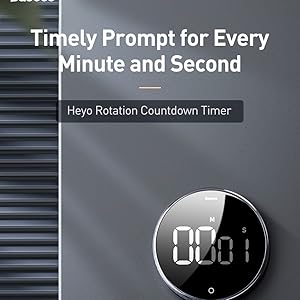
Image 4.1: The timer can be conveniently placed on magnetic surfaces for easy visibility.

Image 4.2: The timer is suitable for various settings, including professional and educational environments.
5. නඩත්තු කිරීම
- පිරිසිදු කිරීම: Wipe the timer with a soft, dry cloth. Do not use abrasive cleaners or immerse in water.
- බැටරි ආදේශනය: Replace batteries when the display becomes dim or the timer functions erratically. Always use new AAA batteries.
- ගබඩා: Store the timer in a cool, dry place when not in use for extended periods. Remove batteries if storing for more than a month to prevent leakage.
- ආන්තික තත්වයන් වළක්වා ගන්න: Do not expose the timer to extreme temperatures, direct sunlight, or high humidity.
6. දෝශ නිරාකරණය
| ගැටලුව | විය හැකි හේතුව | විසඳුම |
|---|---|---|
| සංදර්ශකය හිස් හෝ අඳුරු ය. | අඩු හෝ මිය ගිය බැටරි; වැරදි බැටරි ස්ථාපනය. | නිවැරදි ධ්රැවීයතාව සහතික කරමින් නව AAA බැටරි සමඟ ප්රතිස්ථාපනය කරන්න. |
| Timer does not start/stop. | "O" button not pressed firmly; timer in sleep mode. | Press the "O" button firmly. Rotate the dial to wake the timer from sleep mode. |
| එලාම් එක නාද වෙන්නේ නැහැ. | Volume set to Mute; low battery. | Check the volume switch on the back and set it to Loud or Low. Replace batteries if needed. |
| Numbers are incorrect or flickering. | Faulty unit; very low battery. | බැටරි මාරු කරන්න. ගැටලුව දිගටම පවතී නම්, පාරිභෝගික සහාය අමතන්න. |
7. පිරිවිතර
- ආදර්ශ අංකය: ACDJS-01
- වෙළඳ නාමය: බේසියස්
- ද්රව්ය: ඇක්රිලෝනයිට්රයිල් බියුඩඩීන් ස්ටයිරීන් (ABS)
- වර්ණය: කළු
- මානයන්: 5 සෙ.මී. (ගැඹුර) x 5 සෙ.මී. (පළල) x 3 සෙ.මී. (උස)
- අයිතමයේ බර: ග්රෑම් 150 යි
- කාල පරාසය: 00:00 - 99:55
- බලශක්ති ප්රභවය: 3 x AAA බැටරි (ඇතුළත් කර නැත)
- සැකසීම් ගණන: 4 (referring to volume settings and timing modes)
- මුල් රට: චීනය
- UPC: 738633769932
8. වගකීම් සහ සහාය
Baseus products are manufactured with high-quality standards. For warranty information and customer support, please refer to the warranty card included with your purchase or visit the official Baseus webවෙබ් අඩවිය. වගකීම් හිමිකම් සඳහා කරුණාකර ඔබගේ මිලදී ගැනීමේ රිසිට්පත තබා ගන්න.
නිෂ්පාදකයා: Baseus, Store2508, Dankuni, West Bengal
ආනයනකරු/ඇසුරුම්කරු: MP International - Authorised Distributor
For technical assistance or inquiries, please contact your local distributor or the seller.


