හැඳින්වීම
Thank you for choosing the Aiwa ESP-350WT True Wireless Stereo (TWS) Earbuds. This manual provides essential information on how to set up, operate, and maintain your earbuds to ensure optimal performance and longevity. Please read these instructions carefully before use.
පැකේජයේ අන්තර්ගතය
කරුණාකර පහත අයිතම සඳහා පැකේජය පරීක්ෂා කරන්න:
- Aiwa ESP-350WT TWS Earbuds (Left and Right)
- අයකිරීමේ නඩුව
- USB Charging Cable (braided nylon)
- Silicone Eartips (Sizes S, M, L)
- උපදෙස් අත්පොත
නිෂ්පාදනය අවසන්view
The Aiwa ESP-350WT earbuds are designed for a comfortable and secure fit, offering high-quality wireless audio. Each earbud features intuitive touch controls for easy management of music and calls.
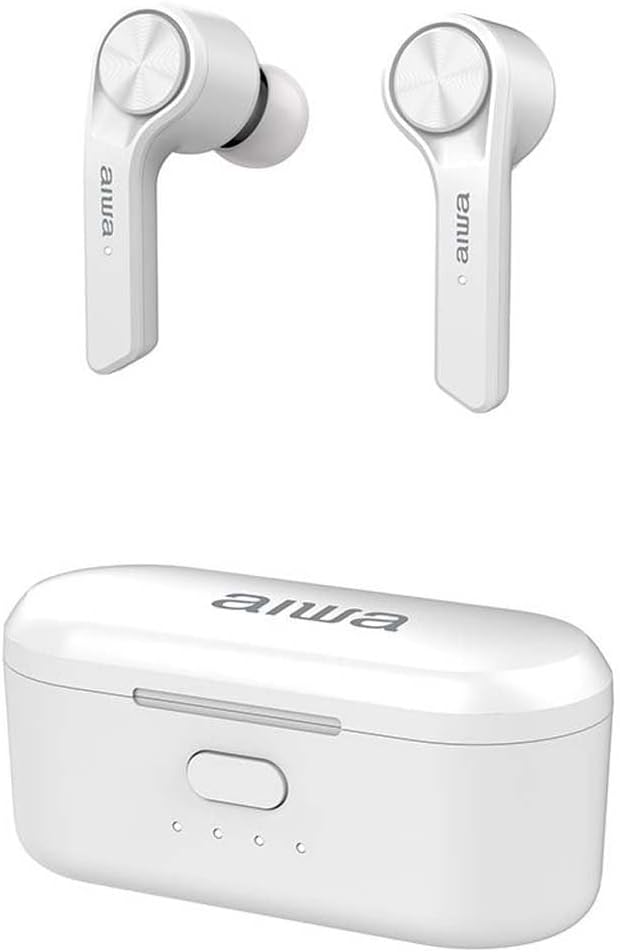
The Aiwa ESP-350WT True Wireless Stereo earbuds are shown alongside their compact white charging case. The earbuds feature a sleek design with the Aiwa logo visible on each stem.
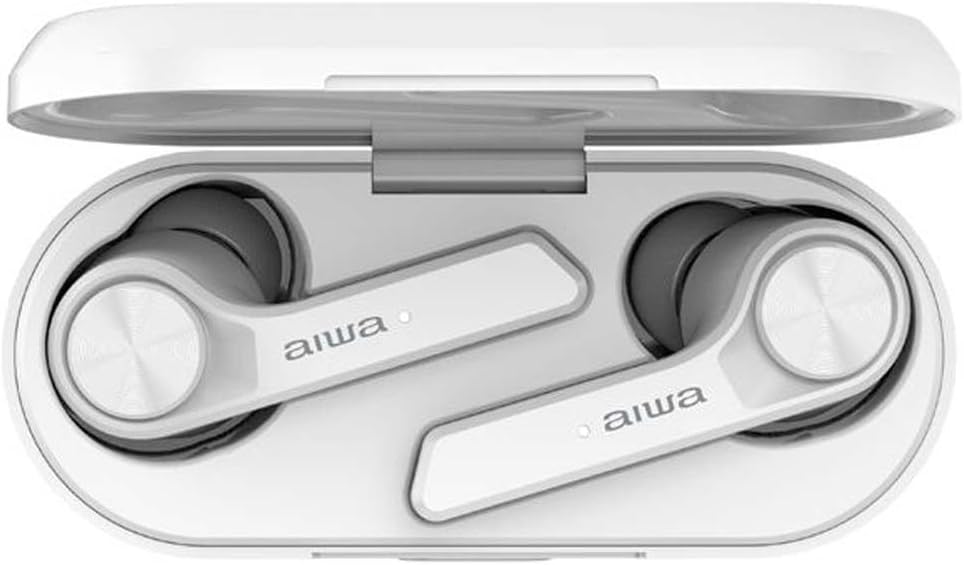
The Aiwa ESP-350WT earbuds are securely placed within their open charging case. This view demonstrates how the earbuds are stored and charged, with the charging contacts visible.
සැලසුම
1. ඉයර්බඩ් සහ කේස් ආරෝපණය කිරීම
Before first use, fully charge the earbuds and the charging case. The charging case provides approximately 12 hours of additional battery life for the earbuds.
- ඉයර්බඩ් ආරෝපණ පෙට්ටියට දමන්න. ඒවා ඒවායේ අදාළ ස්ලොට් වල නිවැරදිව සවි කර ඇති බවට වග බලා ගන්න (වමට L, දකුණට R).
- Connect the USB charging cable to the charging port on the case and to a compatible USB power source.
- ආරෝපණ තත්ත්වය පෙන්වීමට ආරෝපණ පෙට්ටියේ දර්ශක ලාම්පු දැල්වෙනු ඇත. සම්පූර්ණයෙන්ම ආරෝපණය වූ පසු, ලාම්පු වෙනස් වීමට හෝ අක්රිය වීමට ඉඩ ඇත.
2. බ්ලූටූත් උපාංගයක් සමඟ යුගල කිරීම
ස්ථාවර රැහැන් රහිත සම්බන්ධතාවයක් සඳහා ඉයර්බඩ් බ්ලූටූත් 5.0 භාවිතා කරයි.
- ආරෝපණ පෙට්ටිය විවෘත කරන්න. ඉයර්බඩ් ස්වයංක්රීයව ක්රියාත්මක වී යුගල කිරීමේ ප්රකාරයට ඇතුළු වේ.
- ඔබගේ උපාංගයේ (ස්මාර්ට්ෆෝන්, ටැබ්ලටය, ආදිය), බ්ලූටූත් සක්රීය කර පවතින උපාංග සොයන්න.
- Select "Aiwa ESP-350WT" from the list of found devices.
- Once connected, you will hear an audible confirmation, and the earbud indicator lights will stop flashing.
- If pairing fails, place the earbuds back into the case, close it, and then repeat the steps.
මෙහෙයුම් උපදෙස්
The Aiwa ESP-350WT earbuds feature touch controls on both earbuds for convenient operation.
බලය සක්රිය / අක්රිය
- බල ගැන්වීම: ආරෝපණ පෙට්ටිය විවෘත කරන්න, නැතහොත් ඉයර්බඩ් දෙකෙහිම ස්පර්ශ ප්රදේශය තත්පර 3ක් දිගු වේලාවක් ඔබන්න.
- විදුලිය විසන්ධි කිරීම: ඉයර්බඩ් නැවත ආරෝපණ පෙට්ටියට දමා පියන වසා දමන්න, නැතහොත් ඉයර්බඩ් දෙකෙහිම ස්පර්ශ ප්රදේශය තත්පර 5ක් දිගු වේලාවක් ඔබන්න.
සංගීත වාදනය
- වාදනය/විරාමය: ඉයර්බඩ් දෙකෙන් එකක් මත එක තට්ටු කරන්න.
- ඊළඟ ධාවන පථය: දකුණු ඉයර්බඩ් එක දෙවරක් තට්ටු කරන්න.
- පෙර ධාවන පථය: වම් ඉයර්බඩ් එක දෙවරක් තට්ටු කරන්න.
ඇමතුම් කළමනාකරණය
- පිළිතුර/අවසන් ඇමතුම: ඉයර්බඩ් දෙකෙන් එකක් මත එක තට්ටු කරන්න.
- ඇමතුම ප්රතික්ෂේප කරන්න: Long-press the touch area on either earbud for 2 seconds.
පරිමාව පාලනය
- පරිමාව: දකුණු ඉයර්බඩ් එක තුන් වරක් තට්ටු කරන්න.
- ශබ්දය පහළට: වම් ඉයර්බඩ් එක තුන් වරක් තට්ටු කරන්න.
නඩත්තු කිරීම
පිරිසිදු කිරීම
- ඉයර්බඩ්, විශේෂයෙන් ඉයර්ටිප් සහ ආරෝපණ සම්බන්ධතා, මෘදු, වියලි, ලින්ට් රහිත රෙද්දකින් නිතිපතා පිරිසිදු කරන්න.
- දරුණු රසායනික ද්රව්ය, පිරිසිදු කිරීමේ ද්රාවණ හෝ ශක්තිමත් ඩිටර්ජන්ට් භාවිතා නොකරන්න.
- Ensure the charging contacts on both the earbuds and the case are free from dust and debris to maintain proper charging.
ගබඩා කිරීම
- භාවිතයේ නොමැති විට, ඉයර්බඩ් ආරක්ෂා කර ගැනීමට සහ ආරෝපණය කර තබා ගැනීමට ඒවායේ ආරෝපණ පෙට්ටියේ ගබඩා කරන්න.
- අධික උෂ්ණත්වයන්ගෙන් සහ සෘජු හිරු එළියෙන් ඈත්ව සිසිල් වියළි ස්ථානයක ගබඩා කරන්න.
දෝෂගවේෂණය
If you encounter any issues with your Aiwa ESP-350WT earbuds, please refer to the following common solutions:
- ඉයර්බඩ් යුගල නොවේ: Ensure both earbuds are charged. Place them back in the case, close the lid, wait a few seconds, then open the lid to re-initiate pairing mode. Forget the device from your phone's Bluetooth settings and try pairing again.
- එක ඉයර්බඩ් එකකින් ශබ්දයක් නැත: Check if both earbuds are charged. Try resetting the earbuds by placing them in the case and then taking them out. Ensure your device's audio output is set to the earbuds.
- ආරෝපණ ගැටළු: Verify that the charging cable is securely connected to both the case and the power source. Clean the charging contacts on the earbuds and inside the case. Try a different USB cable or power adapter.
- අඩු පරිමාව: ඔබගේ සම්බන්ධිත උපාංගයේ සහ ඉයර්බඩ් ස්පර්ශ පාලන භාවිතයෙන් ශබ්දය සකසන්න.
ගැටලුව දිගටම පවතින්නේ නම්, වැඩිදුර සහාය සඳහා කරුණාකර පාරිභෝගික සහාය අමතන්න.
පිරිවිතර
- මාදිලියේ නම: ESP-350WT
- වෙළඳ නාමය: අයිවා
- සම්බන්ධතා තාක්ෂණය: රැහැන් රහිත
- රැහැන් රහිත සන්නිවේදන තාක්ෂණය: බ්ලූටූත් 5.0
- ආකෘති සාධකය: In-ear
- සම්බාධනය: 32 ඕම්
- විශේෂ ලක්ෂණ: Lightweight, Touch Control
- බැටරි: 1 ලිතියම්-අයන බැටරි (නැවත ආරෝපණය කළ හැකි)
- ද්රව්ය: Silicone, Nylon (for cable)
- වර්ණය: සුදු
වගකීම් සහ සහාය
Aiwa products are manufactured to high-quality standards. For information regarding warranty coverage, technical support, or service, please refer to the warranty card included in your package or visit the official Aiwa webවෙබ් අඩවිය. වගකීම් හිමිකම් සඳහා ඔබේ මිලදී ගැනීමේ සාක්ෂි තබා ගන්න.


