හැඳින්වීම
ස්තූතියි, උදව් කළාටasing the CHOOCL 30-Pin Bluetooth 5.0 aptX-HD Adapter Receiver. This device is designed to upgrade your existing 30-pin docking station speakers, such as Bose SoundDock systems, with modern Bluetooth 5.0 connectivity. This allows for high-quality wireless audio streaming from your Bluetooth-enabled devices.
නිෂ්පාදනය අවසන්view
ප්රධාන ලක්ෂණ
- බ්ලූටූත් 5.0: Provides stable and efficient wireless connection.
- aptX-HD Support: අධි-විභේදන ශ්රව්ය ගුණාත්මක භාවය ලබා දෙයි.
- Robust Aluminium Shell: Features a durable and sleek design.
- පුළුල් අනුකූලතාව: Works with various 30-pin docking stations.
- Dual Audio Streams: Supports connecting two mobile phones simultaneously.
සංරචක
The package includes the CHOOCL 30-Pin Bluetooth Adapter Receiver.

Figure 1: CHOOCL 30-Pin Bluetooth Adapter Receiver, showcasing its robust aluminum shell and Bluetooth 5.0 capabilities.

Figure 2: Function description of the adapter, detailing indicator light colors for different Bluetooth audio formats (aptX-HD, aptX-LL, aptX, AAC, SBC) and the 30-pin interface.
සැකසුම් උපදෙස්
- Power On Docking Station: Ensure your 30-pin docking station speaker is powered on.
- ඇඩැප්ටරය ඇතුළු කරන්න: Carefully insert the CHOOCL Bluetooth adapter into the 30-pin connector on your docking station.
- යුගල කිරීමේ මාදිලිය: The adapter will automatically enter pairing mode. The indicator light (refer to Figure 2) will flash, indicating it is ready to connect.
- බ්ලූටූත් සක්රිය කරන්න: On your mobile device (smartphone, tablet, etc.), go to Bluetooth settings and enable Bluetooth.
- උපාංගය තෝරන්න: Look for "ChooDock" in the list of available Bluetooth devices and select it to pair.
- තහවුරු කිරීම: Once successfully paired, the indicator light on the adapter will change to a solid color corresponding to the active audio format.
For optimal performance, ensure your mobile device is within the Bluetooth range of the adapter.
මෙහෙයුම් උපදෙස්
Connecting to Amazon Echo Dot
The CHOOCL adapter can be used with devices like the Amazon Echo Dot for voice-controlled music streaming through your docking station.
- Open Alexa App: Launch the Alexa app on your smartphone or tablet.
- Find Bluetooth Settings: Navigate to the Bluetooth settings within the Alexa app for your Echo Dot.
- Pair Echo Dot with ChooDock: Initiate pairing from the Alexa app and select "ChooDock" from the discovered devices.
- Play Music: Once paired, instruct your Echo Dot to play music. The audio will be transmitted to your docking station via the ChooDock adapter.

Figure 3: The CHOOCL adapter connected to a Bose SoundDock, receiving audio from an Amazon Echo Dot.

Figure 4: An Amazon Echo Dot, demonstrating its compatibility with the ChooDock adapter for audio streaming, showing the pairing process.
ද්විත්ව උපාංග සම්බන්ධතාවය
The adapter supports connecting two mobile phones simultaneously. This allows for easy switching between audio sources without re-pairing.

Figure 5: Illustration of the adapter's dual audio stream capability, showing two mobile devices connected simultaneously.
ගැළපුම
This adapter is designed for a wide range of 30-pin docking stations. Please review the lists below for known compatible and incompatible devices.
ගැළපෙන උපාංග

Figure 6: A detailed list of various brands and models of 30-pin docking stations that are compatible with the CHOOCL adapter.
Examples of Compatible Brands/Models:
- බෝස්: Original SoundDock, SoundDock Portable, SoundDock I, SoundDock II, SoundDock 10.
- Altec Lansing: iM7, iM9, iM11, iM600, iMT325, iMT620, iMT702, iMT800, M202, M402, T612.
- iHome: iA9, iA5, iA17, iA63, iA100, iD37, iD7, iD8, iD91, iD99, iH16U, iH4, iH5, iH6, iH8, iH9, iH15, iH19 (2Go), iH27, iP1, iP2, iP4, iP9, iP11, iP16, iP21, iP23, iP37, iP46, iP87, iP90, iP97.
- JBL: Onstage 2, On Stage 3, On Stage 4, On Stage 200iD, Onstage Micro, On Beat, On Time 200P, On Time Micro, Radial Micro 700.
- පිලිප්ස්: AJ7030, AJ7035, AJ7040D, DC320/37, DC390/37, DCB291, DCB293, DCB352, DCD132, DCM2020, DCM230/37, DS1100, DS1110, DS1200, DS3000, DS3010/37, DS3510, DS7550, DS7700.
- And many more as listed in Figure 6.
නොගැලපෙන උපාංග
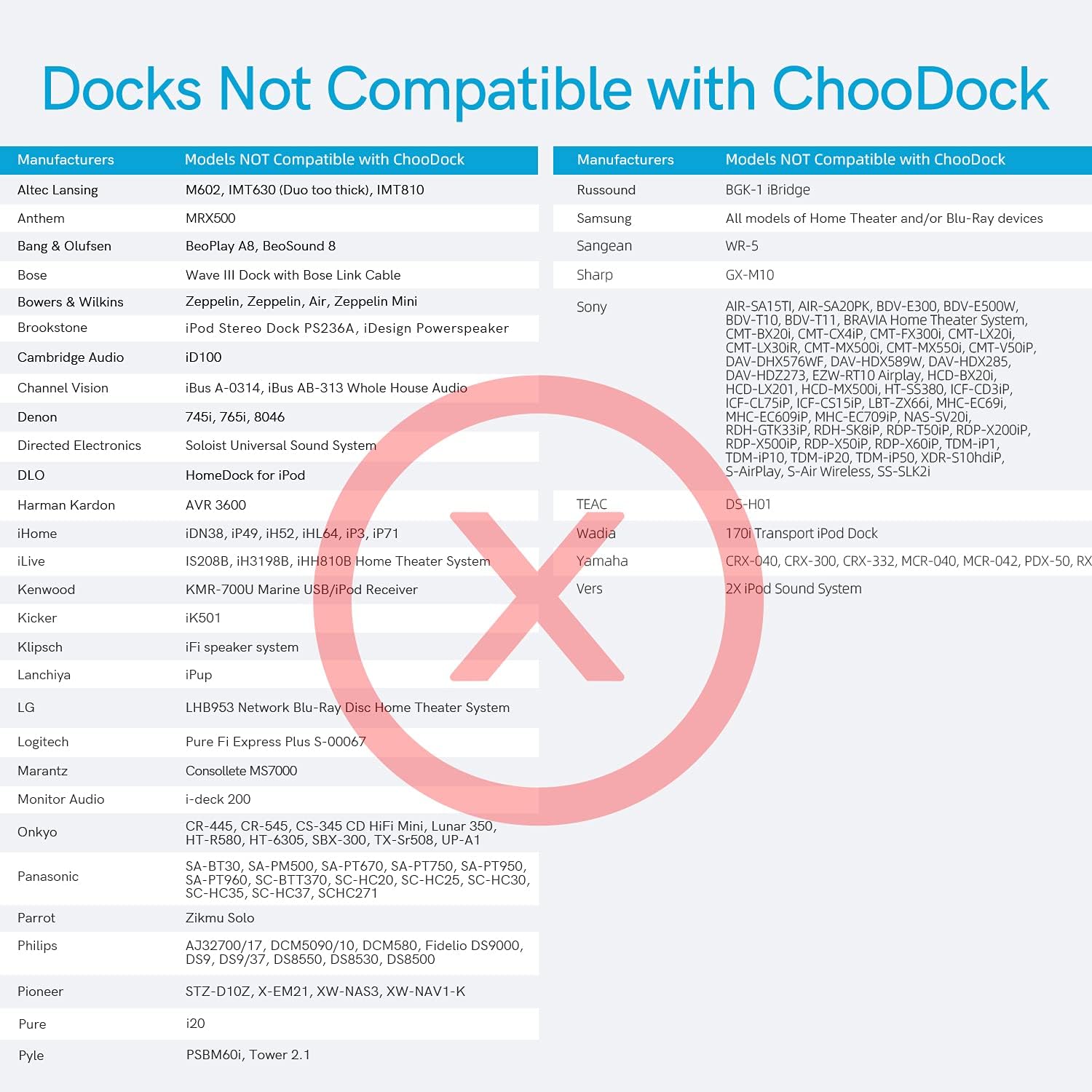
Figure 7: A detailed list of various brands and models of docking stations that are not compatible with the CHOOCL adapter, indicated by a red cross.
Examples of Incompatible Brands/Models:
- Altec Lansing: iM602, iMT630 (Duo too thick), iMT810.
- Bang & Olufsen: BeoPlay A8, BeoSound 8.
- බෝස්: Wave III Dock with Bose Link Cable.
- පිලිප්ස්: AJ3270D/17, DCM5090/10, DCM580, Fidelio DS9000, DS9, DS9/37, DS8850, DS8530, DS8500.
- And others as listed in Figure 7.
If your device is not listed, please consult the manufacturer's specifications or contact customer support for compatibility information.
දෝෂගවේෂණය
| ගැටලුව | විය හැකි හේතුව | විසඳුම |
|---|---|---|
| No audio after pairing. | Incorrect audio source selected on docking station; volume too low. | Ensure the docking station is set to the correct input (e.g., iPod/Aux). Increase volume on both the docking station and your mobile device. |
| Cannot pair with the adapter. | Adapter not in pairing mode; previously paired device connected; interference. | Ensure the adapter's indicator light is flashing. Disconnect from any other paired devices. Move closer to the adapter and away from potential interference sources. Restart both the adapter and your mobile device. |
| දුර්වල ශ්රව්ය ගුණාත්මකභාවය හෝ විසන්ධි කිරීම්. | Distance from adapter; obstacles; low battery on mobile device. | Reduce the distance between your device and the adapter. Remove any obstructions. Ensure your mobile device has sufficient battery. |
| Adapter not recognized by docking station. | Incompatibility with docking station model; dirty 30-pin connector. | Verify your docking station model is listed as compatible (refer to Figure 6 and 7). Clean the 30-pin connector on both the adapter and the docking station. |
පිරිවිතර
- ආදර්ශ අංකය: TBASIN2-1125-18
- බ්ලූටූත් අනුවාදය: 5.0
- ශ්රව්ය කෝඩෙක්ස්: aptX-HD, aptX-LL, aptX, AAC, SBC
- මානයන්: අඟල් 1.85 x 1.41 x 0.4
- අයිතමයේ බර: අවුන්ස 1.76 කි
- බලශක්ති ප්රභවය: Powered by 30-pin docking station (internal battery included for operation, not for charging external devices)
- දෘඪාංග අතුරුමුහුණත: USB (for internal functions, connects via 30-pin to dock)
- ගැළපෙන උපාංග: iPod, iPhone (via 30-pin docking stations)
- වරායන් ගණන: 1 (30-pin connector)
වගකීම් සහ සහාය
For warranty information and technical support, please refer to the product packaging or contact CHOOCL customer service. Keep your purchase receipt for warranty claims.