1. හැඳින්වීම
The YIHUA 853D 2A USB professional soldering, rework, and power supply station is a versatile tool designed for a broad range of electronic tasks, including soldering, desoldering rework, testing, and powering applications. This unit combines a hot air rework station, a soldering station, and a DC power supply into one compact device. It is designed to operate on US mains electricity (110-127V). DO NOT use this product on mains electricity at 220V.
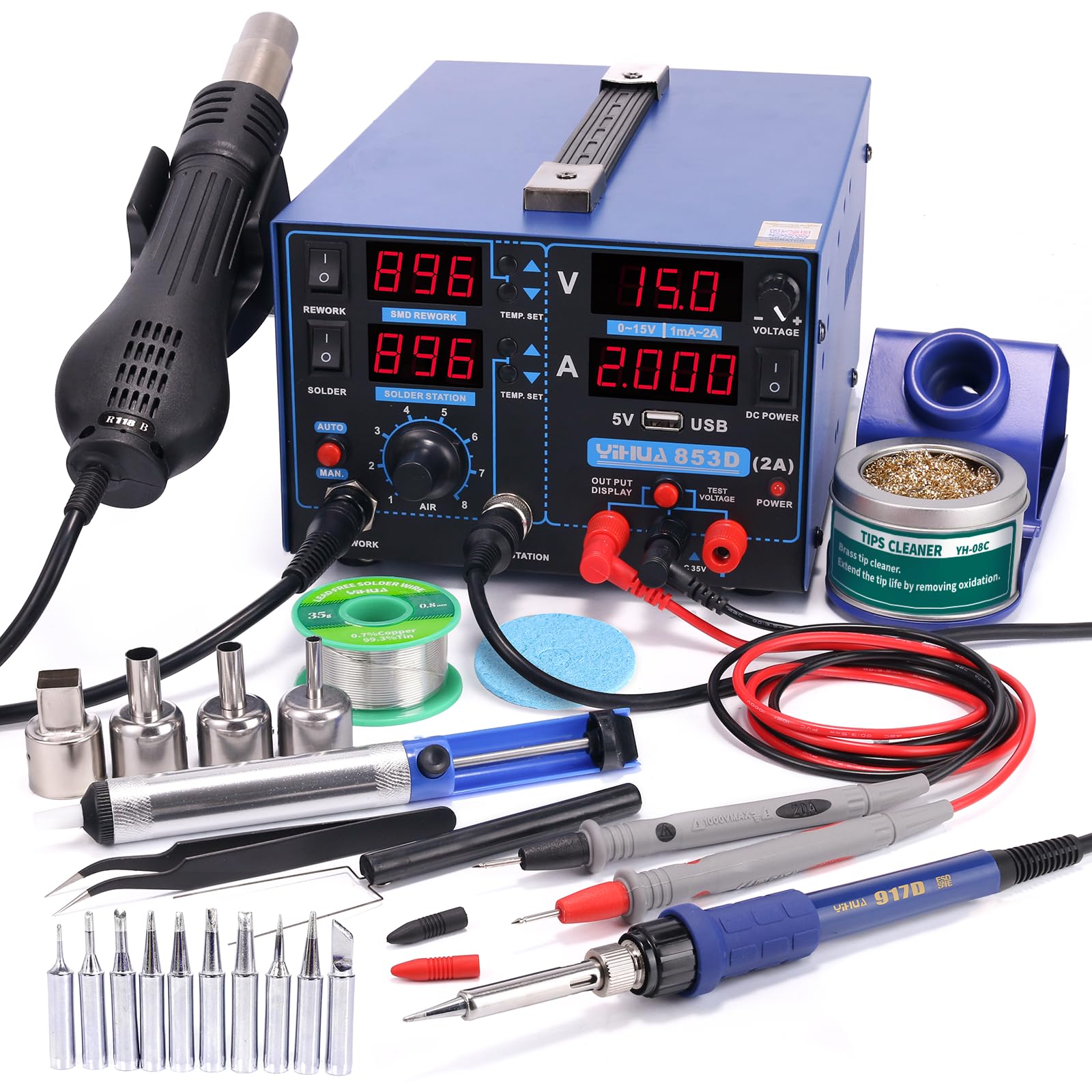
Figure 1: YIHUA 853D 2A USB 3-in-1 Soldering, Rework, and Power Supply Station with included accessories.
2. පැකේජ අන්තර්ගතය
The YIHUA 853D 2A USB station bundle includes the following items:
- 1 x YIHUA 853D 2A USB Professional Soldering, Rework, Power Supply Station
- 1 x 17.32" x 12.20" M180 Professional Soldering Work Mat
- 1 x 50g 0.8mm LEAD-FREE solder wire
- 10 x assorted iron tips
- 4 x assorted hot air nozzles
- 1 x solder wick
- 1 x solder sucker
- 1 x pair of ESD-safe tweezers
- 2 x holders (for hot air gun and soldering iron)
- 1 x cleaning kit (brass ball)
- 1 x IC extractor
- පරීක්ෂණ තුඩු 1 x යුගලයක්

Figure 2: M180 Professional Soldering Work Mat, designed to prevent accidental burning and organize components.

Figure 3: Included soldering accessories: lead-free solder wire, solder wick, solder sucker, and ESD-safe tweezers.

Figure 4: Hot air gun with a selection of assorted nozzles for various rework tasks.
3. පිහිටුවීම
Follow these steps to set up your YIHUA 853D 2A USB station:
- ඇසිරීම: ඇසුරුම්කරණයෙන් සියලුම සංරචක ප්රවේශමෙන් ඉවත් කරන්න.
- ස්ථානගත කිරීම: Place the main unit on a stable, heat-resistant surface, preferably on the M180 work mat.
- උණුසුම් වායු තුවක්කුව සම්බන්ධ කරන්න: Plug the hot air gun into the designated 'SMD REWORK' port on the front panel. Ensure it is securely seated in its holder.
- පෑස්සුම් යකඩ සම්බන්ධ කරන්න: Plug the soldering iron into the 'SOLDERING' port on the front panel. Place the iron in its stand.
- Connect Power Supply Leads (Optional): If using the DC power supply function, connect the test leads to the 'OUTPUT DISPLAY' terminals (red for positive, black for negative).
- බල සම්බන්ධතාවය: Ensure the main power switch on the rear of the unit is in the 'OFF' position. Connect the power cord to the unit and then to a 110-127V AC power outlet.
Video 1: An introductory video demonstrating the YIHUA 853D 2A USB 3-in-1 Multi-Station, including its components and basic connections. This video is provided by the seller.
4. මෙහෙයුම් උපදෙස්
4.1 බලය සක්රිය / අක්රිය
- ප්රධාන බලය: Flip the main power switch on the rear of the unit to the 'ON' position. The digital displays will illuminate.
- Component Power: Use the individual 'POWER' switches on the front panel for the 'REWORK' (hot air) and 'SOLDER' (soldering iron) stations to turn them on or off independently.
4.2 Temperature Control (Soldering & Hot Air)
Both the soldering and hot air stations feature temperature stabilization to maintain the set temperature steadily.
- උෂ්ණත්වය සැකසීම: Use the 'TEMP. SET' up/down arrow buttons next to each display to adjust the desired temperature. The hot air temperature range is 212-896°F (100-480°C), and the soldering station temperature range is 392-896°F (200-480°C).
- උෂ්ණත්ව ඒකක පරිවර්තනය (°C/°F): To switch between Celsius and Fahrenheit, simultaneously press and hold the 'REWORK STATION ▲' button and the 'SOLDERING STATION ▼' button for 2 seconds. Then, press the 'REWORK STATION ▲' button to display °C or the 'REWORK STATION ▼' button to display °F. The selected mode will be saved after 5 seconds of inactivity.

Figure 5: Instructions for converting the temperature display between Celsius and Fahrenheit.
4.3 Hot Air Rework Operation
The hot air gun features an automatic mode for enhanced safety and reduced wear.
- ස්වයංක්රීය ප්රකාරය: When the hot air gun is placed in its holder, it automatically cools down to 100°C (212°F) and enters standby mode. When lifted from the holder, it quickly heats up to the preset temperature.
- අත්පොත මාදිලිය: For continuous operation, press the 'MAN' button. The hot air gun will remain at the set temperature regardless of whether it's in the holder. Press 'AUTO' to return to automatic mode.
- වායු ප්රවාහ ගැලපීම: Use the 'AIR' knob to adjust the airflow intensity.
4.4 DC Power Supply Operation
The integrated DC power supply allows you to power and test devices.
- වෙළුමtage/Current Adjustment: The power supply can output up to 15V and 2A. Use the 'VOLTAGE' knob and 'TEMP. SET' buttons for voltage and current adjustment.
- පරීක්ෂණ වෙළුමtage: The unit can test voltages up to 35V. Connect the test leads to the 'TEST VOLTAGE' terminals and to the circuit you wish to measure.
- USB ආරෝපණ වරාය: A 5V USB port is available for charging compatible devices.
5. නඩත්තු කිරීම
Proper maintenance ensures longevity and optimal performance of your station.
- Soldering Tip Maintenance: Always clean the soldering iron tip when the operation is complete. After cleaning, coat the tip with a thin layer of solder to prevent oxidation and extend its lifespan. Use the included brass ball cleaner.
- Hot Air Nozzle Cleaning: උණුසුම් වායු තුණ්ඩ සුන්බුන් වලින් තොර බවට වග බලා ගන්න. සිසිල් වූ පසු ඒවා මෘදු ලෙස පිරිසිදු කරන්න.
- සාමාන්ය පිරිසිදු කිරීම: Keep the main unit and accessories clean and free from dust and solder splatter. Use a soft, dry cloth.

Figure 6: Demonstrating the use of the brass ball cleaner for soldering iron tip maintenance.
6. දෝශ නිරාකරණය
ඔබට ගැටළු ඇති වුවහොත්, පහත සඳහන් කරුණු සලකා බලන්න:
- බලය නැත: Check the main power switch on the rear, the individual power switches on the front, and the power cord connection. Ensure the unit is plugged into a 110-127V outlet.
- වැරදි උෂ්ණත්ව කියවීම: Verify the temperature unit setting (°C/°F). Ensure the soldering iron or hot air gun is properly connected.
- Hot Air Gun Not Heating: Check if the hot air gun is lifted from its holder (if in automatic mode) and if its power switch is on. Verify the temperature setting.
- පෑස්සුම් යකඩ රත් නොකිරීම: Check if the soldering iron's power switch is on and verify the temperature setting. Ensure the tip is clean and properly seated.
- Power Supply Output Issues: වෙළුම පරීක්ෂා කරන්නtage and current settings. Ensure test leads are correctly connected and not short-circuited.
7. පිරිවිතර
| විශේෂාංගය | වටිනාකම |
|---|---|
| වෙළඳ නාමය | YIHUA |
| ආකෘතිය | 853D 2A USB |
| Hot Air Temperature Range | 212-896°F (100-480°C) |
| Soldering Station Temperature Range | 392-896°F (200-480°C) |
| DC Power Supply Output | 0-15V, 1mA-2A |
| USB ප්රතිදානය | 5V |
| උපරිම පරීක්ෂණ වෙළුමtage | 35V |
| උෂ්ණත්ව ස්ථායීතාවය | ±5°F |
| වට්tage | 30 watts (Soldering Iron) |
| සංදර්ශක වර්ගය | ඩිජිටල් |
| ද්රව්ය | Copper (for some components) |
8. වගකීම් සහ සහාය
YIHUA provides a 12-month US-exclusive manufacturer technical coverage for this product. For any technical assistance or inquiries, please contact YIHUA's professional support team available 24/7 on Amazon.


