1. උපාංගය අවසන්view
The OPPO A93 (CPH2121) is a smartphone designed for efficient mobile communication and multimedia use. It features an ultra-thin design, a 6.43-inch AMOLED display, and a versatile camera system.

රූපය: ඉදිරිපස සහ පසුපස view of the OPPO A93 Smartphone, showcasing එහි සිනිඳු නිර්මාණය සහ කැමරා මොඩියුලය.
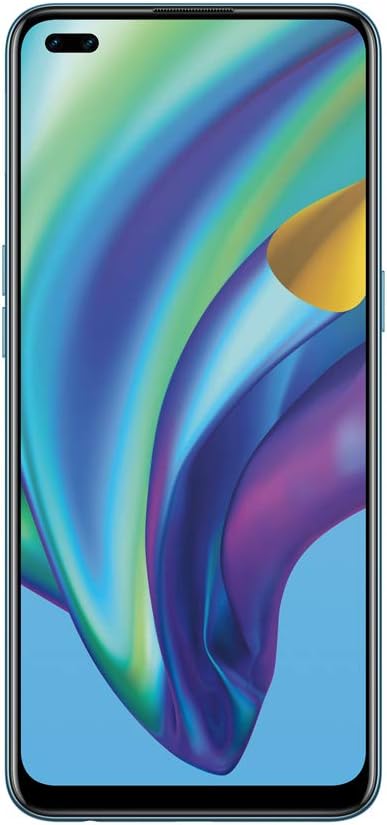
රූපය: ඉදිරිපස view of the OPPO A93 Smartphone, highlighting the dual punch-hole display.

රූපය: ආපසු view of the OPPO A93 Smartphone, showing the quad-camera setup and OPPO branding.
2. සැකසුම් මාර්ගෝපදේශය
2.1 Inserting SIM Cards and SD Card
- ඔබගේ උපාංගයේ පැත්තේ SIM කාඩ්පත් තැටිය සොයා ගන්න.
- තැටිය විවෘත කිරීමට සපයා ඇති SIM ඉජෙක්ටර් මෙවලම භාවිතා කරන්න.
- Carefully place your Nano-SIM cards and/or microSD card into the designated slots on the tray. Ensure correct orientation.
- පැත්ත සමඟ ෆ්ලෂ් වන තුරු තැටිය උපාංගය තුළට මෘදු ලෙස තල්ලු කරන්න.
2.2 මූලික බල සක්රිය කිරීම සහ වින්යාසය
- Press and hold the Power button (located on the right side) until the OPPO logo appears.
- ඔබගේ භාෂාව, කලාපය තෝරා ගැනීමට සහ Wi-Fi ජාලයකට සම්බන්ධ වීමට තිරයේ ඇති උපදෙස් අනුගමනය කරන්න.
- Google සේවාවන් සහ Play Store වෙත ප්රවේශ වීමට ඔබගේ Google ගිණුමෙන් පුරනය වන්න හෝ අලුත් එකක් සාදන්න.
- Set up your preferred screen lock method (PIN, pattern, password, fingerprint, or facial recognition).
2.3 උපාංගය ආරෝපණය කිරීම
Connect the USB Type-C cable to the charging port at the bottom of the phone and the other end to the power adapter. Plug the adapter into a power outlet. The device will indicate charging status on the screen.
3. මෙහෙයුම් උපදෙස්
3.1 මූලික සංචාලනය
- ස්පර්ශ කරන්න: යෙදුමක් විවෘත කිරීමට හෝ අයිතමයක් තේරීමට නිරූපකයක් තට්ටු කරන්න.
- ස්වයිප්: Move your finger across the screen to scroll through pages, lists, or switch between home screens.
- පින්ච්: ඡායාරූප විශාලනය කිරීමට හෝ පිටතට ගැනීමට ඇඟිලි දෙකක් භාවිතා කරන්න සහ web පිටු.
- දිගු මුද්රණ යන්ත්රය: තවත් විකල්ප සඳහා හෝ එය ගෙනයාමට අයිතමයක් ඔබා අල්ලාගෙන සිටින්න.
3.2 කැමරා විශේෂාංග
The OPPO A93 features a 6 AI Portrait Camera system, enhancing photography capabilities:
- AI Super Night Portrait: Captures clear night selfies using HDR, facial recognition, and highlight suppression.
- AI Night Flare Portrait: Transforms low-light portraits into stunning images by adding artistic flare to city lights.
- AI Color Portrait: Isolates the subject in color while artistically fading the background.
- AI Super Clear Portrait: Utilizes AI deep learning to reconstruct facial features for enhanced clarity, even in challenging lighting.
3.3 සංදර්ශකය සහ නිර්මාණය
- Mini Dual Punch-Holes: Maximizes screen real estate on the FHD+ 2400 x 1080 pixel display.
- Shiny Matte Color: Provides a luxurious, fingerprint-resistant finish.
- අතිශය තුනී නිර්මාණය: Offers a smooth, rounded feel for comfortable handling.
4. නඩත්තු කිරීම
4.1 බැටරි සත්කාර
- උපාංගය අධික උෂ්ණත්වයට නිරාවරණය කිරීමෙන් වළකින්න.
- බැටරිය නිතර නිතර සම්පූර්ණයෙන්ම බැස යාමට ඉඩ නොදෙන්න.
- Use only OPPO-approved chargers and cables.
4.2 මෘදුකාංග යාවත්කාලීන
ප්රශස්ත ක්රියාකාරිත්වය, ආරක්ෂාව සහ නව විශේෂාංග වෙත ප්රවේශය සහතික කිරීම සඳහා මෘදුකාංග යාවත්කාලීන කිරීම් නිතිපතා පරීක්ෂා කර ස්ථාපනය කරන්න. වෙත සංචාලනය කරන්න සැකසීම් > මෘදුකාංග යාවත්කාලීන කිරීම.
4.3 ඔබගේ උපාංගය පිරිසිදු කිරීම
Use a soft, lint-free cloth to gently wipe the screen and back of the phone. Avoid using harsh chemicals or abrasive materials.
5. දෝශ නිරාකරණය
5.1 උපාංගය ක්රියාත්මක නොවේ
- බැටරිය ආරෝපණය කර ඇති බවට වග බලා ගන්න. චාජරය සම්බන්ධ කර බලය ක්රියාත්මක කිරීමට උත්සාහ කිරීමට පෙර මිනිත්තු කිහිපයක් රැඳී සිටින්න.
- නැවත ආරම්භ කිරීමට බල කිරීම සඳහා අවම වශයෙන් තත්පර 10-15ක් බල බොත්තම ඔබාගෙන සිටින්න.
5.2 තිරය ප්රතිචාර නොදක්වයි
- Force restart the device (see above).
- If the issue persists, consider performing a factory reset (data will be erased).
5.3 ජාල සම්බන්ධතා ගැටළු
- Check if Airplane Mode is enabled.
- ඔබගේ උපාංගය නැවත ආරම්භ කරන්න.
- ජාල සැකසුම් යළි පිහිටුවන්න හරහා Settings > System settings > Backup and reset > Reset phone > Reset network settings.
5.4 කර්මාන්තශාලා යළි පිහිටුවීමක් සිදු කිරීම
කර්මාන්තශාලා යළි පිහිටුවීමක් ඔබගේ දුරකථනයේ ඇති සියලු දත්ත මකා දමයි. ඉදිරියට යාමට පෙර වැදගත් දත්ත උපස්ථ කරන්න. වෙත යන්න Settings > System settings > Backup and reset > Reset phone > Erase all data.
6. පිරිවිතර
| විශේෂාංගය | පිරිවිතර |
|---|---|
| වෙළඳ නාමය | OPPO |
| මාදිලියේ නම | CPH2121 |
| මෙහෙයුම් පද්ධතිය | Android 10.0 |
| ස්ථාපිත RAM මතක ප්රමාණය | 8 GB |
| CPU ආකෘතිය | Snapdragon |
| CPU වේගය | 2.2 GHz |
| මතක ගබඩා ධාරිතාව | 128 GB |
| තිර ප්රමාණය | අඟල් 6.43 |
| විභේදනය | 1080 x 2400 |
| Refresh Rate | 90 Hz |
7. වගකීම් සහ සහාය
For warranty information and technical support, please refer to the warranty card included with your product or visit the official OPPO support website. You can also contact OPPO customer service for assistance with any issues not covered in this manual.


