හැඳින්වීම
Thank you for choosing the AUNA Microstar Sing Vertical Karaoke Micro System. This manual provides essential information for the safe and efficient operation of your device. Please read it thoroughly before use and retain it for future reference.
ආරක්ෂිත උපදෙස්
- ඒකකය ක්රියාත්මක කිරීමට පෙර සියලු උපදෙස් හොඳින් කියවන්න.
- ඒකකය ජලය, තෙතමනය සහ සෘජු හිරු එළියෙන් ඈත් කර තබන්න.
- වාතාශ්රය විවරයන් අවහිර නොකරන්න. නිසි වායු ප්රවාහය සඳහා ඒකකය වටා ප්රමාණවත් ඉඩක් ඇති බවට වග බලා ගන්න.
- ඒකකය සමඟ සපයා ඇති බල ඇඩැප්ටරය පමණක් භාවිතා කරන්න.
- ඒකකය ඔබම අලුත්වැඩියා කිරීමට හෝ වෙනස් කිරීමට උත්සාහ නොකරන්න. සියලුම සේවා සුදුසුකම් ලත් පුද්ගලයින් වෙත යොමු කරන්න.
- Clean the unit only with a dry, soft cloth. Do not use liquid cleaners or aerosols.
- කුඩා කොටස් සහ ඇසුරුම් ද්රව්ය දරුවන්ට ළඟාවිය නොහැකි ලෙස තබා ගන්න.
පැකේජයේ අන්තර්ගතය
කරුණාකර පහත අයිතම සඳහා පැකේජය පරීක්ෂා කරන්න:
- AUNA Microstar Sing Main Unit
- Stereo Speakers (2 units)
- වයර් මයික්රොෆෝනය
- බල ඇඩැප්ටරය
- පරිශීලක අත්පොත (මෙම ලේඛනය)
නිෂ්පාදනය අවසන්view
The AUNA Microstar Sing is a versatile micro system designed for karaoke and audio playback. It features a compact design, multiple input options, and integrated LED lighting.

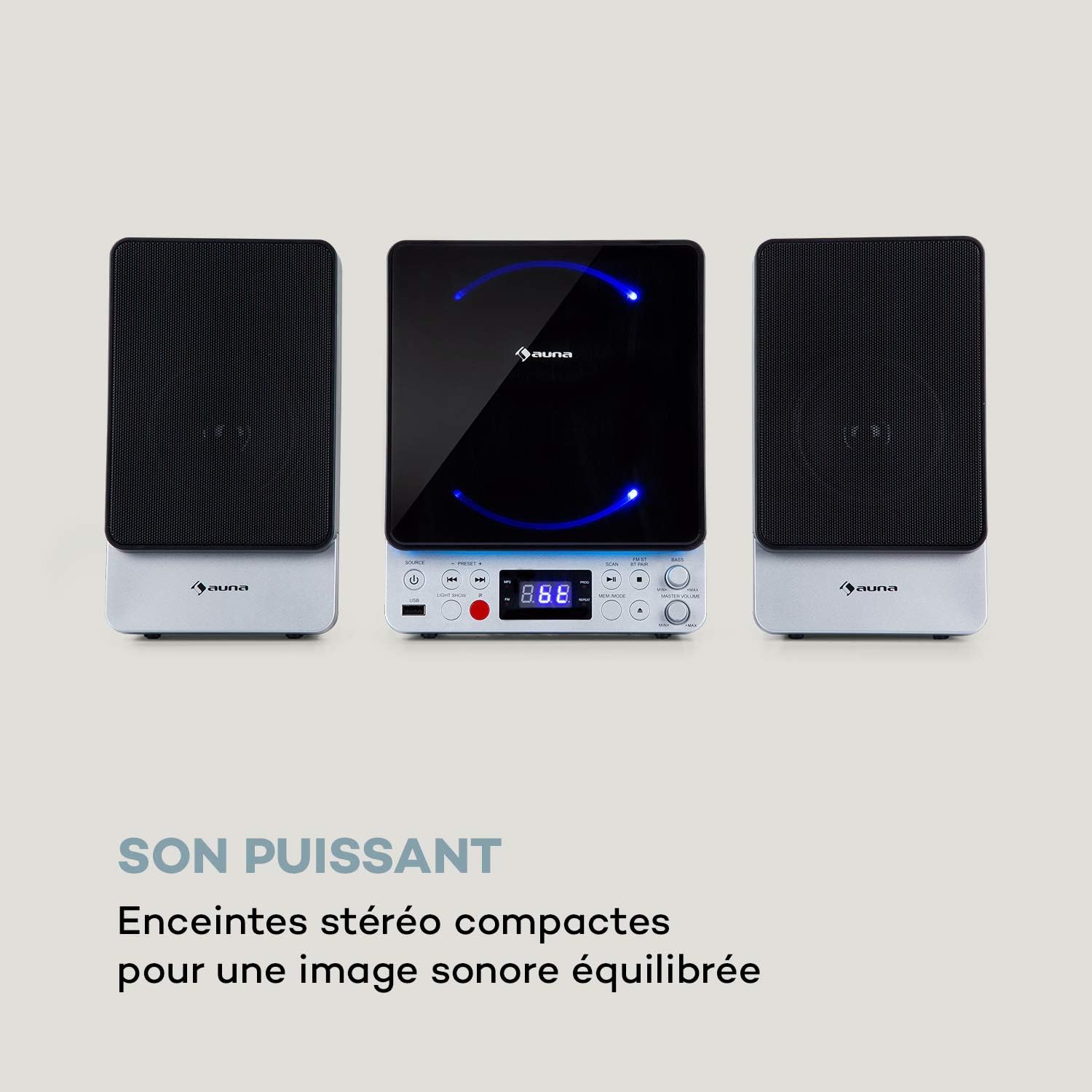

ප්රධාන ලක්ෂණ:
- Space-saving vertical design
- CD player compatible with standard audio CDs, CD-R, CD-RW, MP3 CDs, and CD-G (Karaoke CDs with graphics)
- Video output (composite PAL) for displaying CD-G lyrics on an external screen
- Bluetooth interface for wireless audio streaming
- USB port for MP3 playback from USB storage devices
- FM radio tuner with 30 preset stations
- Two microphone inputs for duets
- Integrated LED lighting for ambiance
- AUX-In for connecting external audio sources
සැලසුම
1. ඇසිරීම සහ ස්ථානගත කිරීම:
Carefully remove all components from the packaging. Place the main unit and speakers on a stable, flat surface. Ensure there is adequate ventilation around the unit.
2. Connecting the Speakers:
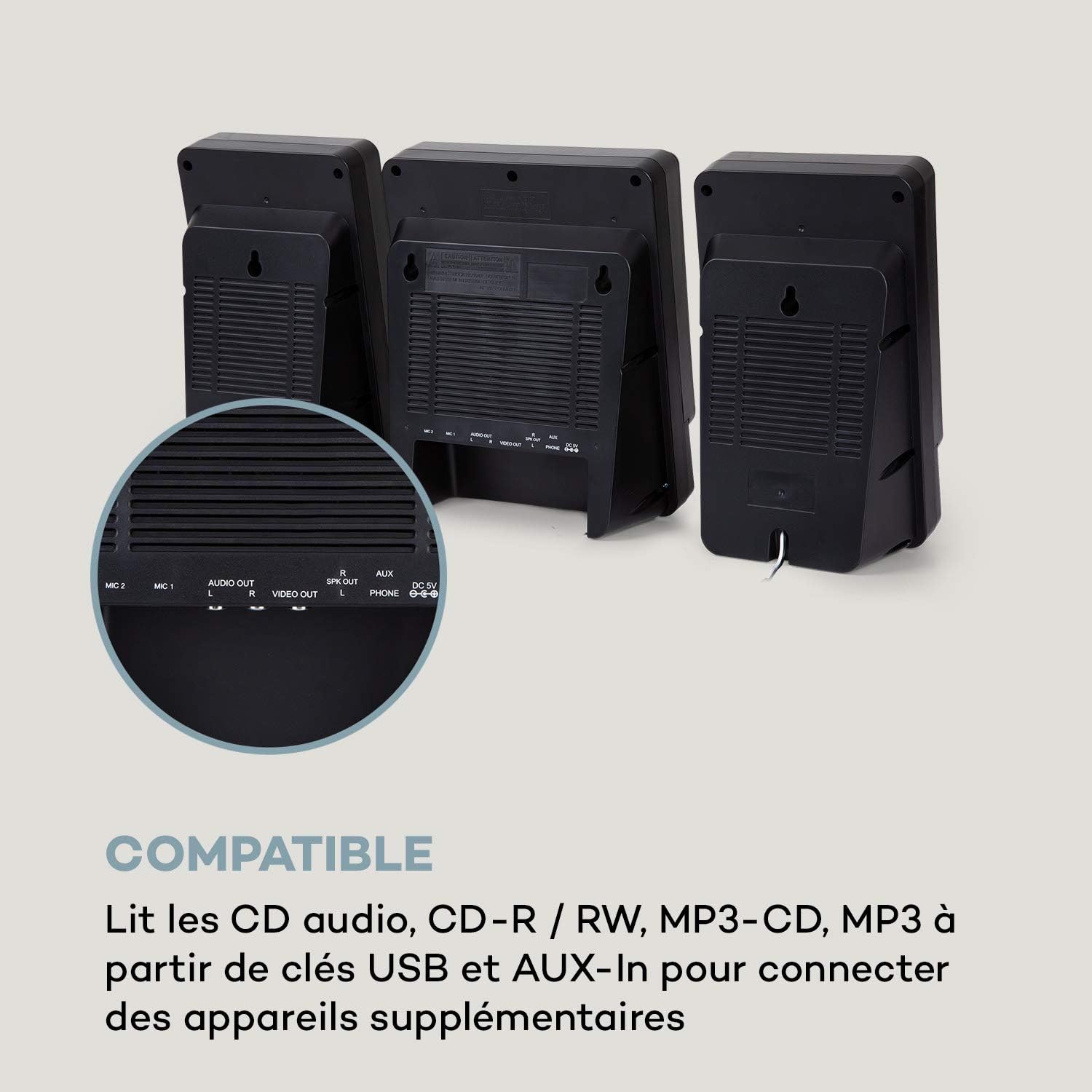
Connect the two stereo speakers to the speaker output ports on the main unit. Ensure a secure connection for optimal sound quality.
3. බල සම්බන්ධතාවය:
Connect the supplied power adapter to the DC 5V input on the main unit, then plug the adapter into a wall outlet.
4. මයික්රෆෝන සම්බන්ධතාවය:
Plug the wired microphone into one of the MIC input jacks (MIC 1 or MIC 2) on the main unit.
5. Video Output (for CD-G):
If using CD-G discs, connect a composite video cable (not included) from the VIDEO OUT port on the main unit to the video input of your TV or monitor.
මෙහෙයුම් උපදෙස්
1. බලය සක්රිය / අක්රිය:
ඔබන්න බලය ඒකකය සක්රිය හෝ අක්රිය කිරීමට බොත්තම.
2. මූලාශ්ර තේරීම:
ඔබන්න මූලාශ්රය button repeatedly to cycle through available modes: CD, Bluetooth (BT), USB, FM, AUX.
3. CD නැවත ධාවනය:
- භාවිතා කර CD මාදිලිය තෝරන්න මූලාශ්රය බොත්තම.
- සංයුක්ත තැටිය විවෘත කරන්න.
- Place a CD (audio CD, CD-R, CD-RW, MP3 CD, or CD-G) onto the spindle with the label side facing up.
- Close the CD compartment. The disc will begin playing automatically or after pressing වාදනය / විරාමය.
- භාවිතා කරන්න පෙර සහ ඊළඟ ධාවන පථ මඟ හැරීමට බොත්තම්.

4. බ්ලූටූත් යුගල කිරීම:
- Select BT mode using the මූලාශ්රය button. The display will show "BT" and flash, indicating pairing mode.
- ඔබගේ ජංගම උපාංගයේ (ස්මාර්ට්ෆෝන්, ටැබ්ලටය, ආදිය) බ්ලූටූත් සක්රීය කරන්න.
- ඒ සඳහා සොයන්න "AUNA Microstar Sing" in your device's Bluetooth settings and select it to pair.
- Once paired, you can stream audio wirelessly from your device to the Microstar Sing.

5. USB ප්ලේබැක්:
- MP3 ශ්රව්ය අඩංගු USB ෆ්ලෑෂ් ධාවකයක් ඇතුළු කරන්න. fileUSB පෝට් එකට s.
- භාවිතා කර USB මාදිලිය තෝරන්න මූලාශ්රය බොත්තම.
- ඒකකය ස්වයංක්රීයව MP3 හඳුනාගෙන වාදනය කිරීම ආරම්භ කරයි files.
- භාවිතා කරන්න පෙර සහ ඊළඟ පීලි සැරිසැරීමට බොත්තම්.
6. එෆ්එම් රේඩියෝව:
- භාවිතා කර FM මාදිලිය තෝරන්න මූලාශ්රය බොත්තම.
- ඔබන්න ස්කෑන් කරන්න පවතින FM මධ්යස්ථාන ස්වයංක්රීයව පරිලෝකනය කර සුරැකීමට බොත්තම.
- භාවිතා කරන්න පෙරසිටුව + සහ පෙරසැකසුම - සුරකින ලද ස්ථාන හරහා චක්රීය කිරීමට බොත්තම්.
7. Karaoke Function:
With a CD-G disc playing and connected to a TV, or any audio source playing, adjust the microphone volume using the dedicated මයික් වෙළුම knob. Sing along with the music. The LED lighting will enhance the karaoke experience.
8. පරිමාව පාලනය:
භාවිතයෙන් සමස්ත පරිමාව සකසන්න මාස්ටර් වොලියම් බොත්තම් එම බාස් knob allows for bass level adjustment.
9. LED Light Show:
ඔබන්න ආලෝක සංදර්ශනය button to activate or deactivate the integrated LED lighting effects.
නඩත්තු කිරීම
පිරිසිදු කිරීම:
Wipe the unit with a soft, dry cloth. Do not use abrasive cleaners, waxes, or solvents as they may damage the finish. Ensure the unit is unplugged before cleaning.
ගබඩා:
If not in use for an extended period, unplug the unit and store it in a cool, dry place, away from direct sunlight and extreme temperatures.
දෝෂගවේෂණය
| ගැටලුව | විය හැකි හේතුව | විසඳුම |
|---|---|---|
| බලය නැත | බල ඇඩැප්ටරය සම්බන්ධ වී නැත හෝ දෝෂ සහිත අලෙවිසැලක්. | බල ඇඩැප්ටරය ඒකකයට සහ ක්රියාකාරී බල අලෙවිසැලකට ආරක්ෂිතව සම්බන්ධ කර ඇති බවට වග බලා ගන්න. |
| ශබ්දයක් නැත | Volume too low; incorrect source selected; speakers not connected. | Increase master volume. Select the correct input source. Check speaker connections. |
| සීඩී එක වාදනය නොවේ | CD inserted incorrectly; disc scratched/dirty; incorrect mode. | Ensure CD is inserted correctly. Clean or replace the disc. Select CD mode. |
| බ්ලූටූත් සම්බන්ධ නොවේ | Unit not in pairing mode; device too far; Bluetooth off on source device. | Ensure unit is in BT mode and flashing. Move device closer. Enable Bluetooth on your device. |
| මයික්රෆෝනය ක්රියා නොකරයි | මයික්රෆෝනය සම්බන්ධ කර නැත; MIC ශබ්දය ඉතා අඩුය. | Ensure microphone is securely plugged in. Increase MIC volume. |
| දුර්වල FM ගුවන් විදුලි පිළිගැනීම | දුර්වල සංඥාව; ඇන්ටනාව නිවැරදිව ස්ථානගත කර නොමැත. | Adjust the position of the unit or external antenna (if applicable) for better reception. |
පිරිවිතර
| විශේෂාංගය | පිරිවිතර |
|---|---|
| වෙළඳ නාමය | අවුනා |
| ආදර්ශ අංකය | MG3-9200-hghg |
| වර්ණය | රිදී |
| සම්බන්ධතා තාක්ෂණය | බ්ලූටූත්, USB |
| සම්බන්ධතා | USB, AUX-In, Microphone (2), Video Out (Composite) |
| සම්පූර්ණ USB පෝට් | 1 |
| මාධ්ය වර්ගය | CD-RW, USB, MP3 CD, CD-G |
| කථිකයින් සංඛ්යාව | 2 (ස්ටීරියෝ) |
| සංරචක ඇතුළත් | මයික්රෆෝනය |
| නිර්දේශිත භාවිතයන් | නිවස |
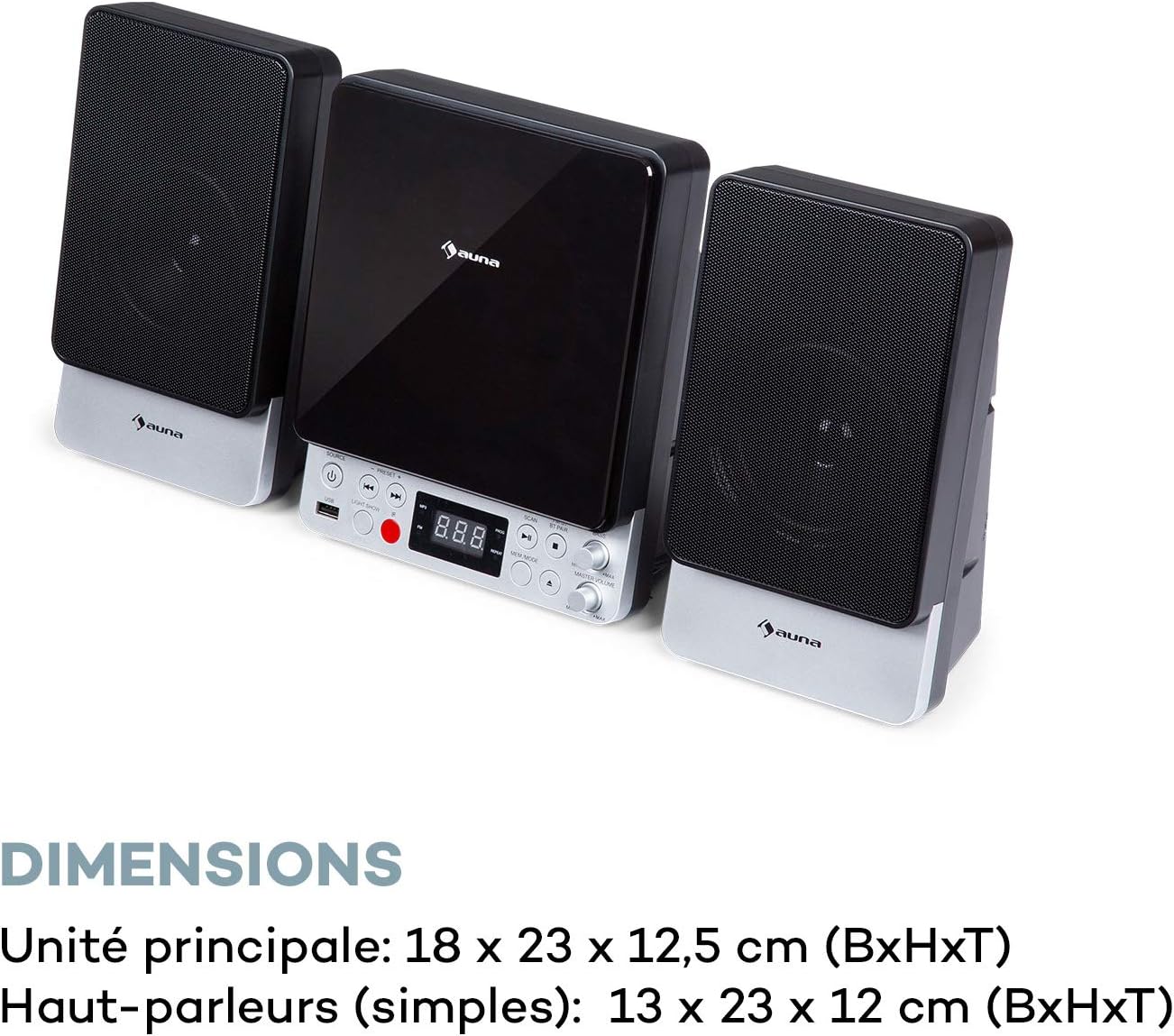
| Main Unit Dimensions (WxHxD) | 18 x 23 x 12.5 සෙ.මී |
| Speaker Dimensions (WxHxD, each) | 13 x 23 x 12 සෙ.මී |
වගකීම් සහ සහාය
For warranty information and technical support, please refer to the warranty card included with your product or contact AUNA customer service directly. Keep your proof of purchase for any warranty claims.
For further assistance, please visit the official AUNA webඅඩවියට පිවිසෙන්න හෝ ඔවුන්ගේ සහාය නාලිකා අමතන්න.


