1. හැඳින්වීම
This instruction manual provides detailed guidance for the installation, operation, and maintenance of your Beghelli Dom-e Wi-Fi Full HD Pan/Tilt Surveillance Camera. Please read this manual thoroughly before using the product to ensure proper functionality and safety. Keep this manual for future reference.

Figure 1: Beghelli Dom-e Wi-Fi Full HD Pan/Tilt Surveillance Camera.
2. නිෂ්පාදන අවසන්view
The Beghelli Dom-e Wi-Fi Camera is a versatile surveillance device designed for indoor use, offering Full HD 1080p resolution and comprehensive monitoring capabilities. It integrates seamlessly into your smart home system via the Dom-e Beghelli application.
ප්රධාන ලක්ෂණ:
- සම්පූර්ණ HD 1080p විභේදනය: පැහැදිලි සහ සවිස්තරාත්මක වීඩියෝ foo සපයයිtage.
- පෑන් සහ ඇලවීමේ ක්රියාකාරිත්වය: Motorized rotation of 355° horizontally and 85° vertically, controllable via the app.
- රාත්රී දර්ශනය: Equipped with IR LEDs for clear visibility up to 10 meters in low-light conditions.
- චලන හඳුනාගැනීම: Sends real-time push notifications to your smartphone upon detecting movement, including specific person detection.
- ස්වයංක්රීය ලුහුබැඳීම: The "Tracking" function enables the camera to automatically follow moving subjects.
- ද්වි-මාර්ග ශ්රව්ය: Built-in microphone and speaker allow for hands-free communication.
- නම්යශීලී පටිගත කිරීමේ විකල්ප: Record directly to your smartphone, to a MicroSD card (up to 128GB, not included), or via optional cloud storage.
- Wi-Fi සම්බන්ධතාවය: Connects to your home Wi-Fi network (2.4 GHz).
- දත්ත සංකේතනය: Ensures the security of your video data.
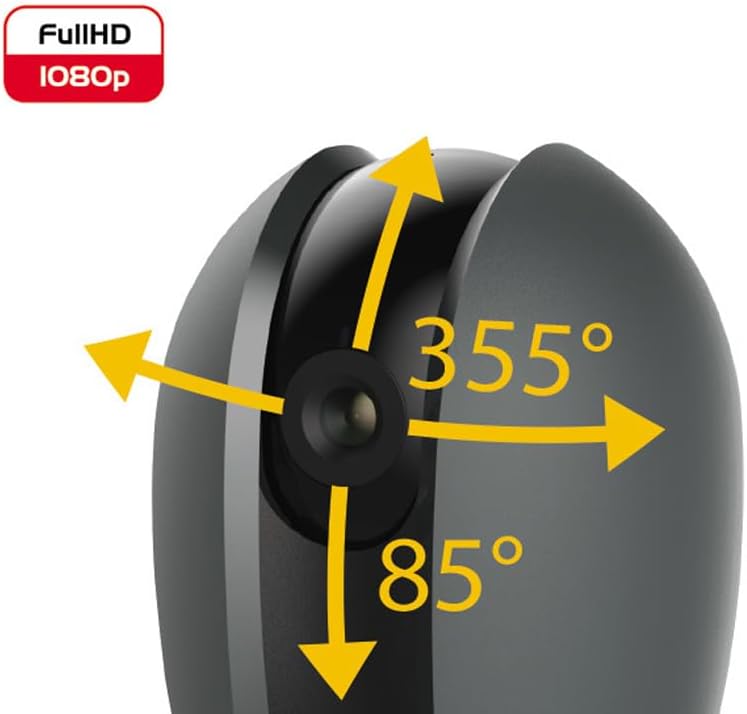
Figure 2: Camera's pan and tilt capabilities.
3. පැකේජ අන්තර්ගතය
සියලුම අයිතම පැකේජයේ ඇති බව තහවුරු කරගන්න:
- Beghelli Dom-e Wi-Fi Full HD Pan/Tilt Surveillance Camera
- USB Power Adapter (230V – DC 5V/1A)
- Mounting accessories (if included, not explicitly listed but implied by "wall or ceiling installation")
- උපදෙස් අත්පොත (මෙම ලේඛනය)

Figure 3: Product packaging for the Beghelli Dom-e Camera.
4. පිහිටුවීම
4.1 කැමරාව බල ගැන්වීම
- Connect the provided USB power adapter to the camera's power input.
- Plug the adapter into a standard 230V power outlet. The camera will power on and initiate its startup sequence.
4.2 ජංගම යෙදුම් ස්ථාපනය
The Beghelli Dom-e camera is controlled via the dedicated "Dom-e Beghelli" mobile application.
- Download the "Dom-e Beghelli" app from the Apple App Store (for iOS 8.0 or later) or Google Play Store (for Android 4.2 or later).
- ඔබගේ ස්මාර්ට් ජංගම දුරකතනයේ හෝ ටැබ්ලටයේ යෙදුම ස්ථාපනය කරන්න.
- නව ගිණුමක් සඳහා ලියාපදිංචි වන්න හෝ ඔබට දැනටමත් එකක් තිබේ නම් ලොග් වන්න.
4.3 Connecting to Wi-Fi and Pairing
Ensure your Wi-Fi network is 2.4 GHz (IEEE802.11 b/g/n). The camera does not support 5 GHz networks.
- Open the Dom-e Beghelli app and follow the on-screen instructions to add a new device.
- Select the Beghelli Dom-e camera from the list of available devices.
- Enter your Wi-Fi network name (SSID) and password when prompted.
- The app will guide you through the pairing process, which typically involves scanning a QR code displayed on your phone with the camera, or listening for an audio prompt.
- Once successfully paired, the camera's status indicator will change, and you will see the live feed in the app.

Figure 4: Simplified setup steps via the Dom-e Beghelli app.
4.4 කැමරාව සවි කිරීම
The camera can be installed on a wall or ceiling. Choose a location that provides the desired viewකෝණය සහ ඔබේ Wi-Fi ජාලයේ සහ බල අලෙවිසැලක පරාසය තුළ පිහිටා ඇත.
- Mark the drilling points on the desired surface using the mounting template (if provided).
- අවශ්ය නම් සිදුරු විද බිත්ති පේනු ඇතුළු කරන්න.
- Secure the mounting bracket (if provided) to the surface.
- කැමරාව සවි කිරීමේ වරහනට අමුණන්න.
- Adjust the camera's angle manually or via the app after installation.
5. මෙහෙයුම් උපදෙස්
5.1 සජීවී View සහ පෑන්/ටිල්ට් පාලනය
- Open the Dom-e Beghelli app and select your camera to view සජීවී පෝෂණය.
- Use the directional controls within the app to pan the camera horizontally (355°) and tilt it vertically (85°) to adjust the viewing ප්රදේශය.
5.2 චලන අනාවරණය සහ දැනුම්දීම්
- Navigate to the camera settings in the app to enable motion detection.
- Configure sensitivity levels and detection zones as needed.
- Enable push notifications to receive alerts on your smartphone when motion is detected.
- The camera also features person detection for more accurate alerts.
5.3 ද්වි-මාර්ග ශ්රව්ය
- අතර viewing the live feed, tap the microphone icon in the app to speak through the camera's speaker.
- The camera's built-in microphone will capture audio from the monitored area, allowing you to listen in.
5.4 පටිගත කිරීම සහ ගබඩා කිරීම
- MicroSD Card Recording: Insert a MicroSD card (up to 128GB, not included) into the camera's slot for continuous recording or event-triggered recording.
- Smartphone Recording: You can manually record video clips directly to your smartphone while viewing the live feed.
- වලාකුළු ගබඩාව: An optional cloud storage service is available via subscription for off-site video backup. Refer to the app for details.
- උපලේඛනගත පටිගත කිරීම: Set up specific times for the camera to record automatically through the app settings.
5.5 රාත්රී දර්ශනය
The camera automatically switches to night vision mode in low-light conditions, utilizing its IR LEDs to provide clear black-and-white footagමීටර් 10 දක්වා.
6. Mobile Application (Dom-e Beghelli App)
The Dom-e Beghelli app is the central control interface for your camera and other compatible smart home devices. It allows for:
- Remote control of camera pan and tilt.
- Access to live video feed and recorded footage.
- Configuration of motion detection, notifications, and recording schedules.
- ද්වි-මාර්ග ශ්රව්ය සන්නිවේදනය.
- Integration with other Dom-e smart home devices (e.g., alarms, smart plugs, lighting).
- Voice control compatibility with Google Assistant and Amazon Alexa (if associated with a compatible smartphone).

Figure 5: The Dom-e Beghelli app interface for camera control.
7. පිරිවිතර
| විශේෂාංගය | පිරිවිතර |
|---|---|
| ආදර්ශ අංකය | 60021 |
| විභේදනය | සම්පූර්ණ HD 1080p (මෙගාපික්සල් 2) |
| සංවේදකය | CMOS 1/2.9" |
| කාච | 3.6 mm / f2.0 / 105° |
| ෂටර වේගය | 1/25 - 1/100,000 sec |
| පෑන් භ්රමණය | 355° තිරස් |
| ඇල කරකැවීම | 85° සිරස් අතට |
| රාත්රී දැක්ම පරාසය | මීටර් 10 දක්වා (IR LED) |
| ශ්රව්ය උපකරණ | Two-way, hands-free (in/out) |
| ගබඩා කිරීම | MicroSD card up to 128GB (not included), Smartphone, Cloud (optional subscription) |
| Wi-Fi ප්රමිතිය | IEEE802.11 b/g/n (2.4 GHz) |
| සංඛ්යාත කලාපය | 2.4 ගිගාහර්ට්ස් - 2.4835 ගිගාහර්ට්ස් |
| බල ආදානය | 230V – DC 5V/1A (USB adapter included) |
| උපරිම බලශක්ති පරිභෝජනය | 4.5 ඩබ්ලිව් |
| මානයන් (L x W x H) | 63 x 58 x 96 mm (Product description) / 7 x 7 x 11 cm (Specifications) |
| බර | ග්රෑම් 330 කි |
| ද්රව්ය | ප්ලාස්ටික් |
| මෙහෙයුම් පද්ධති අනුකූලතාව | Apple iPhone iOS 8.0 or later / Android 4.2 or later |
| නිර්දේශිත භාවිතය | ගෘහස්ථ ආරක්ෂාව |
Note: Some dimensions may vary slightly between product description and specifications list.
8. නඩත්තු කිරීම
8.1 පිරිසිදු කිරීම
- Ensure the camera is powered off and unplugged before cleaning.
- කැමරා ශරීරය පිස දැමීමට මෘදු, වියළි රෙද්දක් භාවිතා කරන්න.
- කාචය සඳහා, සීරීම් වළක්වා ගැනීම සඳහා විශේෂිත කාච පිරිසිදු කිරීමේ රෙද්දක් භාවිතා කරන්න.
- දියර පිරිසිදු කරන්නන්, එයරොසෝල් හෝ උල්ෙල්ඛ ද්රාවක භාවිතා නොකරන්න.
8.2 මෘදුකාංග යාවත්කාලීන
Periodically check the Dom-e Beghelli app for firmware updates. Keeping your camera's firmware updated ensures optimal performance, security, and access to new features.
9. දෝශ නිරාකරණය
| ගැටලුව | විසඳුම |
|---|---|
| කැමරාව ක්රියාත්මක නොවේ | Ensure the USB power adapter is securely connected to the camera and a working power outlet. Verify the outlet has power. |
| Wi-Fi වෙත සම්බන්ධ විය නොහැක |
|
| සජීවී වීඩියෝ සංග්රහයක් නැත |
|
| චලන හඳුනාගැනීම ක්රියා නොකරයි |
|
| Cannot reconnect after Wi-Fi password change | If your Wi-Fi password changes, you will likely need to reset the camera and re-pair it with the app using the new Wi-Fi credentials. Refer to the app for device reset instructions. |
10. වගකීම් සහ සහාය
For warranty information and technical support, please refer to the documentation provided with your purchase or contact Beghelli customer service directly. You can typically find contact details on the Beghelli official website or within the Dom-e Beghelli application.
Manufacturer: Beghelli
මාදිලිය: 60021


