1. හැඳින්වීම
This manual provides instructions for the safe and effective use of your Powerextra CP-W126 AC Power Supply Adapter Kit. This kit is designed to provide continuous power to compatible Fujifilm cameras, replacing the NP-W126 and NP-W126S batteries for extended shooting sessions.
2 ආරක්ෂිත තොරතුරු
- Ensure the power adapter is connected to a power outlet with the correct voltage (AC 100-240V).
- Do not expose the adapter or dummy battery to water or excessive moisture.
- සංරචක බිම හෙළීමෙන් හෝ දැඩි බලපෑම්වලට ලක් කිරීමෙන් වළකින්න.
- නිෂ්පාදිතය විසුරුවා හැරීමට හෝ වෙනස් කිරීමට උත්සාහ නොකරන්න.
- දරුවන්ට ළඟා විය නොහැකි ලෙස තබා ගන්න.
- දිගු කාලයක් භාවිතයේ නොමැති විට ඇඩැප්ටරය බල සැපයුමෙන් විසන්ධි කරන්න.
3. පැකේජ අන්තර්ගතය
ඔබගේ පැකේජයේ සියලුම අයිතම ඇති බව තහවුරු කරගන්න:
- 1x AC බල ඇඩැප්ටරය
- 1x CP-W126 DC Coupler (Dummy Battery)
- 1x US Plug AC Cord
- 1x Microfiber Cleaning Cloth
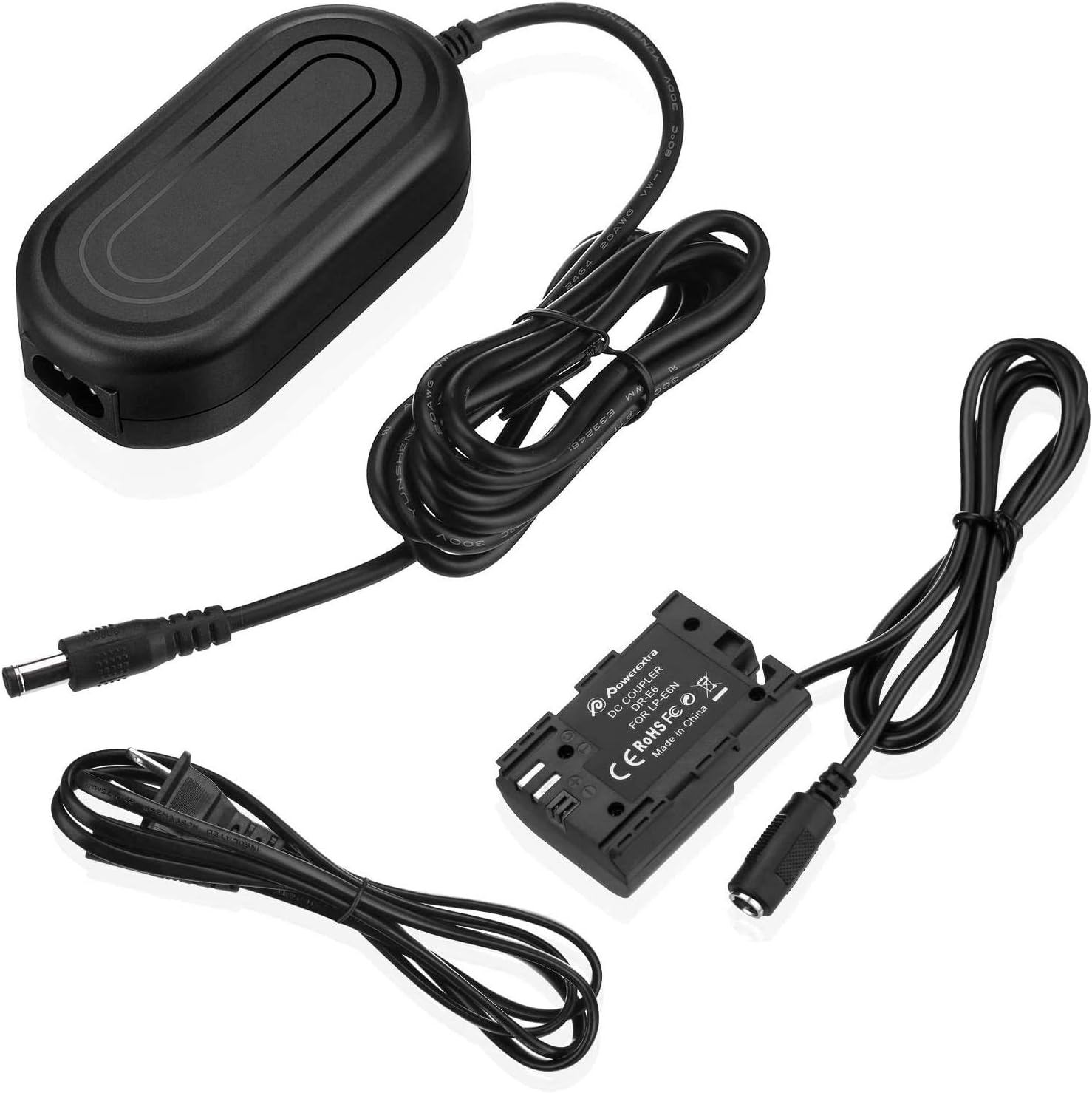
The kit includes the AC power adapter, the DC coupler (dummy battery), and the AC power cord. A microfiber cleaning cloth is also provided.
4. පිහිටුවීම සහ ස්ථාපනය
Follow these steps to set up and install the AC power supply adapter kit:
- AC විදුලි රැහැන සම්බන්ධ කරන්න: Insert the AC power cord into the AC power adapter.
- Connect the DC Coupler: Plug the DC port of the CP-W126 DC Coupler (dummy battery) into the DC port on the AC power adapter.
- Open Camera Battery Compartment: Open the battery compartment door on your compatible Fujifilm camera.
- Insert Dummy Battery: Carefully insert the CP-W126 DC Coupler into the camera's battery compartment, ensuring it is oriented correctly.
- කේබලය යොමු කරන්න: Locate the small rubber flap or opening on your camera's battery compartment door. Route the DC coupler cable through this opening. This allows the battery door to close properly while the cable exits the camera.
- Close Battery Compartment Door: Close the camera's battery compartment door securely. The door must be fully closed for the camera to power on.
- Power Outlet වෙත සම්බන්ධ කරන්න: Plug the AC power cord into a wall power outlet.
- කැමරාව ක්රියාත්මක කරන්න: Turn on your camera. It should now receive continuous power from the adapter.

ස්ථාපන වීඩියෝ මාර්ගෝපදේශය
5. මෙහෙයුම් උපදෙස්
Once installed, the Powerextra CP-W126 AC Power Supply Adapter Kit provides continuous power to your camera, eliminating the need for frequent battery changes. This is ideal for:
- Long studio shooting sessions
- කාලය ගතවන ඡායාරූපකරණය
- Live streaming or video conferencing
- Extended video recording
ගැළපෙන කැමරා ආකෘති
This AC adapter kit is compatible with Fujifilm cameras that use NP-W126 or NP-W126S batteries, including but not limited to:
- Fujifilm X100F, X-A1, X-A2, X-A3, X-A5, X-A7, X-A10, X-A20
- Fujifilm X-E1, X-E2, X-E2S, X-E3
- Fujifilm X-Pro1, X-Pro2, X-Pro3
- Fujifilm X-T1, X-T2, X-T10, X-T20, X-T30, X-T100, X-T200, X-H1, X-M1
- Fujifilm FinePix HS30EXR, HS33EXR, HS35EXR, HS50EXR

6. නඩත්තු කිරීම
To ensure the longevity and optimal performance of your Powerextra AC Power Supply Adapter Kit:
- පිරිසිදු කිරීම: Use the provided microfiber cleaning cloth to gently wipe the adapter and cables. Avoid using harsh chemicals or abrasive materials.
- ගබඩා: භාවිතයේ නොමැති විට සෘජු හිරු එළියෙන් සහ අධික උෂ්ණත්වයන්ගෙන් ඈත්ව සිසිල් වියළි ස්ථානයක කට්ටලය ගබඩා කරන්න.
- කේබල් රැකවරණය: Do not bend or crimp the cables excessively. Avoid placing heavy objects on the cables.
7. දෝශ නිරාකරණය
If you encounter issues with your AC power supply adapter kit, consider the following:
- කැමරාව ක්රියාත්මක නොවේ:
- Ensure all connections are secure between the AC cord, power adapter, and DC coupler.
- Verify that the battery compartment door on your camera is fully closed. The camera will not power on if the door is open.
- වෙනත් උපාංගයක් සම්බන්ධ කිරීමෙන් බිත්ති පිටවාන නිවැරදිව ක්රියාත්මක වේදැයි පරීක්ෂා කරන්න.
- අතරමැදි බලය:
- ඕනෑම දෘශ්ය හානියක් හෝ කැඩීමක් සඳහා කේබල් පරීක්ෂා කරන්න.
- Ensure the cable from the dummy battery is properly routed through the camera's cable exit port and not pinched.
- අධික උනුසුම් වීම:
- While the adapter has built-in protection, ensure adequate ventilation around the power adapter during prolonged use.
- If the adapter feels excessively hot, disconnect it and allow it to cool down before resuming use.
8. පිරිවිතර
| විශේෂාංගය | පිරිවිතර |
|---|---|
| ආදාන වෙළුමtage | AC 100-240V, 50/60Hz |
| ප්රතිදාන වෙළුමtage | ඩීසී 8.4V / 3 ඒ |
| වට්tage | වොට් 6 යි |
| ආරක්ෂණ විශේෂාංග | Over-Heated, Over-Current, Over-Voltage, Short-Circuit Protection |
| ද්රව්ය | ABS + PC retardant materials |
| අයිතමයේ බර | අවුන්ස 7.4 කි |
| පැකේජ මානයන් | අඟල් 6.1 x 5.35 x 1.69 |
9. වගකීම් සහ සහාය
Powerextra products are designed for reliability and performance. For any questions, technical support, or warranty claims, please refer to the following:
- වගකීම්: This product typically comes with a 12-month hassle-free warranty. Please retain your proof of purchase.
- පාරිභෝගික සහාය: Powerextra offers 12-hour response and 7*24 hour stand-by support, along with lifetime support for its products.
- අමතන්න: For further assistance, please visit the official Powerextra store or contact their customer service directly.


