හැඳින්වීම
ස්තූතියි, උදව් කළාටasing the Bytech True Wireless Bluetooth Boost Link True Speaker. This manual provides essential information for setting up, operating, and maintaining your new speakers. Please read this manual thoroughly before use to ensure proper operation and to maximize your listening experience. These speakers feature True Wireless Stereo (TWS) functionality, Bluetooth connectivity, FM Radio, and Bass Boost for rich audio.
ආරක්ෂිත තොරතුරු
- කථිකයන් අධික උෂ්ණත්වයන්ට, ආර්ද්රතාවයට හෝ සෘජු හිරු එළියට නිරාවරණය නොකරන්න.
- Avoid dropping or subjecting the speakers to strong impacts.
- Do not disassemble, repair, or modify the speakers yourself. Refer all servicing to qualified personnel.
- Keep the speakers away from water and other liquids.
- නිශ්චිත ආරෝපණ කේබලය සහ බල ඇඩැප්ටරය පමණක් භාවිතා කරන්න.
- මෘදු වියළි රෙද්දකින් ස්පීකර් පිරිසිදු කරන්න. උල්ෙල්ඛ පිරිසිදු කරන්නන් හෝ ද්රාවක භාවිතා නොකරන්න.
- Listen at moderate volume levels to avoid hearing damage.
පැකේජයේ අන්තර්ගතය

Image: The Bytech Boost Link True Wireless Speakers shown in their retail packaging, highlighting the two speakers and the Bluetooth connectivity feature.
කරුණාකර සියලුම අයිතම තිබේදැයි සහ හොඳ තත්ත්වයේ තිබේදැයි පරීක්ෂා කරන්න:
- 2 x Bytech Boost Link True Wireless Speakers
- 1 x ආරෝපණ කේබලය (USB)
- 1 x පරිශීලක අත්පොත (මෙම ලේඛනය)
නිෂ්පාදනය අවසන්view

රූපය: සමීප ඡායාරූපයක් view of the two Bytech Boost Link True Wireless Speakers, showing the speaker grilles and control buttons at the bottom.
කථිකයාගේ සංරචක සහ පාලනයන් පිළිබඳව ඔබව හුරු කර ගන්න:
- ස්පීකර් ග්රිල්: ස්පීකර් ධාවකය ආරක්ෂා කරයි.
- පාලන බොත්තම්:
- බල බොත්තම: Power On/Off, Play/Pause.
- මාදිලි බොත්තම: Switch between Bluetooth, FM Radio, etc.
- පෙර ඛණ්ඩය/පරිමාව පහළ බොත්තම: පෙර ධාවන පථය සඳහා කෙටි ඔබන්න, ශබ්දය අඩු කිරීමට දිගු ඔබන්න.
- මීළඟ ධාවන පථය/පරිමාව වැඩි කිරීමේ බොත්තම: ඊළඟ ධාවන පථය සඳහා කෙටි ඔබන්න, ශබ්දය වැඩි කිරීමට දිගු ඔබන්න.
- ආරෝපණ වරාය: USB ආරෝපණ කේබලය සම්බන්ධ කිරීම සඳහා.
- LED දර්ශකය: බල තත්ත්වය, ආරෝපණ තත්ත්වය සහ යුගල කිරීමේ තත්ත්වය පෙන්වයි.
සැලසුම
කථානායකවරුන් අයකිරීම
Before first use, fully charge both speakers. Connect the supplied USB charging cable to the charging port on each speaker and plug the other end into a USB power adapter (not included) or a computer's USB port. The LED indicator will show charging status and turn off or change color when fully charged.
බල ගැන්වීම / අක්රිය කිරීම
- බල ගැන්වීමට: Press and hold the Power button on each speaker until the LED indicator lights up and you hear a power-on prompt.
- බලය අක්රිය කිරීමට: Press and hold the Power button on each speaker until the LED indicator turns off and you hear a power-off prompt.
මෙහෙයුම් උපදෙස්
Bluetooth Pairing (Single Speaker Mode)
- Ensure the speaker is powered on and in Bluetooth pairing mode (LED indicator will flash).
- ඔබගේ උපාංගයේ (ස්මාර්ට්ෆෝන්, ටැබ්ලටය, ලැප්ටොප්), බ්ලූටූත් සක්රීය කර පවතින උපාංග සොයන්න.
- Select "BYTECH BOOST LINK" (or similar name) from the list.
- Once paired, the LED indicator will stop flashing and remain solid, and you will hear a confirmation sound.
සත්ය රැහැන් රහිත ස්ටීරියෝ (TWS) යුගලනය (ස්පීකර් දෙකක්)
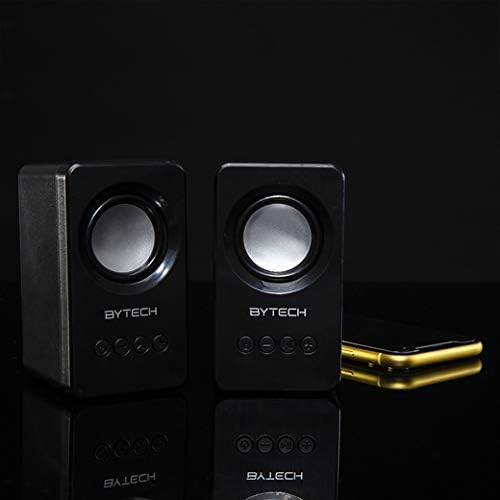
Image: The two Bytech Boost Link True Wireless Speakers positioned next to a smartphone, symbolizing their ability to connect wirelessly to each other and a device for stereo sound.
For a true stereo sound experience, you can pair both speakers together:
- Power on both Bytech Boost Link speakers. Do not connect them to your Bluetooth device yet.
- The speakers will automatically attempt to pair with each other. You will hear a confirmation sound when they are successfully linked for TWS. One speaker will become the master (left channel) and the other the slave (right channel).
- Once TWS paired, the master speaker will enter Bluetooth pairing mode (LED flashing).
- On your device, enable Bluetooth and search for "BYTECH BOOST LINK". Connect to this single entry.
- දැන් ස්පීකර් දෙකම ස්ටීරියෝ ආකාරයෙන් ශ්රව්ය වාදනය කරනු ඇත.
- සටහන: If the speakers do not automatically pair, try double-pressing the Mode button on one of the speakers to initiate TWS pairing.
එෆ්එම් රේඩියෝ මෙහෙයුම
- Power on the speaker(s).
- ඔබන්න මාදිලිය ඔබට FM රේඩියෝ විමසුම ඇසෙන තුරු නැවත නැවතත් බොත්තම ඔබන්න.
- To auto-scan and save stations, press and hold the වාදනය / විරාමය button. The speaker will scan and store available FM stations.
- භාවිතා කරන්න පෙර ධාවන පථය සහ ඊළඟ ධාවන පථය සුරකින ලද ස්ථාන අතර සැරිසැරීමට බොත්තම්.
Audio Playback and Volume Control
- වාදනය/විරාමය: බල බොත්තම කෙටි ඔබන්න.
- ඊළඟ ධාවන පථය: Short press the Next Track/Volume Up button.
- පෙර ධාවන පථය: Short press the Previous Track/Volume Down button.
- පරිමාව: Long press the Next Track/Volume Up button.
- ශබ්දය පහළට: Long press the Previous Track/Volume Down button.
නඩත්තු කිරීම
- පිරිසිදු කිරීම: Use a soft, dry, lint-free cloth to clean the surface of the speakers. Do not use liquid cleaners, aerosols, or solvents.
- ගබඩා: දිගු කාලයක් භාවිතයේ නොමැති විට, සෘජු හිරු එළියෙන් සහ අධික උෂ්ණත්වයන්ගෙන් ඈත්ව සිසිල් වියළි ස්ථානයක ස්පීකර් ගබඩා කරන්න.
- බැටරි සත්කාර: බැටරි ආයු කාලය දීර්ඝ කිරීම සඳහා, බැටරිය නිතර නිතර සම්පූර්ණයෙන්ම විසර්ජනය කිරීමෙන් වළකින්න. භාවිතයේ නොමැති වුවද, ස්පීකර් නිතිපතා ආරෝපණය කරන්න.
දෝෂගවේෂණය
| ගැටලුව | විය හැකි හේතුව | විසඳුම |
|---|---|---|
| ස්පීකරය ක්රියාත්මක නොවේ. | අඩු බැටරි. | ස්පීකරය සම්පූර්ණයෙන්ම ආරෝපණය කරන්න. |
| බ්ලූටූත් හරහා යුගල කළ නොහැක. | Speaker not in pairing mode; Device Bluetooth off; Too far from device. | Ensure speaker LED is flashing; Turn on Bluetooth on your device; Move speaker closer to device (within 10 meters). |
| ශබ්දයක් නැත. | Volume too low; Speaker not connected; Incorrect mode. | Increase volume on speaker and device; Re-pair Bluetooth; Ensure correct mode (Bluetooth/FM). |
| TWS යුගලනය අසාර්ථකයි. | Speakers already connected to a device; Speakers too far apart. | Disconnect speakers from any device; Power off and on both speakers, then try TWS pairing again; Ensure speakers are close to each other. |
| දුර්වල FM රේඩියෝ පිළිගැනීම. | දුර්වල සංඥාව; බාධාව. | Relocate the speaker to an area with better reception; Extend the charging cable (can act as an antenna). |
පිරිවිතර
- ආකෘතිය: BY-AU-BS-152-BK
- වෙළඳ නාමය: බයිටෙක්
- සම්බන්ධතා තාක්ෂණය: රැහැන් රහිත (බ්ලූටූත්)
- ශ්රව්ය ප්රතිදාන ප්රකාරය: වටකරගන්න
- ස්පීකර් වර්ගය: සරවුන්ඩ් සවුන්ඩ්
- විශේෂ ලක්ෂණ: Wireless Bluetooth, Bass Boost, FM Radio, True Wireless Stereo (TWS)
- නිර්දේශිත භාවිතයන්: සංගීත වාදකයින් සඳහා
- ගැළපෙන උපාංග: ලැප්ටොප්, ටැබ්ලට්, ස්මාර්ට්ෆෝන්
- පාලක වර්ගය: On-device buttons
- පැකේජ මානයන්: 20.7 x 16 x 9 සෙ.මී
- බර: 560 ග්රෑම්
වගකීම් සහ සහාය
Bytech products are designed and manufactured to the highest quality standards. For information regarding warranty coverage, technical support, or service inquiries, please refer to the warranty card included with your purchase or visit the official Bytech webවෙබ් අඩවිය. වගකීම් හිමිකම් සඳහා කරුණාකර ඔබේ මිලදී ගැනීමේ සාක්ෂි තබා ගන්න.
For further assistance, please contact Bytech customer support.


