හැඳින්වීම
Welcome to the instruction manual for your FULLJA 9-Inch WiFi Digital Picture Frame. This guide provides detailed information on setting up, operating, and maintaining your digital photo frame to ensure optimal performance and enjoyment. Please read through these instructions carefully before using your device.

Image: The FULLJA 9-Inch WiFi Digital Picture Frame, showcasing its display with a family photo, alongside a smartphone illustrating the VPhoto app for easy sharing.
නිෂ්පාදනය අවසන්view
ප්රධාන ලක්ෂණ
- Wi-Fi Wireless Sharing: Easily upload photos and videos via the VPhoto app or email.
- Superb HD IPS Display: 9-inch screen with 1024x768 resolution for clear and vibrant image presentation.
- ස්පර්ශ තිර අතුරුමුහුණත: Sensitive touch screen for intuitive navigation and control.
- 8GB අභ්යන්තර ආචයනය: Ample space for a large collection of photos and short videos.
- බහු යෙදුම්: Includes slideshows, video playback, background music, alarm, weather forecast, calendar, and auto on/off functions.
පැකේජයේ අන්තර්ගතය
- FULLJA 9-Inch WiFi Digital Picture Frame
- බල ඇඩැප්ටරය
- පරිශීලක අත්පොත
- Stand/Bracket
උපාංග සංරචක
The digital picture frame features a sleek design with a high-definition IPS touch screen. On the rear or sides, you will find ports for power input, a Micro USB port for data transfer, and a Micro SD card slot for expanded storage. The intuitive touch interface allows for direct interaction with the display.
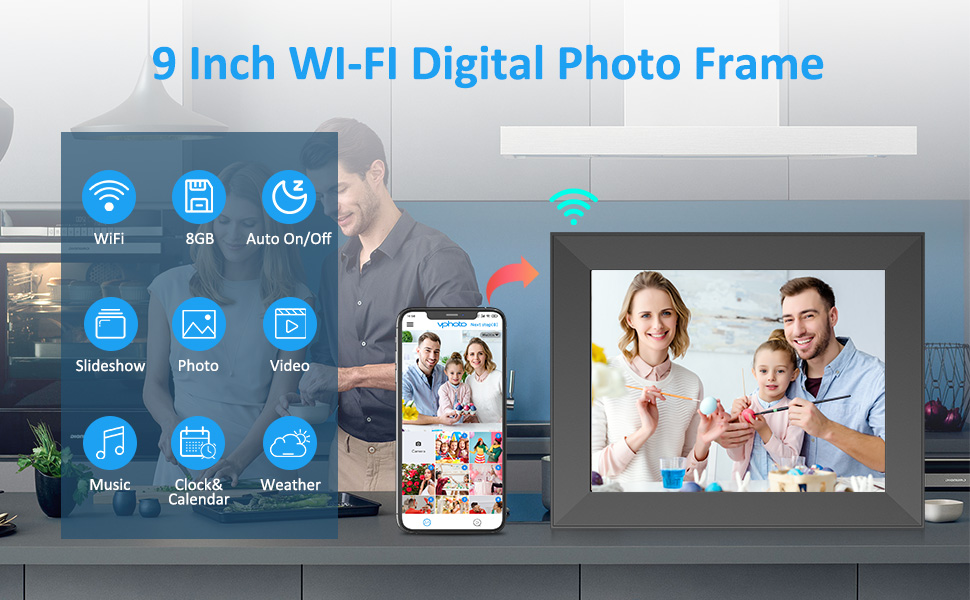
Image: An illustration highlighting the various functionalities of the FULLJA 9-Inch WiFi Digital Photo Frame, such as Wi-Fi connectivity, 8GB storage, automatic power control, slideshows, photo and video display, music playback, clock and calendar, and weather updates. A smartphone is depicted sharing content to the frame.
සැකසුම් මාර්ගෝපදේශය
1. බලගැන්වීම
- Connect the provided power adapter to the frame's power input port.
- Plug the adapter into a standard wall outlet. The frame will automatically power on.
2. Wi-Fi වෙත සම්බන්ධ වීම
- Upon initial startup, the frame will guide you through the Wi-Fi setup process.
- ලැයිස්තුවෙන් ඔබට අවශ්ය Wi-Fi ජාලය තෝරන්න.
- Enter the Wi-Fi password using the on-screen keyboard and tap 'Connect'.
- Once connected, a Wi-Fi icon will appear on the top right of the screen.
3. Installing the VPhoto App
To share photos and videos wirelessly, download the 'VPhoto' app on your smartphone or tablet.
- iOS උපාංග සඳහා: ඒ සඳහා සොයන්න 'VPhoto' in the Apple App Store.
- Android උපාංග සඳහා: ඒ සඳහා සොයන්න 'VPhoto' in the Google Play Store.

Image: The digital picture frame screen showing a QR code for binding the device. Text instructions below guide users to search for the 'VPhoto' app on iOS and Android app stores, and provide details for email setup using a connection code.
4. Binding Your Device
After installing the VPhoto app, you need to bind your smartphone to the digital picture frame.
- QR කේතය භාවිතා කිරීම: On the frame, navigate to Settings > My Frame to find the QR code. Open the VPhoto app on your smartphone and scan the QR code to bind the devices.
- විද්යුත් තැපෑල භාවිතා කිරීම: You can also send photos via email. The frame's settings will provide a unique email address. To bind an email, send an email to the frame's address with the subject line 'bdConnectionCode' followed by the connection code found in the frame's settings.
Video: An official product video demonstrating the setup process and features of the FULLJA 9-Inch WiFi Digital Photo Frame, including connecting to Wi-Fi and binding the device.
මෙහෙයුම් උපදෙස්
ස්පර්ශ තිර අතුරුමුහුණත සැරිසැරීම
The frame features a responsive touch screen. Swipe left or right to browse photos, tap to access options, and use the intuitive icons for various functions.
ඡායාරූප සහ වීඩියෝ උඩුගත කිරීම
- Via VPhoto App: Open the VPhoto app, select the photos or videos you wish to share, and send them directly to your bound frame.
- විද්යුත් තැපෑල හරහා: Send photos or short videos as attachments to the frame's unique email address.
- Via Micro SD Card/USB: Insert a Micro SD card or USB drive into the designated slot to import media directly.

Image: The digital picture frame displaying a family photo, accompanied by icons representing different methods for wireless sharing, including a mobile app, email, Micro USB, and Micro SD card.
Slideshow Settings
Customize your photo slideshow experience:
- ස්ලයිඩ දර්ශන පරතරය: Adjust the duration each photo is displayed (e.g., 5, 10, 15 seconds, 1, 5 minutes).
- විනිවිදක දර්ශන සංක්රාන්ති ආචරණය: Choose from various transition styles (e.g., random, fade, wipe).
- පසුබිම් සංගීතය: Enable or disable background music during slideshows.
අතිරේක කාර්යයන්
Your FULLJA digital picture frame offers several useful functions:
- අනතුරු ඇඟවීම: මතක් කිරීම් සඳහා එලාම සකසන්න.
- ඔරලෝසුව සහ දින දර්ශනය: වත්මන් වේලාව සහ දිනය පෙන්වන්න.
- කාලගුණ අනාවැකිය: View local weather information (requires location services and Wi-Fi).
- ස්වයංක්රීය සක්රිය/අක්රිය: Schedule specific times for the frame to power on and off automatically.

Image: The digital picture frame showcasing a family photo, with a visual representation of its diverse features including Wi-Fi connectivity, photo and video display, music playback, touch screen functionality, clock and calendar, automatic power on/off, and weather updates.
නඩත්තු කිරීම
Cleaning Your Frame
To maintain the clarity of your display, gently wipe the screen with a soft, lint-free cloth. Avoid using abrasive cleaners or sprays directly on the screen.
කර්මාන්තශාලා යළි පිහිටුවීම
If you encounter persistent issues or wish to clear all data, you can perform a factory reset. Navigate to Settings > Factory Data Reset. Be aware that this will erase all photos, videos, and settings from the frame.
දෝෂගවේෂණය
- රාමුව ක්රියාත්මක නොවේ: බල ඇඩැප්ටරය රාමුවට සහ ක්රියාකාරී බල අලෙවිසැලකට ආරක්ෂිතව සම්බන්ධ කර ඇති බවට වග බලා ගන්න.
- Wi-Fi වෙත සම්බන්ධ වීමට නොහැකි විය: Verify your Wi-Fi password is correct. Ensure the frame is within range of your Wi-Fi router. Try restarting your router.
- Photos/Videos not uploading: Check your internet connection. Ensure the VPhoto app is updated to the latest version. Confirm the device is correctly bound. For email uploads, check the subject line format and attachments.
- දුර්වල රූපයේ ගුණාත්මකභාවය: Ensure the original photos are high resolution. The frame's display is 1024x768.
- ස්පර්ශ තිරය ප්රතිචාර නොදක්වයි: Try restarting the frame by unplugging and re-plugging the power adapter. If the issue persists, a factory reset may be necessary.
පිරිවිතර
| විශේෂාංගය | විස්තර |
|---|---|
| තිර ප්රමාණය | අඟල් 9 |
| විභේදනය | 1024*768 IPS HD සංදර්ශකය |
| අභ්යන්තර ගබඩාව | 8GB |
| සම්බන්ධතාවය | Wifi |
| ගැළපෙන උපාංග | iPhone, Android |
| නිෂ්පාදන මානයන් | අඟල් 7.4 x 9.34 x 0.99 |
| අයිතමයේ බර | රාත්තල් 2.19 කි |
වගකීම් සහ සහාය
For warranty information or technical support, please refer to the documentation included with your product or contact FULLJA customer service. Keep your purchase receipt for warranty claims.