හැඳින්වීම
This manual provides comprehensive instructions for the setup, operation, maintenance, and troubleshooting of your LECTRUS Android 10 Tablet. Please read this manual carefully before using your device to ensure optimal performance and longevity.

Figure 1: LECTRUS Android 10 Tablet (Front and Rear View)
This image displays the sleek black design of the LECTRUS Android 10 Tablet, showcasing both its front display and the rear panel with the LECTRUS branding and camera module.
සැකසුම් මාර්ගෝපදේශය
1. මූලික අයකිරීම
Before first use, fully charge your tablet. Connect the provided USB cable to the tablet's charging port and the other end to a compatible USB power adapter (not always included) or a computer's USB port. The battery indicator on the screen will show charging progress.
The tablet is equipped with a 6000 mAh polymer lithium-ion battery, providing up to 7 hours of usage time on a full charge.
2. බලය සක්රිය / අක්රිය කරන්න
- බල ගැන්වීම: Press and hold the Power button located on the side of the tablet until the LECTRUS logo appears on the screen.
- විදුලිය විසන්ධි කිරීම: බල විකල්ප මෙනුව දිස්වන තුරු බල බොත්තම ඔබාගෙන සිටින්න. "බලය අක්රිය කරන්න" තෝරා තහවුරු කරන්න.
- යළි අරඹන්න: බල විකල්ප මෙනුවෙන්, උපාංගය නැවත ආරම්භ කිරීමට "නැවත ආරම්භ කරන්න" තෝරන්න.
3. මූලික සැකසුම් විශාරද
පළමු වරට බලගැන්වීමෙන් පසු, ටැබ්ලටය මූලික සැකසුම් ක්රියාවලියක් හරහා ඔබව මෙහෙයවනු ඇත. තිරයේ ඇති විමසීම් අනුගමනය කරන්න:
- ඔබේ භාෂාව තෝරන්න.
- Wi-Fi ජාලයකට සම්බන්ධ කරන්න.
- ඔබගේ Google ගිණුමෙන් පුරනය වන්න හෝ නව එකක් සාදන්න. Google Play Store සහ අනෙකුත් Google සේවාවන් වෙත ප්රවේශ වීම සඳහා මෙය අත්යවශ්ය වේ.
- තිර අගුල සකසන්න (PIN, රටාව, මුරපදය).
- Review සහ නියමයන් සහ කොන්දේසි පිළිගන්න.
4. MicroSD කාඩ්පතක් ඇතුළු කිරීම (විකල්ප)
The tablet supports expandable memory up to 128GB via a microSD card. To insert:
- ටැබ්ලටයේ පැත්තේ මයික්රෝ එස්ඩී කාඩ් පත සොයා ගන්න.
- රන් සම්බන්ධතා පහළට මුහුණලා ඇති පරිදි මයික්රෝ එස්ඩී කාඩ්පත ස්ලොට් එකට මෘදු ලෙස ඇතුළු කරන්න, එවිට එය නිසි තැනට වැටෙනු ඇත.
- ඉවත් කිරීමට, කාඩ්පත පිටතට එන තුරු මෘදු ලෙස ඇතුළට තල්ලු කරන්න.

Figure 2: Tablet with App Icons and Storage Information
This image illustrates the tablet's capability to support numerous applications, highlighting its 32GB internal storage and expandability for massive app support.
මෙහෙයුම් උපදෙස්
1. Android 10 අතුරුමුහුණත සැරිසැරීම
Your LECTRUS tablet runs on the Android 10.0 operating system, offering an intuitive and user-friendly experience.
- මුල් තිරය: ඔබට යෙදුම්, විජට් සහ කෙටිමං වෙත ප්රවේශ විය හැකි ප්රධාන තිරය.
- දැනුම්දීම් පැනලය: Swipe down from the top of the screen to access notifications and quick settings (Wi-Fi, Bluetooth, Brightness, etc.).
- යෙදුම් ලාච්චුව: තිරයේ පහළ සිට ඉහළට ස්වයිප් කරන්න view සියලුම ස්ථාපිත යෙදුම්.
- සංචාලන තීරුව: Typically located at the bottom of the screen, it includes Back, Home, and Recent Apps buttons.

රූපය 3: Android 10.0 මෙහෙයුම් පද්ධති අතුරුමුහුණත
This image shows the tablet's display with the "Android 10.0 OS" branding, indicating the operating system version.
2. Wi-Fi සම්බන්ධතාව
Wi-Fi ජාලයකට සම්බන්ධ වීමට:
- වෙත යන්න සැකසීම් > ජාලය සහ අන්තර්ජාලය > Wifi.
- Wi-Fi සක්රිය කරන්න.
- ලැයිස්තුවෙන් ඔබට අවශ්ය ජාලය තෝරන්න.
- විමසන්නේ නම් මුරපදය ඇතුළත් කර තට්ටු කරන්න සම්බන්ධ කරන්න.
3. කැමරා භාවිතා කිරීම
The tablet features a 5MP rear camera and a 2MP front camera for photos and video calls.
- විවෘත කරන්න කැමරාව යෙදුම.
- ඉදිරිපස සහ පසුපස කැමරා අතර මාරු වීමට කැමරා ස්විච් නිරූපකය තට්ටු කරන්න.
- ඡායාරූපයක් ගැනීමට හෝ වීඩියෝ පටිගත කිරීම ආරම්භ කිරීමට/නවත්වා ගැනීමට ෂටර් බොත්තම තට්ටු කරන්න.

Figure 4: Capturing Moments with the Tablet Camera
This image demonstrates the tablet's camera in use, capturing a precious moment, emphasizing its ability to record memories.
4. Multimedia and Applications
The 10.1-inch high-definition screen supports 1080p video playback, providing a clear and realistic viewing experience. You can download and use various applications from the Google Play Store, including:
- විනෝදාස්වාදය: YouTube, Netflix, games.
- සන්නිවේදනය: Email, Facebook, Twitter, InstagRAM.
- සංචාලනය: GPS applications.
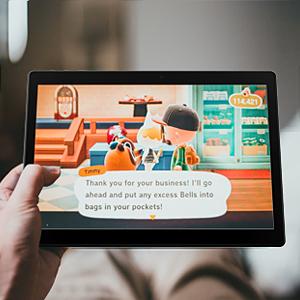
Figure 5: Tablet for Gaming
This image shows the tablet displaying a game, illustrating its use for entertainment.

Figure 6: Tablet for Navigation
This image depicts the tablet displaying a map with a route, highlighting its utility for navigation and GPS functions.
නඩත්තු කිරීම
1. ඔබේ ටැබ්ලටය පිරිසිදු කිරීම
- ටැබ්ලටයේ තිරය සහ ශරීරය පිරිසිදු කිරීමට මෘදු, ලින්ට් රහිත රෙද්දක් භාවිතා කරන්න.
- මුරණ්ඩු පැල්ලම් සඳහා, තරමක් dampen ජලය සහිත රෙදි හෝ ඉලෙක්ට්රොනික උපකරණ සඳහා නිර්මාණය කර ඇති තිර පිරිසිදු කරන්නා.
- ටැබ්ලටය මත කෙලින්ම සැර රසායනික ද්රව්ය, උල්ෙල්ඛ ද්රව්ය හෝ ඒරොසෝල් ඉසින භාවිතා කිරීමෙන් වළකින්න.
2. බැටරි රැකවරණය
- අධික උෂ්ණත්වයන් බැටරි ආයු කාලය අඩු කළ හැකි බැවින් ඒවායින් වළකින්න.
- Do not leave the tablet charging for excessively long periods after it's fully charged.
- ටැබ්ලටය දිගු කාලයක් ගබඩා කරන්නේ නම්, එය නිවා දැමීමට පෙර 50% ක් පමණ ආරෝපණය කරන්න.
3. මෘදුකාංග යාවත්කාලීන
Regularly check for and install software updates to ensure your tablet has the latest features, security patches, and performance improvements.
- වෙත යන්න සැකසීම් > පද්ධතිය > පද්ධති යාවත්කාලීන කිරීම.
- පවතින ඕනෑම යාවත්කාලීනයක් බාගත කර ස්ථාපනය කිරීමට තිරයේ ඇති උපදෙස් අනුගමනය කරන්න.
4. දත්ත උපස්ථ කිරීම
It is recommended to regularly back up your important data (photos, videos, documents) to a cloud service (e.g., Google Drive) or an external storage device to prevent data loss.
දෝෂගවේෂණය
පොදු ගැටළු සහ විසඳුම්
| ගැටලුව | විය හැකි හේතුව | විසඳුම |
|---|---|---|
| ටැබ්ලටය සක්රිය නොවේ. | බැටරිය අඩුයි; පද්ධති බිඳවැටීම. | ටැබ්ලටය අවම වශයෙන් විනාඩි 30ක් ආරෝපණය කරන්න. නැවත ආරම්භ කිරීමට බල කිරීම සඳහා බල බොත්තම තත්පර 10-15ක් ඔබාගෙන සිටින්න. |
| Wi-Fi සම්බන්ධතා ගැටළු. | වැරදි මුරපදයක්; රවුටරයේ ගැටලුවක්; ටැබ්ලට් Wi-Fi අබල කර ඇත. | Ensure correct password. Restart your Wi-Fi router. Toggle Wi-Fi off and on in tablet settings. |
| යෙදුම් බිඳ වැටීම හෝ කැටි වීම. | ප්රමාණවත් RAM නොමැතිකම; යෙදුම් දෝෂය; යල් පැන ගිය යෙදුම. | Close background apps. Clear app cache (Settings > Apps > [App Name] > Storage > Clear cache). Update the app from Google Play Store. |
| මන්දගාමී කාර්ය සාධනය. | යෙදුම් ඕනෑවට වඩා ධාවනය වේ; අඩු ගබඩා ඉඩක්; යල් පැන ගිය මෘදුකාංග. | භාවිතයට නොගත් යෙදුම් වසන්න. අනවශ්ය ඒවා මකා දැමීමෙන් ගබඩාව නිදහස් කරන්න. files. පද්ධති යාවත්කාලීන කිරීම් සඳහා පරීක්ෂා කරන්න. |
| Screen not responding. | තාවකාලික මෘදුකාංග දෝෂයක්. | Force restart the tablet by holding the Power button for 10-15 seconds. |
මෙම විසඳුම් උත්සාහ කිරීමෙන් පසුවත් ගැටලුව පවතින්නේ නම්, කරුණාකර පාරිභෝගික සහාය අමතන්න.
නිෂ්පාදන පිරිවිතර
| විශේෂාංගය | විස්තර |
|---|---|
| වෙළඳ නාමය | Lectrus |
| ආදර්ශ අංකය | ES-KTLA133 |
| වර්ණය | කළු |
| මෙහෙයුම් පද්ධතිය | Android 10 |
| Processor Brand | සියලුම ජයග්රාහකයා |
| ප්රොසෙසර විස්තරය | ක්වාඩ්-කෝර් (1.6 GHz) |
| RAM | 2 GB |
| අභ්යන්තර ගබඩාව (ROM) | 32 GB |
| පුළුල් කළ හැකි මතකය | Up to 128 GB (via Micro SD) |
| තිර ප්රමාණය | අඟල් 10.1 |
| තිර විභේදනය | 1280 x 800 පික්සල |
| පසුපස කැමරාව | 5 MP |
| ඉදිරිපස කැමරාව | 2 MP |
| සම්බන්ධතා වර්ගය | වයි-ෆයි (802.11n) |
| දෘඩාංග අතුරුමුහුණත | බ්ලූටූත්, USB, මයික්රෝ SD |
| බැටරි ධාරිතාව | 6000 mAh |
| බැටරි ආයු කාලය | පැය 7 දක්වා |
| අයිතම මානයන් (L x W x H) | 23.8 x 1 x 16.7 සෙ.මී |
| නිෂ්පාදන බර | ග්රෑම් 900 කි |
වගකීම් සහ සහාය
වගකීම් තොරතුරු
Specific warranty details for your LECTRUS tablet may vary by region and retailer. Please refer to the warranty card included with your product or contact your point of purchase for detailed information regarding warranty coverage and duration.
Note: Information regarding spare parts availability and guaranteed software updates is not available at this time.
පාරිභෝගික සහාය
For technical assistance, troubleshooting beyond this manual, or warranty claims, please contact LECTRUS customer support through their official website or the contact information provided with your purchase. When contacting support, please have your model number (ES-KTLA133) and purchase details ready.


