1. හැඳින්වීම
The THOMSON WEAR7811W True Wireless Bluetooth Earbuds offer a high-quality audio experience with the convenience of True Wireless Stereo (TWS) and Active Noise Cancellation (ANC). Designed for comfort and versatility, these in-ear headphones feature an integrated microphone for calls and intuitive touch controls for easy management.
2. පැකේජ අන්තර්ගතය
පහත ලැයිස්තුගත කර ඇති සියලුම අයිතම ඔබේ පැකේජයට ඇතුළත් කර ඇත්දැයි කරුණාකර පරීක්ෂා කරන්න:
- 1 pair of THOMSON WEAR7811W Bluetooth Earbuds
- 1 ආරෝපණ ස්ථානය
- 3 pairs of Silicone Ear Tips (sizes S/M/L)
- 1 USB-C ආරෝපණ කේබලය
- 1 උපදෙස් අත්පොත

Image: Package contents of the WEAR7811W earbuds.
3. නිෂ්පාදන අවසන්view
The THOMSON WEAR7811W earbuds are designed for a secure and comfortable fit. The compact charging case not only protects your earbuds but also recharges them on the go, extending your listening time.

Image: THOMSON WEAR7811W Earbuds in charging case.
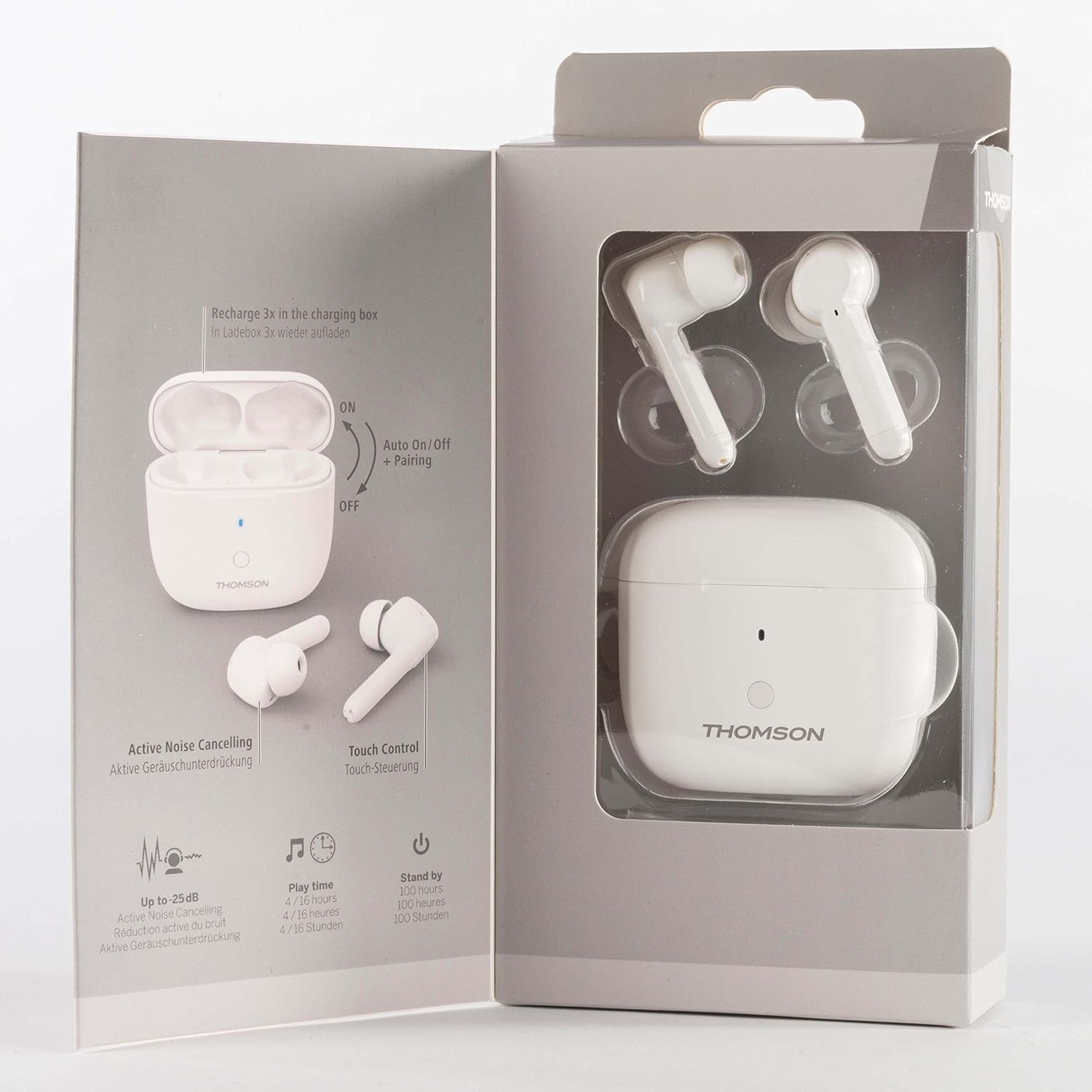
Image: Product packaging highlighting key features.
4. පිහිටුවීම
4.1 ඉයර්බඩ් ආරෝපණය කිරීම සහ නඩුව ආරෝපණය කිරීම
Before first use, fully charge the earbuds and the charging case. Connect the supplied USB-C cable to the charging case and a compatible USB power source. The charging case can provide up to 3 full recharges for the earbuds, offering a total music playback time of up to 16 hours.
4.2 බ්ලූටූත් උපාංගයක් සමඟ යුගල කිරීම
- Remove both earbuds from the charging case. They will automatically power on and enter pairing mode.
- ඔබගේ ස්මාර්ට් ජංගම දුරකථනය, ටැබ්ලටය හෝ වෙනත් බ්ලූටූත් සක්රීය උපාංගයක, බ්ලූටූත් සක්රීය කරන්න.
- ඒ සඳහා සොයන්න available devices and select 'WEAR7811W' from the list.
- Once connected, you will hear an audible confirmation. The Bluetooth version is 5.1, offering a stable transmission distance of up to 10 meters.
4.3 Selecting Ear Tips
Choose the silicone ear tips (S, M, or L) that provide the most comfortable and secure fit for your ears. A proper fit is crucial for optimal sound quality and effective Active Noise Cancellation performance.
5. ඉයර්බඩ් ක්රියාත්මක කිරීම
5.1 බලය සක්රිය / අක්රිය
- බල ගැන්වීම: ආරෝපණ පෙට්ටියෙන් ඉවත් කළ විට ඉයර්බඩ් ස්වයංක්රීයව ක්රියාත්මක වේ.
- විදුලිය විසන්ධි කිරීම: Place the earbuds back into the charging case to automatically power them off and begin charging.
5.2 සංගීත වාදනය
Use the touch controls on the earbuds to manage music playback. Specific gestures for play, pause, skip forward, and skip backward are detailed in the full instruction manual provided in the box, and may vary based on your connected device's support.
5.3 ඇමතුම් කළමනාකරණය
An integrated microphone allows for hands-free calling. Tap the earbud to accept or end a call. Refer to the full instruction manual for specific touch control gestures for call management.
5.4 සක්රීය ශබ්ද අවලංගු කිරීම (ANC)
The WEAR7811W features switchable Active Noise Cancellation, reducing ambient noise by up to -25 dB. Refer to the specific touch control gestures in the included manual for activation and deactivation of the ANC function.
5.5 හ oice සහකාර
Volume can be adjusted via your device's voice assistant. Activate the voice assistant using the designated touch control gesture (refer to the full manual).
5.6 ක්රීඩා මාදිලිය
Benefit from reduced latency in gaming mode for a precise audio experience during gameplay. Activate this mode using the specific touch control gesture outlined in the full instruction manual.
6. නඩත්තු කිරීම
6.1 පිරිසිදු කිරීම
Regularly clean the earbuds and charging case with a soft, dry cloth. Avoid using abrasive materials or harsh chemicals, which can damage the product. Ensure ear tips are free of debris for optimal sound and hygiene.
6.2 ගබඩා කිරීම
When not in use, always store the earbuds in their charging case. This protects them from damage and keeps them charged for your next use. Store in a cool, dry place away from extreme temperatures.
7. දෝශ නිරාකරණය
If you encounter issues with your THOMSON WEAR7811W earbuds, please refer to the following common solutions:
- ඉයර්බඩ් යුගල නොවේ: Ensure both earbuds are charged. Place them back in the charging case, then remove them to re-initiate pairing mode. Check your device's Bluetooth settings and try reconnecting.
- ශබ්දයක් නැත: Verify the earbuds are paired and connected to your device. Check the volume levels on both the earbuds and your device. Ensure the earbuds are sufficiently charged.
- ආරෝපණ ගැටළු: Confirm the USB-C cable and power source are working correctly. Ensure the charging contacts on the earbuds and inside the case are clean and free of obstruction.
- ක්රියාකාරී ශබ්ද අවලංගු කිරීම (ANC) ඵලදායී ලෙස ක්රියා නොකරයි: Ensure ANC is activated via the touch controls. Check for a secure and proper fit of the ear tips to create a good seal.
- අතරමැදි සම්බන්ධතාවය: Ensure you are within the 10-meter Bluetooth range and there are no significant obstacles between the earbuds and your device.
8. පිරිවිතර
| මාදිලියේ නම | WEAR7811W |
| බ්ලූටූත් අනුවාදය | 5.1 |
| සංඛ්යාත කලාපය | 2402-2480 MHz |
| සම්ප්රේෂණ දුර | මීටර් 10 දක්වා |
| හෙඩ්ෆෝන් සම්බාධනය | 32 Ω |
| මයික්රෆෝන සම්බාධනය | 2.2 kΩ |
| Max Talk Time | පැය 3.5 යි |
| උපරිම පොරොත්තු කාලය | පැය 100 යි |
| Max Music Playback Time | 4 hours (up to 16 hours with charging case) |
| මයික්රොෆෝන සංවේදීතාව | -38 dB +/- 1 dB |
| හෙඩ්ෆෝන් සංවේදීතාව | 96 dB +/- 3 ඩීබී |
| ආරෝපණ කාලය | පැය 2 යි |
| බර | 49 ග්රෑම් |
| ක්රියාකාරී ශබ්ද අවලංගු කිරීම | Up to -25 dB |
| සම්බන්ධතාවය | රැහැන් රහිත බ්ලූටූත් |
| ආරෝපණ වරාය | USB-C |
| පාලන ක්රමය | ස්පර්ශ, හඬ |
| Material (Ear Tips) | සිලිකන් |
| ඇතුළත් සංරචක | Earbuds, Charging Station, USB-C Cable, Ear Tips (S/M/L) |
9. වගකීම් සහ සහාය
Warranty and support information for the THOMSON WEAR7811W earbuds is typically provided with the product packaging or available on the manufacturer's official website. Please refer to those resources for details regarding warranty coverage, terms and conditions, and customer support contacts.


