හැඳින්වීම
මෙම අත්පොත ඔබේ කළු පැහැය සැකසීම, ක්රියාත්මක කිරීම, නඩත්තු කිරීම සහ දෝශ නිරාකරණය සඳහා අත්යවශ්ය උපදෙස් සපයයි.view Tab 10 Android Tablet. The Blackview Tab 10 features a 10.1-inch FHD+ display, an MTK8768 Octa-Core processor, 4GB RAM, 64GB internal storage, and runs on Android 11 (Doke OS_P 1.0). It supports dual SIM cards for 4G phone calls and data, Wi-Fi, and Bluetooth 5.0 connectivity.
Please read this manual thoroughly to ensure proper use and to maximize your tablet's performance and longevity.

රූපය: කළුview Tab 10 tablet shown from the rear in three color options: gray, golden, and silvery, highlighting its sleek design.
සැලසුම
පැකේජයේ අන්තර්ගතය
සියලුම අයිතම පැකේජයේ ඇති බවට වග බලා ගන්න:
- කළුview Tab 10 Tablet PC
- USB කේබලය (වර්ගය-C)
- බල ඇඩැප්ටරය (9V 2A)
- පරිශීලක අත්පොත
බැටරිය ආරෝපණය කිරීම
Before first use, fully charge the tablet. Connect the USB Type-C cable to the tablet's Type-C port and the other end to the provided power adapter. Plug the adapter into a power outlet. The charging indicator will show the charging status. The tablet supports 18W fast charging.
Inserting SIM and TF Cards
කළුview Tab 10 supports dual Nano SIM cards or one Nano SIM card and one TF (microSD) card for expandable storage up to 128GB.
- ටැබ්ලටයේ පැත්තේ SIM/TF කාඩ්පත් තැටිය සොයා ගන්න.
- තැටිය විවෘත කිරීමට සපයා ඇති SIM ඉජෙක්ටර් මෙවලම භාවිතා කරන්න.
- Carefully place the Nano SIM card(s) and/or TF card into the designated slots on the tray. Ensure the cards are correctly oriented.
- තැටිය නිසි තැනට ක්ලික් වන තුරු මෘදු ලෙස ටැබ්ලටය තුළට තල්ලු කරන්න.
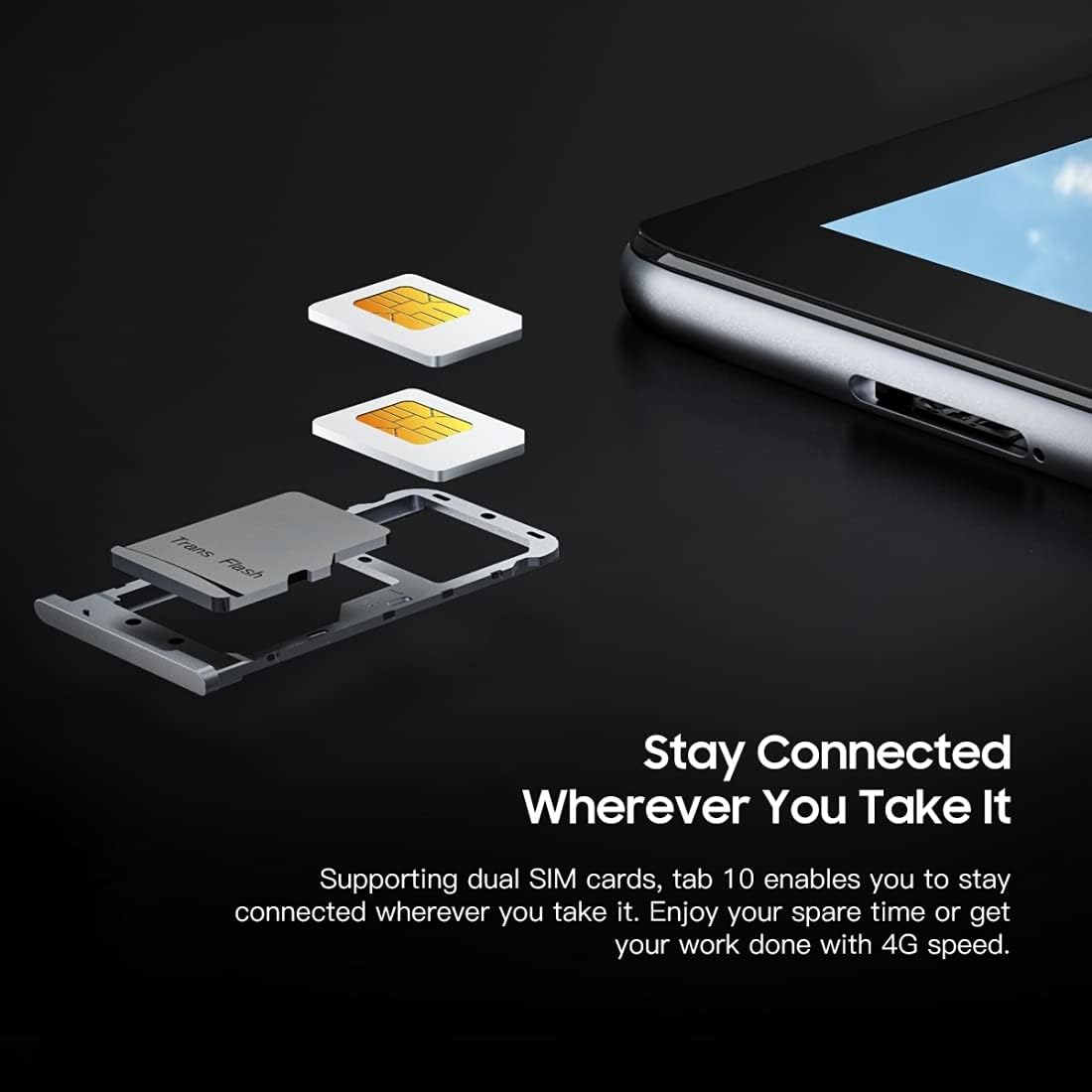
රූපය: සවිස්තරාත්මක view කළු ජාතිකයන්ගේview Tab 10's SIM card tray, showing how two Nano SIM cards are inserted, illustrating the dual SIM support.
බල ගැන්වීම / අක්රිය කිරීම
- බල ගැන්වීමට: කළු පාට වන තුරු බල බොත්තම ඔබාගෙන සිටින්න.view ලාංඡනය දිස්වේ.
- බලය අක්රිය කිරීමට: බල විකල්ප මෙනුව දිස්වන තුරු බල බොත්තම ඔබාගෙන සිටින්න, ඉන්පසු "බලය අක්රිය කරන්න" තෝරන්න.
- නැවත ආරම්භ කිරීමට: බල විකල්ප මෙනුව දිස්වන තුරු බල බොත්තම ඔබාගෙන සිටින්න, ඉන්පසු "නැවත ආරම්භ කරන්න" තෝරන්න.
මූලික සැකසුම
පළමු වරට බලය සක්රිය කළ පසු, මූලික සැකසුම සම්පූර්ණ කිරීමට තිරයේ ඇති විමසීම් අනුගමනය කරන්න:
- ඔබේ භාෂාව තෝරන්න.
- Wi-Fi ජාලයකට සම්බන්ධ කරන්න.
- ඔබගේ Google ගිණුම සමඟින් පුරනය වන්න හෝ අලුත් එකක් සාදන්න.
- තිර අගුල සකසන්න (PIN, රටාව, මුරපදය).
- Review සහ නියමයන් සහ කොන්දේසි පිළිගන්න.
මෙහෙයුම් උපදෙස්
මූලික සංචාලනය
- තට්ටු කරන්න: යෙදුමක් විවෘත කිරීමට, අයිතමයක් තෝරා ගැනීමට හෝ බොත්තමක් ඔබන්න තිරය වරක් ස්පර්ශ කරන්න.
- ස්පර්ශ කර අල්ලාගෙන සිටින්න: තවත් විකල්ප වෙත ප්රවේශ වීමට හෝ එය ගෙන යාමට අයිතමයක් ඔබා අල්ලාගෙන සිටින්න.
- ස්වයිප්: පිටු හෝ අන්තර්ගතය හරහා අනුචලනය කිරීමට තිරය හරහා ඔබේ ඇඟිල්ල අදින්න.
- පින්ච්: රූප විශාලනය කිරීමට හෝ පිටතට ගැනීමට ඇඟිලි දෙකක් භාවිතා කරන්න සහ web පිටු.
ජාල වෙත සම්බන්ධ වෙමින්
- Wifi: වෙත යන්න සැකසීම් > ජාලය සහ අන්තර්ජාලය > Wifi. Wi-Fi ක්රියාත්මක කර, ඔබට අවශ්ය ජාලය තෝරා, අවශ්ය නම් මුරපදය ඇතුළත් කරන්න.
- බ්ලූටූත්: වෙත යන්න සැකසීම් > සම්බන්ධිත උපාංග > බ්ලූටූත්. Turn Bluetooth on, then select a device from the list to pair.
- ජංගම දත්ත (4G): If a SIM card is inserted, go to සැකසීම් > ජාලය සහ අන්තර්ජාලය > ජංගම ජාලය to enable mobile data and configure settings.
කැමරාව භාවිතා කිරීම
කළුview Tab 10 features a 13.0MP rear camera and a 5.0MP front camera.
- විවෘත කරන්න කැමරාව යෙදුම.
- ඉදිරිපස සහ පසුපස කැමරා අතර මාරු වීමට කැමරා නිරූපකය තට්ටු කරන්න.
- ඡායාරූපයක් ගැනීමට හෝ වීඩියෝ පටිගත කිරීම ආරම්භ කිරීමට/නවත්වා ගැනීමට ෂටර් බොත්තම තට්ටු කරන්න.
- Explore various camera modes and settings within the app.

රූපය: කළුview Tab 10 displaying its camera features, including an 8MP front camera and a 13MP rear camera, emphasizing its photographic capabilities.
Android 11 සහ Doke OS_P 1.0
ඔබගේ ටැබ්ලටය කළු පැහැයෙන් යුත් Android 11 මත ධාවනය වේ.view's Doke OS_P 1.0 interface, offering enhanced privacy controls, improved notification management, and a more intuitive user experience. Explore the සැකසීම් menu to customize your device, manage apps, and optimize performance.

රූපය: කළුview Tab 10 screen showing the Doke OS_P 1.0 interface based on Android 11, with various settings and app screens visible.
නඩත්තු කිරීම
උපාංගය පිරිසිදු කිරීම
- ටැබ්ලටයේ තිරය සහ ශරීරය පිරිසිදු කිරීමට මෘදු, ලින්ට් රහිත රෙද්දක් භාවිතා කරන්න.
- මුරණ්ඩු පැල්ලම් සඳහා, තරමක් dampen ජලය සහිත රෙදි හෝ ඉලෙක්ට්රොනික උපකරණ සඳහා නිර්මාණය කර ඇති තිර පිරිසිදු කරන්නා.
- ටැබ්ලටය මත කෙලින්ම සැර රසායනික ද්රව්ය, උල්ෙල්ඛ ද්රව්ය හෝ ඒරොසෝල් ඉසින භාවිතා කිරීමෙන් වළකින්න.
බැටරි සත්කාර
- Avoid exposing the tablet to extreme temperatures (hot or cold), as this can affect battery life.
- ටැබ්ලටය සම්පූර්ණයෙන්ම ආරෝපණය කළ පසු දිගු වේලාවක් ආරෝපණය කරමින් තබන්න එපා.
- Use only the original charger and cable provided with the tablet.
මෘදුකාංග යාවත්කාලීන
ඔබගේ ටැබ්ලටයේ නවතම විශේෂාංග, ආරක්ෂක පැච් සහ කාර්ය සාධන වැඩිදියුණු කිරීම් ඇති බව සහතික කර ගැනීම සඳහා මෘදුකාංග යාවත්කාලීන කිරීම් නිතිපතා පරීක්ෂා කර ස්ථාපනය කරන්න. වෙත යන්න සැකසීම් > පද්ධතිය > පද්ධති යාවත්කාලීන කිරීම.
දෝෂගවේෂණය
උපාංගය ක්රියාත්මක නොවේ
- Ensure the battery is charged. Connect the tablet to the charger for at least 30 minutes.
- නැවත ආරම්භ කිරීමට බල කිරීම සඳහා බල බොත්තම තත්පර 10-15ක් ඔබාගෙන සිටින්න.
Wi-Fi සම්බන්ධතා ගැටළු
- ඔබගේ Wi-Fi රවුටරය සහ ටැබ්ලටය නැවත ආරම්භ කරන්න.
- Wi-Fi සැකසුම් තුළ ජාලය අමතක කර නැවත සම්බන්ධ කරන්න.
- ඔබ Wi-Fi සංඥා පරාසය තුළ සිටින බව සහතික කර ගන්න.
මන්දගාමී කාර්ය සාධනය
- පසුබිමේ ධාවනය වන භාවිතයට නොගත් යෙදුම් වසා දමන්න.
- Clear cache data for apps that are frequently used.
- Ensure sufficient storage space is available. Delete unnecessary files හෝ යෙදුම්.
- Consider a factory reset as a last resort (back up your data first).
යෙදුම් බිඳ වැටීම් හෝ කැටි ගැසීම
- Force close the app: Go to සැකසීම් > යෙදුම් සහ දැනුම්දීම්, යෙදුම තෝරන්න, පසුව තට්ටු කරන්න බලෙන් නතර කරන්න.
- Clear the app's cache and data (this will reset the app).
- යෙදුම අස්ථාපනය කර නැවත ස්ථාපනය කරන්න.
පිරිවිතර
| ආකෘතිය | ටැබ් 10 |
| තිර ප්රමාණය | අඟල් 10.1 |
| සංදර්ශක විභේදනය | 1920 x 1200 (FHD+) |
| ප්රොසෙසරය | MTK8768 Octa Core Cortex-A53 2.0GHz |
| RAM | 4GB |
| අභ්යන්තර ගබඩාව | 64GB |
| පුළුල් කළ හැකි ගබඩාව | 128GB දක්වා TF කාඩ්පත (ඇතුළත් නොවේ) |
| මෙහෙයුම් පද්ධතිය | ඇන්ඩ්රොයිඩ් 11 (ඩෝක් OS_P 1.0) |
| පසුපස කැමරාව | 13.0MP with AF, LED flash |
| ඉදිරිපස කැමරාව | 5.0MP |
| බැටරි ධාරිතාව | 7480mAh |
| අයකිරීම | 9V 2A, 18W Fast Charging |
| ජාල සන්නිවේදනය | 4G LTE, Wi-Fi (802.11a/b/g/n/ac), Bluetooth V5.0 |
| SIM වර්ගය | ද්විත්ව නැනෝ සිම් |
| අතුරුමුහුණත් | 1 x 3.5mm Earphone Port, 1 x Type-C, 1 x Magnetic Port |
| මානයන් (L x W x H) | 243 x 162 x 8.4mm (අඟල් 9.57 x 6.38 x 0.33) |
| බර | 523g (රාත්තල් 1.15) |

රූපය: තොරතුරු චිත්රක සංදර්ශනයක්asing කළුview Tab 10's main features, including its 13MP rear camera, Octa-core processor, 7480mAh battery, 10.1-inch FHD display, 8.8mm slim body, and support for dual SIM cards.
වගකීම් සහ සහාය
කළුview Tab 10 comes with a standard manufacturer's warranty. Please refer to the warranty card included in your package for specific terms and conditions, including warranty period and coverage details.
For technical support, service inquiries, or additional product information, please visit the official Blackview webවෙබ් අඩවියට පිවිසෙන්න හෝ ඔවුන්ගේ පාරිභෝගික සේවා දෙපාර්තමේන්තුව අමතන්න. සහාය සොයන විට ඔබේ මිලදී ගැනීමේ රිසිට්පත සහ නිෂ්පාදන අනුක්රමික අංකය ළඟ තබා ගන්න.
නිල කළුview ගබඩා: කළුview Amazon හි ගබඩා කරන්න


