1. හැඳින්වීම
This manual provides detailed instructions for the installation, configuration, and operation of your MERCUSYS MW306R 300 Mbps Wireless N Router. Please read this manual carefully before using the device to ensure proper setup and optimal performance. Keep this manual for future reference.
2. නිෂ්පාදන අවසන්view
2.1 පැකේජයේ අන්තර්ගතය
- MERCUSYS MW306R Wireless N Router
- බල ඇඩැප්ටරය
- ඊතර්නෙට් කේබලය
- Quick Installation Guide (this manual)
2.2 දෘඪාංග විශේෂාංග
The MW306R router features three 5dBi antennas for enhanced wireless signal strength and stability. It supports 300 Mbps wireless speed, suitable for HD streaming, online gaming, and large file බාගත කිරීම්.
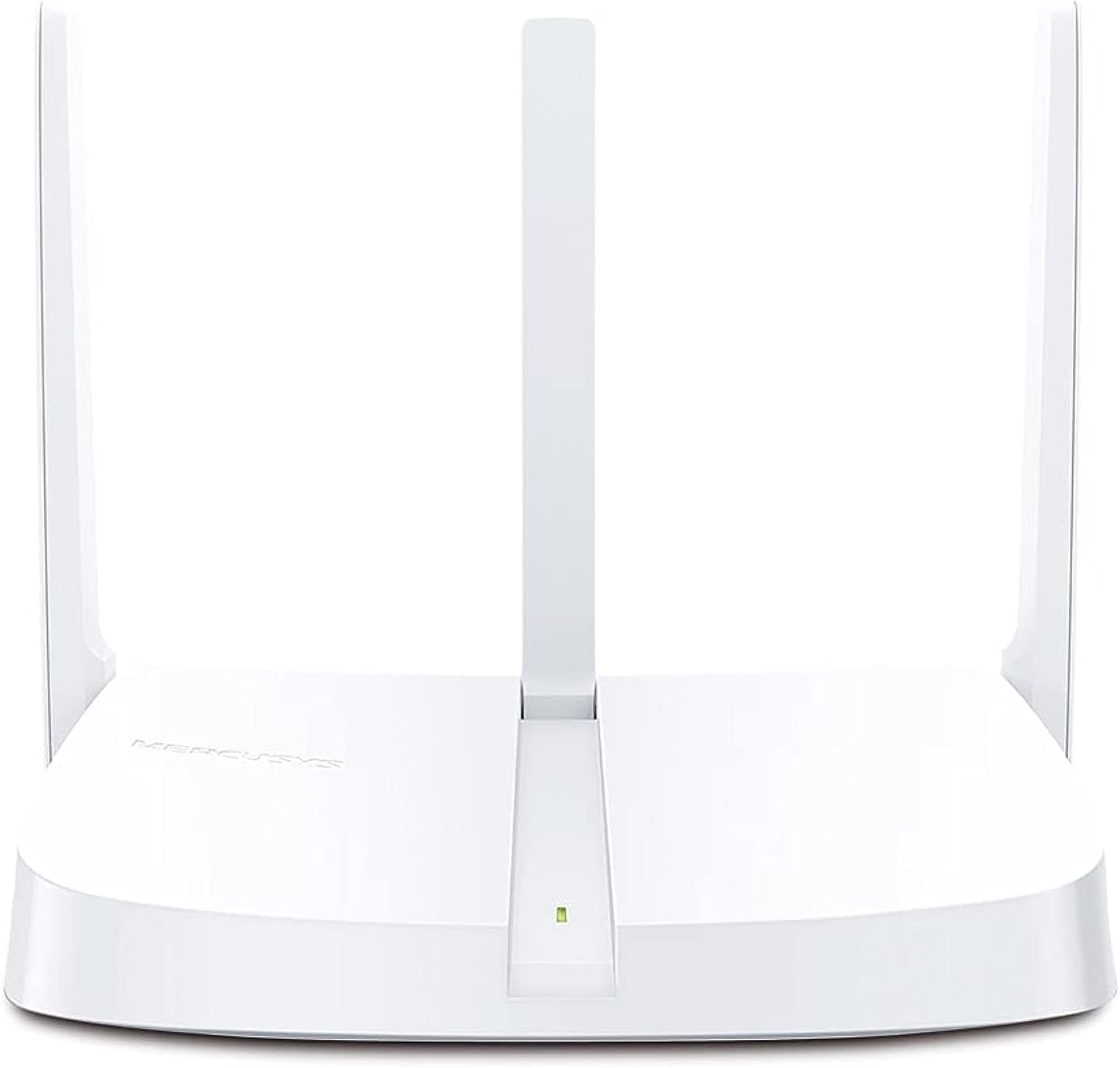
රූපය 2.2.1: ඉදිරිපස view of the MW306R Router. Shows the device with its three fixed antennas and a status LED.

රූපය 2.2.2: පසුපස view of the MW306R Router. Displays the WAN port (orange), three LAN ports (yellow), power input, and the Reset/WPS button.
2.3 LED දර්ශක
- LED පද්ධතිය: Indicates the router's operational status.
2.4 වරායන් සහ බොත්තම්
- WAN වරාය: Connects to your modem or the internet.
- LAN තොට (x3): Connects to wired devices like computers or gaming consoles.
- විදුලිබල වරාය: සපයන ලද බල ඇඩැප්ටරයට සම්බන්ධ වේ.
- Reset/WPS බොත්තම: Press and hold for 5 seconds to reset the router to factory defaults. Press briefly to activate WPS (Wi-Fi Protected Setup).
3. සැකසුම් මාර්ගෝපදේශය
3.1 දෘඪාංග සම්බන්ධතාවය
- විදුලිය විසන්ධි කිරීම: ඔබගේ මොඩමයෙන් සහ රවුටරයෙන් විදුලිය විසන්ධි කරන්න (අදාළ නම්).
- WAN සම්බන්ධ කරන්න: Connect the Ethernet cable from your modem's LAN port to the MW306R's orange WAN port.
- Connect LAN (Optional): If you have wired devices, connect them to the yellow LAN ports on the MW306R using Ethernet cables.
- බල ගැන්වීම: Connect the power adapter to the MW306R's power port and plug it into a power outlet. Power on your modem.
- රැඳී සිටින්න: Wait for the router's System LED to turn solid green, indicating it is ready.
3.2 මූලික වින්යාසය
The MW306R features an intuitive webpage for quick setup.
- රවුටරයට සම්බන්ධ කරන්න: Connect your computer or mobile device to the router's Wi-Fi network (SSID and password are on the label at the bottom of the router) or via an Ethernet cable to a LAN port.
- ප්රවේශය Web අතුරු මුහුණත: a විවෘත කරන්න web බ්රවුසරය සහ වර්ගය
mwlogin.netor192.168.1.1ලිපින තීරුව තුළට. Enter ඔබන්න. - පිවිසුම් මුරපදය සාදන්න: You will be prompted to create a login password for the router's management page.
- සැකසුම් විශාරද අනුගමනය කරන්න: The intuitive setup wizard will guide you through configuring your internet connection type and wireless settings (Wi-Fi name and password).
- සැකසුම් සුරකින්න: Once completed, save your settings. Your router is now configured.

රූපය 3.2.1: Example of the intuitive web-based setup interface for the MW306R.
4. මෙහෙයුම් මාතයන්
The MERCUSYS MW306R supports multiple operating modes to suit various network requirements.

රූපය 4.0.1: Multi-Mode functionality of the MW306R Router.
4.1 රවුටර මාදිලිය
This is the default mode. The router connects to the internet via a modem and shares the internet connection wirelessly or through its LAN ports to multiple devices.
4.2 පරාස විස්තාරක මාදිලිය
In this mode, the MW306R extends the coverage of an existing wireless network. It connects wirelessly to your main router and rebroadcasts the signal, eliminating Wi-Fi dead zones.
4.3 ප්රවේශ ලක්ෂ්ය ප්රකාරය
The router transforms into a wireless access point, converting a wired network connection into a wireless one. It connects to an existing wired router via an Ethernet cable and provides Wi-Fi access.
4.4 WISP මාදිලිය
Wireless Internet Service Provider (WISP) mode allows the router to connect wirelessly to a WISP access point and share the internet connection with local wired and wireless clients.
To change operating modes, access the router's web management interface and navigate to the operating mode settings.
5. නඩත්තු කිරීම
5.1 ස්ථිරාංග යාවත්කාලීන කිරීම
Regularly check the MERCUSYS official website for firmware updates. Updating the firmware can improve performance, add new features, and fix bugs. Download the latest firmware for your MW306R model and follow the instructions provided on the website for a safe update process.
5.2 රවුටරය නැවත සැකසීම
If the router is not functioning correctly, or if you forget your login password, you may need to reset it to factory default settings. With the router powered on, press and hold the Reset/WPS button on the back panel for approximately 5 seconds until the System LED blinks rapidly. Release the button and wait for the router to restart.
5.3 Security Practices
- Change the default login password for the router's web කළමනාකරණ අතුරු මුහුණත.
- Use a strong, unique password for your Wi-Fi network.
- Enable WPA2-PSK (AES) encryption for your wireless network.
- Consider disabling WPS if not actively used.
6. දෝශ නිරාකරණය
6.1 අන්තර්ජාල ප්රවේශය නැත
- Check all cable connections. Ensure the WAN port is securely connected to the modem.
- ඔබගේ මොඩමය නිවැරදිව ක්රියා කරන බවත් සක්රිය අන්තර්ජාල සම්බන්ධතාවයක් ඇති බවත් තහවුරු කරන්න.
- Restart both your modem and the MW306R router.
- රවුටරයට ලොග් වන්න web management page and check the WAN status. Ensure your internet connection type is correctly configured.
6.2 Weak Wi-Fi Signal or Dropped Connections
- බාධා කිරීම් සහ ඇඟිලි ගැසීම් ප්රභවයන්ගෙන් (උදා: රැහැන් රහිත දුරකථන, මයික්රෝවේව් උදුන්) ඈත්ව, රවුටරය මධ්යම ස්ථානයකට ගෙන යන්න.
- ප්රශස්ත සංඥාවක් සඳහා රවුටරයේ ඇන්ටනා සිරස් අතට ස්ථානගත කර ඇති බවට වග බලා ගන්න.
- ඔබගේ උපාංගවල රැහැන් රහිත ඇඩැප්ටර ධාවක යාවත්කාලීන කරන්න.
- Consider adjusting the wireless channel in the router's settings to avoid interference from neighboring networks.
6.3 රවුටර වෙත ප්රවේශ විය නොහැක Web කළමනාකරණ පිටුව
- ඔබගේ උපාංගය රවුටරයේ ජාලයට (රැහැන්ගත හෝ රැහැන් රහිත) සම්බන්ධ වී ඇති බවට වග බලා ගන්න.
- ඔබ නිවැරදි ලිපිනය ටයිප් කරන බව තහවුරු කරන්න (
mwlogin.netor192.168.1.1) in your browser. - ඔබගේ බ්රවුසරයේ හැඹිලිය සහ කුකීස් හිස් කරන්න, නැතහොත් වෙනත් බ්රවුසරයක් උත්සාහ කරන්න.
- ඔබේ පරිගණකයේ ඇති ඕනෑම ෆයර්වෝල් හෝ ප්රති-වයිරස මෘදුකාංගයක් තාවකාලිකව අක්රිය කරන්න.
- If you forgot the login password, perform a factory reset (refer to Section 5.2).
7. පිරිවිතර
| විශේෂාංගය | විස්තර |
|---|---|
| නිෂ්පාදන මානයන් | 11.5 x 14.7 x 3.4 සෙ.මී |
| අයිතමයේ බර | 150 ග්රෑම් |
| නිෂ්පාදකයා | මර්කුසි |
| අයිතම ආදර්ශ අංකය | MW306R |
| වෙළඳ නාමය | මර්කුසි |
| මාදිලියේ නම | 306r |
| විශේෂ ලක්ෂණ | රැහැන් රහිත |
| සංඛ්යාත කලාප පන්තිය | තනි-බෑන්ඩ් (2.4 GHz) |
| රැහැන් රහිත සන්නිවේදන ප්රමිතිය | 802.11b, 802.11g, 802.11n |
| ගැළපෙන උපාංග | Gaming Console, Personal Computer, Smartphone, Tablet, TV |
| නිෂ්පාදනය සඳහා නිර්දේශිත භාවිතයන් | නිවස |
| ඇතුළත් සංරචක | Router, Manual |
| සම්බන්ධතා තාක්ෂණය | ඊතර්නෙට්, Wi-Fi |
| වර්ණය | සුදු |
8. වගකීම් සහ සහාය
8.1 වගකීම් තොරතුරු
For detailed warranty information, please refer to the warranty card included with your product or visit the official MERCUSYS webවෙබ් අඩවිය. වගකීම් නියමයන් සහ කොන්දේසි කලාපය අනුව වෙනස් විය හැකිය.
8.2 තාක්ෂණික සහාය
If you encounter any issues that cannot be resolved using this manual, please visit the MERCUSYS support website for FAQs, firmware downloads, and contact information for technical assistance.
නිල Webඅඩවිය: www.mercusys.com


