1. හැඳින්වීම
This manual provides detailed instructions for the installation, operation, and maintenance of the Vivotek ND9425P 16-Channel 4K UHD Network Video Recorder (NVR). This NVR is designed to manage and record video streams from up to 16 IP cameras, offering 4K UHD resolution support for high-quality surveillance. It is an integral component of a comprehensive security system, suitable for various applications requiring reliable video monitoring and recording.
Key features of the Vivotek ND9425P NVR include:
- Multimedia SoC CPU for efficient processing.
- Support for H.265, H.264, and MJPEG video codecs for flexible compression.
- Seamless recording capabilities.
- Smart Stream III optimization for bandwidth efficiency.
- Integrated PoE technology for simplified camera connectivity (when used with compatible PoE cameras).
2 ආරක්ෂිත තොරතුරු
උපාංගය ක්රියාත්මක කිරීමට පෙර කරුණාකර සියලු ආරක්ෂක උපදෙස් ප්රවේශමෙන් කියවන්න. මෙම උපදෙස් අනුගමනය කිරීමට අපොහොසත් වීමෙන් නිෂ්පාදනයට තුවාල හෝ හානි සිදුවිය හැකිය.
- බලශක්ති ප්රභවය: Use only the power adapter supplied with the NVR. Ensure the power outlet provides the correct voltage.
- වාතාශ්රය: Do not block any ventilation openings. Install the NVR in a well-ventilated area to prevent overheating.
- පරිසරය: Avoid exposing the NVR to water, moisture, extreme temperatures, or direct sunlight.
- පිරිසිදු කිරීම: Disconnect power before cleaning. Use a dry, soft cloth. Do not use liquid or aerosol cleaners.
- සේවා: මෙම නිෂ්පාදනය ඔබම සේවය කිරීමට උත්සාහ නොකරන්න. සියලුම සේවා සුදුසුකම් ලත් සේවකයින් වෙත යොමු කරන්න.
- කේබල්: Ensure all cables are properly connected and secured to prevent tripping hazards or accidental disconnections.
3. පැකේජ අන්තර්ගතය
ස්ථාපනය සමඟ ඉදිරියට යාමට පෙර සියලුම අයිතම පැකේජයේ ඇති බව තහවුරු කර ගන්න:
- Vivotek ND9425P 16-Channel 4K UHD NVR Unit
- බල ඇඩැප්ටරය
- USB මූසිකය
- ඉක්මන් ස්ථාපන මාර්ගෝපදේශය
- Resource CD (containing full manual and software)
- Screws for HDD installation (if applicable)
- ඊතර්නෙට් කේබලය
Note: The package contents may vary slightly depending on the specific kit purchased. For example, some kits may include 8 x 2 MP Night Vision Dome Cameras and 8 x Ethernet Patch Cables.
4. නිෂ්පාදන අවසන්view
මෙම කොටස වැඩි කාලයක් ලබා දෙයිview of the Vivotek ND9425P NVR's physical components and interfaces.
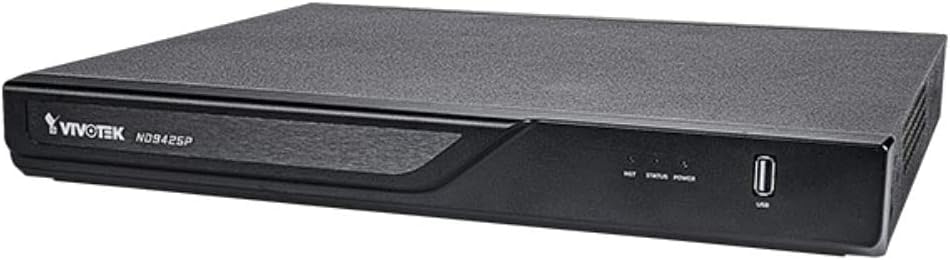
රූපය 4.1: Vivotek ND9425P NVR Front Panel
The image displays the Vivotek ND9425P NVR unit, a compact black rectangular device. The front panel features the "VIVOTEK ND9425P" logo on the left, followed by three small indicator lights labeled "NET", "STATUS", and "POWER". On the far right of the front panel, there is a USB port, labeled "USB" below it. The top surface of the NVR has a textured finish.
4.1 ඉදිරිපස පැනල් දර්ශක සහ තොට
- දැල් LED: ජාල ක්රියාකාරිත්වය පෙන්නුම් කරයි.
- තත්ත්වය LED: Indicates system status (e.g., recording, error).
- පවර් LED: බල තත්ත්වය පෙන්නුම් කරයි.
- USB Port: For connecting a USB mouse, keyboard, or external storage devices for backup.
4.2 පසුපස පැනල් තොටුපළ
The rear panel typically includes ports for power input, Ethernet (LAN), HDMI/VGA video output, audio input/output, and additional USB ports for peripheral connections.
5. පිහිටුවීම
5.1 දෘඪාංග ස්ථාපනය
- දෘඪ තැටි ස්ථාපනය (පෙර ස්ථාපනය කර නොමැති නම්):
Unscrew the NVR cover. Carefully slide the hard drive into the bay and secure it with the provided screws. Reattach the cover.
- කැමරා සම්බන්ධ කරන්න:
Connect your IP cameras to the NVR's PoE ports (if available) or to your network switch. Ensure all cameras are powered on and accessible on the network.
- ජාලයට සම්බන්ධ වන්න:
NVR හි LAN port එකෙන් ඔබේ රවුටරයට හෝ ජාල ස්විචයට ඊතර්නෙට් කේබලයක් සම්බන්ධ කරන්න.
- සම්බන්ධක සංදර්ශකය:
NVR හි HDMI හෝ VGA ප්රතිදාන තොටට මොනිටරයක් සම්බන්ධ කරන්න.
- පර්යන්ත සම්බන්ධ කරන්න:
USB මූසිකය NVR එකේ USB පෝට් එකකට සම්බන්ධ කරන්න.
- බල ගැන්වීම:
බල ඇඩැප්ටරය NVR හි බල ආදානයට සම්බන්ධ කර පසුව එය බල අලෙවිසැලකට සම්බන්ධ කරන්න. NVR ස්වයංක්රීයව ක්රියාත්මක වේ.
5.2 Initial Configuration Wizard
Upon the first boot, the NVR will typically launch an initial configuration wizard. Follow the on-screen prompts to:
- පරිපාලක මුරපදය සකසන්න.
- ජාල සැකසුම් වින්යාස කරන්න (DHCP හෝ ස්ථිතික IP).
- ඒ සඳහා සොයන්න සහ සම්බන්ධිත IP කැමරා එකතු කරන්න.
- දිනය සහ වේලාව සකසන්න.
- පටිගත කිරීම සඳහා දෘඪ තැටිය ආරම්භ කරන්න.
6. NVR ක්රියාත්මක කිරීම
6.1 සජීවී View
After initial setup, the NVR will display the live view සම්බන්ධිත කැමරා ගණන. ඔබට තනි කැමරාවක් අතර මාරු විය හැකිය view සහ බහු-කැමරා ජාලකය views.
6.2 පටිගත කිරීමේ වින්යාසය
Access the recording settings through the main menu to configure recording schedules and modes:
- අඛණ්ඩ පටිගත කිරීම: වාර්තා 24/7.
- චලන අනාවරණය පටිගත කිරීම: Records only when motion is detected by the camera.
- උපලේඛනගත පටිගත කිරීම: Records during specific times of the day or week.
- සිදුවීම් පටිගත කිරීම: Records based on specific events (e.g., alarm input).
6.3 නැවත ධාවනය සහ උපස්ථය
නැවත කිරීමටview වාර්තාගත footage:
- Navigate to the "Playback" section from the main menu.
- අවශ්ය කැමරාව(ය) සහ දිනය/වේලා පරාසය තෝරන්න.
- පටිගත කිරීම් හරහා සැරිසැරීමට කාලරේඛාව භාවිතා කරන්න.
- To back up footage, insert a USB drive into the NVR's USB port and follow the on-screen instructions for export.
6.4 දුරස්ථ ප්රවේශය
The Vivotek ND9425P NVR supports remote access via a web browser or dedicated mobile applications (e.g., VIVOCloud). Refer to the full user manual on the Resource CD for detailed instructions on setting up remote access, including port forwarding or P2P cloud services.
7. නඩත්තු කිරීම
7.1 ස්ථිරාංග යාවත්කාලීන කිරීම්
Regularly check for and install firmware updates to ensure optimal performance, security, and access to new features. Firmware updates can typically be performed via the NVR's web interface or through a USB drive.
7.2 දෘඪ තැටි කළමනාකරණය
The NVR will automatically overwrite the oldest recordings when the hard drive is full. You can configure storage settings, check HDD health, and format the drive through the system settings.
7.3 පිරිසිදු කිරීම
Keep the NVR unit clean by gently wiping its exterior with a dry, soft cloth. Ensure ventilation openings are free from dust and obstructions.
8. දෝශ නිරාකරණය
| ගැටලුව | විය හැකි හේතුව | විසඳුම |
|---|---|---|
| බලය නැත | බල කේබලය විසන්ධි වී ඇත; දෝෂ සහිත බල ඇඩැප්ටරය; බල සැපයුමේ ගැටළුවක්. | Check power cable connection; try a different power outlet; contact support if adapter is faulty. |
| වීඩියෝ ප්රතිදානයක් නොමැත | HDMI/VGA cable loose; incorrect display input selected; NVR not booted. | Ensure display cable is secure; select correct input on monitor; wait for NVR to boot up. |
| කැමරා නොපෙන්වයි | Network issue; camera not powered; incorrect camera IP address; camera not added to NVR. | Check network cables; ensure cameras are powered; verify camera IP settings; add cameras via NVR interface. |
| පටිගත කිරීමක් නැත | Hard drive not initialized; recording schedule not set; HDD full. | Initialize HDD in settings; configure recording schedule; check HDD status. |
| Remote Access Fails | Network configuration issue; port forwarding not set up; firewall blocking. | Verify network settings; configure port forwarding on router; check firewall rules. |
For more detailed troubleshooting, refer to the comprehensive user manual provided on the Resource CD or visit the VIVOTEK support webඅඩවිය.
9. පිරිවිතර
| විශේෂාංගය | විස්තර |
|---|---|
| ආදර්ශ අංකය | ND9425P |
| නිෂ්පාදකයා | Vivotek USA |
| නිෂ්පාදන මානයන් | අඟල් 19.69 x 19.69 x 11.02 |
| අයිතමයේ බර | රාත්තල් 8.62 කි |
| සම්බන්ධතා තාක්ෂණය | ඊතර්නෙට් |
| ගැළපෙන උපාංග | කැමරාව |
| මතක ගබඩා ධාරිතාව | 64 GB (referring to internal flash/RAM, not HDD capacity) |
| නාලිකා ගණන | 16 |
| වීඩියෝ කෝඩෙක්ස් | H.265, H.264, MJPEG |
| උපරිම විභේදන සහාය | 4K UHD (as per product title) |
10. වගකීම් සහ සහාය
For warranty information, please refer to the warranty card included with your product or visit the official VIVOTEK website. VIVOTEK provides technical support for its products. If you encounter issues that cannot be resolved using this manual or the troubleshooting section, please contact VIVOTEK customer support through their official webඅඩවිය හෝ නම් කරන ලද ආධාරක නාලිකා.
Official VIVOTEK Webඅඩවිය: www.vivotek.com


