1. හැඳින්වීම
Thank you for choosing the AUKEY Sprint Wireless Power Bank PB-Y32. This device is designed to provide portable power for your mobile devices, featuring both wired and wireless fast charging capabilities. Please read this manual carefully before use to ensure optimal performance and safety.
2. නිෂ්පාදන ලක්ෂණ
- 10000 mAh ධාරිතාව: High-capacity battery to charge your devices multiple times.
- වේගවත් ආරෝපණ සහාය: Supports Quick Charge 3.0 and Power Delivery for rapid charging of compatible devices.
- රැහැන් රහිත ආරෝපණය: Conveniently charge Qi-compatible devices at up to 10W.
- බහු ප්රතිදාන වරායන්: Equipped with USB-C and USB-A ports for versatile charging.
- සංයුක්ත සහ අතේ ගෙන යා හැකි නිර්මාණය: Easy to carry for on-the-go power.
- ආරක්ෂිත විශේෂාංග: Built-in protections against overcharge, over-discharge, overcurrent, and short circuits.
3. පැකේජ අන්තර්ගතය
- AUKEY Sprint Wireless Power Bank PB-Y32
- USB-A සිට C කේබලය
- පරිශීලක අත්පොත
4. සැකසුම සහ මූලික භාවිතය
4.1 බලශක්ති බැංකුව ආරෝපණය කිරීම
Before first use, fully charge the power bank. It takes approximately 7 hours to fully charge the power bank using a compatible USB-C power adapter.
- Connect the included USB-A to C cable to the power bank's USB-C input port.
- කේබලයේ අනෙක් කෙළවර USB බිත්ති චාජරයකට සම්බන්ධ කරන්න (ඇතුළත් කර නැත).
- The LED indicators will light up to show the charging status. All four LEDs will be solid when fully charged.
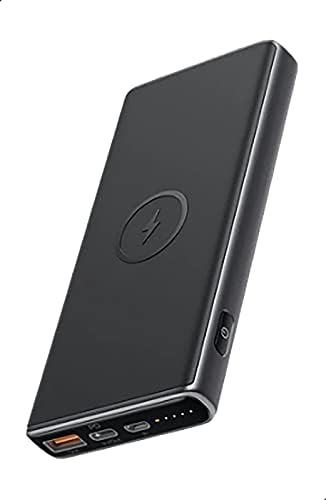
Image: The AUKEY Sprint Wireless Power Bank PB-Y32, showcasing its sleek black design and port layout.
5. මෙහෙයුම් උපදෙස්
5.1 රැහැන්ගත ආරෝපණය
To charge your device using a cable:
- ඔබගේ උපාංගයේ ආරෝපණ කේබලය USB-A ප්රතිදාන තොටට හෝ බලශක්ති බැංකුවේ USB-C ප්රතිදාන තොටට සම්බන්ධ කරන්න.
- කේබලයේ අනෙක් කෙළවර ඔබගේ උපාංගයට සම්බන්ධ කරන්න.
- බලශක්ති බැංකුව ස්වයංක්රීයව ඔබගේ උපාංගය ආරෝපණය කිරීම ආරම්භ කරයි.
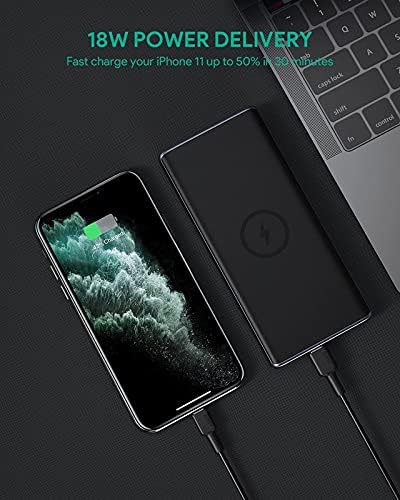
Image: The power bank connected via cable to a smartphone, demonstrating 18W Power Delivery fast charging.

Image: A smartphone connected to the power bank, illustrating Qualcomm Quick Charge 3.0 capabilities for rapid charging.
5.2 රැහැන් රහිත ආරෝපණය
To charge your Qi-compatible device wirelessly:
- Place your Qi-compatible device directly onto the wireless charging pad located on the top surface of the power bank. Ensure the device is centered on the charging symbol.
- The power bank will automatically detect your device and begin wireless charging.

Image: A smartphone placed on the power bank's surface, demonstrating the wireless charging feature.

රූපය: සමීප ඡායාරූපයක් view of the power bank showing the silicone ring designed to keep the phone stable during wireless charging.
5.3 අඩු ධාරා ආරෝපණ මාදිලිය
This mode is ideal for charging low-power devices like wireless earbuds or smartwatches.
- Press and hold the power button for 2 seconds to enter low-current charging mode. The first LED indicator will blink green.
- Connect your low-power device or place it on the wireless charging pad.
- To exit low-current charging mode, press the power button once, or it will automatically exit after 2 hours.
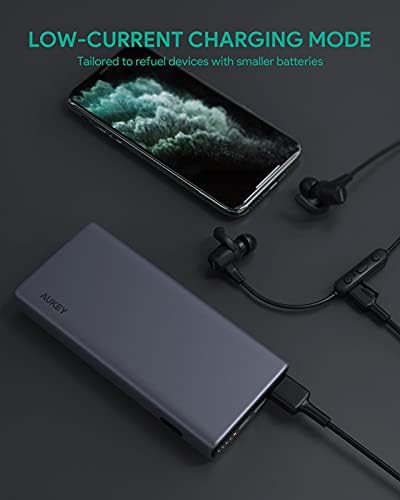
Image: The power bank connected to a smartphone and wireless earbuds, demonstrating its low-current charging mode for smaller devices.

Image: An illustration showing the power bank's broad compatibility with various devices, including smartphones, tablets, and gaming consoles.
6. නඩත්තු කිරීම
- Keep the power bank away from liquids, extreme heat, and strong magnetic fields.
- පවර් බෑන්ක් එක බිම දාන්න එපා හෝ තද බලපෑම් වලට ලක් කරන්න එපා.
- Clean the power bank with a dry, soft cloth. Do not use corrosive cleaners.
- බලශක්ති බැංකුව භාවිතා නොකරන විට සිසිල් වියළි ස්ථානයක ගබඩා කරන්න.
- බැටරි සෞඛ්යය පවත්වා ගැනීම සඳහා අවම වශයෙන් සෑම මාස 3 කට වරක්වත් පවර් බෑන්ක් එක නැවත ආරෝපණය කරන්න.
7. දෝශ නිරාකරණය
7.1 බලශක්ති බැංකුව ආරෝපණය නොවේ
- ආරෝපණ කේබලය පවර් බෑන්ක් එකට සහ බිත්ති චාජරයට ආරක්ෂිතව සම්බන්ධ කර ඇති බවට වග බලා ගන්න.
- වෙනස් USB-C කේබලයක් හෝ බිත්ති චාජරයක් උත්සාහ කරන්න.
- Verify the wall charger's output meets the power bank's input requirements (DC 5V-3A / 9V-2A).
7.2 උපාංගය Power Bank එකෙන් ආරෝපණය නොවේ
- විදුලිබල බැංකුවට ප්රමාණවත් ආරෝපණයක් ඇති බවට වග බලා ගන්න.
- ඔබගේ උපාංගය සඳහා වෙනස් ආරෝපණ කේබලයක් උත්සාහ කරන්න.
- For wireless charging, ensure your device is Qi-compatible and properly aligned on the charging pad. Remove any thick cases that might interfere.
- If charging a low-power device, ensure low-current charging mode is activated.
7.3 පවර් බෑන්ක් අධික ලෙස රත් වීම
- ආරෝපණය කිරීමේදී හෝ විසර්ජනය කිරීමේදී පවර් බෑන්ක් එක තරමක් උණුසුම් වීම සාමාන්ය දෙයකි.
- If it becomes excessively hot, disconnect all devices and the charging cable immediately. Allow it to cool down before resuming use.
- Ensure proper ventilation and avoid covering the power bank during use.
8. පිරිවිතර
| විශේෂාංගය | විස්තර |
|---|---|
| මාදිලියේ නම | ස්ප්රින්ට් |
| ආදර්ශ අංකය | PB-Y32 |
| බැටරි ධාරිතාව | 10000 mAh |
| USB Type-C ආදානය | DC 5V-3A / 9V-2A |
| USB Type-C ප්රතිදානය | DC 5V-3A / 9V-2A / 12V-1.5A |
| USB Type-A ප්රතිදානය | 18W |
| උපරිම ප්රතිදාන බලය | 18W |
| රැහැන් රහිත ආරෝපණ ප්රතිදානය | 5W, 7.5W, 10W |
| මානයන් | 144 x 67 x 17 මි.මී |
| බර | ග්රෑම් 210 කි |
| බැටරි සෛල සංයුතිය | ලිතියම් පොලිමර් |
| විශේෂ ලක්ෂණ | Short Circuit Protection, Wireless Charging |
| වර්ණය | කළු |
| බැටරි ආරෝපණ කාලය | පැය 7 යි |
9. වගකීම් සහ සහාය
According to the product specifications, this product comes with වගකීමක් නැත. For any product-related inquiries or support, please refer to the retailer or manufacturer's official webසම්බන්ධතා තොරතුරු සඳහා අඩවිය.