1. හැඳින්වීම
Thank you for choosing the BenQ DVD-2019 DVD Player. This manual provides essential information for the safe and efficient use of your new device. Please read it thoroughly before operating the player and retain it for future reference.
වැදගත් ආරක්ෂක තොරතුරු:
- ඒකකය වැසි හෝ තෙතමනය නිරාවරණය නොකරන්න.
- c එක අරින්න එපාasing; සියලුම සේවා සුදුසුකම් ලත් පුද්ගලයින් වෙත යොමු කරන්න.
- ඒකකය වටා නිසි වාතාශ්රය සහතික කරන්න.
- මෙම උපාංගය සඳහා නිශ්චිතව දක්වා ඇති බල සැපයුම පමණක් භාවිතා කරන්න.
2. පැකේජ අන්තර්ගතය
කරුණාකර සියලුම අයිතම පැකේජයේ තිබේදැයි පරීක්ෂා කරන්න:
- BenQ DVD-2019 DVD Player
- දුරස්ථ පාලකය
- AV කේබල් (RCA)
- බල කේබලය
- උපදෙස් අත්පොත (මෙම ලේඛනය)
3. නිෂ්පාදන අවසන්view
3.1 ඉදිරිපස පුවරුව

Figure 1: Front Panel of the DVD-2019 Player
The front panel features the disc tray, power button, play/pause, stop, and skip buttons. It also includes a USB port and an SD card slot for playing media from external storage devices.
3.2 පසුපස පුවරුව

Figure 2: Rear Panel of the DVD-2019 Player
The rear panel provides various connection ports for audio and video output, including HDMI, RCA (composite video and stereo audio), and component video outputs. The power input is also located here.
3.3 දුරස්ථ පාලනය
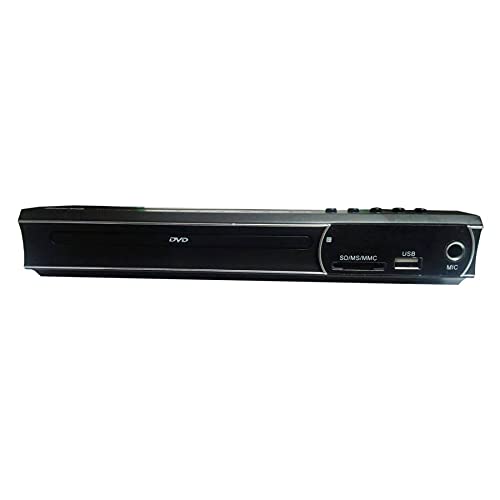
Figure 3: Remote Control for the DVD-2019 Player
The remote control allows you to operate all functions of the DVD player from a distance. It requires two AAA batteries (not included).
4. පිහිටුවීම
4.1 රූපවාහිනියකට සම්බන්ධ වීම
පහත සම්බන්ධතා ක්රම වලින් එකක් තෝරන්න:
- HDMI සම්බන්ධතාවය (හොඳම ගුණාත්මකභාවය සඳහා නිර්දේශ කෙරේ):
Connect one end of an HDMI cable (not included) to the HDMI OUT port on the DVD player and the other end to an HDMI IN port on your television. Select the corresponding HDMI input on your TV. - RCA සම්බන්ධතාවය:
Connect the yellow video cable to the VIDEO OUT port on the DVD player and the yellow video input on your TV. Connect the red and white audio cables to the AUDIO OUT (R/L) ports on the DVD player and the corresponding red and white audio input ports on your TV. Select the AV input on your TV.
4.2 බල සම්බන්ධතාවය
After connecting the video and audio cables, plug the power cable into the AC IN port on the rear of the DVD player and then into a wall outlet.
5. මෙහෙයුම් උපදෙස්
5.1 මූලික DVD නැවත ධාවනය
- Turn on your TV and the DVD player.
- Select the correct input source on your TV (e.g., HDMI 1, AV).
- Press the OPEN/CLOSE button on the front panel or remote to open the disc tray.
- ලේබල පැත්ත ඉහළට යොමු වන පරිදි DVD තැටියක් මෘදු ලෙස තැටියට දමන්න.
- Press the OPEN/CLOSE button again to close the tray. The disc will load automatically.
- Playback should begin automatically. If a menu appears, use the arrow keys and OK button on the remote to navigate.
5.2 USB/SD කාඩ් නැවත ධාවනය
- USB ෆ්ලෑෂ් ඩ්රයිව් එකක් USB පෝට් එකට හෝ SD කාඩ් පතක් ඉදිරිපස පුවරුවේ ඇති SD කාඩ් පතට ඇතුළු කරන්න.
- The player should automatically detect the device and display a media browser. If not, press the SOURCE or USB/CARD button on the remote.
- Use the arrow keys and OK button to navigate through your files (videos, music, photos).
- a තෝරන්න file සහ නැවත ධාවනය ආරම්භ කිරීමට OK ඔබන්න.
5.3 ශ්රව්ය සහ දෘශ්ය සැකසුම්
Access the player's setup menu by pressing the SETUP button on the remote control. Here you can adjust settings such as:
- වීඩියෝ සැකසුම්: Aspect ratio (4:3, 16:9), video output resolution.
- ශ්රව්ය සැකසුම්: Audio output mode (Stereo, Dolby Digital, DTS), dynamic range control.
- භාෂා සැකසුම්: OSD language, audio language, subtitle language.
6. නඩත්තු කිරීම
6.1 ඒකකය පිරිසිදු කිරීම
- මෘදු, වියළි රෙද්දකින් ක්රීඩකයාගේ බාහිර පෙනුම පිස දමන්න.
- දියර පිරිසිදු කරන්නන් හෝ එයරොසෝල් ඉසින භාවිතා නොකරන්න.
- For the disc tray, use a soft, lint-free cloth to gently remove dust.
6.2 තැටි හැසිරවීම
- Always hold discs by their edges.
- Keep discs clean and free from scratches. Use a soft cloth to wipe from the center outwards.
- භාවිතයේ නොමැති විට තැටි ඒවායේ නඩු වල ගබඩා කරන්න.
7. දෝශ නිරාකරණය
| ගැටලුව | විය හැකි හේතුව | විසඳුම |
|---|---|---|
| බලය නැත | බල කේබලය සම්බන්ධ කර නැත; බල සැපයුම දෝෂ සහිතයි. | බල කේබලය ආරක්ෂිතව සම්බන්ධ කර ඇති බව සහතික කර ගන්න. වෙනත් අලෙවිසැලක් උත්සාහ කරන්න. |
| පින්තූරයක් නැත | Incorrect TV input selected; video cable loose or faulty. | Select the correct HDMI/AV input on your TV. Check video cable connections. |
| ශබ්දයක් නැත | Audio cables loose or faulty; TV volume muted. | Check audio cable connections. Increase TV volume and ensure it's not muted. |
| තැටිය වාදනය නොවේ | තැටිය අපිරිසිදු, සීරීම් සහිත හෝ නොගැලපෙන ආකෘතියකි. | Clean the disc. Try a different disc. Ensure the disc format is supported (DVD). |
| දුරස්ථ පාලකය ක්රියා නොකරයි | බැටරි ක්රියා විරහිත වී හෝ වැරදි ලෙස ඇතුළු කර ඇත; දුරස්ථ පාලකය සහ වාදකය අතර බාධාවක්. | බැටරි මාරු කරන්න. නිවැරදි ධ්රැවීයතාව සහතික කරන්න. ඕනෑම බාධාවක් ඉවත් කරන්න. |
8. පිරිවිතර
| විශේෂාංගය | විස්තර |
|---|---|
| ආදර්ශ අංකය | DVD-2019 |
| වෙළඳ නාමය | BenQ |
| මාධ්ය වර්ගය | DVD |
| සම්බන්ධක වර්ගය | HDMI, RCA |
| සම්බන්ධතා තාක්ෂණය | HDMI, RCA, USB |
| සහාය දක්වන ශ්රව්ය ආකෘති | ඩොල්බි ඩිජිටල්, DTS, PCM |
| ගැළපෙන උපාංග | රූපවාහිනිය |
9. වගකීම් සහ සහාය
This BenQ DVD-2019 DVD Player comes with a standard manufacturer's warranty. Please refer to the warranty card included in your package for specific terms and conditions, including the warranty period and coverage details.
For technical support, service inquiries, or to obtain replacement parts, please contact BenQ customer service through their official website or the contact information provided on your warranty documentation. Keep your purchase receipt as proof of purchase for warranty claims.