1. හැඳින්වීම
The JVC HA-A5T Gumy Mini True Wireless Earbuds are designed for convenient, high-quality audio on the go. These compact and lightweight earbuds feature a Neodymium magnet driver for clear sound, Bluetooth 5.1 for stable wireless connection, and an IPX4 rain-proof rating for durability. They offer hands-free calling with voice assistant compatibility and simple one-button control.
ප්රධාන ලක්ෂණ:
- සංයුක්ත සහ සැහැල්ලු නිර්මාණය
- High sound quality with Neodymium magnet driver
- Bluetooth Version 5.1 for stable wireless connectivity
- Rain Proof (IPX4) for protection against splashes and sweat
- Up to 15 hours of total battery life (including charging case)
- Hands-free microphone with Voice Assistant compatibility
- පහසු මෙහෙයුම් සඳහා එක්-බොත්තම පාලනය
- Auto on/off/connect function
- Compatible with iOS, Android, and Windows devices
2. පැකේජ අන්තර්ගතය
කරුණාකර සියලුම අයිතම පැකේජයේ ඇති බවට වග බලා ගන්න:
- JVC HA-A5T True Wireless Earbuds (Left and Right)
- අයකිරීමේ නඩුව
- Regular Silicon Earpieces (S/M/L sizes)
- USB ආරෝපණ කේබලය

Image: The retail packaging for the JVC HA-A5T Gumy Mini True Wireless Earbuds, showing the earbuds and charging case.
3. පිහිටුවීම
3.1 ඉයර්බඩ් සහ කේස් ආරෝපණය කිරීම
Before first use, fully charge the earbuds and the charging case. The charging case provides additional power to the earbuds, extending their usage time.
- ආරෝපණ පෙට්ටියේ ඉයර්බඩ් ඒවායේ අදාළ ස්ලොට් වලට දමන්න. ඒවා නිවැරදිව සවි කර ඇති බවට වග බලා ගන්න.
- සපයන ලද USB ආරෝපණ කේබලය නඩුවේ ආරෝපණ වරායට සහ USB බල ප්රභවයකට (උදා: පරිගණකය, USB බිත්ති ඇඩැප්ටරය) සම්බන්ධ කරන්න.
- The indicator lights on the case will show the charging status. Refer to the indicator light section for details.
- Once fully charged, disconnect the USB cable. The earbuds and case together provide up to 15 hours of playback.

Image: The JVC HA-A5T earbuds placed inside their open charging case, ready for charging.
3.2 බ්ලූටූත් උපාංගයක් සමඟ යුගල කිරීම
The earbuds feature an auto on/off/connect function for seamless pairing.
- ආරෝපණ පෙට්ටිය විවෘත කරන්න. ඉයර්බඩ් ස්වයංක්රීයව ක්රියාත්මක වී යුගල කිරීමේ ප්රකාරයට ඇතුළු වේ.
- ඔබගේ බ්ලූටූත් උපාංගයේ (ස්මාර්ට්ෆෝන්, ටැබ්ලටය, ආදිය), බ්ලූටූත් සක්රීය කර පවතින උපාංග සොයන්න.
- Select "JVC HA-A5T" from the list of found devices.
- Once connected, a confirmation sound or indicator will notify you. The earbuds will automatically reconnect to the last paired device when taken out of the case.
3.3 Selecting the Right Earpieces
For optimal sound quality and comfort, choose the silicone earpieces that best fit your ears. The package includes Small (S), Medium (M), and Large (L) sizes.
- Try each size to find the one that creates a snug seal in your ear canal. A good seal enhances bass response and noise isolation.
- ඉයර්බඩය ඔබේ කනට මෘදු ලෙස ඇතුළු කර එය ආරක්ෂිත සහ සුවපහසු බවක් දැනෙන තුරු තරමක් කරකවන්න.
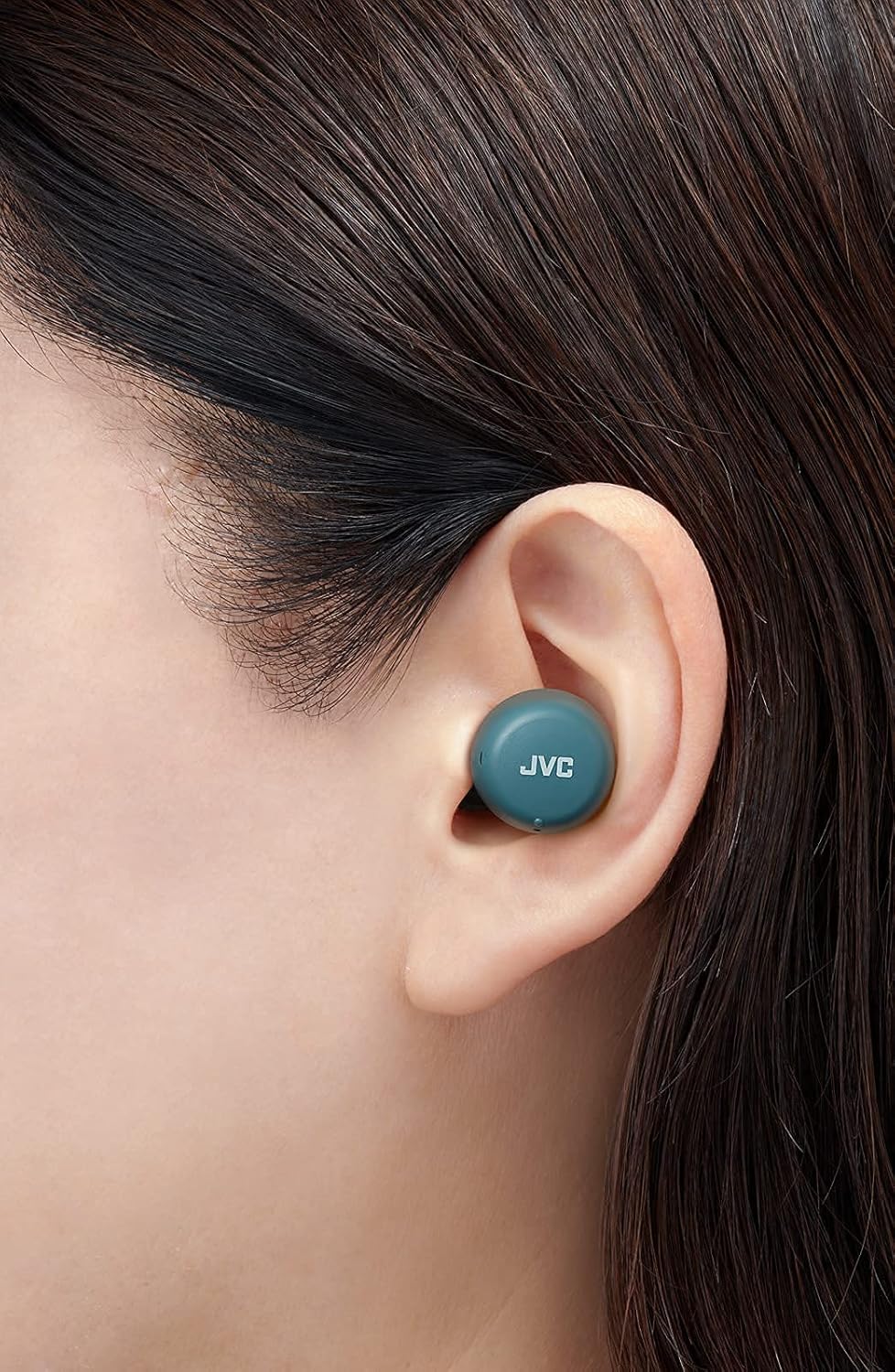
රූපය: සමීප ඡායාරූපයක් view of a JVC HA-A5T earbud correctly positioned in a user's ear, demonstrating proper fit.
4. ඉයර්බඩ් ක්රියාත්මක කිරීම
4.1 බලය සක්රිය / අක්රිය
- බල ගැන්වීම: Open the charging case or press and hold the button on each earbud for approximately 2 seconds.
- විදුලිය විසන්ධි කිරීම: Place the earbuds back into the charging case and close the lid, or press and hold the button on each earbud for approximately 5 seconds.
4.2 Basic Controls (One-Button Operation)
Each earbud features a multi-function button for controlling playback and calls.
| කාර්යය | ක්රියාව |
|---|---|
| වාදනය / විරාමය | ඉයර්බඩ් දෙකෙන් එකක බොත්තම වරක් ඔබන්න. |
| ඊළඟ ධාවන පථය | දකුණු ඉයර්බඩයේ බොත්තම දෙවරක් ඔබන්න. |
| පෙර ධාවන පථය | වම් ඉයර්බඩයේ බොත්තම දෙවරක් ඔබන්න. |
| ඇමතුමට පිළිතුරු දෙන්න/අවසන් කරන්න | Press the button on either earbud once during an incoming call or active call. |
| ඇමතුම ප්රතික්ෂේප කරන්න | ලැබෙන ඇමතුමක් අතරතුර ඉයර්බඩ් දෙකෙහිම බොත්තම තත්පර 2ක් පමණ ඔබාගෙන සිටින්න. |
| හඬ සහායක සක්රිය කරන්න | Press the button on either earbud three times. |
4.3 තනි ඉයර්බඩ් භාවිතය
The JVC HA-A5T earbuds support single earbud use, specifically with the left earbud. This allows you to use one earbud while the other is charging or stored.
- To use only the left earbud, simply take it out of the case. It will automatically connect to your device if previously paired.
- The right earbud cannot be used independently for calls or music playback.
4.4 හ oice සහකාර
Activate your smartphone's voice assistant (e.g., Siri, Google Assistant) directly from the earbuds.
- Press the multi-function button on either earbud three times to activate the voice assistant.
- Speak your command after the prompt.

Image: A woman wearing JVC HA-A5T earbuds, demonstrating their use for listening to audio.
5. නඩත්තු කිරීම
5.1 පිරිසිදු කිරීම
නිතිපතා පිරිසිදු කිරීම ඔබේ ඉයර්බඩ් වල ක්රියාකාරිත්වය සහ ආයු කාලය පවත්වා ගැනීමට උපකාරී වේ.
- මෘදු, වියලි, ලින්ට් රහිත රෙද්දකින් ඉයර්බඩ් සහ ආරෝපණ පෙට්ටිය මෘදු ලෙස පිස දමන්න.
- Remove the silicone earpieces and clean them with a mild soap solution if necessary. Rinse thoroughly and dry completely before reattaching.
- Do not use harsh chemicals, abrasive materials, or immerse the earbuds or case in water.
5.2 ගබඩා කිරීම
භාවිතයේ නොමැති විට, දූවිලි, හානිවලින් ආරක්ෂා වීමට සහ ආරෝපණය කර තබා ගැනීමට ඉයර්බඩ් ඒවායේ ආරෝපණ පෙට්ටියේ ගබඩා කරන්න.
- සෘජු හිරු එළියෙන් සහ අධික උෂ්ණත්වයන්ගෙන් ඈත්ව සිසිල් වියළි ස්ථානයක ගබඩා කරන්න.
5.3 ජල ප්රතිරෝධය (IPX4)
The earbuds are rated IPX4, meaning they are protected against splashing water from any direction. This makes them suitable for workouts and light rain.
- ඉයර්බඩ් වතුරේ ගිල්වන්න එපා.
- ආරෝපණ සම්බන්ධතා වලට හානි වීම වැළැක්වීම සඳහා ඉයර්බඩ් නැවත ආරෝපණ පෙට්ටියට දැමීමට පෙර ඒවා වියළී ඇති බවට වග බලා ගන්න.

Image: A woman engaged in physical activity while wearing the JVC HA-A5T earbuds, highlighting their sweat and rain-proof capabilities.
6. දෝශ නිරාකරණය
If you encounter issues with your JVC HA-A5T earbuds, refer to the following common solutions:
| ගැටලුව | විය හැකි හේතුව | විසඳුම |
|---|---|---|
| ඉයර්බඩ් ක්රියාත්මක නොවේ. | අඩු බැටරි. | ඉයර්බඩ් ආරෝපණ පෙට්ටියේ තබා සම්පූර්ණයෙන්ම ආරෝපණය කරන්න. |
| උපාංගය සමඟ යුගල කළ නොහැක. | උපාංගයේ බ්ලූටූත් ක්රියාවිරහිතයි; ඉයර්බඩ් යුගල කිරීමේ ආකාරයෙන් නොමැත; පෙර යුගල කළ උපාංගය බාධා කරයි. | Ensure Bluetooth is enabled on your device. Place earbuds in case, close, then open to re-enter pairing mode. Forget "JVC HA-A5T" from your device's Bluetooth list and try pairing again. |
| ශබ්දයක් නැත හෝ අඩු පරිමාවක් නැත. | Volume too low on device; earbuds not properly seated; poor earpiece fit. | Increase volume on your connected device. Ensure earbuds are properly inserted. Try different earpiece sizes for a better seal. |
| අතරමැදි සම්බන්ධතාවය හෝ ශ්රව්ය බිඳවැටීම්. | Distance from device; interference; low earbud battery. | Keep earbuds within 10 meters (33 feet) of your device. Avoid areas with strong Wi-Fi or other Bluetooth signals. Charge earbuds fully. |
| මයික්රෆෝනය ක්රියා නොකරයි. | මයික්රෆෝනය අවහිර කර ඇත; උපාංග සැකසුම්. | Ensure the microphone port is not obstructed. Check your device's audio input settings to confirm "JVC HA-A5T" is selected. |
7. පිරිවිතර
| විශේෂාංගය | පිරිවිතර |
|---|---|
| මාදිලියේ නම | HA-A5T |
| සම්බන්ධතා තාක්ෂණය | බ්ලූටූත්, රැහැන් රහිත |
| බ්ලූටූත් අනුවාදය | 5.1 |
| ජල ප්රතිරෝධක මට්ටම | IPX4 (Rain Proof) |
| බැටරි ආයු කාලය | පැය 15ක් දක්වා (ආරෝපණ නඩුවක් සමඟ) |
| බලශක්ති ප්රභවය | Battery-Powered (2 Lithium Polymer batteries included) |
| මයික්රෆෝන ආකෘතිය | බිල්ට්-ඉන් |
| පාලන වර්ගය | One-button control, Voice Control |
| ද්රව්ය | ප්ලාස්ටික් |
| ආකෘති සාධකය | කනේ |
| සම්බාධනය | 16 ඕම් |
| අයිතමයේ බර | 90 ග්රෑම් |
| නිෂ්පාදන මානයන් | 40 x 47 x 23 සෙ.මී |
| ඇතුළත් සංරචක | Regular Silicon Earpieces (S/M/L), USB charging cable, Charging case |
8. වගකීම් සහ සහාය
For warranty information and customer support, please refer to the warranty card included with your product or visit the official JVC webවෙබ් අඩවිය. ඕනෑම වගකීම් හිමිකම් සඳහා ඔබේ මිලදී ගැනීමේ සාක්ෂි තබා ගන්න.
- මාර්ගගත සහාය: Visit the JVC official webනිතර අසන ප්රශ්න, ධාවක බාගැනීම් සහ සම්බන්ධතා තොරතුරු සඳහා අඩවිය.
- සබඳතා තොරතුරු: Refer to your product packaging or the JVC webකලාපීය පාරිභෝගික සේවා සම්බන්ධතා තොරතුරු සඳහා අඩවිය.


