1. හැඳින්වීම
This manual provides comprehensive instructions for the installation, operation, and maintenance of your Intel Core i7-12700K Gaming Desktop Processor. The Intel Core i7-12700K is a high-performance processor designed for gaming, content creation, and demanding multitasking, featuring Intel's performance hybrid architecture with 12 cores (8 Performance-cores + 4 Efficient-cores) and integrated Intel UHD 770 Graphics.
It is compatible with Intel 600 series and 700 series chipset-based motherboards and offers up to 5.0 GHz unlocked clock speed for enhanced performance.
පැකේජයේ අන්තර්ගතය:
- Intel Core i7-12700K Processor
- ලියකියවිලි (මෙම අත්පොත, වගකීම් තොරතුරු)
- Note: A CPU cooler is not included and must be purchased separately.

Figure 1.1: The retail packaging for the Intel Core i7-12700K processor, showcasing the product branding and model information.
2 ආරක්ෂිත තොරතුරු
Please read and understand all safety precautions before installing or operating the processor. Failure to do so may result in personal injury or damage to your system components.
- විද්යුත් ස්ථිතික විසර්ජනය (ESD) වැළැක්වීම: Always handle the processor by its edges. Wear an anti-static wrist strap and work on an anti-static mat to prevent ESD damage.
- විදුලිය විසන්ධි කිරීම: Ensure your computer system is completely powered off and unplugged from the wall outlet before beginning any installation.
- සංරචක අනුකූලතාව: Verify that your motherboard, RAM, and power supply are compatible with the Intel Core i7-12700K processor. Refer to your motherboard's manual for specific compatibility lists.
- තාප කළමනාකරණය: An adequate CPU cooler is essential for proper operation and longevity. Ensure the cooler is correctly installed and thermal paste is applied.
- වාතාශ්රය: Ensure your computer case has sufficient airflow to dissipate heat generated by the processor and other components.
3. පිහිටුවීම සහ ස්ථාපනය
This section guides you through the physical installation of the Intel Core i7-12700K processor into your motherboard.
3.1. Preparing Your Motherboard
- Unpack Motherboard: Carefully remove your motherboard from its packaging and place it on an anti-static surface.
- Locate CPU Socket: Identify the LGA1700 CPU socket on your motherboard.
- Open Socket Lever: Gently push down and away on the small metal lever next to the CPU socket to release it. Lift the load plate.
- ආරක්ෂිත ආවරණය ඉවත් කරන්න: The socket will have a plastic protective cover. Do not touch the pins inside the socket.
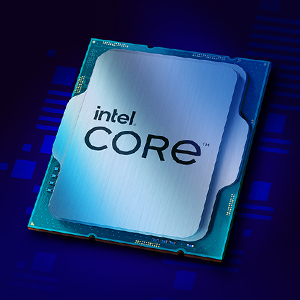
රූපය 3.1: සමීප රූපයක් view of the Intel Core i7 processor chip, showing its metallic surface and integrated components.
3.2. සකසනය ස්ථාපනය කිරීම
- Handle Processor: Remove the Intel Core i7-12700K processor from its packaging, holding it only by the edges. Avoid touching the gold contacts on the underside or the top surface.
- Align Processor: Align the two notches on the sides of the processor with the corresponding keys on the CPU socket. Ensure the small golden triangle on one corner of the processor aligns with the triangle on the socket.
- Gently Place: Carefully lower the processor straight down into the socket. Do not force it. It should sit flush without resistance.
- Close Socket: Lower the load plate back down over the processor. Push the metal lever back into its locked position. This will secure the processor firmly in place.
3.3. Installing the CPU Cooler
A CPU cooler is critical for dissipating heat from the processor. Follow the instructions provided with your specific CPU cooler for installation. General steps include:
- තාප පේස්ට් යොදන්න: If your cooler does not have pre-applied thermal paste, apply a small amount (pea-sized dot) to the center of the processor's integrated heat spreader (IHS).
- Mount Cooler: Carefully place the cooler onto the CPU, aligning it with the mounting holes or brackets on the motherboard.
- ආරක්ෂිත සිසිලකය: Fasten the cooler securely according to its manufacturer's instructions. Ensure even pressure is applied to prevent uneven thermal paste spread.
- විදුලි පංකාව සම්බන්ධ කරන්න: CPU සිසිලකයේ විදුලි පංකා කේබලය ඔබේ මවු පුවරුවේ "CPU_FAN" ශීර්ෂයට සම්බන්ධ කරන්න.
4. ඔබේ පද්ධතිය ක්රියාත්මක කිරීම
Once the processor and cooler are installed, you can proceed with assembling the rest of your computer system and powering it on.
- පළමු ඇරඹුම: After assembling your PC, connect a monitor, keyboard, and mouse. Power on the system.
- BIOS/UEFI වින්යාසය: Access your motherboard's BIOS/UEFI settings (usually by pressing DEL or F2 during boot). Verify that the processor is recognized correctly. You may need to enable XMP/DOCP for your RAM.
- මෙහෙයුම් පද්ධති ස්ථාපනය: Install your preferred operating system (e.g., Windows 10/11, Linux).
- ධාවක ස්ථාපනය: Install the latest chipset drivers from your motherboard manufacturer's website and the latest graphics drivers for the integrated Intel UHD 770 Graphics from Intel's official webඅඩවිය.
- කාර්ය සාධන අධීක්ෂණය: Utilize software tools (e.g., Intel Extreme Tuning Utility, HWMonitor) to monitor CPU temperatures and clock speeds to ensure optimal performance and stability.

රූපය 4.1: හිටපු කෙනෙක්ample of a multi-monitor setup, illustrating the capabilities of the Intel Core i7-12700K processor for gaming, streaming, and multitasking.
5. නඩත්තු කිරීම
Proper maintenance ensures the longevity and stable performance of your Intel Core i7-12700K processor.
- දූවිලි ඉවත් කිරීම: Regularly clean dust from your CPU cooler and case fans using compressed air. Dust buildup can impede airflow and lead to higher temperatures.
- Thermal Paste Replacement: Consider replacing thermal paste every 2-3 years, or if you remove and re-install your CPU cooler, to maintain optimal thermal conductivity.
- මෘදුකාංග යාවත්කාලීන: Keep your operating system, motherboard BIOS/UEFI, and Intel drivers updated to benefit from performance improvements, security patches, and bug fixes.
- පද්ධති අධීක්ෂණය: Periodically check CPU temperatures and usage patterns. Unusual spikes or consistently high temperatures may indicate a cooling issue.
6. දෝශ නිරාකරණය
මෙම කොටසේදී ඔබේ සකසනය සමඟ ඔබට මුහුණ දීමට සිදුවිය හැකි පොදු ගැටළු සාකච්ඡා කෙරේ.
| ගැටලුව | විය හැකි හේතුව | විසඳුම |
|---|---|---|
| පද්ධතිය ආරම්භ නොවේ / දර්ශනයක් නොමැත | CPU not seated correctly, power cables loose, incompatible RAM/motherboard. | Re-seat CPU, check all power connections (24-pin ATX, 8-pin CPU), verify RAM and motherboard compatibility. |
| ඉහළ CPU උෂ්ණත්වයන් | Improper cooler installation, insufficient thermal paste, poor case airflow. | Ensure cooler is securely mounted, re-apply thermal paste, improve case ventilation. |
| පද්ධතිය බිඳ වැටීම් හෝ කැටි ගැසීම් | Overheating, unstable overclock, outdated drivers, faulty RAM. | Monitor temperatures, reset BIOS to default, update drivers, test RAM with diagnostic tools. |
| Poor performance in applications/games | Outdated drivers, background processes, power settings, thermal throttling. | Update drivers, close unnecessary background apps, set Windows power plan to "High Performance", check temperatures. |
7. පිරිවිතර
Detailed technical specifications for the Intel Core i7-12700K processor:
- ප්රොසෙසර මූලික සංඛ්යාතය: 3.6 GHz
- Max Turbo Frequency: 5.0 GHz දක්වා
- මුළු හරය: 12 (8 Performance-cores, 4 Efficient-cores)
- Total Threads: 20
- ප්රොසෙසර ග්රැෆික්ස්: Intel UHD Graphics 770
- Graphics Base Frequency: 300 MHz
- Graphics Max Dynamic Frequency: 1.45 GHz
- හැඹිලිය: 25 MB ඉන්ටෙල් ස්මාර්ට් හැඹිලිය
- TDP: 125W (සකසනයේ මූලික බලය)
- Max Turbo Power: 190W
- සොකට්: LGA1700
- Memory Types: Up to DDR5 4800 MT/s, DDR4 3200 MT/s
- Max Memory Size: 128 GB
- PCI Express Revision: 5.0 සහ 4.0
- PCI Express සැකසුම්: Up to 1x16+4, 2x8+4
- Intel Optane Memory Supported: ඔව්
- Intel Thermal Velocity Boost: නැත
- Intel Turbo Boost Max Technology 3.0: ඔව්
- Intel Hyper-Threading තාක්ෂණය: ඔව්
- Intel Virtualization Technology (VT-x): ඔව්
- Intel VT-d for Directed I/O (VT-d): ඔව්
- Intel AES නව උපදෙස්: ඔව්
- නිෂ්පාදන මානයන්: අඟල් 4.57 x 1.73 x 3.98
- අයිතමයේ බර: අවුන්ස 2.82 කි
8. වගකීම් සහ සහාය
Intel provides a limited warranty for its processors. For detailed warranty terms and conditions, please refer to the official Intel webවෙබ් අඩවිය හෝ ඔබේ නිෂ්පාදනය සමඟ ඇතුළත් වගකීම් කාඩ්පත.
- වගකීම් කාලය: Typically 3 years from the date of purchase for boxed processors.
- වගකීම් හිමිකම්: Contact Intel Customer Support or your point of purchase for warranty service.
- තාක්ෂණික සහාය: For technical assistance, driver downloads, and troubleshooting guides, visit the official Intel Support webඅඩවිය: www.intel.com/සහාය
- Product Compatibility Tool: To find compatible motherboards and other related information, use the Intel Product Compatibility Tool: Intel නිෂ්පාදන අනුකූලතා මෙවලම


