1. හැඳින්වීම
Thank you for choosing the Aurora AU200MA 200-Sheet Auto-Feed Micro-Cut Paper Shredder. This manual provides essential information for the safe and efficient operation, maintenance, and troubleshooting of your new shredder. Please read these instructions thoroughly before use and retain them for future reference.

Figure 1.1: Aurora AU200MA Paper Shredder
The Aurora AU200MA is designed for commercial and home office use, offering high-security micro-cut shredding for sensitive documents. It features an automatic feed for up to 200 sheets and a manual feed slot for up to 10 sheets, including credit cards and small paper clips.
2. වැදගත් ආරක්ෂක උපදෙස්
ගින්න, විදුලි කම්පනය හෝ තුවාල ඇතිවීමේ අවදානම අවම කිරීම සඳහා, මෙම උපකරණය භාවිතා කරන විට සෑම විටම මූලික ආරක්ෂක පියවරයන් අනුගමනය කරන්න:
- Read all instructions before operating the shredder.
- ළමයින් සහ සුරතල් සතුන් ඉරා දැමීමෙන් ඈත් කරන්න.
- ලිහිල් ඇඳුම්, ආභරණ, හිසකෙස් සහ අත් කඩදාසි ඇතුල් කිරීමේ ස්ථානයෙන් ඈත් කර තබන්න.
- Do not spray any aerosol-based products into or around the shredder.
- Do not shred metal objects, cardboard, or plastic other than credit cards.
- විදුලි රැහැනට හානි සිදුවුවහොත් ඉරීම යන්ත්රය ක්රියාත්මක නොකරන්න.
- අපද්රව්ය බඳුන ගෙනයාමට, පිරිසිදු කිරීමට හෝ හිස් කිරීමට පෙර සෑම විටම ඉරීම යන්ත්රය විසන්ධි කරන්න.
- ඉරීම ස්ථාවර, සමතලා මතුපිටක් මත තබා ඇති බවට වග බලා ගන්න.
3. නිෂ්පාදන අවසන්view
3.1 සංරචක
- Auto-Feed Tray: For automatic shredding of up to 200 sheets.
- අතින් පෝෂක ස්ලොට්: For manual shredding of up to 10 sheets, credit cards, and small paper clips.
- පාලන පුවරුව: Features power button and indicator lights.
- අපද්රව්ය බඳුන: 8.5-gallon pullout bin for shredded materials.
- වාත්තුකරුවන්: For easy mobility of the unit.
3.2 පාලන පැනලය සහ දර්ශක

රූපය 3.1: පාලක පැනලය අවසන්view
The control panel includes various LED indicators to communicate the shredder's status:
- සුදානමින් සිටීම: ෂ්රෙඩරය ක්රියාත්මක කර ක්රියාත්මක වීමට සූදානම් බව අඟවයි.
- උනුසුම් වීම: Illuminates when the shredder has exceeded its continuous run time and needs to cool down.
- Bin-full: Indicates the waste bin is full and needs to be emptied.
- අධි බර: Lights up if too much paper is inserted, triggering the anti-jam auto-reverse function.
- දොර විවෘත: Indicates the waste bin is not properly closed or inserted.
4. පිහිටුවීම
- ෂ්රෙඩරය ඉවත් කරන්න: ඉරීම එහි ඇසුරුම්වලින් ප්රවේශමෙන් ඉවත් කරන්න.
- ෂ්රෙඩරය ස්ථානගත කරන්න: Place the shredder on a flat, stable surface. The integrated casters allow for easy movement.
- සම්බන්ධක බලය: බල කේබලය සම්මත 120V AC අලෙවිසැලකට සම්බන්ධ කරන්න.
- Ensure Bin is Closed: Make sure the pullout waste bin is fully and correctly inserted into the shredder. The "Door Open" indicator should not be lit.
5. මෙහෙයුම් උපදෙස්
5.1 Auto-Feed Shredding

Figure 5.1: Auto-Feed Tray with Documents
The auto-feed feature allows for convenient shredding of multiple sheets without manual feeding.
- ස්වයංක්රීයව පෝෂණය වන තැටි කවරය විවෘත කරන්න.
- Stack up to 200 sheets of paper neatly into the auto-feed tray. Ensure the paper is free of staples, paper clips (except small ones in manual feed), and other foreign objects.
- Close the auto-feed tray cover. The shredder will automatically begin processing the documents.
- The shredder has a continuous run time of 60 minutes. After this period, it may enter an overheat state to cool down.
5.2 Manual Feed Shredding

Figure 5.2: Manual Feed Slot and Shredding Capabilities
For smaller quantities of paper or other shreddable items:
- Insert up to 10 sheets of paper into the manual feed slot.
- The manual feed slot can also shred credit cards and small paper clips. Insert these items one at a time into the center of the manual feed slot.
5.3 Anti-Jam Auto-Reverse
The shredder is equipped with an anti-jam auto-reverse function. If too much paper is inserted, the shredder will automatically reverse to clear the jam. If a jam persists, press the reverse button on the control panel to manually clear the paper.
5.4 Auto Power-Sleep
For energy efficiency, the shredder will automatically enter a power-sleep mode after a period of inactivity. It will reactivate when paper is detected or a button is pressed.
6. නඩත්තු කිරීම
6.1 කසළ බඳුන හිස් කිරීම

Figure 6.1: Pullout Waste Bin
When the "Bin-full" indicator illuminates, the waste bin needs to be emptied.
- Ensure the shredder is in standby mode or unplugged.
- Gently pull out the 8.5-gallon waste bin from the front of the shredder.
- ඉරා දැමූ ද්රව්ය බැහැර කරන්න.
- Slide the waste bin back into the shredder until it clicks securely into place. Ensure the "Door Open" indicator is off.
6.2 Shredder Oiling
Regular oiling of the shredder blades is recommended to maintain optimal performance and extend the life of your micro-cut shredder. Use shredder oil specifically designed for paper shredders.
- Apply a thin line of shredder oil across the paper entry slot.
- Run a few sheets of paper through the manual feed slot to distribute the oil.
- Repeat this process after every 30 minutes of accumulated shredding or when you notice a decrease in performance.
6.3 පිරිසිදු කිරීම
මෘදු වියළි රෙද්දකින් ඉරීමේ යන්ත්රයේ පිටත කොටස පිස දමන්න. උල්ෙල්ඛ පිරිසිදු කරන්නන් හෝ ද්රාවක භාවිතා නොකරන්න.
7. දෝශ නිරාකරණය
| ගැටලුව | විය හැකි හේතුව | විසඳුම |
|---|---|---|
| ෂ්රෙඩර් ක්රියා නොකරයි. | විදුලිය නැත; අපද්රව්ය බඳුන නිසි ලෙස ඇතුළත් කර නැත; අධික උනුසුම් ආරක්ෂාව සක්රිය කර ඇත. | Check power connection; Ensure waste bin is fully closed (Door Open indicator off); Allow shredder to cool down if Overheat indicator is on. |
| කඩදාසි තදබදය. | වැඩිපුර කඩදාසි ඇතුළත් කර ඇත; කඩදාසි කෙළින්ම ඇතුළු කර නැත. | The shredder has an anti-jam auto-reverse function. If it persists, press the reverse button on the control panel to manually clear the paper. Reduce the amount of paper for future shredding. |
| ක්රියාත්මක වන විට ෂ්රෙඩරය නතර වේ. | Overheat protection activated; Waste bin full. | Allow shredder to cool down if Overheat indicator is on; Empty the waste bin if Bin-full indicator is on. |
| Shredded material is not fine enough. | Not applicable (Micro-cut shredder). | The Aurora AU200MA is a micro-cut shredder, producing tiny particles (P-5 security level). |
8. පිරිවිතර
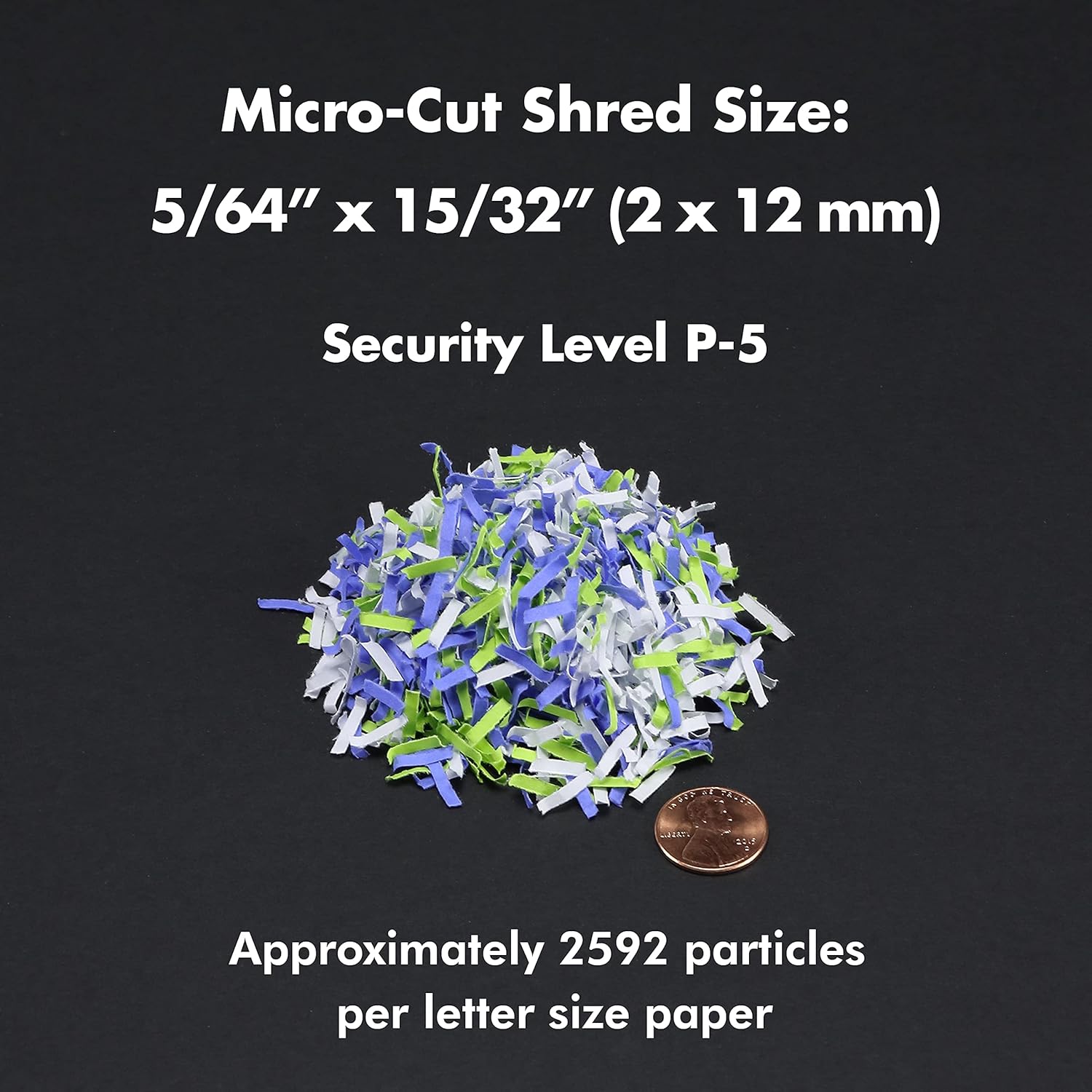
Figure 8.1: Micro-Cut Shred Size and Security Level
- ආකෘතිය: AU200MA
- ඉරීම වර්ගය: මයික්රො-කට්
- ඉරීම ප්රමාණය: 5/64" x 15/32" (2 x 12 mm)
- ආරක්ෂක මට්ටම: P-5
- ස්වයංක්රීය පෝෂණ ධාරිතාව: තහඩු 200 ක් දක්වා
- අතින් පෝෂක ධාරිතාව: තහඩු 10 ක් දක්වා
- අඛණ්ඩ ධාවන කාලය: 60 විනාඩි
- සිසිල් කාලය: Approximately 30-40 minutes (after 60 min continuous use)
- කසළ බඳුන් ධාරිතාව: ගැලුම් 8.5 කි
- කෑලි: Paper, Credit Cards, Small Paper Clips
- වෙළුමtage: 120V AC
- සංඛ්යාතය: 60 Hz
- Product Dimensions (H x W x L): 22.83" x 14.02" x 18.35"
- අයිතමයේ බර: රාත්තල් 38.1
9. වගකීම් සහ සහාය
For warranty information or technical support, please refer to the warranty card included with your product or visit the official Aurora website. You may also contact Aurora customer service directly for assistance.
Aurora Customer Service: Please refer to your product packaging or the official Aurora webනවතම සම්බන්ධතා තොරතුරු සඳහා අඩවිය.


