හැඳින්වීම
The HTC True Wireless Earbuds 2 offer a seamless audio experience with advanced features designed for comfort and convenience. These earbuds utilize the latest Bluetooth 5.1 technology for instant pairing and stable connections across various devices. Enjoy extended listening times, intuitive touch controls, and a comfortable, ergonomic fit for all-day use.

Image: HTC True Wireless Earbuds 2 in their pink charging case, showcasing සංයුක්ත නිර්මාණය.

Image: A display of HTC True Wireless Earbuds 2 in three available colors: white, black, and pink.
වීඩියෝ: නිලධාරියෙක් අවසන්view of the HTC True Wireless Bluetooth Earbuds, highlighting key features and design.
පෙට්ටියේ ඇති දේ
Your HTC True Wireless Earbuds 2 package includes the following items:
- HTC True Wireless Earbuds 2 (Left and Right)
- USB-C ආරෝපණ කේබලය
- Rubber Eartips (Two pairs: Large and Small sizes, in addition to the pre-installed medium size)
- අයකිරීමේ නඩුව
Video: An unboxing video for the HTC True Wireless Earbuds 2, showing the contents of the package.
සැලසුම
1. ඉයර්බඩ් සහ කේස් ආරෝපණය කිරීම
Before first use, ensure both the earbuds and the charging case are fully charged. Connect the provided USB-C cable to the charging port on the case and plug the other end into a compatible USB power source. The indicator light on the case will show charging status. A full charge provides up to 8 hours of listening time for the earbuds and up to 32 hours total with the charging case.

Image: Pink HTC True Wireless Earbuds 2 and their charging case, illustrating the 30-hour combined battery life.
2. ඔබගේ උපාංගය සමඟ යුගල කිරීම
- ආරෝපණ පෙට්ටිය විවෘත කරන්න. ඉයර්බඩ් ස්වයංක්රීයව යුගල කිරීමේ ප්රකාරයට ඇතුළු වනු ඇත.
- ඔබගේ උපාංගයේ (ස්මාර්ට්ෆෝන්, ටැබ්ලටය, ලැප්ටොප්), බ්ලූටූත් සැකසුම් වෙත යන්න.
- Select "HTC True Wireless Earbuds 2" from the list of available devices.
- සම්බන්ධ වූ පසු, ඔබට ශ්රව්ය විමසුමක් ඇසෙනු ඇති අතර, ඉයර්බඩ් වල දර්ශක ආලෝකය වෙනස් වනු ඇත.
The earbuds utilize Bluetooth 5.1 for quick and stable connections. They are compatible with iOS, Android, and Windows devices.

Image: A diagram illustrating the quick pairing process and wide compatibility of the HTC True Wireless Earbuds 2 with various devices.
3. Achieving Optimal Comfort
The earbuds are ergonomically crafted for a secure and comfortable in-ear fit. Experiment with the included rubber eartips (small, medium, large) to find the size that provides the best seal and comfort for your ears. A proper fit enhances sound quality and noise isolation.

Image: A woman wearing pink HTC True Wireless Earbuds 2 while working on a laptop, emphasizing the ultra-lightweight comfort and ergonomic design.
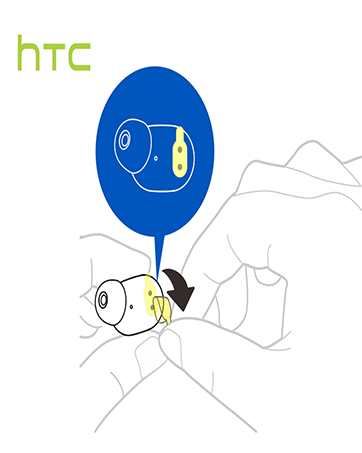
Image: A diagram illustrating the correct method for inserting an earbud to ensure a secure and comfortable fit.
මෙහෙයුම් උපදෙස්
ස්පර්ශ පාලන
The HTC True Wireless Earbuds 2 feature intuitive touch controls on each earbud for easy management of your audio and calls:
- වාදනය/විරාමය: වම්/දකුණු ඉයර්බඩ් එක වරක් තට්ටු කරන්න.
- පිළිතුරු ඇමතුම: වම් ඉයර්බඩ් එක වරක් තට්ටු කරන්න.
- ඇමතුම විසන්ධි කරන්න: දකුණු ඉයර්බඩ් එක වරක් තට්ටු කරන්න.
- ඇමතුම ප්රතික්ෂේප කරන්න: Tap and hold left/right earbud for 2 seconds.
- පෙර ධාවන පථය: Tap and hold left earbud for 2 seconds.
- ඊළඟ ධාවන පථය: Tap and hold right earbud for 2 seconds.
- පරිමාව: Tap left earbud twice.
- ශබ්දය පහළට: Tap right earbud twice.
- හ oice සහකාර සක්රිය කරන්න: Tap left/right earbud three times.

Image: A visual guide detailing the simple touch controls for the pink HTC True Wireless Earbuds 2.

Image: A visual guide detailing the simple touch controls for the black HTC True Wireless Earbuds 2.
තනි කරාබු භාවිතය
You can use either earbud independently for mono audio or calls. Simply take one earbud out of the case, and it will automatically connect to your device. This feature allows for versatility depending on your listening needs.

Image: Two smartphones connected to individual pink HTC True Wireless Earbuds 2, showcasing the versatility of using one or both earbuds.

Image: A diagram illustrating the versatility of using one or both black HTC True Wireless Earbuds 2 with different devices.
නඩත්තු කිරීම
පිරිසිදු කිරීම සහ රැකවරණය
- මෘදු, වියළි රෙද්දකින් ඉයර්බඩ් සහ ආරෝපණ පෙට්ටිය නිතිපතා පිරිසිදු කරන්න.
- කන් ඉඟි ඉවත් කර අවශ්ය නම් මෘදු සබන් හා වතුරෙන් පිරිසිදු කරන්න, නැවත සවි කිරීමට පෙර ඒවා සම්පූර්ණයෙන්ම වියළී ඇති බවට වග බලා ගන්න.
- උල්ෙල්ඛ ද්රව්ය හෝ දරුණු රසායනික ද්රව්ය භාවිතා කිරීමෙන් වළකින්න.
ජල ප්රතිරෝධය
The HTC True Wireless Earbuds 2 are IPX5 waterproof, meaning they are protected against low-pressure water jets from any direction. This makes them suitable for workouts and light rain. However, they are not designed for submersion in water.
දෝෂගවේෂණය
If you encounter any issues with your HTC True Wireless Earbuds 2, please refer to the following common solutions:
| ගැටලුව | විසඳුම |
|---|---|
| ඉයර්බඩ් යුගල නොවේ | Ensure earbuds are charged. Place them back in the case, close, then reopen to re-enter pairing mode. Check your device's Bluetooth settings and forget/remove previous connections if necessary. |
| එක් ඉයර්බඩ් එකකින් ශබ්දයක් නැත | Ensure both earbuds are charged. Try placing both back in the case and taking them out again. Re-pair with your device. |
| ස්පර්ශ පාලන ප්රතිචාර නොදක්වයි | Ensure earbuds are clean and dry. Restart your device and re-pair the earbuds. |
| දුර්වල ශබ්ද ගුණාත්මකභාවය | Adjust the eartips for a better seal. Ensure your device is within the 10m Bluetooth range. Check for interference from other wireless devices. |
පිරිවිතර
| විශේෂාංගය | විස්තර |
|---|---|
| මාදිලියේ නම | HTC True Wireless Earbuds 2 |
| අයිතම ආදර්ශ අංකය | HTC TWS3 |
| සම්බන්ධතා තාක්ෂණය | රැහැන් රහිත (බ්ලූටූත් 5.1) |
| බැටරි ආයු කාලය (ඉයර්බඩ්) | එක් ආරෝපණයකින් පැය 8ක් දක්වා |
| බැටරි ආයු කාලය (ආරෝපණ ආවරණයක් සහිතව) | පැය 32 දක්වා |
| ආරෝපණ කේස් බැටරි ධාරිතාව | 500 mAh |
| ජල ප්රතිරෝධක මට්ටම | IPX5 (ජල ප්රතිරෝධී) |
| පාලන වර්ගය | Touch Control (Volume, Play/Pause, Call Management, Voice Assistant) |
| කන් ස්ථානගත කිරීම | කනේ |
| සංඛ්යාත පරාසය | 20-20,000 Hz |
| අයිතමයේ බර | අවුන්ස 2.82 කි |
| නිෂ්පාදන මානයන් | අඟල් 1.71 x 1.71 x 1.36 |
වගකීම් සහ සහාය
HTC provides a 12-month warranty for the True Wireless Earbuds 2. For any support inquiries or warranty claims, please contact HTC customer service through their official webභාණ්ඩය මිලදී ගත් ස්ථානය හෝ සිල්ලර වෙළෙන්දා.
වැඩි විස්තර සඳහා, නිලධාරියා වෙත පිවිසෙන්න HTC Store on Amazon.