1. ආරක්ෂිත උපදෙස්
Please read these safety instructions carefully before using the product. Keep this manual for future reference.
- මෙම නිෂ්පාදනය ගෘහස්ථ භාවිතය සඳහා පමණක් නිර්මාණය කර ඇත. තෙතමනය හෝ අධික උෂ්ණත්වයන්ට නිරාවරණය නොවන්න.
- Do not attempt to open or modify the device. This may void the warranty and pose a safety risk.
- උපකරණය දරුවන්ගෙන් ඈත් කරන්න.
- Use only the provided micro-USB cable for charging.
- LED ආලෝක ප්රභවය දෙස කෙලින්ම බලන්න එපා.
2. පැකේජ අන්තර්ගතය
සියලුම අයිතම පැකේජයේ ඇති බවට වග බලා ගන්න:
- ANSMANN Under-Cabinet Light M
- Micro-USB ආරෝපණ කේබලය
- උපදෙස් අත්පොත
3. නිෂ්පාදන අවසන්view
The ANSMANN Under-Cabinet Light M is a versatile, rechargeable LED lamp designed for various indoor applications. It features a motion sensor, adjustable color temperatures, and a slim design for discreet placement.

Image 1: The ANSMANN Under-Cabinet Light M, showcasing its sleek, white design and integrated motion sensor.
ප්රධාන ලක්ෂණ:
- PIR චලන සංවේදකය: Automatically activates the light when motion is detected in low-light conditions.
- අන්ධකාර සංවේදකය: Ensures the light only activates in dark environments, conserving battery life.
- වෙනස් කළ හැකි වර්ණ උෂ්ණත්වය: Choose between 3 color temperatures (cool white, neutral white, warm white) or activate all LEDs for maximum brightness.
- පියවර රහිත අඳුරු කිරීම: Adjust brightness by holding down the control button.
- නැවත ආරෝපණය කළ හැකි බැටරි: Integrated battery for cordless operation, charged via micro-USB.
- චුම්බක සවි කිරීම: Easy installation and removal with a magnetic strip.

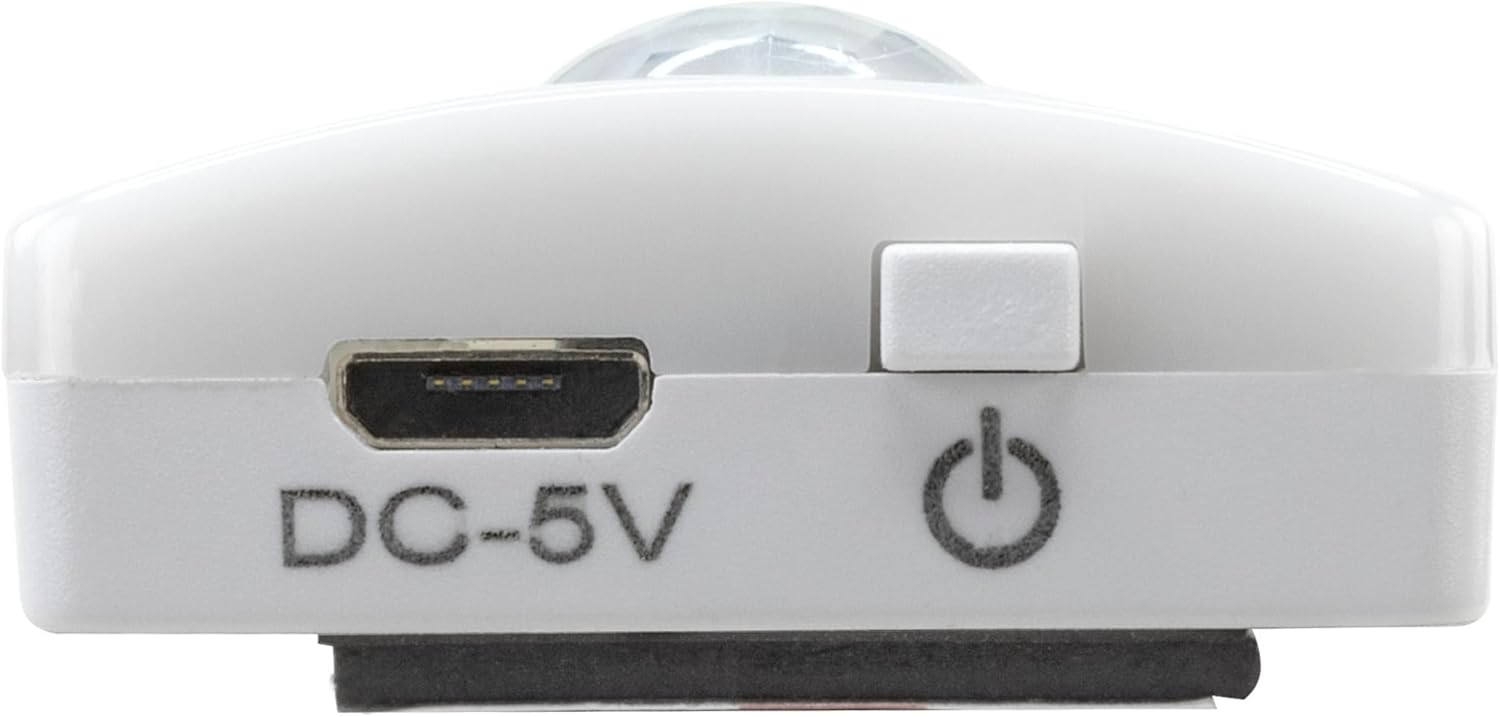
Image 2: Diagram illustrating the Micro-USB Port, On/Off button, and PIR motion sensor on the device.
4. පිහිටුවීම සහ ස්ථාපනය
The Under-Cabinet Light M offers flexible installation options using its integrated magnetic strip.
චුම්බක සවි කිරීම:
- Identify a suitable, clean, and dry surface for installation (e.g., inside a cabinet, under a shelf).
- The light comes with a fixed magnetic strip on its back. For non-metallic surfaces, use the included adhesive strip.
- Peel off the protective film from the adhesive strip and firmly press it onto the desired surface.
- Attach the Under-Cabinet Light M to the adhesive strip. The magnetic connection will hold it in place.
රූපය 3: සමීප රූපය view of the magnetic strip and the removable adhesive strip, demonstrating the mounting mechanism.

රූපය 4: උදාample of the under-cabinet light installed in a modern kitchen setting, providing illumination over a countertop.
5. මෙහෙයුම
The Under-Cabinet Light M offers intuitive control for its lighting functions.
බලය සක්රිය / අක්රිය:
- Locate the On/Off button (refer to Image 2).
- Press the button once to turn the light on or off.
වර්ණ උෂ්ණත්වය සකස් කිරීම:
- With the light on, short press the control button repeatedly to cycle through the 3 available color temperatures: cool white, neutral white, and warm white.
- A fourth press will activate all LEDs for maximum brightness.
අඳුරු කිරීමේ කාර්යය:
- To adjust the brightness, press and hold the control button. The light will gradually dim or brighten. Release the button when the desired brightness level is reached.
Motion and Twilight Sensor:
- When the light is in motion sensor mode, it will automatically turn on when movement is detected within its range.
- The integrated twilight sensor ensures that the motion sensor only activates the light in dark environments, preventing unnecessary illumination during daylight hours.
6. ආරෝපණය කිරීම
The Under-Cabinet Light M is equipped with a rechargeable battery for convenient cordless use.
- When the battery is low, the light output may decrease or the light may not turn on.
- Gently detach the light from its magnetic mounting surface.
- Connect the provided micro-USB cable to the micro-USB port on the light (refer to Image 2).
- Connect the other end of the micro-USB cable to a suitable USB power source (e.g., USB wall adapter, computer USB port).
- දර්ශක ආලෝකයක් ආරෝපණ තත්ත්වය පෙන්වයි (උදා: ආරෝපණය කිරීම සඳහා රතු, සම්පූර්ණයෙන්ම ආරෝපණය කිරීම සඳහා කොළ).
- Once fully charged, disconnect the cable and reattach the light to its mounting surface.

රූපය 5: විස්තරාත්මක view of the Micro-USB charging port and the On/Off button, essential for charging and operation.
7. නඩත්තු කිරීම
To ensure the longevity and optimal performance of your Under-Cabinet Light M, follow these simple maintenance guidelines:
- මෘදු වියළි රෙද්දකින් නිතිපතා ආලෝකය පිරිසිදු කරන්න. උල්ෙල්ඛ පිරිසිදු කරන්නන් හෝ ද්රාවක භාවිතා නොකරන්න.
- Ensure the motion sensor lens is kept clean and free from obstructions for proper function.
- Store the light in a cool, dry place if not in use for extended periods.
8. දෝශ නිරාකරණය
If you encounter issues with your Under-Cabinet Light M, refer to the following common problems and solutions:
| ගැටලුව | විය හැකි හේතුව | විසඳුම |
|---|---|---|
| ආලෝකය ක්රියාත්මක නොවේ. | බැටරිය ක්ෂය වී ඇත. | Charge the light using the micro-USB cable. |
| චලන සංවේදකය චලනය හඳුනා නොගනී. | Ensure the sensor is clean and unobstructed. Check if the environment is dark enough for the twilight sensor to activate. | |
| ආලෝකය ආරෝපණය නොවේ. | දෝෂ සහිත කේබලයක් හෝ බල ප්රභවයක්. | Try a different micro-USB cable or USB power adapter. |
| ආරෝපණ තොට අපිරිසිදුයි. | Gently clean the micro-USB port with a dry, soft brush. | |
| ආලෝකය දැල්වෙයි හෝ අඳුරු වේ. | අඩු බැටරි. | උපාංගය නැවත ආරෝපණය කරන්න. |
මෙම විසඳුම් උත්සාහ කිරීමෙන් පසුවත් ගැටලුව පවතින්නේ නම්, කරුණාකර පාරිභෝගික සහාය අමතන්න.
9. පිරිවිතර
| විශේෂාංගය | විස්තර |
|---|---|
| ආදර්ශ අංකය | 1600-0438 |
| නිෂ්පාදන මානයන් | 25L x 3.5W x 1.3H සෙ.මී. (9.84L x 1.38W x 0.51H අඟල්) |
| අයිතමයේ බර | ග්රෑම් 112 (රාත්තල් 0.25) |
| බලශක්ති ප්රභවය | බැටරි බලයෙන් |
| ආරෝපණ වරාය | Micro-USB (DC-5V) |
| ද්රව්ය | ප්ලාස්ටික් |
| වර්ණය | සුදු |
| ස්ථාපන වර්ගය | බිත්ති සවිකිරීම (චුම්භක) |
| කාමර වර්ගය | Dining Room, Kitchen, Wardrobe, Hallway, etc. |
10. වගකීම් සහ සහාය
ANSMANN products are manufactured with high-quality standards. For information regarding warranty terms and conditions, please refer to the documentation provided with your purchase or visit the official ANSMANN webඅඩවිය.
For technical support or inquiries, please contact ANSMANN customer service through their official channels.


