1. හැඳින්වීම
This manual provides essential information for the safe and efficient use of your Aligator A675 Senior Double SIM 2G Mobile Phone. Please read it carefully before using the device and keep it for future reference. The Aligator A675 is designed for ease of use, featuring large buttons and a clear display, making it ideal for senior users.
2. පැකේජ අන්තර්ගතය
සියලුම අයිතම පැකේජයේ ඇති බවට වග බලා ගන්න:
- Aligator A675 Mobile Phone
- බැටරි
- චාජර්
- පරිශීලක අත්පොත (මෙම ලේඛනය)
කිසියම් අයිතමයක් අස්ථානගත වී හෝ හානි වී ඇත්නම්, කරුණාකර ඔබේ සිල්ලර වෙළෙන්දා අමතන්න.
3. උපාංගය අවසන්view
Familiarize yourself with the key components of your Aligator A675 phone.

රූපය 3.1: ඉදිරිපස සහ පසුපස view of the Aligator A675 mobile phone. The front shows the display, keypad, and navigation buttons. The back features the speaker and camera module.
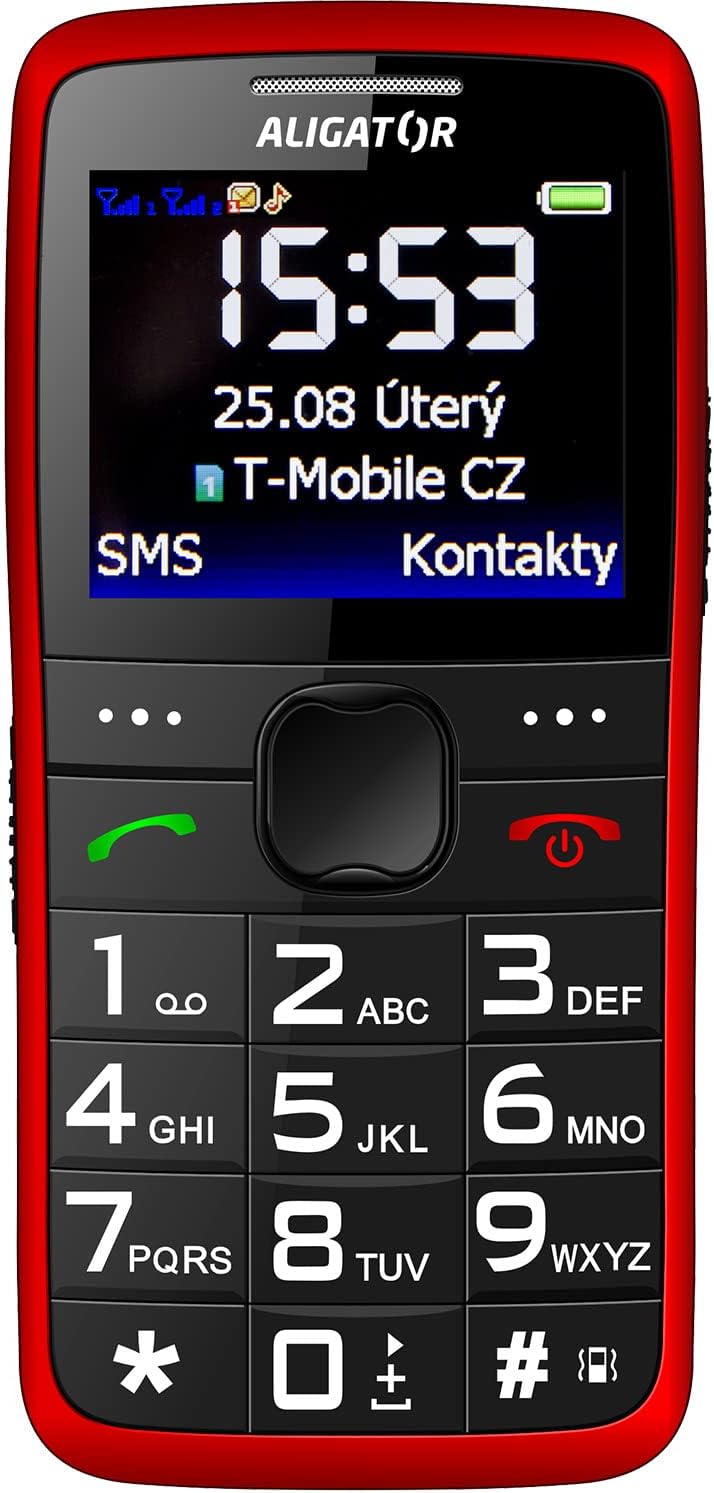
රූපය 3.2: සවිස්තරාත්මක ඉදිරිපස view of the Aligator A675 mobile phone, highlighting the large display, clear numeric keypad, and dedicated call/end buttons.
3.1 ඉදිරිපස View
- සංදර්ශකය: Shows time, date, network status, battery level, and menu options.
- සංචාලන යතුර: මෙනු සහ විකල්ප හරහා අනුචලනය කිරීමට භාවිතා කරයි.
- ඇමතුම් බොත්තම (කොළ): ඇමතුම් ආරම්භ කර ලැබෙන ඇමතුම්වලට පිළිතුරු දෙයි.
- අන්ත/බල බොත්තම (රතු): Ends calls, returns to the home screen, and powers the phone on/off.
- යතුරු පෑඩ්: Numeric keys (0-9), asterisk (*), and hash (#) for dialing and text input.
3.2 ආපසු View
- ශබ්ද විකාශන යන්ත්රය: For ringtones and hands-free calls.
- කැමරාව: For basic photo capture.
- SOS බොත්තම: A dedicated button for emergency calls/SMS (refer to section 5.4 for setup).
4. පිහිටුවීම
Follow these steps to prepare your phone for first use.
4.1 සිම් කාඩ්පත් ඇතුළු කිරීම
- දුරකථනයේ පිටුපස කවරය මෘදු ලෙස නොච් එකෙන් විවෘත කර ඉවත් කරන්න.
- බැටරිය ඇතුළු කර ඇත්නම්, එය ඉවත් කරන්න.
- Locate the SIM card slots. The Aligator A675 supports two SIM cards (Dual SIM).
- Carefully insert your 2G GSM SIM card(s) into the designated slot(s) with the gold contacts facing down, ensuring they are correctly oriented.
- SIM කාඩ්පත් ආරක්ෂිතව ස්ථානගත කර ඇති බවට වග බලා ගන්න.
4.2 බැටරිය ඇතුල් කිරීම
- දුරකථනයේ බැටරි මැදිරියේ ඇති සම්බන්ධතා සමඟ බැටරි සම්බන්ධතා පෙළගස්වන්න.
- Gently press the battery into place until it fits snugly.
- පසුපස කවරය ප්රතිස්ථාපනය කරන්න, එය ස්ථානයට ක්ලික් කරන බව සහතික කර ගන්න.
4.3 දුරකථනය ආරෝපණය කිරීම
- Connect the charger cable to the charging port on the phone (usually located at the bottom).
- චාජරය බල පිටවන ස්ථානයකට සම්බන්ධ කරන්න.
- සංදර්ශකයේ ඇති බැටරි නිරූපකය ආරෝපණ තත්ත්වය පෙන්නුම් කරයි.
- Allow the phone to charge completely before first use. This typically takes a few hours.
5. දුරකථනය ක්රියාත්මක කිරීම
Basic functions and features of your Aligator A675.
5.1 බල ගැන්වීම සක්රිය / අක්රිය කිරීම
- බල ගැන්වීමට: ඔබා අල්ලාගෙන සිටින්න End/Power Button (red button) until the screen lights up.
- බලය අක්රිය කිරීමට: ඔබා අල්ලාගෙන සිටින්න End/Power Button until the power-off options appear, then confirm.
5.2 ඇමතුම් ලබා ගැනීම සහ ලබා ගැනීම
- ඇමතුමක් ගැනීමට: යතුරු පුවරුව භාවිතයෙන් දුරකථන අංකය ඇතුළත් කර බොත්තම ඔබන්න. බොත්තම අමතන්න (කොළ බොත්තම).
- ඇමතුමකට පිළිතුරු දීමට: ඔබන්න බොත්තම අමතන්න දුරකථනය නාද වන විට.
- ඇමතුමක් අවසන් කිරීමට: ඔබන්න End/Power Button.
5.3 කෙටි පණිවිඩ යැවීම සහ ලැබීම
- Navigate to the 'Messages' menu using the navigation key.
- නව SMS එකක් රචනා කිරීමට 'පණිවිඩය ලියන්න' තෝරන්න.
- ලබන්නාගේ අංකය ඇතුළත් කරන්න හෝ සම්බන්ධතා වලින් තෝරන්න.
- Type your message using the keypad. Press the appropriate key multiple times for different letters (e.g., '2' for A, B, C).
- 'යවන්න' තෝරන්න.
- Incoming messages will be displayed on the screen and stored in the 'Inbox'.
5.4 SOS කාර්යය
SOS ශ්රිතය මඟින් ඔබට කලින් සකසා ඇති හදිසි අංක ඉක්මනින් සම්බන්ධ කර ගැනීමට ඉඩ සලසයි.
- Setting Up SOS Numbers: Go to 'Settings' > 'SOS Settings'. Add up to 5 emergency contact numbers.
- SOS සක්රිය කිරීම: ඔබා අල්ලාගෙන සිටින්න SOS බොත්තම on the back of the phone for a few seconds.
- The phone will automatically send an emergency SMS to the pre-set numbers and then start dialing them one by one until a call is answered.
5.5 සම්බන්ධතා
- සම්බන්ධතාවක් එකතු කිරීම: Go to 'Contacts' > 'Add New'. Enter the name and phone number, then save.
- සම්බන්ධතාවක් සොයමින්: Go to 'Contacts' and use the navigation key to scroll or type the first letters of the name.
6. නඩත්තුව සහ රැකවරණය
Proper care ensures the longevity of your Aligator A675 phone.
- පිරිසිදු කිරීම: දුරකථනයේ මතුපිට පිරිසිදු කිරීම සඳහා මෘදු වියළි රෙද්දක් භාවිතා කරන්න. දියර පිරිසිදු කරන්නන් හෝ උල්ෙල්ඛ ද්රව්ය භාවිතා කිරීමෙන් වළකින්න.
- බැටරි සත්කාර: Do not expose the battery to extreme temperatures. Avoid fully discharging the battery frequently.
- ගබඩා: සෘජු හිරු එළියෙන් සහ තෙතමනයෙන් ඈත්ව සිසිල් වියළි ස්ථානයක දුරකථනය ගබඩා කරන්න.
- ජල ප්රතිරෝධය: This phone is not water-resistant. Avoid contact with liquids.
7. දෝශ නිරාකරණය
පොදු ගැටළු සහ ඒවාට විසඳුම්.
| ගැටලුව | විය හැකි හේතුව | විසඳුම |
|---|---|---|
| දුරකථනය ක්රියාත්මක නොවේ | බැටරිය අඩුයි; බැටරිය නිවැරදිව ඇතුළත් කර නැත. | Charge the battery; Reinsert the battery correctly |
| ඇමතුම් ලබා ගැනීමට/ලැබීමට නොහැකිය | No network signal; SIM card not inserted; SIM card not activated | Move to an area with better signal; Reinsert SIM card; Contact your network provider |
| ඇමතුම් අතරතුර ශබ්දයක් නැත | Volume too low; Speaker blocked | Increase call volume; Check if speaker is obstructed |
| SOS ශ්රිතය ක්රියා නොකරයි | SOS numbers not set; No network signal | Set up SOS numbers in settings; Ensure network coverage |
ගැටලුව දිගටම පවතින්නේ නම්, කරුණාකර පාරිභෝගික සහාය අමතන්න.
8. පිරිවිතර
Key technical details of the Aligator A675.
- වෙළඳ නාමය: අලිගේටර්
- ආකෘතිය: A675
- රැහැන් රහිත වාහකය: අගුලු හරින ලදී
- රැහැන් රහිත ජාල තාක්ෂණය: GSM (2G)
- තිර ප්රමාණය: අඟල් 3
- මානව අතුරු මුහුණත් ආදානය: යතුරු පුවරුව
- සිම් සහාය: ද්විත්ව සිම්
9. වගකීම් සහ සහාය
Your Aligator A675 phone is covered by a standard manufacturer's warranty. Please refer to the warranty card included in your package for specific terms and conditions, including the warranty period and coverage details.
For technical support, service, or warranty claims, please contact your retailer or the official Aligator customer service. Contact information can typically be found on the manufacturer's website or on the packaging.
ඕනෑම වගකීම් සේවාවක් සඳහා අවශ්ය වන බැවින්, ඔබේ මිලදී ගැනීමේ සාක්ෂි (රිසිට්පත හෝ ඉන්වොයිසිය) තබා ගන්න.