1. හැඳින්වීම
Thank you for choosing the iPega PG-P4008 Wireless Game Controller. This manual provides detailed instructions on how to set up, operate, and maintain your controller. The PG-P4008 offers broad compatibility with PS4, PS3, Android (10.0+), iOS (13.0+), and Windows PC, connecting wirelessly via Bluetooth for an enhanced gaming experience.
2. නිෂ්පාදන අවසන්view
The iPega PG-P4008 is designed for versatile gaming across multiple platforms. It features a comfortable ergonomic design, responsive controls, and several advanced functionalities to immerse you in your games.
ප්රධාන ලක්ෂණ:
- Wireless Bluetooth connectivity (BT2.1+EDR) with up to 8 meters range.
- No driver installation required for connection.
- Integrated colored LED light indicator for operational status.
- Dual motors for realistic vibration feedback during gameplay.
- Built-in three-dimensional acceleration sensor and gyroscope sensor with six-axis induction.
- Integrated speaker and 3.5mm earphone jack for game audio.
- Dual-point capacitive touchpad for enhanced control.
- Compatible with PS4, PS3, Android (10.0+), iOS (13.0+), and Windows PC.
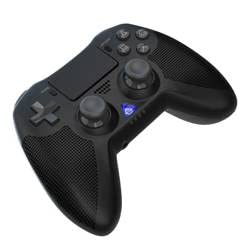
රූපය 1: ඉදිරිපස view of the iPega PG-P4008 Wireless Game Controller. This image displays the controller's ergonomic design, dual analog sticks, D-pad, action buttons, touchpad, and the central LED indicator.
3. පිහිටුවීම සහ සම්බන්ධ කිරීම
The PG-P4008 controller connects wirelessly via Bluetooth. Follow these steps to pair your controller with your device:
- බල ගැන්වීම: Ensure the controller is charged. Press and hold the PS බොත්තම (or equivalent power button) to turn on the controller.
- යුගල කිරීමේ මාදිලිය:
- For PS4/PS3: Connect the controller to the console using a USB cable. Once recognized, you can disconnect the cable for wireless play. The connection method is similar to the official P4 controller.
- For Android/iOS: Activate Bluetooth on your mobile device. On the controller, press and hold the SHARE button + PS button simultaneously until the LED indicator flashes rapidly, indicating pairing mode. Select "PG-P4008" (or similar) from your device's Bluetooth list to connect.
- For Windows PC: Ensure your PC has Bluetooth capability. On the controller, press and hold the PS button + OPTIONS button simultaneously until the LED indicator flashes rapidly. On your PC, go to Bluetooth settings, add a new device, and select "PG-P4008" (or similar) to pair.
- සාර්ථක සම්බන්ධතාවය: Once connected, the LED indicator on the controller will change to a solid color, indicating a successful pairing.
සටහන: No additional driver software is required for operation. The controller supports a stable connection up to 8 meters.
4. මෙහෙයුම් උපදෙස්
LED දර්ශකය:
The built-in colored LED light indicates the controller's operational status and player assignment, similar to the official PS4 controller. Different colors will signify different stages or player numbers.
කම්පන ප්රතිපෝෂණ:
The controller features dual motors embedded in the handles, providing tactile vibration feedback to enhance your gaming immersion. This feedback will vary based on in-game events.
Touchpad:
The dual-point capacitive touchpad allows for intuitive control in games that support touch input, offering an additional layer of interaction.
ශ්රව්ය ක්රියාකාරිත්වය:
Connect your 3.5mm earphones to the integrated jack on the controller to experience game audio directly, providing a private and immersive sound experience.
5. නඩත්තු කිරීම
- Keep the controller dry and away from moisture to prevent damage to internal components.
- මෘදු වියළි රෙද්දකින් පාලකය නිතිපතා පිරිසිදු කරන්න. රළු රසායනික ද්රව්ය හෝ උල්ෙල්ඛ ද්රව්ය භාවිතා කිරීමෙන් වළකින්න.
- භාවිතා නොකරන විට පාලකය සිසිල් වියළි ස්ථානයක ගබඩා කරන්න.
- පාලකය අධික උෂ්ණත්වයන්ට හෝ සෘජු හිරු එළියට නිරාවරණය කිරීමෙන් වළකින්න.
- Do not attempt to disassemble or modify the controller, as this will void any potential warranty and may cause damage.
6. දෝශ නිරාකරණය
- පාලකය සම්බන්ධ නොවේ:
- පාලකය සම්පූර්ණයෙන්ම ආරෝපණය වී ඇති බවට වග බලා ගන්න.
- ඔබගේ උපාංගයේ බ්ලූටූත් සක්රීය කර ඇති බව තහවුරු කරන්න.
- Make sure the controller is in the correct pairing mode for your device (refer to Section 3).
- පාලකය සහ ඔබගේ උපාංගය යන දෙකම නැවත ආරම්භ කිරීමට උත්සාහ කරන්න.
- Remove previous pairings from your device's Bluetooth list and try pairing again.
- ආදාන ප්රමාදය හෝ විසන්ධි වීම:
- ඔබ මීටර් 8ක මෙහෙයුම් පරාසය තුළ සිටින බවට වග බලා ගන්න.
- අනෙකුත් රැහැන් රහිත උපාංග වලින් ඇතිවන බාධා අවම කරන්න.
- Check for any physical obstructions between the controller and the device.
- කම්පනය ක්රියා නොකරයි:
- ඔබ ක්රීඩා කරන ක්රීඩාව කම්පන ප්රතිපෝෂණයට සහය දක්වන බවට සහතික වන්න.
- කම්පනය සක්රීය කර ඇති බව සහතික කර ගැනීමට ක්රීඩාව තුළ සැකසුම් පරීක්ෂා කරන්න.
- Audio not working via 3.5mm jack:
- Ensure your earphones are properly plugged in.
- Check the volume settings on your device and in-game.
- Test with another pair of earphones to rule out earphone issues.
7. පිරිවිතර
| ආදර්ශ අංකය | PG-P4008 |
| වෙළඳ නාමය | අයිපෙගා |
| සම්බන්ධතාවය | Bluetooth (BT2.1+EDR) |
| රැහැන් රහිත පරාසය | මීටර් 8 දක්වා |
| ගැළපෙන උපාංග | PS4, PS3, Android (10.0+), iOS (13.0+), Windows PC |
| විශේෂ ලක්ෂණ | Wireless, Touchpad, Vibration, 6-axis Gyroscope, Built-in Speaker, 3.5mm Audio Jack |
| බොත්තම් ප්රමාණය | 17 |
| බලශක්ති ප්රභවය | බැටරි බලයෙන් |
8. වගකීම් සහ සහාය
Information regarding product warranty and customer support is not provided within this manual. Please refer to the product packaging or the retailer's webවගකීම් ආවරණය සහ සහාය සඳහා පාරිභෝගික සහාය සම්බන්ධ කර ගන්නේ කෙසේද යන්න පිළිබඳ විස්තර සඳහා වෙබ් අඩවිය.


