හැඳින්වීම
This manual provides detailed instructions for the setup, operation, and maintenance of your AcuRite Iris (5-in-1) Wireless Weather Station and Add-On Display. This system is designed to monitor various environmental conditions, including indoor and outdoor temperature, humidity, wind speed, wind direction, and rainfall.
නිෂ්පාදනය අවසන්view
The AcuRite Iris (5-in-1) Weather Station combines multiple sensors into a single outdoor unit, transmitting data wirelessly to an indoor display. The add-on display allows for monitoring conditions from additional locations within your home or office.
ප්රධාන ලක්ෂණ
- Comprehensive weather information with over 55 data points, including historical data, heat index, dew point, 'feels like' temperature, and pressure trends.
- Real-time monitoring of indoor/outdoor temperature and humidity, wind speed/direction, barometric pressure, and rainfall.
- Compatibility with any AcuRite 5-in-1 Weather Sensor, enabling observation of conditions from multiple rooms with additional displays.
- Illuminated color display with manual and auto-dimming brightness, providing a 12 to 24-hour weather forecast.
- Includes mounting hardware for easy setup and features a 2-year battery life for the outdoor sensor (batteries not included).

Image: The AcuRite Iris 5-in-1 Weather Station, showing the outdoor sensor and the indoor display unit. Callouts indicate its ability to accurately measure indoor and outdoor temperature and humidity, monitor wind speed and direction, provide a visual readout of current weather conditions, and offer a real-time weather ticker for straightforward information.
පෙට්ටියේ ඇති දේ
සැකසුම සමඟ ඉදිරියට යාමට පෙර සියලුම සංරචක පවතින බව තහවුරු කර ගන්න.
- ඇකියුරයිට් අයිරිස් (5-in-1) එළිමහන් සංවේදකය
- ඩිජිටල් සංදර්ශක ඒකකය
- Power Adapter for Display
- Mounting Hardware (for outdoor sensor)
- උපදෙස් අත්පොත (මෙම ලේඛනය)
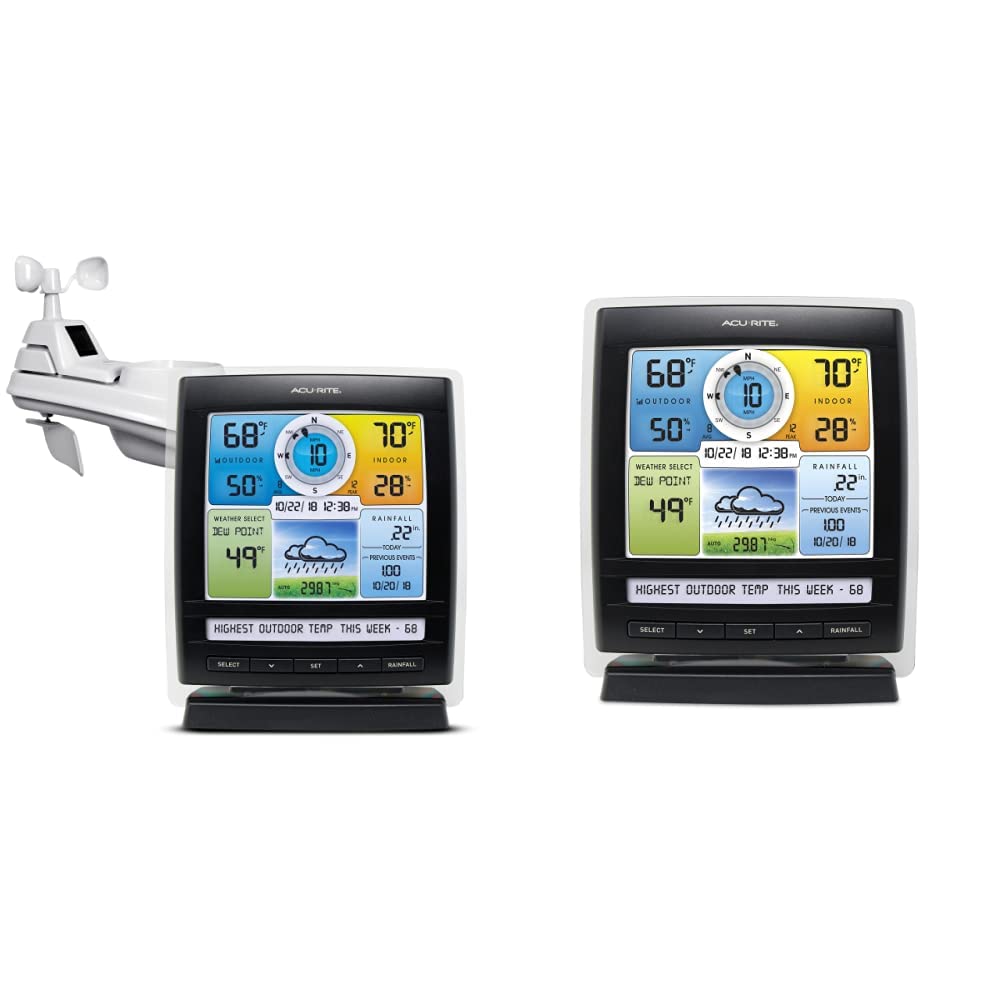
Image: The main components of the AcuRite Iris 5-in-1 Weather Station, featuring the outdoor sensor and the indoor digital display unit.
සැලසුම
අසුරනවා
ඇසුරුම්කරණයෙන් සියලුම සංරචක ප්රවේශමෙන් ඉවත් කරන්න. අවශ්ය නම් අනාගත ගබඩා කිරීම හෝ ප්රවාහනය සඳහා ඇසුරුම් ද්රව්ය තබා ගන්න.
සංදර්ශකය බල ගැන්වීම
- Plug the included power adapter into the display unit and then into a standard electrical outlet.
- Optional: For backup power, insert 6 AA alkaline batteries (not included) into the battery compartment on the back of the display.
සංවේදක ස්ථානගත කිරීම
Proper placement of the 5-in-1 outdoor sensor is crucial for accurate readings. Choose a location that is:
- අවම වශයෙන් අඩි 5 ක් (මීටර් 1.5 ක්) බිමෙන් ඉවතට.
- Away from direct heat sources (e.g., exhaust vents, air conditioners).
- Free from obstructions that could block wind or rain (e.g., tall buildings, trees).
- Within 330 feet (100 meters) of the display unit for optimal wireless signal.
සංවේදකය සවි කිරීම
Use the included mounting hardware to securely attach the 5-in-1 sensor to a post or pole. Ensure the sensor is level for accurate rainfall measurements.
මෙහෙයුම් උපදෙස්
ප්රදර්ශනය අවසන්view
The illuminated color LCD display presents various weather data in an organized manner. Familiarize yourself with the different sections:
- Outdoor Section: Displays outdoor temperature, humidity, and trend indicators.
- Wind Section: Shows current wind speed, average wind speed, peak wind speed, and wind direction.
- Indoor Section: Displays indoor temperature and humidity.
- Weather Select: ඉඩ දෙයි viewing of dew point, heat index, or 'feels like' temperature.
- Rainfall Section: Shows current day's rainfall and historical rainfall data.
- කාලගුණ අනාවැකිය: Provides a 12 to 24-hour forecast based on barometric pressure changes.

Image: The AcuRite Iris display unit, highlighting sections for weather, humidity, and wind information with trend indicators; dew point, weather forecast, and rainfall visuals; and the date and time.
මූලික සංචාලනය
Use the buttons located below the display to navigate through settings and view different data points:
- තෝරන්න: Cycles through various weather data points in the 'Weather Select' area.
- සැකසුම: Enters setup mode for time, date, and other preferences.
- ඉහළ/පහළ ඊතල: Adjusts values during setup or navigates through historical data.
- වර්ෂාපතනය: Displays daily, weekly, monthly, or yearly rainfall totals.

රූපය: පැහැදිලි ඉදිරිපසක් view of the AcuRite Iris digital display, showing the color screen with various weather readings and the control buttons at the bottom.
Understanding Readings
The display provides real-time data. Trend arrows indicate whether temperature, humidity, or pressure are rising, falling, or steady. The self-calibrating forecasting feature improves accuracy over time by analyzing barometric pressure changes.
කාලගුණ ටිකර්
The 'Weather Ticker' at the bottom of the display streams useful environmental information, such as 'feels like' temperature, number of days since last rainfall, and other relevant alerts or data points.
නඩත්තු කිරීම
බැටරි ප්රතිස්ථාපනය
The outdoor 5-in-1 sensor requires 4 AA batteries (not included) and has an estimated battery life of 2 years. Replace batteries when the low battery indicator appears on the display. Ensure to use fresh, high-quality alkaline or lithium batteries (lithium recommended for temperatures below -4°F / -20°C).
සංවේදක පිරිසිදු කිරීම
Periodically inspect the outdoor sensor for debris, especially in the rain collector funnel and around the wind cups. Clean gently with a damp cloth. Ensure the rain gauge tipping bucket mechanism moves freely.
දෝෂගවේෂණය
If you encounter issues with your AcuRite Iris Weather Station, consider the following common solutions:
- එළිමහන් සංවේදක දත්ත නොමැත: Ensure the sensor is within range of the display (max 330 ft / 100 m) and has fresh batteries. Try relocating the display or sensor to reduce interference.
- සාවද්ය උෂ්ණත්වය/ආර්ද්රතාවය: Verify the sensor is not exposed to direct sunlight or heat sources. Allow up to 30 minutes for readings to stabilize after setup or relocation.
- වැරදි වර්ෂාපතනය: Check that the sensor is level and the rain collector funnel is clear of debris.
- සංදර්ශකය ක්රියාත්මක නොවේ: Confirm the power adapter is securely connected and the electrical outlet is functional. If using batteries, ensure they are correctly inserted and fresh.
For more detailed troubleshooting guides and support, please visit the official AcuRite webඅඩවිය.
පිරිවිතර
| වෙළඳ නාමය | ඇකුරයිට් |
| බල ප්රභවය (සංවේදකය) | Battery Powered (4 AA, not included) |
| බල ප්රභවය (දර්ශනය) | 4.5V Power Adapter (included) or 6 AA batteries (not included) |
| සම්බන්ධතා තාක්ෂණය | රැහැන් රහිත |
| උෂ්ණත්ව නිරවද්යතාව | ±1 °C |
| ඉහළ උෂ්ණත්ව ශ්රේණිගත කිරීම | 45 සෙල්සියස් අංශක |
| සංදර්ශක වර්ගය | LCD වර්ණ සංදර්ශකය |
| ඇතුළත් සංරචක | Power Adapter, Stand, Mounting Hardware |
වගකීම් සහ සහාය
AcuRite products are designed for reliability and performance. For information regarding product warranty, technical support, or to register your product, please visit the official AcuRite webවෙබ් අඩවියට පිවිසෙන්න හෝ ඔවුන්ගේ පාරිභෝගික සේවා දෙපාර්තමේන්තුව අමතන්න. මිලදී ගැනීමේ සාක්ෂියක් ලෙස ඔබේ මිලදී ගැනීමේ රිසිට්පත තබා ගන්න.
Webඅඩවිය: www.acurite.com


