1. හැඳින්වීම
This manual provides detailed instructions for the installation, operation, and maintenance of your Tukzer 19-Inch Monitor Screen Light Bar. Please read this manual thoroughly before use to ensure proper functionality and to extend the product's lifespan. Keep it for future reference.

රූපය 1.1: ඉදිරිපස සහ පසුපස view of the Tukzer Monitor Screen Light Bar.
2. නිෂ්පාදන ලක්ෂණ
- No Screen Glare: Asymmetrical optical design illuminates the desktop and keyboard without reflecting glare on the screen, reducing eye strain.
- Smart Touch Sensor Controls: Intuitive touch controls for power and settings adjustments.
- Power-Off මතකය: Automatically resumes the last used brightness and color temperature settings upon restart.
- පියවර රහිත අඳුරු කිරීම: Adjustable brightness from -5 to +45 levels for personalized illumination.
- වර්ණ උෂ්ණත්ව ආකාර තුනක්:
- Warm Light (3000K): Ideal for reading and relaxation.
- Warm-White Light (4500K): Balanced light for comfortable viewing.
- White Light (6500K): Bright, clear light for efficient work.
- USB බලගතු: Convenient 5W LED operation via any standard USB port (1A~5V Min).
- අවකාශය ඉතිරි කිරීමේ සැලසුම: සී-ක්ලබ්amp mounting system saves desk space.
- High Color Rendering Index (Ra >80): Ensures accurate color representation.

Image 2.1: Key features of the Tukzer Monitor Screen Light Bar.
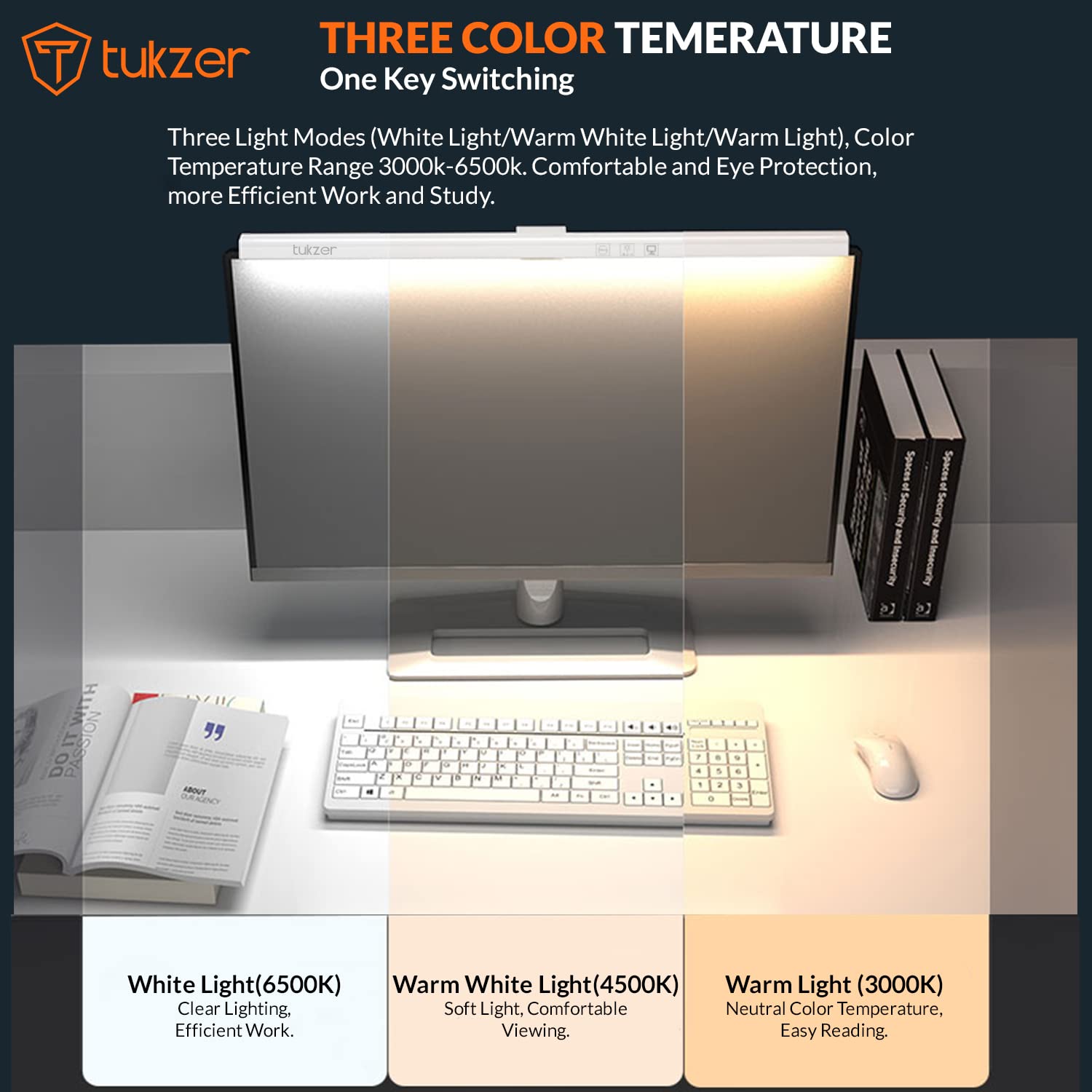
Image 2.2: Visual representation of the three adjustable color temperature modes.

Image 2.3: Asymmetric light source design for glare-free illumination.
3. පිහිටුවීම සහ ස්ථාපනය
Follow these steps to properly install your monitor screen light bar:
- Prepare the Monitor: Ensure the top surface of your monitor is clean and dry.
- සිලිකොන් පෑඩ් අමුණන්න: If your monitor's back is not flat, or for added stability, peel off the protection paper from the provided silicone pad and stick it onto the monitor's top edge where the light bar will rest.
- ආලෝක තීරුව ස්ථානගත කරන්න: Place the light bar's C-clamp mechanism over the top edge of your monitor.
- චූෂණ කෝප්පය සුරක්ෂිත කරන්න: Press the suction cup firmly onto the monitor's back to secure the light bar in place.
- USB බලය සම්බන්ධ කරන්න: Connect the USB power cable from the light bar to any available USB port (e.g., computer, monitor, phone charger, power bank) with a minimum output of 1A at 5V.
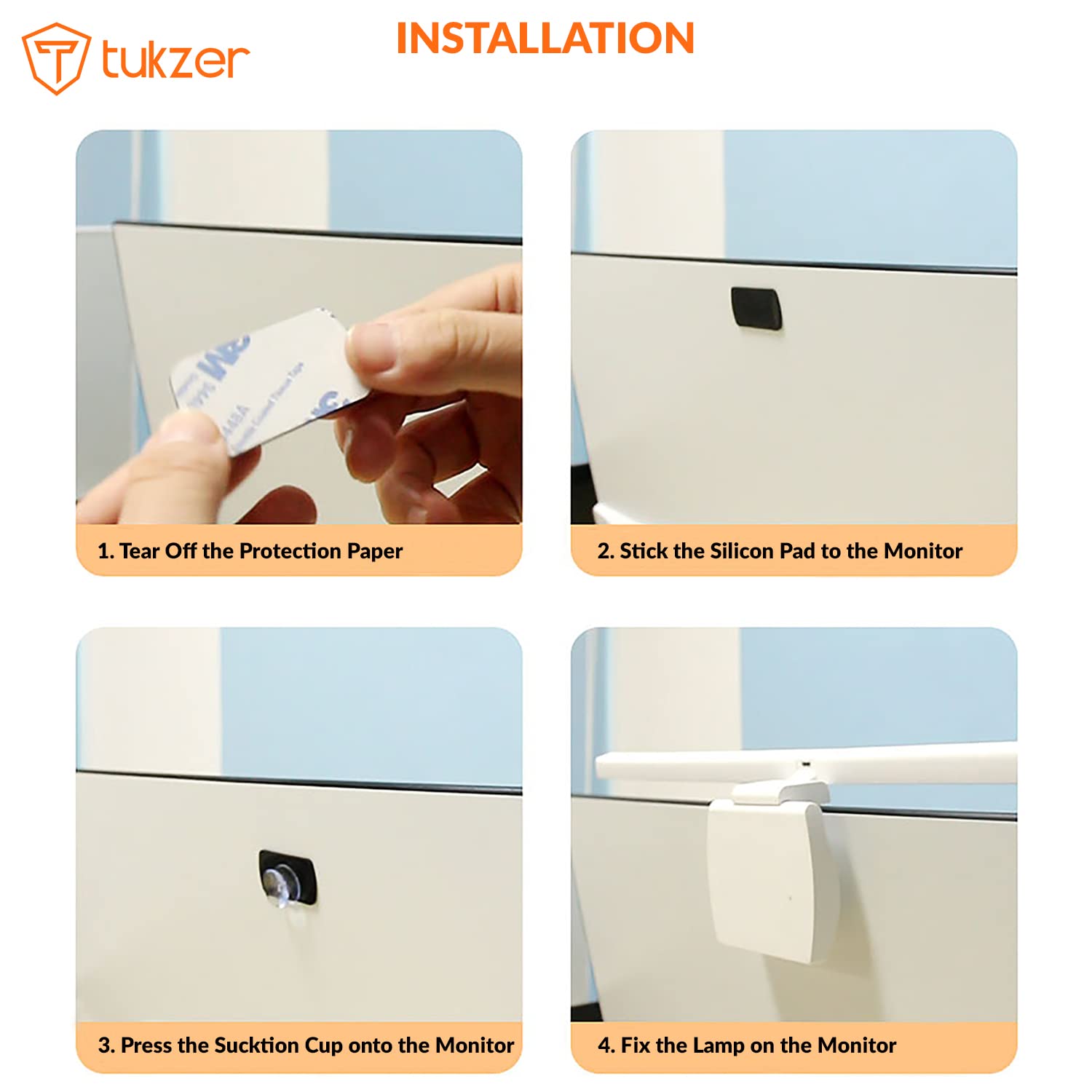
Image 3.1: Step-by-step installation process.

Image 3.2: Product parts and hanging angle adjustment range.
4. මෙහෙයුම් උපදෙස්
The Tukzer Monitor Screen Light Bar features smart touch sensor controls for easy operation.
- බලය සක්රිය / අක්රිය: Lightly touch the power icon once to turn the light bar on or off.
- දීප්තිය සකසන්න (පියවර රහිත අඳුරු කිරීම): Press and hold the brightness adjustment icon to smoothly increase or decrease the light intensity. Release when the desired brightness is reached.
- වර්ණ උෂ්ණත්වය වෙනස් කරන්න: Tap the color temperature icon to cycle through the three modes: Warm Light (3000K), Warm-White Light (4500K), and White Light (6500K).
- මිනිත්තු 60 ක වේලාව: Tap the timer icon once to activate the 60-minute timer. The light will automatically turn off after 60 minutes.
- Power-Off මතකය: The light bar will remember your last brightness and color temperature settings when turned off and on again.

Image 4.1: Smart touch sensor controls for operation.
5. නඩත්තුව සහ රැකවරණය
ඔබේ ආලෝක තීරුවේ ආයු කාලය සහ ප්රශස්ත ක්රියාකාරිත්වය සහතික කිරීම සඳහා, මෙම නඩත්තු මාර්ගෝපදේශ අනුගමනය කරන්න:
- පිරිසිදු කිරීම: Use a soft, dry cloth to gently wipe the surface of the light bar. Avoid using abrasive cleaners, solvents, or sprays that could damage the finish or electronic components.
- ගබඩා: දිගු කාලයක් භාවිතයේ නොමැති විට, ආලෝක තීරුව සෘජු හිරු එළියෙන් සහ අධික උෂ්ණත්වයන්ගෙන් ඈත්ව සිසිල් වියළි ස්ථානයක ගබඩා කරන්න.
- හැසිරවීම: ආලෝක තීරුව පරිස්සමෙන් හසුරුවන්න. එය බිම හෙළීමෙන් හෝ දැඩි බලපෑම්වලට ලක් කිරීමෙන් වළකින්න.
- විසුරුවා හැරීම: Do not attempt to disassemble or modify the product. This will void the warranty and may cause damage or injury.
6. දෝශ නිරාකරණය
If you encounter any issues with your Tukzer Monitor Screen Light Bar, please refer to the following common problems and solutions:
| ගැටලුව | විය හැකි හේතුව | විසඳුම |
|---|---|---|
| ආලෝක තීරුව ක්රියාත්මක නොවේ. |
|
|
| ආලෝකය දැල්වෙයි හෝ අස්ථායී වේ. |
|
|
| ස්පර්ශ පාලන ප්රතිචාර නොදක්වයි. |
|
|
| Light bar is not stable on the monitor. |
|
|
මෙම විසඳුම් උත්සාහ කිරීමෙන් පසුවත් ගැටලුව පවතින්නේ නම්, කරුණාකර පාරිභෝගික සහාය අමතන්න.
7. පිරිවිතර
| විශේෂාංගය | විස්තර |
|---|---|
| ආදර්ශ අංකය | TZ-ML-02 |
| නිෂ්පාදන ද්රව්ය | ඇක්රිලෝනයිට්රයිල් බියුඩඩීන් ස්ටයිරීන් (ABS) |
| ශ්රේණිගත කළ වෙළුමtage | 5V |
| නිෂ්පාදන බලය | 5W MAX (78x0.2W/LED Module) |
| ශ්රේණිගත ධාරාව | 1A |
| ආලෝක ප්රභවය | LED |
| වර්ණ විදැහුම්කරණ දර්ශකය (CRI) | >80 රා |
| මෙහෙයුම් උෂ්ණත්වය | -5 ° C සිට +45 ° C |
| වර්ණ උෂ්ණත්ව මාතයන් | Warm Light (3000K), Warm-White Light (4500K), White Light (6500K) |
| ලුමිනස් ෆ්ලක්ස් | >90 LM |
| නිෂ්පාදන බර | ග්රෑම් 170 යි |
| නිෂ්පාදන මානයන් | 50 cm (Length) x 10.4 cm (Width) x 6.5 cm (Depth) |
| USB Power Cable Length | මීටර් 1.2 කි |
| පාලන ක්රමය | සංවේදකය ස්පර්ශ කරන්න |
| සවිකිරීමේ වර්ගය | Screen Mount (C-clamp with suction cup) |
| ඇතුළත් සංරචක | Monitor Screen Light Bar |

Image 7.1: Product dimensions and detailed specifications.
8. වගකීම් සහ සහාය
8.1. වගකීම් තොරතුරු
The Tukzer Monitor Screen Light Bar comes with a මාස 06 වගකීමක් මිලදී ගත් දින සිට. මෙම වගකීම් සහතිකය සාමාන්ය භාවිතය යටතේ නිෂ්පාදන දෝෂ සහ අක්රමිකතා ආවරණය කරයි. අනිසි භාවිතය, අනතුරු, අනවසර වෙනස් කිරීම් හෝ නුසුදුසු ස්ථාපනය හේතුවෙන් සිදුවන හානිය එය ආවරණය නොකරයි.
වගකීම් හිමිකම් සඳහා මිලදී ගැනීමේ සාක්ෂියක් ලෙස කරුණාකර ඔබගේ මිලදී ගැනීමේ රිසිට්පත තබා ගන්න.
8.2. පාරිභෝගික සහාය
For technical assistance, warranty claims, or any other inquiries, please contact Tukzer customer support. Refer to the official Tukzer webසම්බන්ධතා විස්තර සඳහා වෙබ් අඩවිය හෝ ඔබේ මිලදී ගැනීමේ ලියකියවිලි.
When contacting support, please provide your product model number (TZ-ML-02) and a detailed description of the issue.
9. වැදගත් සටහන්
- මෙම නිෂ්පාදනය ගෘහස්ථ භාවිතය සඳහා පමණක් නිර්මාණය කර ඇත.
- Do not expose the product to water or high humidity. It is not water resistant.
- දරුවන්ට ළඟා විය නොහැකි ලෙස තබා ගන්න.
- The light source of this product is not replaceable. When the light source reaches the end of its life, the entire lamp ප්රතිස්ථාපනය කළ යුතුය.
- Use only with a 5V/1A USB power supply.


