හැඳින්වීම
Thank you for choosing the Baseus True Wireless Earphones Bowie E3. These earphones are designed to provide a high-quality audio experience with advanced features such as low latency, fast charging, and IP64 dust and water resistance. This manual will guide you through the setup, operation, maintenance, and troubleshooting of your new earphones.
නිෂ්පාදනය අවසන්view

The Baseus Bowie E3 True Wireless Earphones, shown here in their open charging case, highlighting their compact and sleek white design.

Illustration demonstrating the Baseus Dual Channel Connection and Low Latency feature, indicating a delayed time of less than 0.06 seconds for fast response.

Visual representation of the Baseus Flash Charge capability, showing that 10 minutes of charging provides 2 hours of music playback.

සමීප රූපය view of the 13mm Titanium Vibrating Diaphragms, designed for well-balanced triple frequency and clear sound quality.
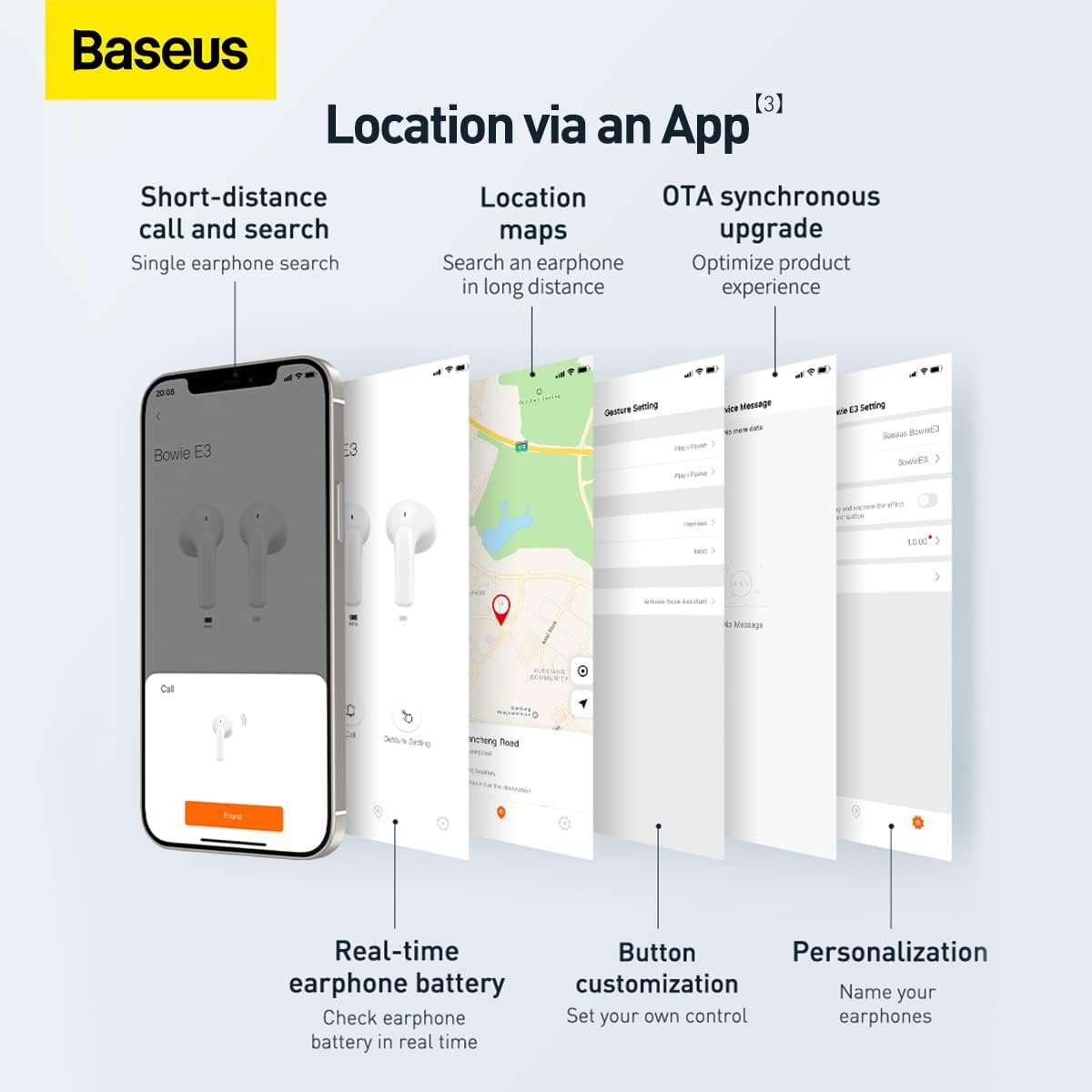
Screenshots illustrating the Baseus app features, including short-distance call and search, location maps, OTA synchronous upgrade, real-time earphone battery check, button customization, and personalization options.

Diagram showing the internal chip for Wireless 5.2 Stable Connection, indicating improved transmission rate and stability.

Summary of key features for Pure Music and Fast Response, including flash charge, 13mm PU+Titanium Moving Coils, 0.06 second delay, and location tracking via the app.

The retail packaging for the Baseus Bowie E3 True Wireless Earphones, displaying the product name and brand logo.
සැලසුම
1. ඉයර්ෆෝන් සහ කේස් ආරෝපණය කිරීම
Before first use, fully charge the earphones and the charging case. Connect the charging case to a USB power source using a compatible USB-C cable. The indicator light on the case will show charging status.
- Flash Charge: A 10-minute charge provides approximately 2 hours of music playback.
- Ensure the earphones are properly seated in the charging case for them to charge.
2. ඔබගේ උපාංගය සමඟ යුගල කිරීම
- ආරෝපණ පෙට්ටිය විවෘත කරන්න. ඉයර්ෆෝන් ස්වයංක්රීයව යුගල කිරීමේ ප්රකාරයට ඇතුළු වනු ඇත.
- ඔබගේ උපාංගයේ (ස්මාර්ට්ෆෝන්, ටැබ්ලටය, ආදිය), බ්ලූටූත් සක්රීය කරන්න.
- ඒ සඳහා සොයන්න "Baseus Bowie E3" in the list of available Bluetooth devices.
- Select "Baseus Bowie E3" to connect. Once connected, a voice prompt will confirm successful pairing.
- For subsequent uses, the earphones will automatically connect to the last paired device when taken out of the case.
මෙහෙයුම් උපදෙස්
ස්පර්ශ පාලන
The Baseus Bowie E3 earphones feature touch-sensitive controls on each earbud. The following actions are typically supported:
- වාදනය/විරාමය: ඉයර්බඩ් දෙකෙන් දෙකට තට්ටු කරන්න.
- ඊළඟ ධාවන පථය: දකුණු ඉයර්බඩය තුන් වරක් තට්ටු කරන්න.
- පෙර ධාවන පථය: වම් ඉයර්බඩය තුන් වරක් තට්ටු කරන්න.
- පිළිතුර/අවසන් ඇමතුම: ඉයර්බඩ් දෙකෙන් දෙකට තට්ටු කරන්න.
- ඇමතුම ප්රතික්ෂේප කරන්න: ඉයර්බඩ් එකක් තත්පර 2ක් ඔබාගෙන සිටින්න.
- හ oice සහකාර සක්රිය කරන්න: ඉයර්බඩ් එකක් තත්පර 3ක් ඔබාගෙන සිටින්න.
Note: Specific touch controls may be customizable via the Baseus app.
Using the Baseus App
Download the official Baseus app from your device's app store to unlock additional features and customization options:
- Earphone Location: Use the app to locate your earphones if misplaced.
- බැටරි තත්ත්වය: Check the real-time battery level of each earbud.
- බොත්තම් අභිරුචිකරණය: Personalize touch controls to your preference.
- OTA Synchronous Upgrade: Receive firmware updates to optimize product experience.
- පුද්ගලීකරණය: Name your earphones within the app.
නඩත්තු කිරීම
- පිරිසිදු කිරීම: Regularly clean the earphones and charging case with a soft, dry, lint-free cloth. Do not use abrasive cleaners or solvents.
- ජල ප්රතිරෝධය: The earphones are IP64 dustproof and waterproof. This means they are protected from dust ingress and splashing water from any direction. Do not submerge them in water or expose them to strong jets of water.
- ගබඩා: භාවිතයේ නොමැති විට, ඉයර්ෆෝන් ආරක්ෂා කර ගැනීමට සහ ආරෝපණය කර තබා ගැනීමට ඒවායේ ආරෝපණ පෙට්ටියේ ගබඩා කරන්න. සෘජු හිරු එළියෙන් සහ අධික උෂ්ණත්වයෙන් ඈත්ව සිසිල් වියළි ස්ථානයක ගබඩා කරන්න.
- බැටරි සත්කාර: බැටරි ආයු කාලය දීර්ඝ කිරීම සඳහා, ඉයර්ෆෝන් නිතර නිතර සම්පූර්ණයෙන්ම විසර්ජනය කිරීමෙන් වළකින්න. නිරන්තරයෙන් භාවිතයේ නොමැති වුවද, ඒවා නිතිපතා ආරෝපණය කරන්න.
දෝෂගවේෂණය
| ගැටලුව | විය හැකි හේතුව | විසඳුම |
|---|---|---|
| ඉයර්ෆෝන් යුගල නොවේ | Bluetooth is off; earphones not in pairing mode; interference. | Ensure Bluetooth is on. Place earphones back in case, close, then reopen. Try pairing again. Move away from other wireless devices. |
| එක් ඉයර්බඩ් එකකින් ශබ්දයක් නැත | Low battery; earbud not connected; dirty contacts. | Charge both earphones. Re-pair the earphones. Clean the charging contacts on the earbud and in the case. |
| අඩු පරිමාවක් | Device volume too low; earbud placement; dirty earbud mesh. | Increase volume on your device. Adjust earbud position. Gently clean the earbud mesh. |
| අයකිරීමේ ගැටළු | Cable or adapter fault; dirty charging port/contacts. | Try a different USB-C cable and power adapter. Clean the charging port and earbud contacts. |
| App not connecting to earphones | Earphones not paired to phone; app permissions. | Ensure earphones are connected via Bluetooth. Check app permissions in phone settings. Restart app. |
පිරිවිතර
- ආකෘතිය: NGTW080002
- වෙළඳ නාමය: බේසියස්
- සම්බන්ධතාවය: බ්ලූටූත් 5.2
- කන් ස්ථානගත කිරීම: කනේ
- ආකෘති සාධකය: කනේ
- සම්බාධනය: 32 ඕම්
- ශබ්ද පාලනය: ශබ්ද හුදකලා කිරීම
- රියදුරන්: 13mm Titanium Vibrating Diaphragms
- ප්රමාදය: 0.06 seconds (low latency)
- අයකිරීම: Flash charge (10 min charge for 2h playback)
- ජල ප්රතිරෝධය: IP64 දූවිලි ආරක්ෂිත සහ ජල ආරක්ෂිත
- බැටරි: 1 Lithium Ion battery required (per earbud, case has its own)
- නිෂ්පාදන මානයන්: 3.8 x 9.2 x 9.2 cm (packaging/case); 100 g
- නිෂ්පාදකයා: බේසියස්
- මුල් රට: චීනය
- මුලින්ම ලබා ගත හැකි: 1 මාර්තු 2022
වගකීම් සහ සහාය
වගකීම් තොරතුරු
This product comes with a standard manufacturer's warranty. For specific warranty terms and conditions, please refer to the warranty card included in the product packaging or visit the official Baseus website. Extended warranty plans may also be available for purchase, such as 1-Year or 2-Year Extended Warranty Plans.
පාරිභෝගික සහාය
For technical assistance, troubleshooting beyond this manual, or warranty claims, please contact Baseus customer support through their official website or the contact information provided in your product documentation. Please have your product model number (NGTW080002) and purchase details ready when contacting support.
සබැඳි සම්පත්:
- නිල බේසියස් Webඅඩවිය: www.baseus.com (කරුණාකර කලාපීය සඳහා පරීක්ෂා කරන්න) websites for specific support)
- Baseus App: Available on iOS App Store and Android Google Play Store.


