1. හැඳින්වීම
The Neoline G-Tech X63 is an advanced high-definition video recorder designed for vehicles. It features a dual-camera system integrated into a single housing, providing comprehensive coverage. The front camera offers a wide-angle 2K QHD resolution, while an interior Full HD camera monitors the cabin. Additionally, a separate Full HD rear camera captures events behind your vehicle. This device is equipped with a supercapacitor, which provides enhanced durability and more reliable operation across a wider range of temperatures compared to traditional batteries.
Key features include a wide viewing angle, front, interior, and rear cameras, high-contrast video recording, weather protection, a built-in GPS module, and 2K QHD resolution for the front camera.
2. පැකේජ අන්තර්ගතය
කරුණාකර පහත අයිතම සඳහා කොටුව සලකුණු කරන්න:
- Neoline G-Tech X63 Dash Cam
- පසුපස කැමරාව
- 3M මැලියම් කන්ද
- බල ඇඩැප්ටරය (මෝටර් රථ චාජර්)
- මයික්රෝ USB කේබලය
- පරිශීලක අත්පොත
- වගකීම් සහතිකය
3. නිෂ්පාදන අවසන්view
Familiarize yourself with the components of your Neoline G-Tech X63 dash cam.
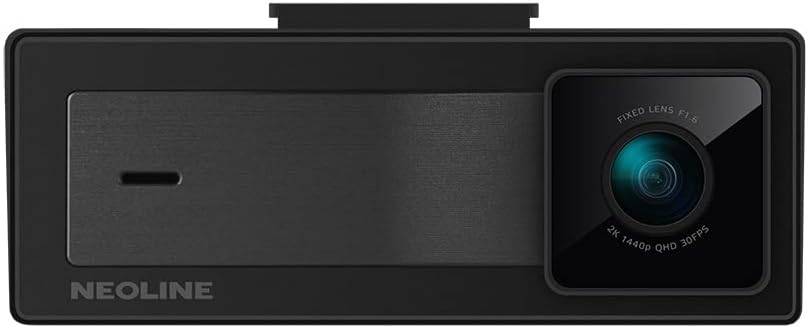
රූපය 3.1: ඉදිරිපස view of the Neoline G-Tech X63 dash cam, showing the main lens and Neoline branding.

රූපය 3.2: පසුපස view of the dash cam, displaying the screen and control buttons.

රූපය 3.3: The compact rear camera module for external mounting.

රූපය 3.4: ඉහළ view showing the mounting slot and various ports for connections.
4. පිහිටුවීම සහ ස්ථාපනය
4.1. මතක කාඩ්පත ඇතුල් කිරීම
Before first use, insert a high-speed microSD card (Class 10 or higher, up to 128GB recommended) into the designated slot on the dash cam. Ensure the card is inserted correctly until it clicks into place. Format the card within the dash cam settings for optimal performance.
4.2. ඩෑෂ් කැම් සවි කිරීම
- Clean the windshield surface where you intend to mount the dash cam. Ensure it is dry and free of dust.
- Attach the 3M adhesive mount to the dash cam.
- Peel off the protective film from the 3M adhesive and firmly press the mount onto the chosen spot on your windshield, ideally behind the rearview mirror for an unobstructed view. Hold for at least 30 seconds.
- Adjust the camera lens to ensure it captures the road ahead clearly, with the horizon in the middle of the frame.

රූපය 4.1: Example of the dash cam mounted on the vehicle's windshield.
4.3. පසුපස කැමරාව සම්බන්ධ කිරීම
Connect the rear camera cable to the main dash cam unit. Route the cable neatly along the vehicle's headliner and pillars to the rear of the vehicle. Mount the rear camera on the rear windshield or license plate area, ensuring a clear view. Connect the red wire of the rear camera to the reverse light power source if you wish to enable parking assistance features.
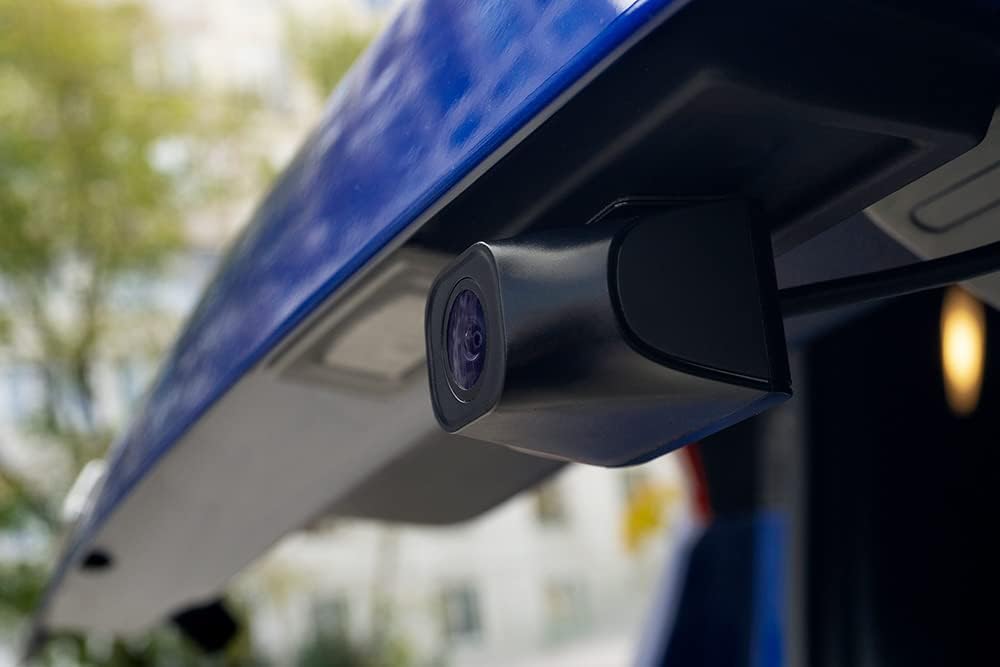
රූපය 4.2: The rear camera installed, providing a view වාහනය පිටුපස ප්රදේශයේ.
4.4. බල සම්බන්ධතාවය
Plug the included power adapter into your vehicle's 12V power outlet (cigarette lighter socket). Connect the other end of the cable to the dash cam's power input. The dash cam will automatically power on and begin recording when the vehicle's ignition is turned on, and power off when the ignition is turned off.
5. මෙහෙයුම් උපදෙස්
5.1. මූලික පටිගත කිරීම
බලගැන්වීමෙන් පසු, ඩෑෂ් කැමරාව ස්වයංක්රීයව අඛණ්ඩ ලූප් පටිගත කිරීම ආරම්භ කරයි. වීඩියෝව files are saved in segments (e.g., 1, 3, or 5 minutes) to the microSD card. When the card is full, the oldest unprotected fileනව පටිගත කිරීම් මගින් s උඩින් ලියනු ලැබේ.
5.2. G-Sensor (Emergency Recording)
The built-in G-sensor detects sudden impacts or rapid acceleration/deceleration. When triggered, the current video segment is automatically locked and protected from being overwritten, ensuring critical footage is saved. The sensitivity of the G-sensor can be adjusted in the settings menu.
5.3. වාහන නැවැත්වීමේ මාදිලිය
The Neoline G-Tech X63 supports parking mode. When enabled and the vehicle is parked, the dash cam can detect motion or impacts and automatically start recording. This feature requires a continuous power supply (e.g., hardwiring kit, sold separately) to function when the vehicle is off.
5.4. GPS ක්රියාකාරීත්වය
The integrated GPS module records your vehicle's speed and location data, which can be viewed during video playback using dedicated software. This provides additional context for recorded events.
5.5 මෙනු සංචාලනය
Use the buttons located on the device (refer to Figure 3.2 and 5.1 for button layout) to navigate through the menu options. The 'OK' button typically confirms selections, while arrow buttons navigate. The 'M' button often switches between recording, playback, and settings modes.
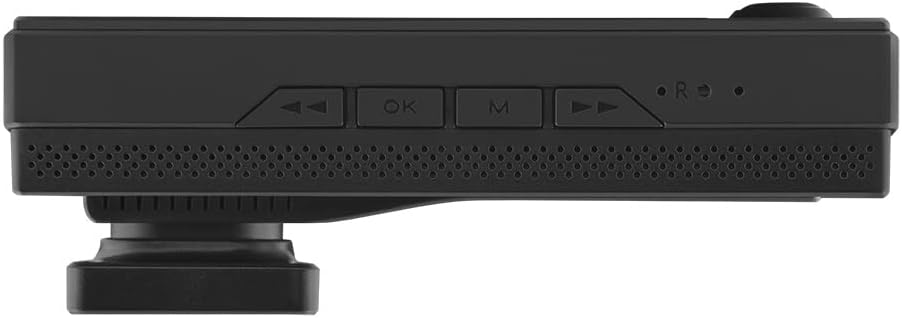
රූපය 5.1: පහළ view showing the control buttons for menu navigation and operation.
6. නඩත්තු කිරීම
- පිරිසිදු කිරීම: Use a soft, dry cloth to clean the dash cam body and lenses. Do not use abrasive cleaners or solvents.
- මතක කාඩ්පත: Regularly format your microSD card (at least once a month) within the dash cam to maintain optimal recording performance and prevent data corruption. Back up any important fileහැඩතල ගැන්වීමට පෙර s.
- ස්ථිරාංග යාවත්කාලීන කිරීම්: Check the official Neoline website periodically for firmware updates. Updating the firmware can improve performance, add new features, or fix bugs. Follow the instructions provided with the firmware update carefully.
- උෂ්ණත්වය: Avoid exposing the dash cam to extreme temperatures for extended periods. While the supercapacitor offers better temperature tolerance, prolonged exposure to direct sunlight in a hot car can still affect its lifespan.
7. දෝශ නිරාකරණය
| ගැටලුව | විය හැකි හේතුව | විසඳුම |
|---|---|---|
| ඩෑෂ් කැමරාව ක්රියාත්මක නොවේ. | බල සැපයුමක් නැත; දෝෂ සහිත බල ඇඩැප්ටරය; ලිහිල් සම්බන්ධතාවය. | Check power connection to the vehicle's 12V outlet. Ensure the power adapter is working. Try a different power source if available. |
| පටිගත කිරීම නතර වේ හෝ කැටි වේ. | Memory card full; slow memory card; memory card error. | Format the microSD card. Use a high-speed (Class 10 or U3) microSD card. Replace the memory card if errors persist. |
| වීඩියෝ ගුණාත්මකභාවය දුර්වලයි. | අපිරිසිදු කාචය; කාචයේ තවමත් ආරක්ෂිත පටලය; වැරදි විභේදන සැකසුම්. | Clean the camera lens. Remove any protective film. Check video resolution settings in the menu and set to 2K QHD for front camera. |
| GPS not working. | Poor satellite signal; GPS module obstruction. | ඩෑෂ් කැමරාවේ පැහැදිලි බවක් ඇති බවට වග බලා ගන්න view අහසේ. සංඥාවට බාධා කළ හැකි ලෝහමය වස්තූන් අසල සවි කිරීමෙන් වළකින්න. |
| බොත්තම් ප්රතිචාර නොදක්වයි. | තාවකාලික මෘදුකාංග දෝෂයක්. | Perform a soft reset (if available, check manual for specific instructions) or disconnect and reconnect power. |
8. පිරිවිතර
- ආකෘතිය: G-Tech X63
- නිෂ්පාදකයා: නියොලින්
- ඉදිරිපස කැමරා විභේදනය: 2K QHD (1440p)
- Interior Camera Resolution: සම්පූර්ණ HD (1080p)
- පසුපස කැමරා විභේදනය: සම්පූර්ණ HD (1080p)
- සංදර්ශක ප්රමාණය: අඟල් 3
- බලශක්ති ප්රභවය: සුපිරි කොලෙස්ටරෝල්
- GPS මොඩියුලය: ඒකාබද්ධ
- G-සංවේදකය: ඔව්
- ලූප් පටිගත කිරීම: ඔව්
- වාහන නැවැත්වීමේ මාදිලිය: Yes (requires continuous power)
- මානයන් (L x W x H): 10.5 x 3.5 x 3.5 සෙ.මී. (ආසන්න වශයෙන් 4.13 x 1.38 x 1.38 අඟල්)
- බර: ග්රෑම් 100 (ආසන්න වශයෙන් රාත්තල් 0.22)
- සවිකිරීමේ වර්ගය: Windshield Mount (3M adhesive)
- වර්ණය: කළු
9. වගකීම් සහ සහාය
The Neoline G-Tech X63 comes with a warranty certificate included in the package. Please refer to this document for specific warranty terms and conditions, including coverage period and claim procedures. For technical support, troubleshooting assistance beyond this manual, or service inquiries, please contact Neoline customer support through their official website or the contact information provided on your warranty certificate.
Keep your purchase receipt and warranty certificate in a safe place as proof of purchase may be required for warranty claims.


