ProForm 325 CSX ව්යායාම බයික් පරිශීලක අත්පොත
Model: 325 CSX
හැඳින්වීම
This manual provides essential information for the safe and effective use, assembly, operation, and maintenance of your ProForm 325 CSX Exercise Bike. Please read this manual thoroughly before using the equipment and retain it for future reference.

Image: The ProForm 325 CSX Exercise Bike, showcasing its full design including the console, seat, and pedals.
සැකසීම සහ එකලස් කිරීම
Before assembly, ensure all parts are present and undamaged. Assembly typically requires two people. Refer to the included assembly guide for detailed, step-by-step instructions and diagrams.
ඇසිරීම සහ ස්ථානගත කිරීම:
- ඇසුරුම්කරණයෙන් සියලුම සංරචක ප්රවේශමෙන් ඉවත් කරන්න.
- Place the exercise bike on a level surface with adequate clearance around it for safe operation and maintenance.
- Ensure the area is free from obstructions and has proper ventilation.
Initial Assembly Steps:
- ඉදිරිපස සහ පසුපස ස්ථායීකාරක ප්රධාන රාමුවට සවි කරන්න.
- Secure the seat post and seat assembly.
- Install the console mast and handlebars.
- Attach the pedals, ensuring they are tightened securely (left pedal is reverse-threaded).
- Connect any necessary wiring for the console.
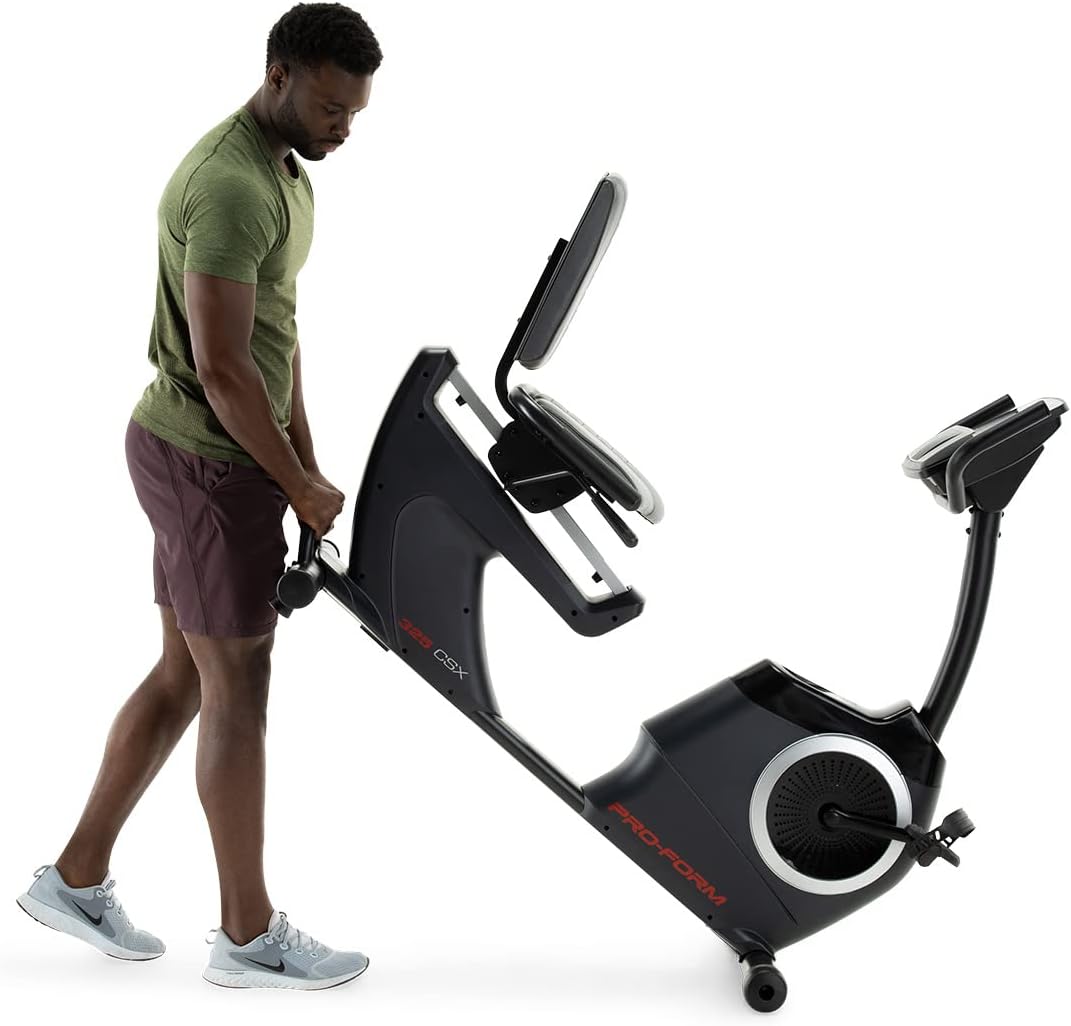
Image: Moving the exercise bike. The bike features transport wheels for easier relocation after assembly.
මෙහෙයුම් උපදෙස්
ආසනය සකස් කිරීම:
The cushioned seat is adjustable to accommodate various user heights. To adjust, locate the adjustment lever beneath the seat. Pull the lever, slide the seat to the desired position, and release the lever to lock it in place. Ensure the seat is securely locked before use.

Image: A user demonstrating the correct riding position on the ProForm 325 CSX Exercise Bike, highlighting the adjustable seat.
Console Features and iFIT Connectivity:
The 5-inch high-contrast display provides real-time workout statistics. The bike features 22 digital resistance levels, allowing for precise intensity control. The console also supports iFIT connectivity for interactive workouts.
- බල ගැන්වීම: Press any button on the console or begin pedaling to activate the display.
- ප්රතිරෝධක ගැලපීම: Use the '+' and '-' buttons on the console to increase or decrease resistance. Quick resistance buttons (2, 4, 6, etc.) are also available.
- පුහුණු වැඩසටහන්: Select from 24 built-in workout programs. Refer to the console manual for navigation.
- iFIT Connection: Connect your own device (tablet/smartphone) via Bluetooth to access iFIT's global outdoor workouts and hands-free intensity adjustments. A 30-day iFIT membership is typically included with purchase.

රූපය: විස්තරාත්මක view of the console, showing the digital display, resistance controls, and integrated fan.

Image: A user engaging with the iFIT application on a tablet, demonstrating the bike's connectivity features.

Image: An illustration of the iFIT connection, highlighting how a personal device can enhance the workout experience.
නඩත්තු කිරීම
නිතිපතා නඩත්තු කිරීම ඔබේ ව්යායාම බයිසිකලයේ ආයු කාලය සහ ප්රශස්ත ක්රියාකාරිත්වය සහතික කරයි.
- පිරිසිදු කිරීම: දැන්වීමක් සමඟ එක් එක් භාවිතයෙන් පසු බයිසිකලය පිස දමන්න.amp දහඩිය සහ දූවිලි ඉවත් කිරීමට රෙදි. උල්ෙල්ඛ පිරිසිදු කරන්නන්ගෙන් වළකින්න.
- පරීක්ෂණ: Periodically check all bolts and nuts for tightness. Retighten as necessary.
- පෙඩල්ස්: පැඩල් ආරක්ෂිතව සවි කර නිදහසේ කැරකෙන බවට වග බලා ගන්න.
- ලිහිසි තෙල්: The internal magnetic resistance system and belt drive are generally maintenance-free and do not require lubrication.
දෝෂගවේෂණය
| ගැටලුව | විය හැකි හේතුව | විසඳුම |
|---|---|---|
| කොන්සෝලය දත්ත පෙන්වන්නේ නැත. | Loose wire connection; batteries low/dead (if applicable). | Check all console wire connections. Replace console batteries if battery-powered. |
| ප්රතිරෝධය වෙනස් නොවේ. | ප්රතිරෝධක මෝටරයට සම්බන්ධතාවය ලිහිල් වීම; කොන්සෝලය ක්රියා විරහිත වීම. | Ensure all connections are secure. If using iFIT, ensure the app is properly connected and controlling the bike. |
| මෙහෙයුම අතරතුර අසාමාන්ය ශබ්දය. | Loose hardware; component friction. | Inspect all bolts and nuts and tighten any loose ones. Ensure no parts are rubbing. |
| Pedals feel loose or wobbly. | Pedals not tightened sufficiently. | Retighten pedals. Remember the left pedal is reverse-threaded. |
පිරිවිතර
| විශේෂාංගය | විස්තර |
|---|---|
| මාදිලියේ නම | 325 CSX |
| වෙළඳ නාමය | ProForm |
| වර්ණය | කළු |
| ප්රතිරෝධක යාන්ත්රණය | චුම්බක |
| ප්රතිරෝධක මට්ටම් සංඛ්යාව | ඩිජිටල් මට්ටම් 22ක් |
| ධාවක පද්ධතිය | පටිය |
| උපරිම පරිශීලක බර | රාත්තල් 300 (දළ වශයෙන් කිලෝග්රෑම් 136) |
| අයිතමයේ බර | කිලෝග්රෑම් 50.8 (ආසන්න වශයෙන් රාත්තල් 112) |
| ද්රව්ය | ඇලෝයි වානේ |
| බලශක්ති ප්රභවය | Pedal-powered (non-electric for main operation, console may use batteries) |
| නිර්දේශිත භාවිතය | ගෘහස්ථ |
| කොන්සෝල සංදර්ශකය | 5-inch High-Contrast Display |
| සම්බන්ධතාවය | iFIT (Bluetooth compatible) |
| UPC | 043619106961 |
| නිෂ්පාදකයා | iFIT සෞඛ්ය සහ යෝග්යතාවය |
වගකීම් සහ සහාය
ProForm products are manufactured with high-quality materials and craftsmanship. For specific warranty details, please refer to the warranty card included with your product or visit the official ProForm website. Warranty coverage typically includes the frame, parts, and labor for a specified period from the date of purchase.
For technical assistance, replacement parts, or customer service inquiries, please contact ProForm customer support. Have your model number (325 CSX) and serial number ready when contacting support.
ඔබට ප්රයෝජනවත් සම්පත් සහ නිතර අසන ප්රශ්න ද සොයාගත හැකිය ProForm Store on Amazon හෝ නිෂ්පාදකයාගේ නිලධාරියා webඅඩවිය.


