1. හැඳින්වීම
Thank you for choosing the UGREEN 140W Nexode 3-Port USB-C Charger. This device is designed to provide efficient and fast charging for a wide range of electronic devices, including laptops, tablets, and smartphones. Utilizing advanced GaN II technology, it offers high power output in a compact form factor. Please read this manual carefully before use to ensure proper operation and to maximize the lifespan of your product.
2 ආරක්ෂිත තොරතුරු
- චාජරය දියර, තෙතමනය හෝ අධික උෂ්ණත්වයන්ට නිරාවරණය නොකරන්න.
- චාජරය බිම හෙළීමෙන් හෝ දැඩි බලපෑම්වලට ලක් කිරීමෙන් වළකින්න.
- Do not disassemble, modify, or attempt to repair the charger. This will void the warranty and may cause damage or injury.
- හොඳින් වාතාශ්රය ඇති ප්රදේශයක චාජරය භාවිතා කරන බවට වග බලා ගන්න.
- ගැළපෙන කේබල් සහ උපාංග පමණක් භාවිතා කරන්න.
- අකුණු කුණාටු ඇති විට හෝ දිගු කාලයක් භාවිතා නොකළ විට චාජරය විසන්ධි කරන්න.
- දරුවන්ට ළඟා විය නොහැකි ලෙස තබා ගන්න.
3. පැකේජ අන්තර්ගතය
The UGREEN 140W Nexode 3-Port USB-C Charger package typically includes:
- UGREEN 140W Nexode 3-Port USB-C Charger (Model 90322)
- USB-C to USB-C Charging Cable (may vary by region/bundle)
- පරිශීලක අත්පොත
4. නිෂ්පාදන අවසන්view
The UGREEN 140W Nexode charger features three charging ports and incorporates advanced GaN II technology for efficient power delivery. It is designed to be compact and portable while offering high wattagඊ ප්රතිදානය.

Image: The UGREEN 140W Nexode 3-Port USB-C Charger, showcasing එහි සංයුක්ත නිර්මාණය සහ බහු වරායන්.
4.1 වරාය සහ දර්ශක
- USB-C1 තොට: Primary high-power output, supporting up to 140W.
- USB-C2 තොට: Secondary USB-C output.
- USB-A වරාය: Standard USB-A output.
- LED දර්ශකය: Illuminates when the charger is connected to power.

රූපය: සමීප රූපය view of the UGREEN 140W Nexode charger highlighting its three output ports (2x USB-C, 1x USB-A).
5. පිහිටුවීම
Setting up your UGREEN 140W Nexode charger is straightforward:
- බලයට සම්බන්ධ කරන්න: Plug the charger into a standard wall outlet. The LED indicator will light up, confirming power connection.
- උපාංගය සම්බන්ධ කරන්න: Use a compatible charging cable (USB-C to USB-C, USB-C to Lightning, or USB-A to device-specific connector) to connect your electronic device to one of the charger's output ports.
- ආරෝපණය ආරම්භ කරන්න: Your device should automatically begin charging. The charger's intelligent power distribution system will optimize the output for connected devices.

Image: The UGREEN 140W Nexode charger connected to a wall outlet, simultaneously charging a laptop, tablet, and smartphone.
6. මෙහෙයුම් උපදෙස්
6.1 බලය බෙදා හැරීම
The UGREEN 140W Nexode charger features a Power Dispenser System that intelligently adjusts power output based on the number and type of connected devices. This ensures optimal charging speed and protects battery life.

Image: Diagram illustrating power distribution when a single device is connected, showing maximum output for a MacBook Pro 16 inch (140W Max).

Image: Diagram illustrating power distribution when multiple devices are connected, showing how power is dynamically allocated across ports.
6.2 Fast Charging Capabilities
This charger supports various fast charging protocols, including PD 3.1, allowing for rapid charging of compatible devices. For example, a MacBook Pro 16" can reach 56% charge in approximately 30 minutes when connected to the 140W USB-C port.

Image: A UGREEN 140W Nexode charger connected to a MacBook Pro 16 inch, demonstrating PD 3.1 fast charging capabilities.
6.3 බහු උපාංග ආරෝපණය කිරීම
The charger can simultaneously charge up to three devices. When charging multiple devices, the total 140W output is shared intelligently among the ports. For optimal performance, refer to the power distribution diagrams or the specifications section.

Image: Two laptops being charged simultaneously by the UGREEN 140W Nexode charger, illustrating its multi-device charging capability.
7. ආරෝපණ අනුකූලතාව
The UGREEN 140W Nexode charger is compatible with a wide range of devices, including but not limited to:
- ලැප්ටොප්: MacBook Pro 16" (140W/100W), MacBook Pro 13"/14" (65W), Dell XPS, Lenovo ThinkPad series, Samsung Chromebook 4.
- ටැබ්ලට්: iPad Pro/Air/Mini.
- ස්මාර්ට්ෆෝන්: iPhone 14-8 Series (30W), Samsung Galaxy S23 Ultra/S23 Plus/Steam Deck (45W), Galaxy Series (25W), Google Pixel 7 Pro/6/5.
- වෙනත් උපකරණ: Game consoles (Steam Deck/Switch), Drones (DJI Pocket 2/DJI Mini 3 Pro), Earphones (Airpods Pro 2/Airpods), Smartwatches (Apple Watch 8 Series, Samsung Galaxy Watch 5 Pro, Huawei Watch).
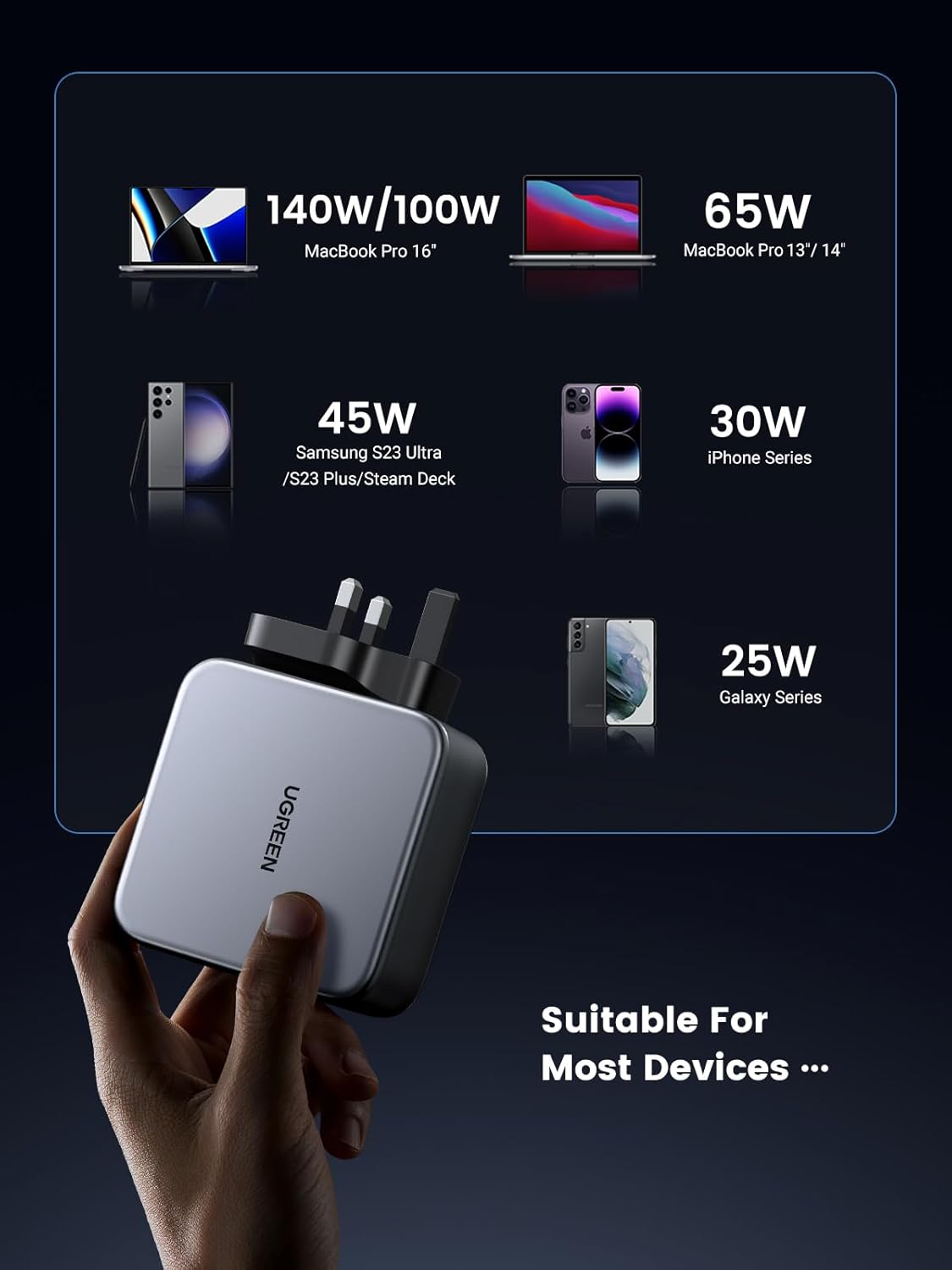
Image: Visual representation of various devices compatible with the UGREEN 140W Nexode charger and their typical charging wattages.
8. නඩත්තු කිරීම
ඔබේ චාජරයේ ආයු කාලය සහ ප්රශස්ත ක්රියාකාරිත්වය සහතික කිරීම සඳහා:
- පිරිසිදු කිරීම: පිරිසිදු කිරීමට පෙර චාජරය බල සැපයුමෙන් සහ සියලුම උපාංගවලින් විසන්ධි කරන්න. මතුපිට පිස දැමීමට මෘදු, වියළි රෙද්දක් භාවිතා කරන්න. දියර පිරිසිදු කරන්නන් හෝ එයරොසෝල් භාවිතා නොකරන්න.
- ගබඩා: චාජරය සෘජු හිරු එළිය සහ අධික උෂ්ණත්වයන්ගෙන් ඈත්ව සිසිල් වියළි ස්ථානයක ගබඩා කරන්න.
- කේබල් රැකවරණය: Avoid bending or twisting charging cables excessively, as this can damage the internal wires.
9. දෝශ නිරාකරණය
9.1 උපාංගය ආරෝපණය නොවේ
- බල සම්බන්ධතාවය පරීක්ෂා කරන්න: Ensure the charger is securely plugged into a working wall outlet. The LED indicator should be lit.
- කේබලය පරීක්ෂා කරන්න: Verify that the charging cable is properly connected to both the charger and your device. Try using a different cable to rule out a faulty cable.
- උපාංග ගැළපුම: Confirm that your device is compatible with USB-C or USB-A charging and that the power requirements are within the charger's capabilities.
- උපාංගය නැවත ආරම්භ කරන්න: Sometimes, restarting your device can resolve charging issues.
9.2 මන්දගාමී ආරෝපණය
- කේබල් ගුණාත්මකභාවය: Ensure you are using a high-quality cable that supports fast charging (e.g., a 240W PD cable for maximum laptop charging).
- බහු උපාංග: When multiple devices are connected, the total power output is shared. Disconnect other devices to allow a single device to receive maximum power.
- උපාංග සහාය: Confirm your device supports fast charging protocols (e.g., Power Delivery) and is connected to the appropriate port (e.g., USB-C1 for 140W).
9.3 අධික උනුසුම් වීම
- වාතාශ්රය: චාජරය හොඳින් වාතාශ්රය ඇති ප්රදේශයක ඇති බවත් එය ආවරණය නොකරන බවත් සහතික කර ගන්න.
- පැටවීම: High-power charging can generate heat. If the charger feels excessively hot, disconnect it and allow it to cool down before resuming use. If the issue persists, contact support.
10. පිරිවිතර
| විශේෂාංගය | පිරිවිතර |
|---|---|
| වෙළඳ නාමය | UGREEN |
| ආදර්ශ අංකය | 90322 |
| වට්tage | වොට් 140 යි |
| වරායන් ගණන | 3 (2x USB-C, 1x USB-A) |
| ආදාන වෙළුමtage | වෝල්ට් 240 |
| Ampකෝපය | 3 Amps |
| විශේෂ ලක්ෂණ | වේගවත් ආරෝපණය, GaN II තාක්ෂණය |
| ද්රව්ය වර්ගය | ඇලුමිනියම් |
| සවිකිරීමේ වර්ගය | වෝල් මවුන්ට් |
| පැකේජ මානයන් | 18.2 x 12 x 5.8 සෙ.මී |
| අයිතමයේ බර | 500 ග්රෑම් |
11. වගකීම් සහ සහාය
UGREEN products come with a standard warranty. For detailed warranty information, please refer to the warranty card included with your product or visit the official UGREEN website. If you encounter any issues or have questions regarding your UGREEN 140W Nexode 3-Port USB-C Charger, please contact UGREEN customer support through their official channels.
UGREEN නිල Webඅඩවිය: www.ugreen.com
12. නිෂ්පාදන වීඩියෝ
12.1 UGREEN 140W Nexode Charger Overview
වීඩියෝ: පුළුල් විස්තරයක්view of the UGREEN 140W Nexode 3-Port USB-C Charger, demonstrating its features and usage. (Duration: 3:14)
12.2 Fast Charging Demonstration
වීඩියෝ: කෙටි නිරූපණ සංදර්ශනයක්asing the fast charging capabilities of the UGREEN 140W Nexode charger. (Duration: 0:46)


