1. හැඳින්වීම
The TP-Link EAP670 is an Omada WiFi 6 AX5400 Wireless 2.5G Ceiling Mount Access Point designed to provide high-speed, reliable wireless connectivity. This device integrates into the Omada Software Defined Networking (SDN) platform, offering centralized cloud management for various network environments. It supports advanced Wi-Fi 6 technologies such as OFDMA, MU-MIMO, and HE160 for enhanced performance and capacity.
ප්රධාන ලක්ෂණ ඇතුළත් වේ:
- Ultra-Fast Wi-Fi 6 Speeds: Delivers dual-band Wi-Fi speeds up to 5400 Mbps, utilizing 1024-QAM, HE160, and Long OFDM Symbol technologies.
- 2.5 ගිගාබිට් ඊතර්නෙට් වරාය: Equipped with a 2.5GE port for multi-gigabit performance and increased internet throughput.
- ඊතර්නෙට් හරහා බලය (PoE+): Supports 802.3at PoE+ for flexible and simplified installation, eliminating the need for nearby power outlets.
- ඔමාඩා SDN ඒකාබද්ධ කිරීම: Seamlessly integrates with the Omada SDN platform for centralized management of access points, switches, and gateways.
- වලාකුළු ප්රවේශය සහ ඔමාඩා යෙදුම: Offers remote cloud access and management via the Omada app, allowing control from anywhere, anytime.
- උසස් රැහැන් රහිත තාක්ෂණයන්: Features Mesh WiFi, Seamless Roaming, Band Steering, Load Balancing, Airtime Fairness, and Beamforming.

Image 1: TP-Link EAP670 Omada WiFi 6 AX5400 Wireless Access Point, front view LED දර්ශකය සමඟ.
2. පැකේජ අන්තර්ගතය
ඔබේ පැකේජයේ පහත අයිතම අඩංගු බව තහවුරු කරන්න:
- TP-Link EAP670 Access Point
- බල ඇඩැප්ටරය (12V/1.5A DC)
- සිවිලිම / බිත්ති සවිකිරීම් කට්ටල
- ස්ථාපන මාර්ගෝපදේශය
3. පිහිටුවීම සහ ස්ථාපනය
The EAP670 can be powered via Power over Ethernet (PoE+) or a standard DC power adapter. It supports both ceiling and wall mounting.
3.1 උපාංගය අවසන්view
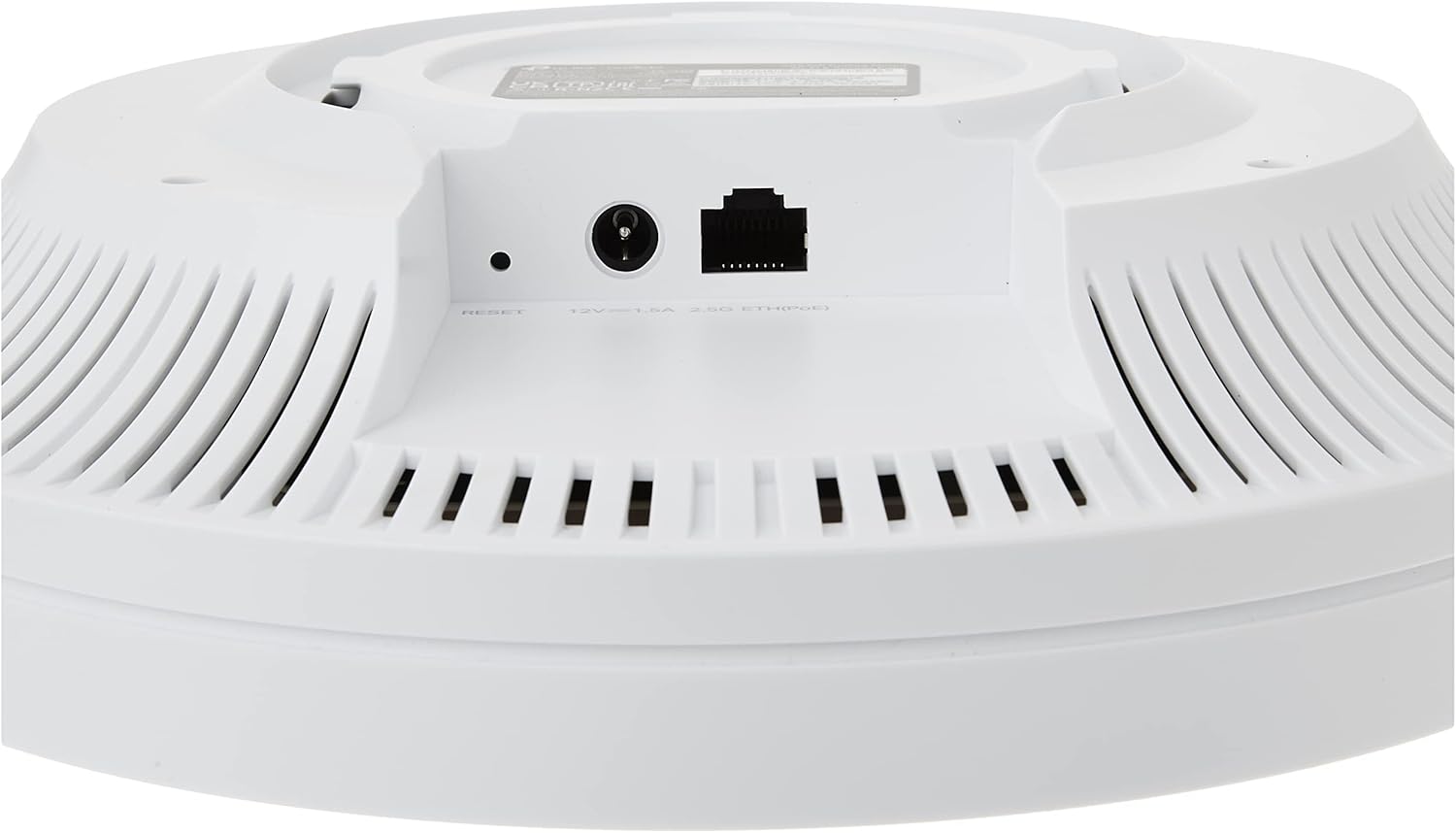
රූපය 2: පසුපස view of the EAP670 showing the 2.5 Gigabit Ethernet port (PoE+ compatible), 12V/1.5A DC power input, and reset button.
3.2 උපාංගය බල ගැන්වීම
- PoE+ (නිර්දේශිත): Connect an Ethernet cable from a PoE+ switch (802.3at compliant) to the 2.5G Ethernet port on the EAP670. The device will receive both power and data through this single cable.
- DC බල ඇඩැප්ටරය: Connect the provided 12V/1.5A DC power adapter to the DC power input port on the EAP670, then plug the adapter into a power outlet. Connect an Ethernet cable from your network to the 2.5G Ethernet port for data.
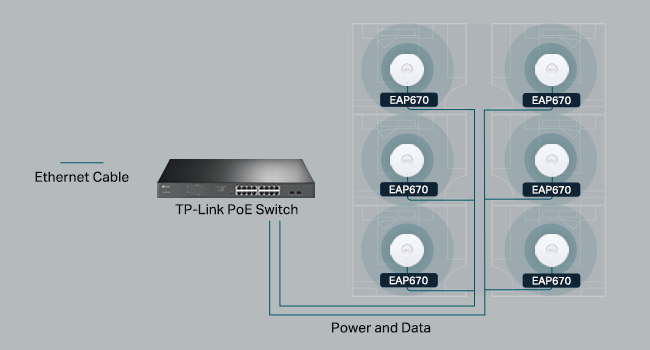
Image 3: Diagram illustrating the deployment of EAP670 units powered by a TP-Link PoE switch, providing both power and data.
3.3 උපාංගය සවි කිරීම
Refer to the included Installation Guide for detailed instructions on using the ceiling/wall mounting kits to securely install your EAP670.
3.4 මූලික වින්යාසය
The EAP670 can be configured in standalone mode or integrated into the Omada SDN platform. For initial setup, you can use the Omada app or a web බ්රවුසරය.
- ඔමාඩා යෙදුම: Download the Omada app from your mobile app store. Scan the S/N code on the device packaging to quickly add and configure your EAP670.
- Web බ්රවුසරය: Connect a computer to the EAP670's network. Open a web browser and navigate to the default management IP address (refer to the Installation Guide for details) to access the web- පදනම් වූ කළමනාකරණ අතුරු මුහුණත.
4. Operating the EAP670
The EAP670 offers flexible management options, including standalone mode, software controller, hardware controller, or cloud-based controller within the Omada SDN ecosystem.
4.1 ඔමාඩා එස්ඩීඑන් ඒකාබද්ධ කිරීම
The Omada Software Defined Networking (SDN) platform allows for centralized management of your network devices. This includes access points, switches, and gateways, all controlled from a single interface.

Image 4: Diagram illustrating the Omada SDN platform, showing various access point types, Jetstream switches, Omada Security Gateways, and unified management interfaces (hardware, software, and cloud controllers).
4.2 Cloud Access and Omada App
Remote cloud access and the Omada app facilitate centralized cloud management of your entire network across different sites. This allows for control from a single interface, anytime and anywhere.

රූපය 5: ඉවරයිview of the Omada cloud solution for business networking, demonstrating centralized management via tablet and smartphone apps, integrating various Omada devices.
පහසු කළමනාකරණය සඳහා Omada යෙදුම බාගන්න: TP-Link Omada යෙදුම
4.3 Advanced Wireless Features
The EAP670 supports several advanced wireless technologies to optimize network performance:
- Mesh WiFi: Creates a seamless mesh network for extended coverage (requires Omada SDN controllers).
- බාධාවකින් තොරව රෝමිං: Allows devices to automatically switch between access points for uninterrupted connections (requires Omada SDN controllers).
- බෑන්ඩ් සුක්කානම: Guides dual-band clients to the less congested 5 GHz band.
- පැටවුම් තුලනය: Distributes client connections across multiple access points to prevent overload.
- ගුවන් කාල සාධාරණත්වය: Ensures that slower clients do not monopolize airtime, improving overall network efficiency.
- කිරණ සැකසීම: ශක්තිමත්, වඩා විශ්වාසදායක සම්බන්ධතා සඳහා සම්බන්ධිත උපාංග දෙසට Wi-Fi සංඥා යොමු කරයි.

Image 6: Diagram illustrating seamless roaming functionality, where devices automatically switch between multiple access points for continuous connectivity throughout a building.

Image 7: Chart comparing Wi-Fi speeds of the EAP670 (Wi-Fi 6) against older Wi-Fi 5 and Wi-Fi 6 (HE80) devices, highlighting its AX5400 performance.
5. නඩත්තු කිරීම
To ensure optimal performance and longevity of your EAP670, consider the following maintenance practices:
- ස්ථිරාංග යාවත්කාලීන කිරීම්: Regularly check for and install the latest firmware updates from the TP-Link website or via your Omada controller. Firmware updates often include performance improvements, security patches, and new features.
- භෞතික පිරිසිදු කිරීම: Keep the device clean and free from dust. Use a soft, dry cloth to wipe the exterior. Ensure ventilation holes are not obstructed.
- පාරිසරික තත්ත්වයන්: Operate the device within its specified temperature and humidity ranges. Avoid exposing it to direct sunlight, excessive heat, or moisture.
- ජාල නිරීක්ෂණ: Utilize the Omada controller or app to monitor network health and device status, addressing any alerts promptly.
6. දෝශ නිරාකරණය
If you encounter issues with your EAP670, consider the following troubleshooting steps:
- බලය නැත: Verify that the power adapter is securely connected to both the EAP670 and a working power outlet, or that the PoE+ source is active and connected correctly.
- අන්තර්ජාල ප්රවේශය නැත: Check the Ethernet cable connection to your router or switch. Ensure your router has an active internet connection. If using an Omada controller, check its status and configuration.
- Weak Wi-Fi Signal or Slow Speeds: Ensure the EAP670 is mounted in an optimal location, away from obstructions and sources of interference (e.g., microwaves, cordless phones). Check for environmental factors mentioned in the legal disclaimer that might affect wireless performance.
- කළමනාකරණ අතුරුමුහුණතට ප්රවේශ විය නොහැක: Ensure your computer is connected to the same network as the EAP670. Verify the IP address or hostname used to access the interface. Try restarting the EAP670.
- උපාංගය නැවත සැකසීම: If issues persist, you may need to reset the EAP670 to factory default settings. Locate the reset button (refer to Image 2) and press and hold it for approximately 5-10 seconds until the LED indicator changes. අවවාදයයි: මෙය සියලු අභිරුචි වින්යාසයන් මකා දමනු ඇත.
නෛතික වියාචනය: Actual wireless transmission rate and wireless coverage are not guaranteed and will vary due to environmental factors (building materials, physical objects, obstacles), network conditions (interference, traffic, product location, network complexity), and client limitations (rated performance, location, connection quality).
7. පිරිවිතර
Below are the technical specifications for the TP-Link EAP670 Omada WiFi 6 AX5400 Wireless Access Point:
| විශේෂාංගය | පිරිවිතර |
|---|---|
| මාදිලියේ නම | ඊඒපී 670 |
| රැහැන් රහිත වර්ගය | 802.11ax (Wi-Fi 6) |
| සංඛ්යාත කලාප පන්තිය | ද්විත්ව කලාප (2.4 GHz සහ 5 GHz) |
| ඊතර්නෙට් වරාය | 1x 2.5 Gigabit Ethernet Port |
| බල සැපයුම | 802.3at PoE+ or 12V/1.5A DC |
| මෙහෙයුම් පද්ධතිය | Omada OS |
| මානයන් (LxWxH) | 9.59 x 9.59 x 2.59 අඟල් (243 x 243 x 66 මි.මී.) |
| අයිතමයේ බර | රාත්තල් 1.74 (කිලෝ ග්රෑම් 0.79) |
| වර්ණය | සුදු |
| විශේෂ ලක්ෂණය | WPS (Wi-Fi ආරක්ෂිත සැකසුම) |
| ඇතුළත් සංරචක | EAP670, Power Adapter, Ceiling/Wall Mounting Kits, Installation Guide |
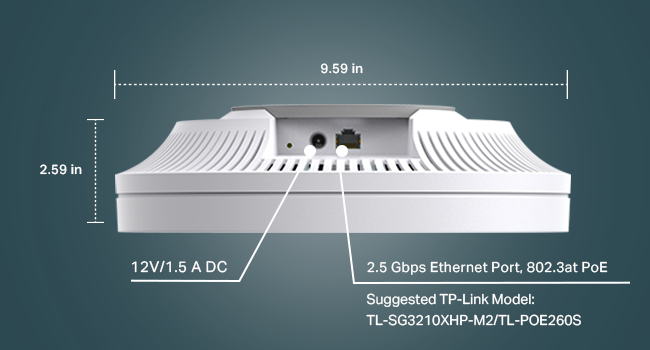
රූපය 8: විස්තරාත්මක view of the EAP670's dimensions and port labels, including 12V/1.5A DC input and 2.5 Gbps Ethernet Port (802.3at PoE).
8. වගකීම් සහ සහාය
8.1 වගකීම් තොරතුරු
The TP-Link EAP670 comes with an industry-leading 5-year warranty.
8.2 තාක්ෂණික සහාය
For technical assistance, please contact TP-Link support:
- දුරකථනය: (866) 225-8139 (Available Monday to Friday, 6 AM to 6 PM PST)
- සහාය Webඅඩවිය: myproducts.tp-link.com/us
- විද්යුත් තැපෑල: support.USA@tp-link.com