1. හැඳින්වීම
This manual provides detailed instructions for the installation, operation, and maintenance of your Geek Smart Fingerprint Door Lock, Model L-B201. Please read this manual thoroughly before installation and use to ensure proper function and longevity of the product. Keep this manual for future reference.
2. නිෂ්පාදන ලක්ෂණ
- ඇඟිලි සලකුණු හඳුනාගැනීම: Stores up to 20 unique fingerprints for quick and secure access. Unlocks in approximately 0.1 seconds.
- ද්විත්ව මෙහෙයුම් ආකාර: Easily switch between Normal mode (auto-lock after 5 seconds) and Passage mode (remains unlocked for free passage).
- දිගු බැටරි ආයු කාලය: Powered by 4 AAA batteries (not included), providing approximately 8-12 months of operation.
- හදිසි බලය: Equipped with a USB port for emergency charging if batteries deplete.
- සරල ස්ථාපනය: Designed for easy DIY installation with minimal tools required. Voice assistant guides programming.
- විශ්ව අනුකූලතාව: Suitable for both left and right-handed doors. Fits standard door thicknesses from 1-3/8'' to 2-1/8'' (35 to 55mm). Adjustable latch for 2-3/8'' (60mm) or 2-3/4'' (70mm) backsets.
- උපස්ථ ප්රවේශය: Includes physical keys for manual override.
3. පැකේජ අන්තර්ගතය
ස්ථාපනය ආරම්භ කිරීමට පෙර සියලුම සංරචක පවතින බව තහවුරු කර ගන්න:
- ඉදිරිපස හැන්ඩ්ල් එකලස් කිරීම
- පසුපස හැන්ඩ්ල් එකලස් කිරීම
- අගුල
- වැඩ වර්ජන තහඩුව
- යතුරු (2)
- Keyhole Cover Pin
- සවිකරන ඉස්කුරුප්පු (4)
- රබර් ගෑස්කට්
- උපදෙස් අත්පොත (මෙම ලේඛනය)
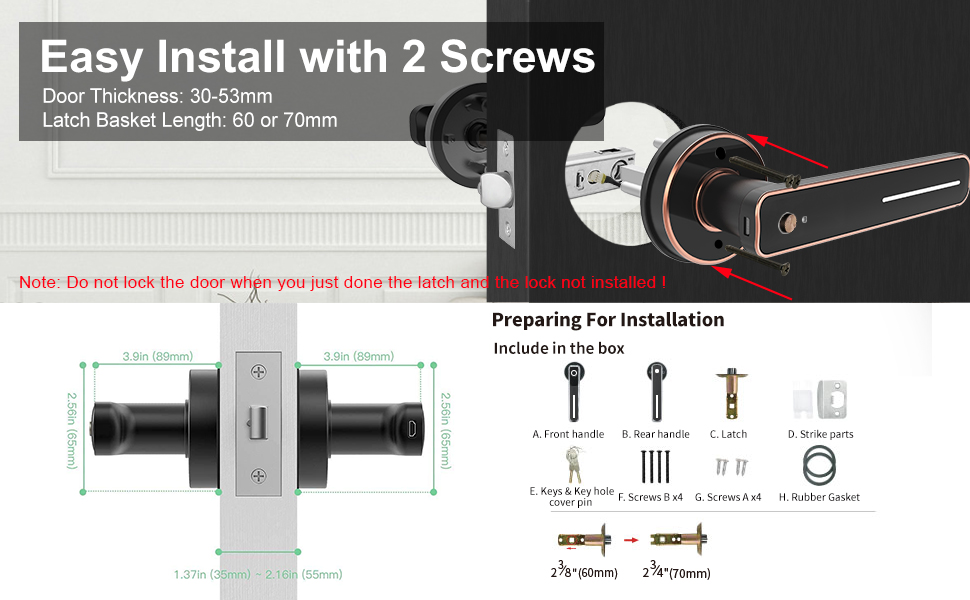
Image: Included components for installation, featuring front and rear handles, latch, strike plate, keys, screws, and gasket.
4. ස්ථාපන මාර්ගෝපදේශය
Installation typically requires only a screwdriver. Follow these steps carefully:
- දොර සකස් කරන්න: Ensure your door meets the thickness requirements (1-3/8'' to 2-1/8'' or 35-55mm) and that the latch backset is set correctly (60mm or 70mm).
- අගුල ස්ථාපනය කරන්න: Insert the latch into the door edge. Ensure the bevel of the latch bolt faces the door frame. Secure with screws.
- Install the Front Handle: Position the front handle assembly on the exterior side of the door, aligning the spindle with the latch mechanism.
- Install the Rear Handle: Place the rubber gasket on the interior side of the door. Connect the rear handle assembly to the front handle, ensuring wires are not pinched.
- අගුල සුරක්ෂිත කරන්න: Use the provided screws to firmly attach both handle assemblies to the door.
- ස්ට්රයික් ප්ලේට් ස්ථාපනය කරන්න: දොර රාමුව මත ස්ට්රයික් ප්ලේට් එක සවි කරන්න, එය ලැච් බෝල්ට් එක සමඟ පෙළගස්වන්න.
- බැටරි ඇතුළු කරන්න: Open the battery compartment on the rear handle and insert 4 AAA batteries (not included), observing polarity.

Image: Visual guide for installing the smart lock using two screws, highlighting door thickness and latch basket length.
Note: Do not lock the door when you have just installed the latch and the lock is not fully assembled.
5. මෙහෙයුම
5.1 Initial Setup and Fingerprint Enrollment
- After battery installation, the lock will prompt you with voice instructions.
- To add the first administrator fingerprint, follow the voice prompts. You will typically need to place your finger on the sensor multiple times from different angles.
- Once the administrator fingerprint is registered, you can add additional user fingerprints (up to 20 total) by following similar voice prompts.

Image: The fingerprint sensor in action, showing a quick 0.1-second read speed and capacity for 20 fingerprints.
5.2 දොර ඇරීම
- ඇඟිලි සලකුණු: Place a registered finger on the sensor. The lock will unlock if the fingerprint is recognized.
- යතුර: In case of emergency or battery depletion, use the provided physical key to unlock the door.
5.3 Mode Switching (Passage Mode / Normal Mode)
The lock features a mode switching button, typically located on the interior handle. Press this button to toggle between modes.
- සාමාන්ය මාදිලිය: The lock will automatically engage (auto-lock) approximately 5 seconds after being unlocked. This is the standard secure mode.
- ගමන් ප්රකාරය: The lock will remain unlocked, allowing free entry and exit without requiring a fingerprint or key. This mode is suitable for periods of high traffic.
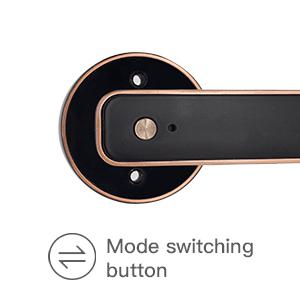
Image: Detail of the mode switching button on the lock's interior handle.

Image: The lock set to Passage Mode, allowing unrestricted entry and exit.
5.4 හදිසි ආරෝපණය
If the batteries run out, the lock can be temporarily powered using a standard USB power bank connected to the emergency USB port on the exterior handle. This allows you to unlock the door with a registered fingerprint or key.

Image: The USB port for emergency power, located on the exterior handle.

Image: A physical backup key provided for manual access.
6. නඩත්තු කිරීම
- පිරිසිදු කිරීම: Wipe the lock surface with a soft, dry cloth. Avoid abrasive cleaners or solvents that could damage the finish or electronic components.
- බැටරි ආදේශනය: Replace all 4 AAA batteries when the low battery indicator or voice prompt is activated. Do not mix old and new batteries.
- ඇඟිලි සලකුණු සංවේදක සත්කාරය: ප්රශස්ත ක්රියාකාරිත්වය සඳහා ඇඟිලි සලකුණු සංවේදකය පිරිසිදුව හා වියලිව තබා ගන්න.
7. දෝශ නිරාකරණය
| ගැටලුව | විය හැකි හේතුව | විසඳුම |
|---|---|---|
| අගුල ප්රතිචාර නොදක්වයි. | මිය ගිය බැටරි. | Replace batteries or use emergency USB power. |
| ඇඟිලි සලකුණ හඳුනා නොගන්නා ලදී. | ඇඟිල්ල තෙත්/අපිරිසිදුයි, සංවේදකය අපිරිසිදුයි, නැතහොත් ඇඟිලි සලකුණ නිසි ලෙස ලියාපදිංචි වී නැත. | Clean finger and sensor. Re-enroll fingerprint if necessary. Try a different registered finger. |
| අගුල ස්වයංක්රීයව අගුළු නොදමයි. | Lock is in Passage Mode. | Press the mode switching button to return to Normal Mode. |
| Voice prompts are unclear or absent. | Low battery or internal error. | බැටරි මාරු කරන්න. ගැටලුව දිගටම පවතී නම්, පාරිභෝගික සහාය අමතන්න. |
8. පිරිවිතර
| විශේෂාංගය | විස්තර |
|---|---|
| ආකෘතිය | එල්-බී 201 |
| වෙළඳ නාමය | Geek Smart |
| අගුළු වර්ගය | Biometric Fingerprint Handle Lock |
| ද්රව්ය | ඇලුමිනියම් |
| වර්ණය | කළු |
| ඇඟිලි සලකුණු ධාරිතාව | 20 දක්වා |
| අගුළු හැරීමේ වේගය | තත්පර 0.1 ක් පමණ |
| බලශක්ති ප්රභවය | 4 x AAA බැටරි (ඇතුළත් කර නැත) |
| හදිසි බලය | USB Port |
| බැටරි ආයු කාලය | මාස 8-12 (ආසන්න වශයෙන්) |
| දොර ඝණකම | 1-3/8'' to 2-1/8'' (35-55mm) |
| සකස් කළ හැකි අගුල | 2-3/8'' (60mm) or 2-3/4'' (70mm) |
| මානයන් (L x W x H) | අඟල් 6.03 x 2.55 x 2.82 |
| අයිතමයේ බර | රාත්තල් 2.72 කි |
| සම්බන්ධතාවය | No Bluetooth or Wi-Fi Connectivity |
9. වගකීම් සහ සහාය
For warranty information and customer support, please refer to the official Geek Smart webඔබ භාණ්ඩය මිලදී ගත් සිල්ලර වෙළෙන්දා වෙබ් අඩවියට පිවිසෙන්න හෝ සම්බන්ධ කරගන්න. මිලදී ගත් බවට සාක්ෂියක් ලෙස ඔබේ මිලදී ගැනීමේ රිසිට්පත තබා ගන්න.


