1. හැඳින්වීම
This manual provides essential information for the safe and efficient operation of your Powertech MB3904 8 Step Intelligent Lead Acid and Lithium Battery Charger. Please read this manual thoroughly before use and retain it for future reference.
2 ආරක්ෂිත තොරතුරු
සෑම විටම පහත සඳහන් ආරක්ෂක පියවරයන් නිරීක්ෂණය කරන්න:
- බැටරියට සම්බන්ධතා ඇති කර ගැනීමට හෝ බිඳ දැමීමට පෙර චාජරය බල සැපයුමෙන් විසන්ධි වී ඇති බවට වග බලා ගන්න.
- හොඳින් වාතාශ්රය ඇති ප්රදේශවල පමණක් චාජරය භාවිතා කරන්න.
- ශීත කළ බැටරි ආරෝපණය කිරීමෙන් වළකින්න.
- චාජරය වර්ෂාවට හෝ අධික තෙතමනයට නිරාවරණය නොකරන්න.
- දරුවන්ට ළඟා විය නොහැකි ලෙස තබා ගන්න.
- This charger is designed for 6V or 12V Lead Acid or LiFePO4 batteries only. Do not use with other battery types.
3. පැකේජ අන්තර්ගතය
සියලුම අයිතම පැකේජයේ ඇති බව තහවුරු කරගන්න:
- Powertech MB3904 8 Step Intelligent Battery Charger Unit
- බැටරි Clamp Connectors (Red and Black)
- Ring Terminal Connectors
- AC විදුලි රැහැන
- පරිශීලක අත්පොත (මෙම ලේඛනය)
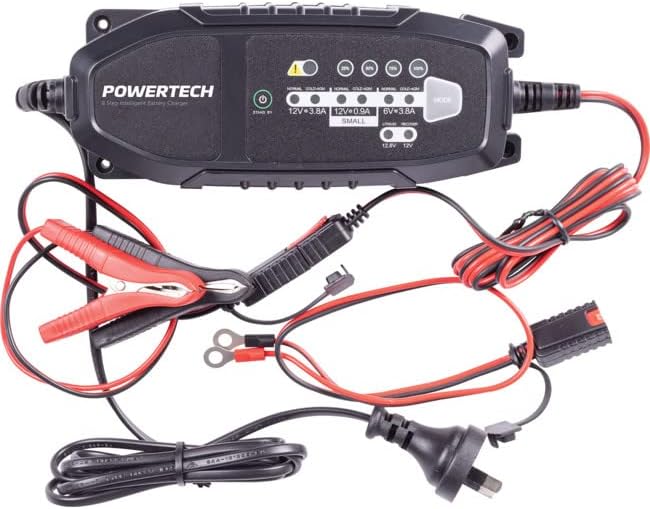
Image: The Powertech MB3904 battery charger unit shown with its various included accessories, including battery clamps, ring terminals, and the AC power cord.
4. නිෂ්පාදන ලක්ෂණ
The Powertech MB3904 charger offers advanced features for optimal battery maintenance:
- 8-පියවර ආරෝපණ ක්රියාවලිය: Ensures thorough and efficient charging for various battery types.
- බහු-වෙළුමtagඊ ගැළපුම: Suitable for both 6V and 12V lead acid and LiFePO4 batteries.
- විස්තීර්ණ ආරක්ෂාව: Includes overload, short circuit, reverse polarity, safety timer, and wrong battery protection.
- බුද්ධිමය LED දර්ශක: Clearly display charge status and selected mode.
- මාදිලිය තේරීමේ බොත්තම: Allows easy switching between charging modes.
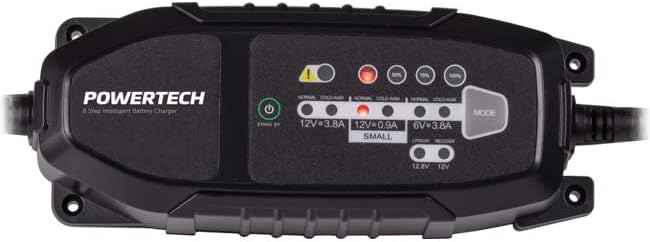
රූපය: ඉහළ-පහළ view of the Powertech MB3904 charger, highlighting the LED indicators for charge status and the 'MODE' button for selecting charging programs.
5. පිහිටුවීම
- ස්ථානගත කිරීම: Place the charger on a stable, flat surface in a well-ventilated area, away from direct sunlight or heat sources.
- බැටරි සම්බන්ධතාවය: Ensure the battery terminals are clean. Connect the red (+) clamp/ring terminal to the positive (+) battery terminal and the black (-) clamp/ring terminal to the negative (-) battery terminal. Ensure a secure connection.
- බල සම්බන්ධතාවය: Plug the AC power cord into a suitable wall outlet. The charger will enter standby mode.
6. මෙහෙයුම් උපදෙස්
6.1. ආරෝපණ මාදිලිය තෝරා ගැනීම
After connecting the battery and power, press the මාදිලිය button to cycle through the available charging programs. The corresponding LED will illuminate to indicate the selected mode:
- 12V 3.8A (Normal): Standard charging for 12V lead acid batteries.
- 12V 3.8A (Cold/AGM): For charging 12V lead acid batteries in cold conditions or AGM batteries.
- 12V 0.9A (Small): For charging smaller 12V lead acid batteries.
- 6V 3.8A: For charging 6V lead acid batteries.
- Lithium (12.8V/12V): For charging 12V LiFePO4 batteries.
- අලුත්වැඩියා: A special mode for desulfation of deeply discharged lead acid batteries.
6.2. ආරෝපණ ක්රියාවලිය
Once a mode is selected, the charger will automatically begin the 8-step charging process. The progress LEDs (25%, 50%, 75%, 100%) will illuminate sequentially to indicate the battery's charge level. When the 100% LED is solid, the battery is fully charged.
6.3. චාජරය විසන්ධි කිරීම
- බිත්ති පිටවන ස්ථානයෙන් AC විදුලි රැහැන විසන්ධි කරන්න.
- කළු (-) cl එක විසන්ධි කරන්නamp/ring terminal from the negative (-) battery terminal.
- රතු (+) cl විසන්ධි කරන්නamp/ring terminal from the positive (+) battery terminal.
7. නඩත්තු කිරීම
- පිරිසිදු කිරීම: චාජරය පිරිසිදු කරන්න casinමෘදු වියළි රෙද්දකින් g. උල්ෙල්ඛ පිරිසිදු කරන්නන් හෝ ද්රාවක භාවිතා නොකරන්න.
- ගබඩා: භාවිතා නොකරන විට චාජරය සිසිල් වියළි ස්ථානයක ගබඩා කරන්න.
- කේබල් පරීක්ෂාව: Periodically inspect the power cord and battery cables for any signs of damage. Do not use the charger if cables are damaged.
8. දෝශ නිරාකරණය
| ගැටලුව | විය හැකි හේතුව | විසඳුම |
|---|---|---|
| චාජරය ක්රියාත්මක නොවේ. | අලෙවිසැලෙන් විදුලිය නැත; සම්බන්ධතාවය ලිහිල්යි. | බල සැපයුම පරීක්ෂා කරන්න; විදුලි රැහැන ආරක්ෂිතව සම්බන්ධ කර ඇති බවට වග බලා ගන්න. |
| දෝෂ LED දැල්වී ඇත. | Reverse polarity; short circuit; wrong battery type. | Check battery connections for correct polarity; inspect cables for shorts; ensure battery type matches selected mode. |
| බැටරිය ආරෝපණය නොවේ. | Battery deeply discharged/damaged; incorrect mode selected. | Try "Repair" mode for lead acid batteries; test battery with a multimeter; ensure correct charging mode is selected. |
9. පිරිවිතර
- ආකෘතිය: MB3904
- ආදාන වෙළුමtage: 220-240V AC, 50/60Hz
- ප්රතිදාන වෙළුමtage: 6V / 12V DC
- ආරෝපණ ධාරාව: 0.9A / 3.8A
- බැටරි වර්ග: Lead Acid (WET, MF, CA, EFB, GEL, AGM), LiFePO4
- ආරක්ෂාව: Overload, Short Circuit, Reverse Polarity, Safety Timer, Wrong Battery
- මානයන්: ආසන්න වශයෙන් 20.4 x 7.4 x 4.8 සෙ.මී
- බර: ආසන්න වශයෙන් 534 ග්රෑම්
- අනුකූලතාව: CE
10. වගකීම් සහ සහාය
This Powertech product is covered by a standard manufacturer's warranty. For specific warranty terms and conditions, please refer to the warranty card included with your purchase or contact your retailer.
For technical support or service inquiries, please contact Jaycar Electronics customer service or visit their official webවෙබ් අඩවිය. වගකීම් හිමිකම් සඳහා ඔබේ මිලදී ගැනීමේ සාක්ෂි තබා ගන්න.
ජයකාර් ඉලෙක්ට්රොනික්ස් Webඅඩවිය: www.jaycar.com.au


