හැඳින්වීම
This manual provides detailed instructions for the safe installation, operation, and maintenance of your Maxxima 4-inch 5 CCT Ultra Thin Recessed LED Downlight. Please read all instructions carefully before installation and retain this manual for future reference.
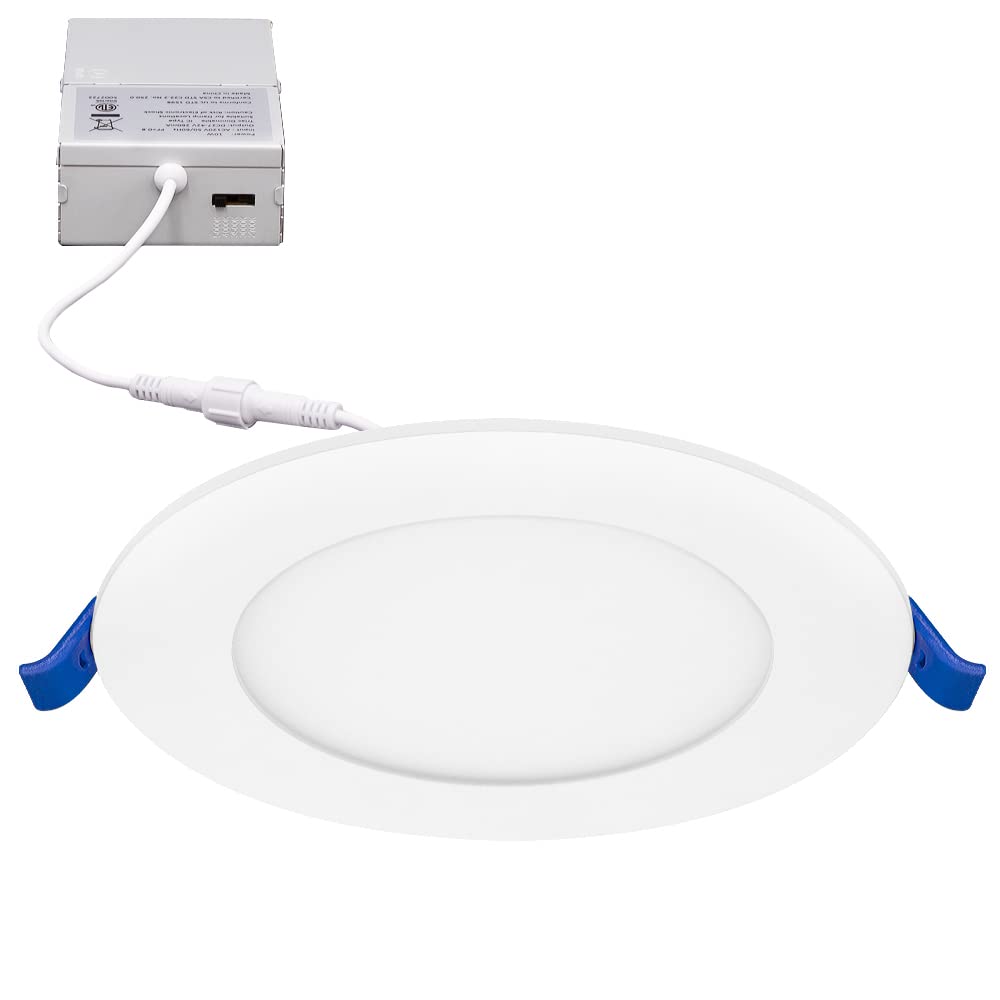
රූපය: ඉදිරිපස view of the Maxxima 4-inch 5 CCT Ultra Thin Recessed LED Downlight.
ආරක්ෂිත තොරතුරු
To reduce the risk of fire, electric shock, or injury to persons, please observe the following safety precautions:
- Always turn off power at the circuit breaker before beginning installation or performing any maintenance.
- සියලුම විදුලි සම්බන්ධතා දේශීය කේත සහ ආඥාපනත මෙන්ම ජාතික විදුලි කේතය (NEC) වලට අනුකූල වන බවට සහතික වන්න.
- ඔබට රැහැන් ඇදීම ගැන සැකයක් ඇත්නම්, සුදුසුකම් ලත් විදුලි කාර්මිකයෙකුගෙන් විමසන්න.
- Do not install in locations where the operating temperature exceeds the fixture's rated temperature.
- මෙම සවිකිරීම d සඳහා සුදුසු වේamp locations and is IC Rated, meaning it is safe for direct contact with insulation.
- සවිකිරීම වෙනස් නොකරන්න හෝ එහි අපේක්ෂිත භාවිතය හැර වෙනත් අරමුණු සඳහා එය භාවිතා නොකරන්න.
පැකේජයේ අන්තර්ගතය
ස්ථාපනය ආරම්භ කිරීමට පෙර සියලුම සංරචක පවතින බව තහවුරු කර ගන්න:
- 1 x Maxxima 4 in. 5 CCT Ultra Thin Recessed LED Downlight
- 1 x Junction Box (J-Box) with integrated power supply
- දෘඪාංග සවිකිරීම
පිරිවිතර
| විශේෂාංගය | පිරිවිතර |
|---|---|
| ආදර්ශ අංකය | MRL-S40905 |
| ප්රමාණය | අඟල් 4 |
| වට්tage | 10W (60W තාපදීප්තයට සමාන) |
| Lumen ප්රතිදානය | 750 Lumens |
| වර්ණ උෂ්ණත්වය (CCT) | තෝරා ගත හැකි: 2700K, 3000K, 3500K, 4000K, 5000K |
| වෙළුමtage | 120VAC |
| අඳුරු කළ හැකි | Yes (20% - 100% with compatible LED dimmer) |
| CRI | 82 |
| ද්රව්ය | ඇලුමිනියම් |
| ස්ථාපන වර්ගය | ෆ්ලෂ් මවුන්ට්, කැන්ලස් |
| සහතික | IC Rated, ETL Listed |
| හන්දි පෙට්ටියේ මානයන් | 1.4" H x 2.7" W x 4.11" D |
| සවිකෘත මානයන් | 4.8” Diameter x 0.87” Thickness |
සැකසුම සහ ස්ථාපනය
නිසි ස්ථාපනය සඳහා මෙම පියවර අනුගමනය කරන්න:
- බලය අක්රිය කරන්න: Before starting any electrical work, ensure the power supply to the installation area is turned off at the circuit breaker.
- Prepare Ceiling Opening: Cut a 4-inch diameter hole in the ceiling at the desired location. Ensure there are no obstructions such as joists or pipes.
- රැහැන් සම්බන්ධ කරන්න: Open the junction box cover. Connect the supply wires to the wires inside the junction box using the provided wire nuts:
- Connect the black wire from the supply to the black wire of the J-Box.
- Connect the white wire from the supply to the white wire of the J-Box.
- Connect the ground wire from the supply to the green wire of the J-Box.
- වර්ණ උෂ්ණත්වය (CCT) තෝරන්න: Before inserting the light into the ceiling, locate the CCT selection switch on the side of the junction box. Choose your desired color temperature (2700K, 3000K, 3500K, 4000K, or 5000K) by sliding the switch.
- Insert Junction Box: Place the wired junction box into the ceiling opening.
- ඩවුන්ලයිට් ස්ථාපනය කරන්න: Connect the downlight to the junction box via the male/female connector. Push the spring clips on the sides of the downlight upwards and insert the fixture into the ceiling hole. The clips will automatically secure the light in place.
- බලය ප්රතිස්ථාපනය කරන්න: පරිපථ කඩනයේදී නැවත බලය සක්රිය කරන්න.

Image: The LED downlight connected to its junction box.

රූපය: සමීප රූපය view of the CCT selection switch located on the side of the junction box.

රූපය: පැත්ත view of the downlight showing the tension spring clips used for installation.
මෙහෙයුම් උපදෙස්
වර්ණ උෂ්ණත්ව තේරීම
The Maxxima 4-inch LED Downlight features 5 CCT (Correlated Color Temperature) options, allowing you to customize the light output to your preference. The selection switch is located on the side of the junction box.
- 2700K: Soft White (Warm, inviting light)
- 3000K: Warm White (Slightly brighter, still warm)
- 3500K: Bright White (Neutral, balanced light)
- 4000K: Neutral White (Cooler, more energetic light)
- 5000K: Daylight (Brightest, closest to natural daylight)
To change the CCT, you must access the junction box. It is recommended to select your preferred CCT before final installation into the ceiling. If changing after installation, ensure power is off before accessing the J-Box.

Image: Visual representation of the five selectable color temperatures.
අඳුරු කිරීමේ ක්රියාකාරීත්වය
This LED downlight is dimmable from 20% to 100% when used with a compatible LED dimmer switch. Ensure your dimmer switch is rated for LED lighting to prevent flickering or damage to the fixture.
නඩත්තු කිරීම
Maxxima LED ඩවුන්ලයිට් සඳහා අවම නඩත්තුවක් අවශ්ය වේ.
- පිරිසිදු කිරීම: පිරිසිදු කිරීමට පෙර විදුලිය විසන්ධි කර ඇති බවට වග බලා ගන්න. මෘදු, වියලි හෝ තරමක් d පිරිසිදු කරන්නෙකු භාවිතයෙන් සවිකිරීම පිස දමන්න.amp රෙදි. උල්ෙල්ඛ පිරිසිදු කරන්නන් හෝ ද්රාවක භාවිතා නොකරන්න, මන්ද ඒවා නිමාව හෝ විදුලි සංරචක වලට හානි කළ හැකිය.
- පරිශීලක-සේවා කළ හැකි කොටස් නොමැත: The LED light source is integrated and not replaceable. Do not attempt to open or repair the fixture.
දෝෂගවේෂණය
If you encounter issues with your downlight, refer to the following table:
| ගැටලුව | විය හැකි හේතුව | විසඳුම |
|---|---|---|
| ආලෝකය දැල්වෙන්නේ නැත | බල සැපයුමක් නැත ලිහිල් රැහැන් සම්බන්ධතාවය දෝෂ සහිත ස්විචයක් හෝ පරිපථ කඩනයක් | Check circuit breaker and wall switch. Ensure all wiring connections are secure. Test with a known working fixture or consult an electrician. |
| ආලෝකය අනිසි ලෙස දැල්වෙයි හෝ අඳුරු වේ | නොගැලපෙන ඩිමර් ස්විචය ලිහිල් රැහැන් | Ensure an LED-compatible dimmer is used. Check wiring connections. |
| වැරදි වර්ණ උෂ්ණත්වය | CCT ස්විචය වැරදි ලෙස සකසා ඇත | Turn off power, access the junction box, and adjust the CCT selection switch to the desired setting. |
වගකීම් සහතිකය
මෙම Maxxima LED පහළ ආලෝකය a මගින් ආවරණය කර ඇත වසර 3ක වගකීමක් from the date of purchase. This warranty covers defects in materials and workmanship under normal use. For warranty claims or further details, please contact Maxxima customer support.
පාරිභෝගික සහාය
For technical assistance, troubleshooting, or warranty inquiries, please contact Maxxima customer support. Refer to the product packaging or the official Maxxima webවත්මන් සම්බන්ධතා තොරතුරු සඳහා අඩවිය.
Please have your model number (MRL-S40905) and date of purchase available when contacting support.


