1. හැඳින්වීම
This manual provides essential instructions for the safe and efficient use of your Alcatel 3085 mobile phone. Please read this guide thoroughly before operating the device to ensure proper functionality and to prevent damage. Keep this manual for future reference.
2. පැකේජ අන්තර්ගතය
ඔබේ පැකේජයේ පහත අයිතම අඩංගු බව තහවුරු කරන්න:
- Alcatel 3085 Mobile Phone
- බැටරි
- චාජර්
- ඉක්මන් ආරම්භක මාර්ගෝපදේශය
- (Optional) Charging Cradle
කිසියම් අයිතමයක් අස්ථානගත වී හෝ හානි වී ඇත්නම්, කරුණාකර ඔබේ සිල්ලර වෙළෙන්දා අමතන්න.
3. පිහිටුවීම
3.1. සිම් කාඩ්පත සහ බැටරිය ඇතුළු කිරීම
- පිටුපස කවරය ඉවත් කරන්න: Gently pry open the back cover of the phone using the notch provided.
- SIM කාඩ්පත ඇතුළු කරන්න: Locate the SIM card slot(s). Align your SIM card with the cut corner and slide it into the slot until it clicks into place. Ensure the gold contacts face downwards.
- බැටරිය ඇතුල් කරන්න: Place the battery into the battery compartment, ensuring the gold contacts on the battery align with the contacts in the phone.
- පිටුපස කවරය ප්රතිස්ථාපනය කරන්න: Carefully align the back cover and press it firmly until it snaps into place.
3.2. බැටරිය ආරෝපණය කිරීම
පළමු භාවිතයට පෙර, දුරකථනයේ බැටරිය සම්පූර්ණයෙන්ම ආරෝපණය කරන්න.
- Connect the charger to the charging port on the phone or place the phone in the charging cradle (if included).
- චාජරය බල පිටවන ස්ථානයකට සම්බන්ධ කරන්න.
- ආරෝපණ දර්ශකය තිරය මත දිස්වනු ඇත. බැටරිය සම්පූර්ණයෙන්ම ආරෝපණය වූ පසු චාජරය විසන්ධි කරන්න.
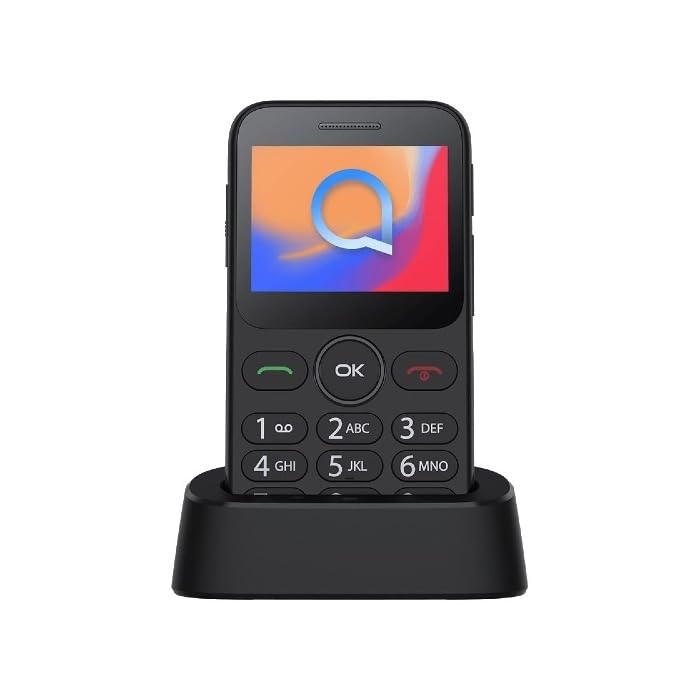
Image 1: Alcatel 3085 mobile phone placed in its charging cradle. The phone features a small color screen and a physical keypad with large, clearly labeled buttons.
4. මෙහෙයුම් උපදෙස්
4.1. බල ගැන්වීම / අක්රිය කිරීම
- බල ගැන්වීමට: ඔබා අල්ලාගෙන සිටින්න බලය/අවසන් ඇමතුම තිරය දැල්වෙන තුරු බොත්තම (රතු බොත්තම).
- බලය අක්රිය කිරීමට: ඔබා අල්ලාගෙන සිටින්න බලය/අවසන් ඇමතුම බලය අක්රිය කිරීමේ විකල්ප දිස්වන තුරු බොත්තම ඔබාගෙන සිටින්න, ඉන්පසු "බලය අක්රිය කරන්න" තෝරන්න.
4.2. ඇමතුම් ලබා ගැනීම සහ ලබා ගැනීම
- ඇමතුමක් ගැනීම: යතුරු පුවරුව භාවිතයෙන් දුරකථන අංකය ඇතුළත් කර බොත්තම ඔබන්න. අමතන්න බොත්තම (කොළ බොත්තම).
- ඇමතුමක් ලැබීම: දුරකථනය නාද වන විට, ඔබන්න අමතන්න පිළිතුරු දීමට බොත්තම.
- ඇමතුමක් අවසන් කිරීම: ඔබන්න ඇමතුම අවසන් කරන්න බොත්තම.
4.3. පණිවිඩ යැවීම සහ ලැබීම
- වෙත සංචාලනය කරන්න පණිවිඩ menu from the main screen.
- Select "Create new message" or "New SMS".
- ලබන්නාගේ අංකය ඇතුළත් කර යතුරු පෑඩය භාවිතයෙන් ඔබේ පණිවිඩය ටයිප් කරන්න.
- "යවන්න" ඔබන්න.
4.4. මූලික සංචාලනය
- භාවිතා කරන්න සංචාලන යතුරු (up, down, left, right) to scroll through menus.
- ඔබන්න හරි/තෝරන්න button (center button) to confirm a selection.
- ඔබන්න ආපසු / පැහැදිලි button (often the right soft key) to go back to the previous screen or delete characters.
5. නඩත්තුව සහ රැකවරණය
- පිරිසිදු කිරීම: දුරකථනයේ තිරය සහ ශරීරය පිරිසිදු කිරීමට මෘදු, වියළි රෙද්දක් භාවිතා කරන්න. දියර පිරිසිදු කරන්නන්ගෙන් වළකින්න.
- ගබඩා: සෘජු හිරු එළියෙන් සහ අධික උෂ්ණත්වයන්ගෙන් ඈත්ව සිසිල් වියළි ස්ථානයක දුරකථනය ගබඩා කරන්න.
- බැටරි සත්කාර: Do not expose the battery to high temperatures or dispose of it in fire. Use only approved chargers.
- ජල ප්රතිරෝධය: මෙම දුරකථනය ජලයට ඔරොත්තු නොදේ. ද්රවවලට නිරාවරණය වීමෙන් වළකින්න.
6. දෝශ නිරාකරණය
| ගැටලුව | හැකි විසඳුම |
|---|---|
| දුරකථනය ක්රියාත්මක නොවේ | බැටරිය නිවැරදිව ඇතුළු කර ආරෝපණය කර ඇති බවට වග බලා ගන්න. අවම වශයෙන් විනාඩි 30 ක් දුරකථනය ආරෝපණය කිරීමට උත්සාහ කරන්න. |
| ඇමතුම් ගැනීමට හෝ ලබා ගැනීමට නොහැකිය. | Check if the SIM card is properly inserted. Verify that you have network coverage. Contact your service provider if the issue persists. |
| බැටරිය ඉක්මනින් බැස යයි | Reduce screen brightness. Close unused applications. Ensure the phone is not in an area with poor network signal, which can increase battery consumption. |
| යතුරුපුවරුව ප්රතිචාර නොදක්වයි | Restart the phone. Ensure no physical obstruction is affecting the keys. |
7. පිරිවිතර
| විශේෂාංගය | විස්තර |
|---|---|
| වෙළඳ නාමය | ඇල්කැටෙල් |
| ආදර්ශ අංකය | 3085 (HP02945) |
| වර්ණය | ලෝහමය කළු |
| ASIN | B0B8X482MH |
| නිෂ්පාදකයා | ඇල්කැටෙල් |
| මෘදුකාංග යාවත්කාලීන කිරීම් සහතික කෙරේ | තොරතුරු නොමැත |
| අමතර කොටස් ලබා ගැනීමේ හැකියාව | තොරතුරු නොමැත |
8. වගකීම් සහ සහාය
For warranty information, please refer to the warranty card included in your product packaging or visit the official Alcatel website. For technical support, please contact Alcatel customer service through their official channels.
You can find more information and support resources on the official Alcatel webඅඩවිය: www.alcatelmobile.com
9 ආරක්ෂිත තොරතුරු
- Do not attempt to disassemble or modify the phone.
- Use only original or approved accessories.
- දුරකථනය අධික උෂ්ණත්වයන්ට, සෘජු හිරු එළියට හෝ තෙතමනයට නිරාවරණය වීමෙන් වළකින්න.
- වෛද්ය උපකරණවල ක්රියාකාරිත්වයට බාධාවක් විය හැකි බැවින් දුරකථනය ඒවායින් ඈත් කර තබන්න.
- දේශීය රෙගුලාසි වලට අනුව වගකීමෙන් යුතුව දුරකථනය සහ බැටරිය බැහැර කරන්න.


