1. හැඳින්වීම
This manual provides detailed instructions for the installation, operation, and maintenance of your Fractal Design Define 7 Nano Black Solid Mini ITX PC Case. Please read this manual thoroughly before beginning assembly to ensure proper installation and to maximize the performance and longevity of your system.
The Define 7 Nano is a compact Mini ITX case designed for silent operation and flexible component support, offering a balance of size and functionality for small form factor builds.

රූපය 1: ඉදිරිපස පැත්ත view of the Fractal Design Define 7 Nano Black Solid Mini ITX PC Case.
2 ආරක්ෂිත තොරතුරු
ස්ථාපනය සහ ක්රියාත්මක කිරීමේදී පහත සඳහන් ආරක්ෂක පියවරයන් නිරීක්ෂණය කරන්න:
- කිසියම් සංරචකයක් ස්ථාපනය කිරීමට හෝ ඉවත් කිරීමට පෙර සෑම විටම බිත්ති අලෙවිසැලෙන් බල සැපයුම විසන්ධි කරන්න.
- සංවේදී සංරචක වලට විද්යුත් ස්ථිතික විසර්ජන (ESD) හානි වැළැක්වීම සඳහා ප්රති-ස්ථිතික මැණික් කටු පටියක් පළඳින්න.
- භෞතික හානි වළක්වා ගැනීම සඳහා සංරචක ප්රවේශමෙන් හසුරුවන්න.
- අධික උනුසුම් වීම වැළැක්වීම සඳහා පරිගණක කේස් එක වටා නිසි වාතාශ්රයක් සහතික කරන්න.
- නඩුව දියර හා අධික ආර්ද්රතාවයෙන් ඈත් කර තබන්න.
- Do not attempt to modify the case structure, as this may void your warranty and pose safety risks.
3. පැකේජ අන්තර්ගතය
සියලුම සංරචක පැකේජයේ ඇති බව තහවුරු කර ගන්න:
- Fractal Design Define 7 Nano PC Case
- Accessory Box (screws, zip ties, standoffs, cleaning cloth)
- පරිශීලක අත්පොත (මෙම ලේඛනය)
- Pre-installed fans (Dynamic X2 GP-12/GP-14, quantity may vary)

රූපය 2: පුපුරා ගියේය view showing the various removable components of the Define 7 Nano case.
4. සැකසුම සහ සංරචක ස්ථාපනය
4.1. සකස් කිරීම
- නඩුව ඉවත් කරන්න: කවරය එහි ඇසුරුම් වලින් ප්රවේශමෙන් ඉවත් කරන්න.
- පැති පැනල් ඉවත් කරන්න: The side panels are secured with captive thumbscrews. Loosen the thumbscrews and slide the panels backward to remove them.
- Remove Top Panel (Optional): The top panel can be removed for easier access during installation or for enhanced airflow. Press the release button at the rear of the top panel and lift it off.
- Remove Front Panel (Optional): The front panel can be carefully pulled off from the bottom for access to front fan mounts and dust filters.
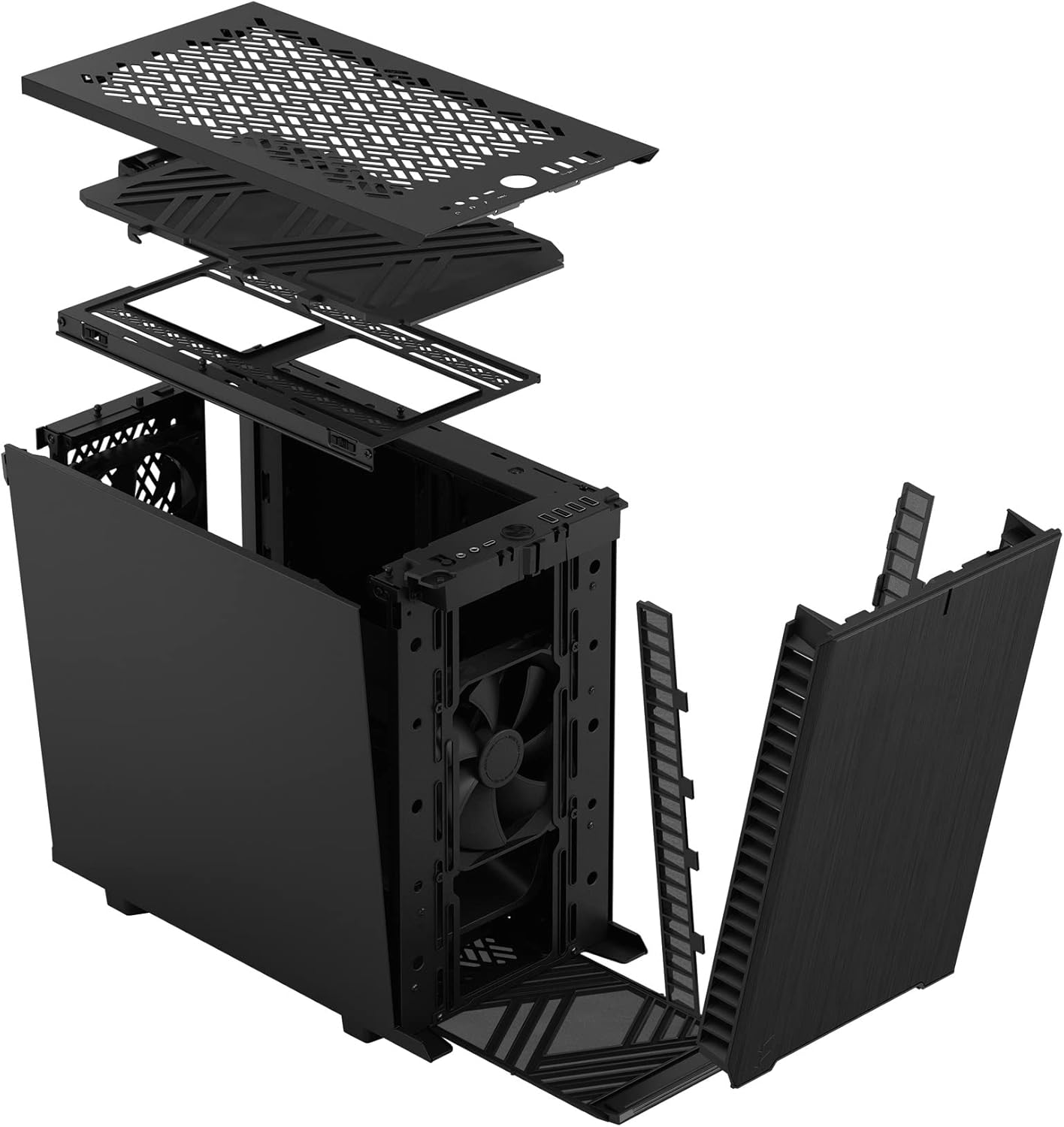
රූපය 3: පුපුරා ගියේය view illustrating the removal process for the front and top panels.
4.2. මවු පුවරු ස්ථාපනය
The Define 7 Nano supports Mini ITX motherboards.
- I/O පලිහ ස්ථාපනය කරන්න: If your motherboard requires an I/O shield, install it into the rear opening of the case before mounting the motherboard.
- Position Motherboard: Align your Mini ITX motherboard with the pre-installed standoffs inside the case.
- ආරක්ෂිත මවු පුවරුව: Use the provided screws from the accessory box to secure the motherboard to the standoffs.
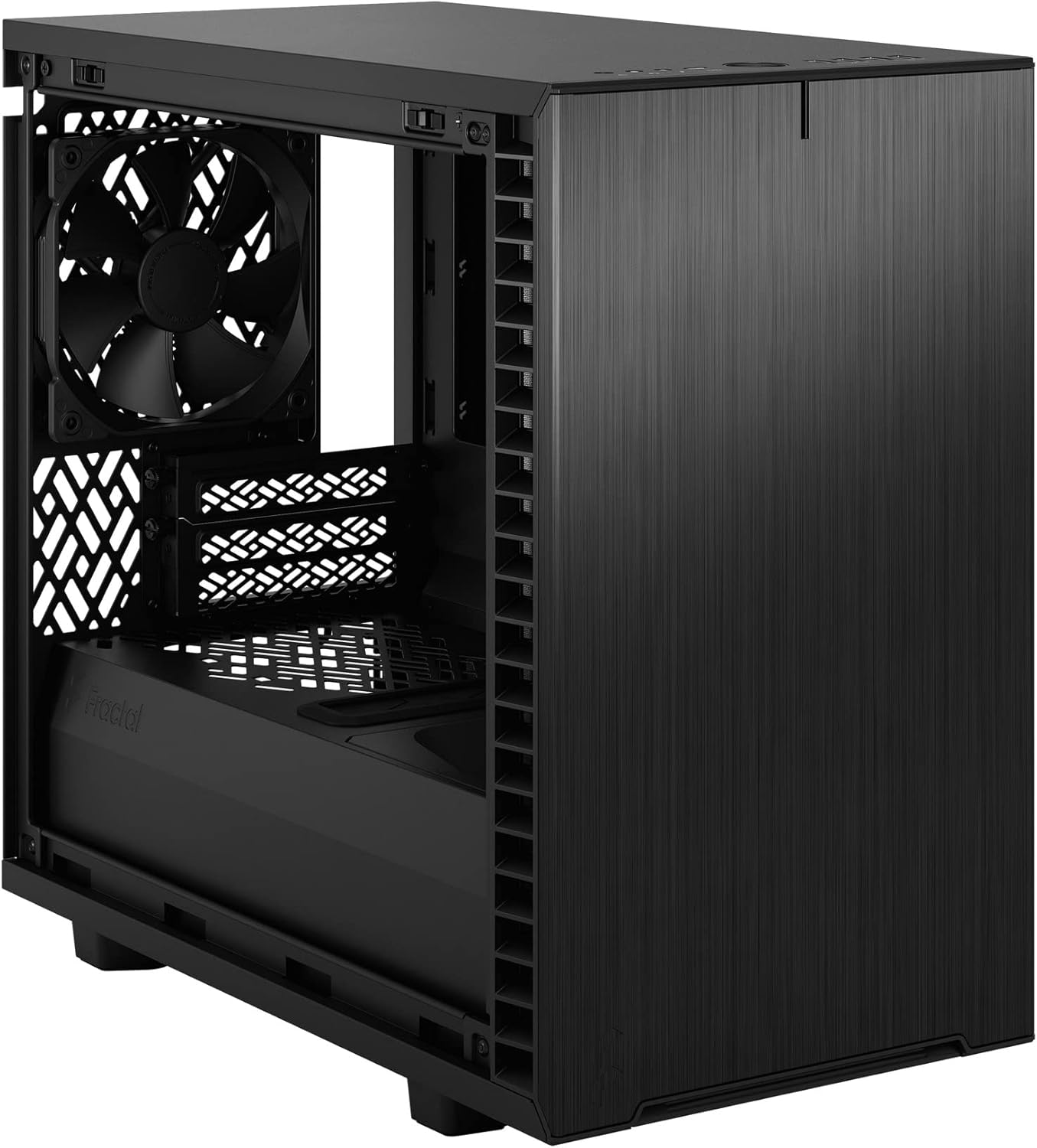
රූපය 4: අභ්යන්තරය view of the case, highlighting the motherboard mounting area and fan locations.
4.3. බල සැපයුම් ඒකකය (PSU) ස්ථාපනය
The Define 7 Nano supports ATX PSUs.
- Mount PSU Bracket: Attach the PSU mounting bracket to your power supply using the screws provided with the PSU.
- Slide PSU into Case: Slide the PSU with the attached bracket into the rear of the case.
- Secure PSU: Secure the PSU bracket to the case using the thumbscrews.
4.4. ගබඩා ධාවක ස්ථාපනය
The case supports 2.5" SSDs and 3.5" HDDs.
- 2.5" ධාවක: Mount 2.5" drives to the dedicated SSD brackets located behind the motherboard tray or on the PSU shroud. Secure with screws.
- 3.5" ධාවක: Install 3.5" drives into the drive cage located beneath the PSU shroud. Secure with screws.
4.5. ග්රැෆික් කාඩ් (GPU) ස්ථාපනය
- Remove PCIe Slot Covers: නඩුවේ පිටුපසින් අවශ්ය PCIe තව් ආවරණ ඉවත් කරන්න.
- Insert GPU: Carefully insert your graphics card into the primary PCIe slot on the motherboard.
- Secure GPU: Secure the graphics card to the case using the thumbscrews or standard screws.
4.6. සිසිලන පද්ධති ස්ථාපනය (විදුලි පංකා/රේඩියේටර්)
The Define 7 Nano offers flexible cooling options.
- ඉදිරිපස පංකා: Up to two 120/140mm fans or a 240/280mm radiator can be installed at the front.
- ඉහළම රසිකයින්: Up to two 120/140mm fans or a 240mm radiator can be installed at the top (requires removing the solid top panel and installing the ventilated top panel).
- පසුපස විදුලි පංකාව: One 120mm fan can be installed at the rear.
- Bottom Fan: One 120mm fan can be installed at the bottom.
Ensure fans are oriented correctly for optimal airflow (intake or exhaust).
4.7. කේබල් කළමනාකරණය
The case features routing channels and Velcro straps behind the motherboard tray for organized cable management.
- මාර්ග කේබල්: Pass power and data cables through the rubber grommets to the back of the motherboard tray.
- ආරක්ෂිත කේබල්: Use the pre-installed Velcro straps and included zip ties to bundle and secure cables.

රූපය 5: පසුපස අභ්යන්තරය view demonstrating the cable management system with Velcro straps.
4.8. ඉදිරිපස පැනල් සම්බන්ධතා
Connect the front panel cables to the corresponding headers on your motherboard:
- Power Button (PWR SW)
- Reset Button (RESET SW)
- Power LED (PWR LED)
- HDD Activity LED (HDD LED)
- USB 3.0 ශීර්ෂකය
- USB Type-C Header (if applicable)
- HD ශ්රව්ය ශීර්ෂකය
Refer to your motherboard manual for exact header locations.
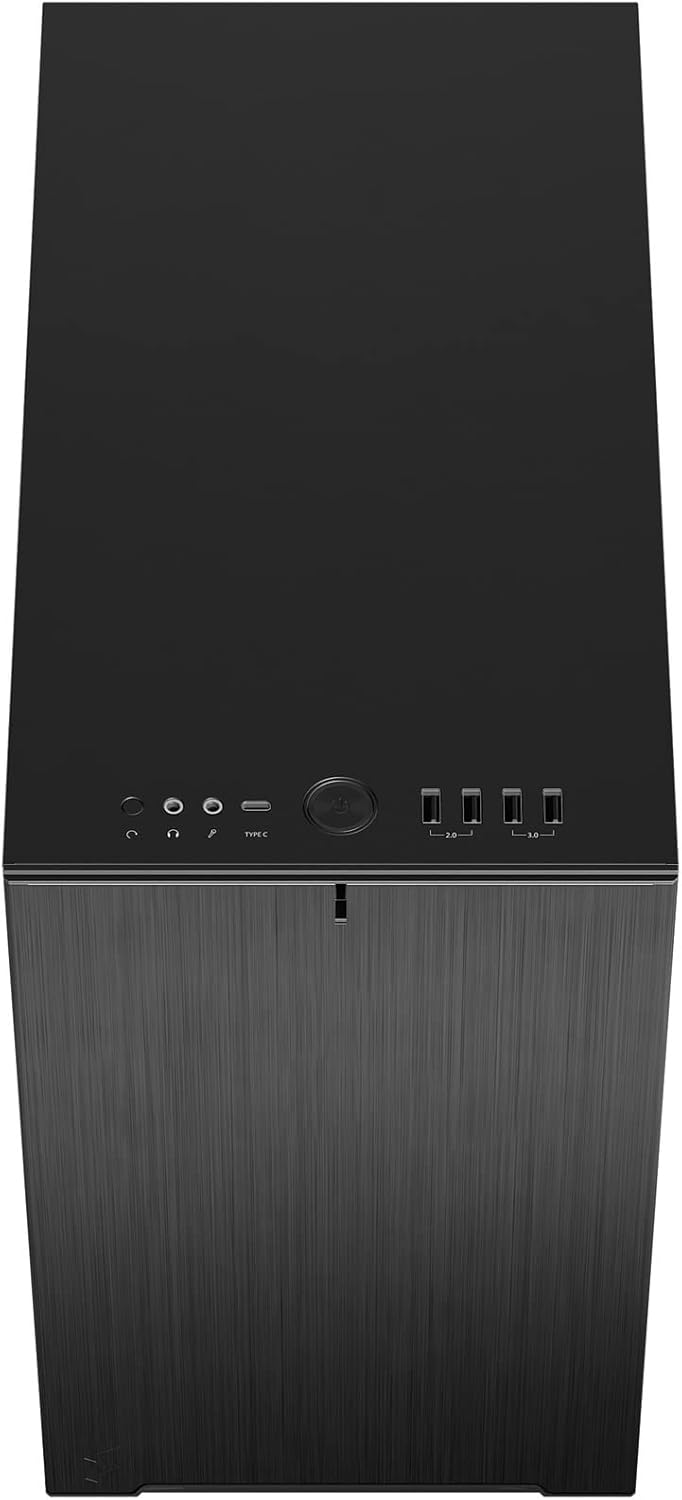
රූපය 6: ඉහළ-ඉදිරිපස view displaying the front I/O panel with USB ports, audio jacks, and power button.
5. මෙහෙයුම් උපදෙස්
5.1. බල ගැන්වීම / අක්රිය කිරීම
- බල ගැන්වීම: Press the power button located on the front I/O panel.
- විදුලිය විසන්ධි කිරීම: Initiate a shutdown from your operating system. Alternatively, press and hold the power button for 5 seconds for a forced shutdown.
5.2. ඉදිරිපස පැනල් තොටුපළ භාවිතා කිරීම
The front I/O panel provides convenient access to:
- USB 3.0 Ports: අනුකූල උපාංග සමඟ අධිවේගී දත්ත හුවමාරුව සඳහා.
- USB Type-C Port: For modern devices requiring a Type-C connection.
- ශ්රව්ය ජැක්: හෙඩ්ෆෝන් සහ මයික්රෆෝන සම්බන්ධ කිරීම සඳහා.
6. නඩත්තු කිරීම
නිතිපතා නඩත්තු කිරීම ඔබේ පරිගණක සංරචකවල ප්රශස්ත ක්රියාකාරිත්වය සහ කල්පැවැත්ම සහතික කිරීමට උපකාරී වේ.
6.1. දූවිලි පෙරහන් පිරිසිදු කිරීම
The Define 7 Nano is equipped with easily removable dust filters to prevent dust buildup inside the case.
- ඉදිරිපස පෙරහන: Can be accessed by removing the front panel.
- Top Filter: Located beneath the ventilated top panel (if installed).
- Bottom Filter: Slides out from the front of the case.
Clean filters regularly (e.g., monthly) by rinsing them with water and allowing them to dry completely, or by using a soft brush or compressed air.
6.2 සාමාන්ය පිරිසිදු කිරීම
- මෘදු, ඩී භාවිතා කරන්නamp cloth to wipe down the exterior surfaces of the case.
- නිමාවට හානි කළ හැකි රළු රසායනික ද්රව්ය හෝ උල්ෙල්ඛ ද්රව්ය භාවිතා කිරීමෙන් වළකින්න.
- For interior cleaning, use compressed air to remove dust from components. Ensure the system is powered off and unplugged.
7. දෝශ නිරාකරණය
මෙම කොටසින් ඔබට මුහුණ දීමට සිදුවිය හැකි පොදු ගැටළු සාකච්ඡා කෙරේ.
7.1. විදුලිය නැත / පද්ධතිය ආරම්භ නොවේ
- බල සම්බන්ධතා පරීක්ෂා කරන්න: Ensure the PSU is properly connected to the wall outlet and the power switch on the PSU is in the 'ON' position. Verify all internal power cables (24-pin ATX, 8-pin CPU, PCIe, SATA) are securely connected.
- ඉදිරිපස පැනල ශීර්ෂයන්: Double-check that the power button header (PWR SW) is correctly connected to the motherboard.
- Motherboard/CPU: Ensure the CPU and RAM are correctly seated.
7.2. Excessive Noise
- විදුලි පංකා ශබ්දය: Check if any fan cables are obstructing fan blades. Ensure fans are securely mounted. Consider adjusting fan speeds in your motherboard's BIOS/UEFI or operating system.
- කම්පනය: Ensure all components (PSU, drives, GPU) are securely fastened to prevent rattling.
7.3. අධික උනුසුම් වීම
- වායු දහරාව: Verify that fans are oriented correctly (intake/exhaust) and that there is adequate airflow.
- දූවිලි පෙරහන්: Clean dust filters regularly to prevent restricted airflow.
- තාප පේස්ට්: Ensure CPU cooler has proper thermal paste application.
8. පිරිවිතර
| විශේෂාංගය | පිරිවිතර |
|---|---|
| මාදිලියේ නම | Define 7 Nano |
| ආදර්ශ අංකය | FD-C-DEF7N-01 |
| නඩු වර්ගය | කුඩා කුළුණ |
| මවු පුවරු අනුකූලතාව | මිනි ITX |
| මානයන් (L x W x H) | දළ වශයෙන්. 18.74 x 11.38 x 17.91 අඟල් (පැකේජය) |
| බර | ආසන්න වශයෙන්. රාත්තල් 18.37 කි |
| ද්රව්ය | ඇලුමිනියම් |
| වර්ණය | කළු ඝන |
| ඉදිරිපස I / O වරාය | 5x USB 3.0, Audio In/Out, Power Button |
| Drive Bays | 2.5" SSD, 3.5" HDD (specific quantities vary by configuration) |
| සිසිලන ක්රමය | වාතය |
| පෙර ස්ථාපිත විදුලි පංකා | Dynamic X2 GP-12 (rear), Dynamic X2 GP-14 (front) |
9. වගකීම් සහ සහාය
Fractal Design products are manufactured to the highest quality standards and come with a limited warranty. For detailed warranty information, please refer to the official Fractal Design webවෙබ් අඩවිය හෝ ඔබේ නිෂ්පාදනය සමඟ ඇතුළත් වගකීම් කාඩ්පත.
For technical support, troubleshooting assistance, or to inquire about replacement parts, please visit the official Fractal Design support page:
www.fractal-design.com/support/
Please have your product model number (FD-C-DEF7N-01) and proof of purchase ready when contacting support.


