VANBAR Trail Camera D500 User Manual
ආකෘතිය: D500
For Wildlife Monitoring, Hunting, and Home Security
1. හැඳින්වීම
The VANBAR D500 Trail Camera is a high-performance digital camera designed for outdoor use, ideal for capturing wildlife, monitoring property, or for hunting applications. It features advanced imaging capabilities, motion detection, and robust weather resistance to ensure reliable operation in various environments. This manual provides detailed instructions for setting up, operating, and maintaining your camera.

රූපය 1.1: ඉවරයිview of the VANBAR D500 Trail Camera and its key features.
2. පෙට්ටියේ ඇති දේ
- VANBAR D500 Wildlife Camera
- 64GB මයික්රෝ SD කාඩ්පත (පෙර ඇතුළත් කර ඇත)
- පරිශීලක අත්පොත
- සවි කිරීම සඳහා ඉස්කුරුප්පු කට්ටලය
- සකස් කළ හැකි වරහන
- හෙක්ස් යතුර
- සවිකරන පටිය
- USB කේබලය
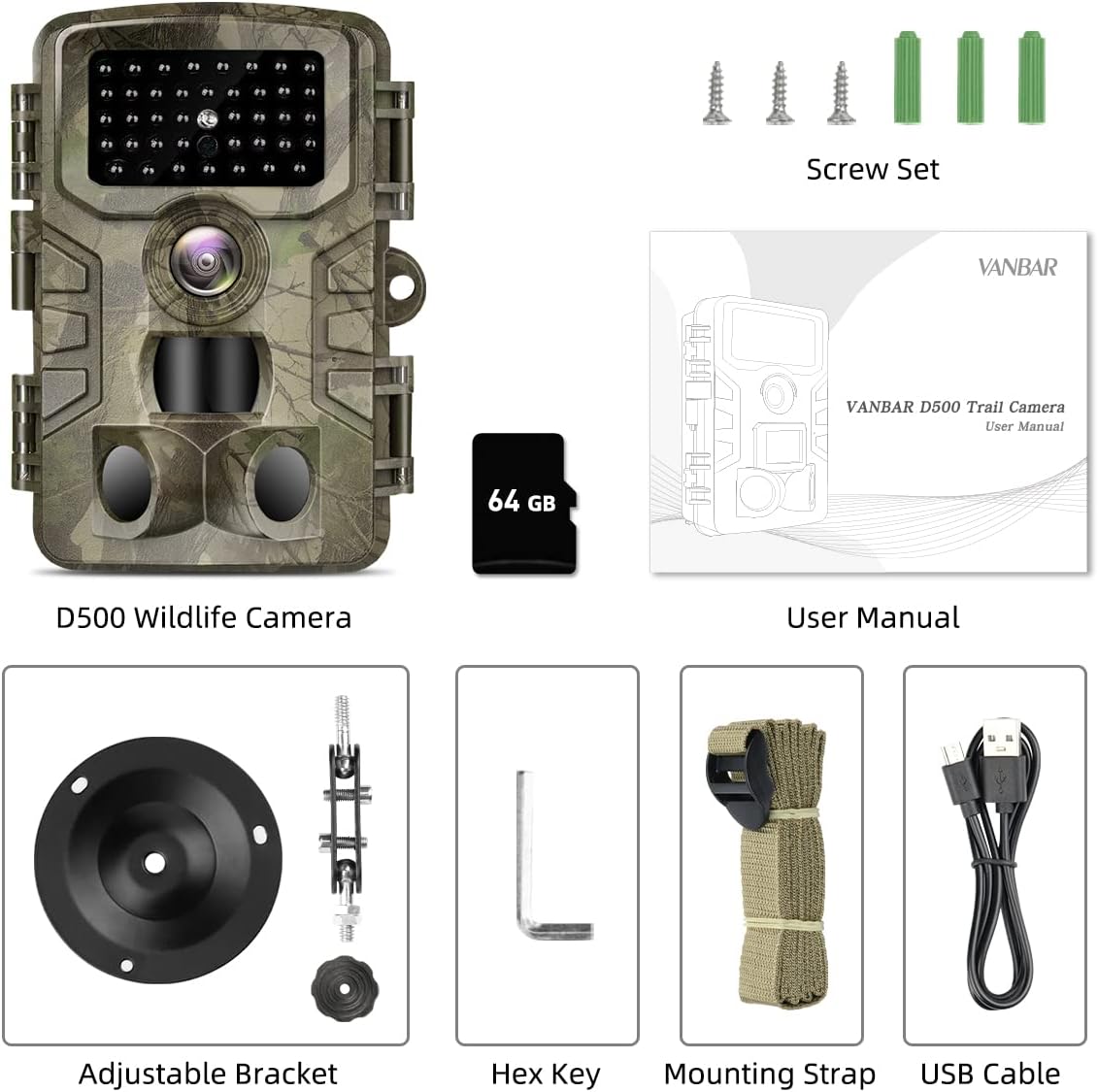
Image 2.1: All components included with your VANBAR D500 Trail Camera.
3. නිෂ්පාදන අවසන්view
Familiarize yourself with the main components of your VANBAR D500 Trail Camera:

Image 3.1: Front and internal view of the camera with labeled parts.
- IR LED: රාත්රී දර්ශනය සඳහා අධෝරක්ත LED.
- Cam Lens: රූප සහ වීඩියෝ ග්රහණය කර ගැනීම සඳහා ප්රධාන කැමරා කාචය.
- PIR සංවේදක: Passive Infrared sensors for motion detection (one 60° central, two 30° side sensors).
- Lock Catch: කැමරා නිවාසය සුරක්ෂිත කරයි.
- 2.0" LCD තිරය: සඳහා viewing settings, playback, and live preview.
- මෙහෙයුම් පැනලය: Buttons for navigation and control (MENU, REPLAY, SHOT, OK, navigation arrows).
- කථානායක: ශ්රව්ය නැවත ධාවනය සඳහා.
- USB Port: පරිගණකයකට සම්බන්ධ වීම සඳහා.
- TF තව්: මයික්රෝ SD කාඩ්පත ඇතුළු කිරීම සඳහා.
- ON/TEST/OFF Switch: Power and mode selection switch.
- ඩීසී තුළ: Port for external power supply (not included).
- බැටරි මැදිරිය: Holds 8 AA batteries (not included).
4. පිහිටුවීම
Follow these steps for initial setup of your trail camera:
- බැටරි ස්ථාපනය කරන්න: Open the camera housing. Insert 8 AA batteries (not included) into the battery compartment, ensuring correct polarity.
- මයික්රෝ SD කාඩ්පත ඇතුළු කරන්න: The 64GB Micro SD card is pre-inserted. If removed, re-insert it into the TF slot until it clicks.
- Switch to TEST Mode: Move the ON/TEST/OFF switch to the 'TEST' position. The LCD screen will turn on.
- SD කාඩ් ආකෘතිය: Press the 'MENU' button. Navigate to 'Format' and select 'Yes' to format the Micro SD card. This prepares the card for optimal performance and clears any previous data.
- දිනය සහ වේලාව සකසන්න: In the 'MENU' settings, navigate to 'Set Clock' to adjust the date and time. This ensures accurate timestampඔබේ පටිගත කිරීම් මත.
- සැකසුම් වින්යාස කරන්න: Adjust other settings such as 'Mode' (Photo, Video, Photo+Video), 'Video Length', 'Photo Size', 'PIR Interval', and 'PIR Level' according to your needs.
- Switch to ON Mode: Once all settings are configured, move the ON/TEST/OFF switch to the 'ON' position. The screen will turn off, and the camera will enter active monitoring mode.

Image 4.1: Visual guide for quick setup of the D500 Trail Camera.
5. කැමරාව ක්රියාත්මක කිරීම
5.1 ග්රහණ ක්රම
The camera supports three capture modes: Photo, Video, and Photo+Video. Select your desired mode from the 'Mode' setting in the menu.
- ඡායාරූප ප්රකාරය: Captures still images at up to 32MP resolution.
- වීඩියෝ මාදිලිය: Records video clips at up to 1520P resolution.
- ඡායාරූප+වීඩියෝ මාදිලිය: Captures a still image followed by a video clip when triggered.

Image 5.1: High-resolution capture capabilities of the D500 camera.
5.2 Motion Activation and Trigger Speed
The camera utilizes 3 PIR sensors for a 120° wide detection range. With a rapid 0.2-second trigger speed, it ensures that fast-moving subjects are captured effectively.

Image 5.2: The camera's fast trigger speed captures dynamic moments.
5.3 රාත්රී දර්ශනය
Equipped with 40pcs non-glow IR LEDs, the camera provides clear black-and-white images and videos at night without disturbing wildlife. The 120° wide-angle detection range is maintained in low-light conditions.

Image 5.3: Advanced night vision capabilities for clear nocturnal recordings.
5.4 ලූප් පටිගත කිරීම
The loop recording feature automatically overwrites the oldest files when the memory card is full, ensuring continuous operation without manual intervention. You can set specific files to be protected from deletion.
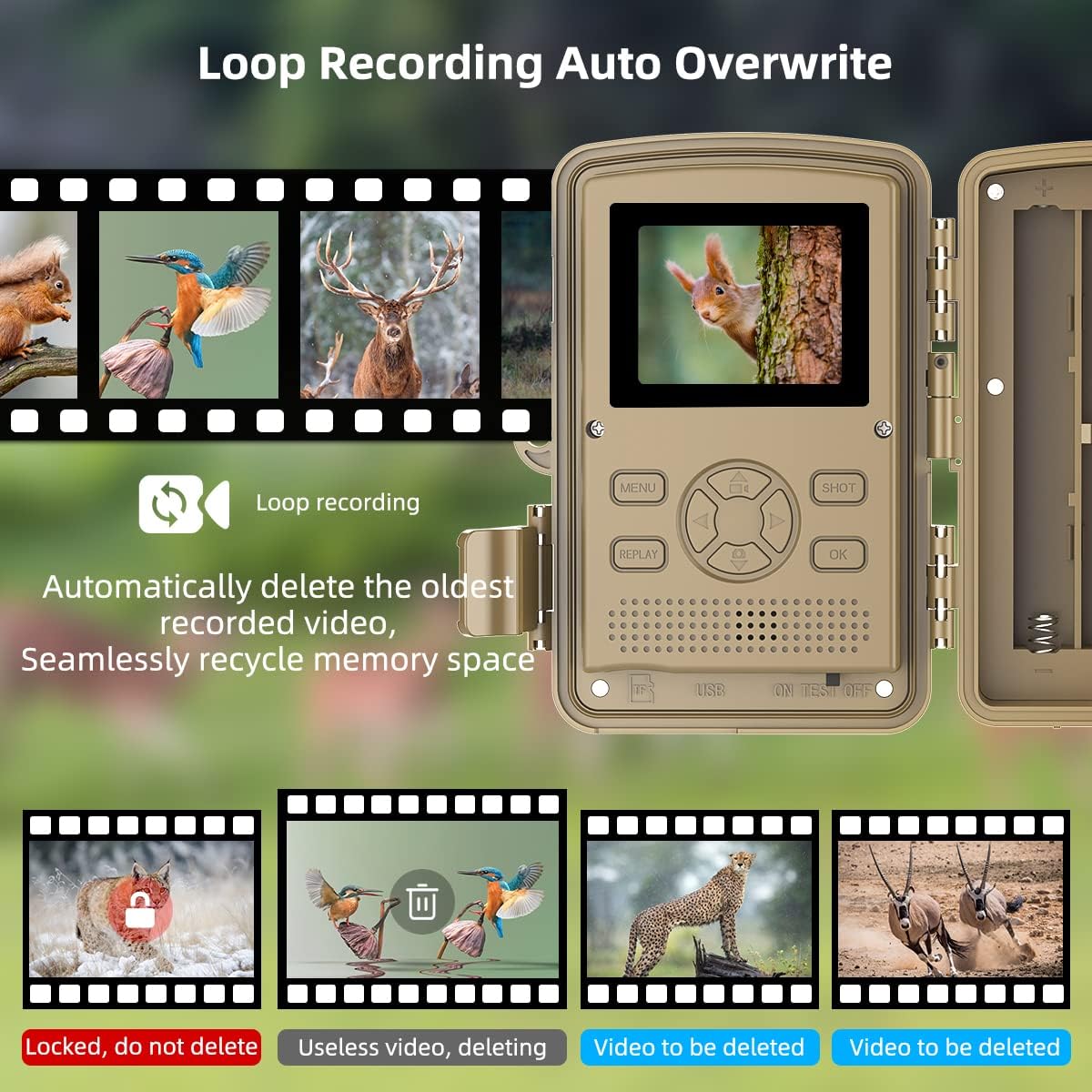
Image 5.4: Explanation of the loop recording and auto-overwrite function.
5.5 අයදුම්පත්
The VANBAR D500 Trail Camera is versatile and can be used for various purposes:
- වනජීවී අධීක්ෂණය: Observe animal behavior in their natural habitat.
- දඩයම් කිරීම: Scout game trails and identify animal patterns.
- නිවසේ ආරක්ෂාව: Monitor your property for unauthorized activity.
- Farm Surveillance: Keep an eye on livestock or deter trespassers.
- Plant Monitoring: Document the growth process of plants over time using time-lapse.

Image 5.5: Diverse applications of the VANBAR D500 Trail Camera.

Image 5.6: Additional monitoring applications including plant growth and property surveillance.
6. නඩත්තු කිරීම
නිසි නඩත්තුව ඔබේ කැමරාවේ ආයු කාලය සහ ප්රශස්ත ක්රියාකාරිත්වය සහතික කරයි:
- ජලය සහ දූවිලි සාධනය: The camera has an IP66 rating, making it highly resistant to water and dust. It is suitable for outdoor use in various weather conditions, operating effectively between -20°C to 70°C (-4°F to 158°F).
- පිරිසිදු කිරීම: කැමරා කාචය සහ බඳ පිරිසිදු කිරීමට මෘදු, වියළි රෙද්දක් භාවිතා කරන්න. උල්ෙල්ඛ පිරිසිදු කරන්නන් හෝ ද්රාවක භාවිතා කිරීමෙන් වළකින්න.
- බැටරි ආයු කාලය: The camera offers a long standby time of 8-10 months. Replace batteries when the low battery indicator appears on the screen.
- SD කාඩ් රැකවරණය: Regularly back up important data from the SD card to a computer and format the card periodically to maintain performance.
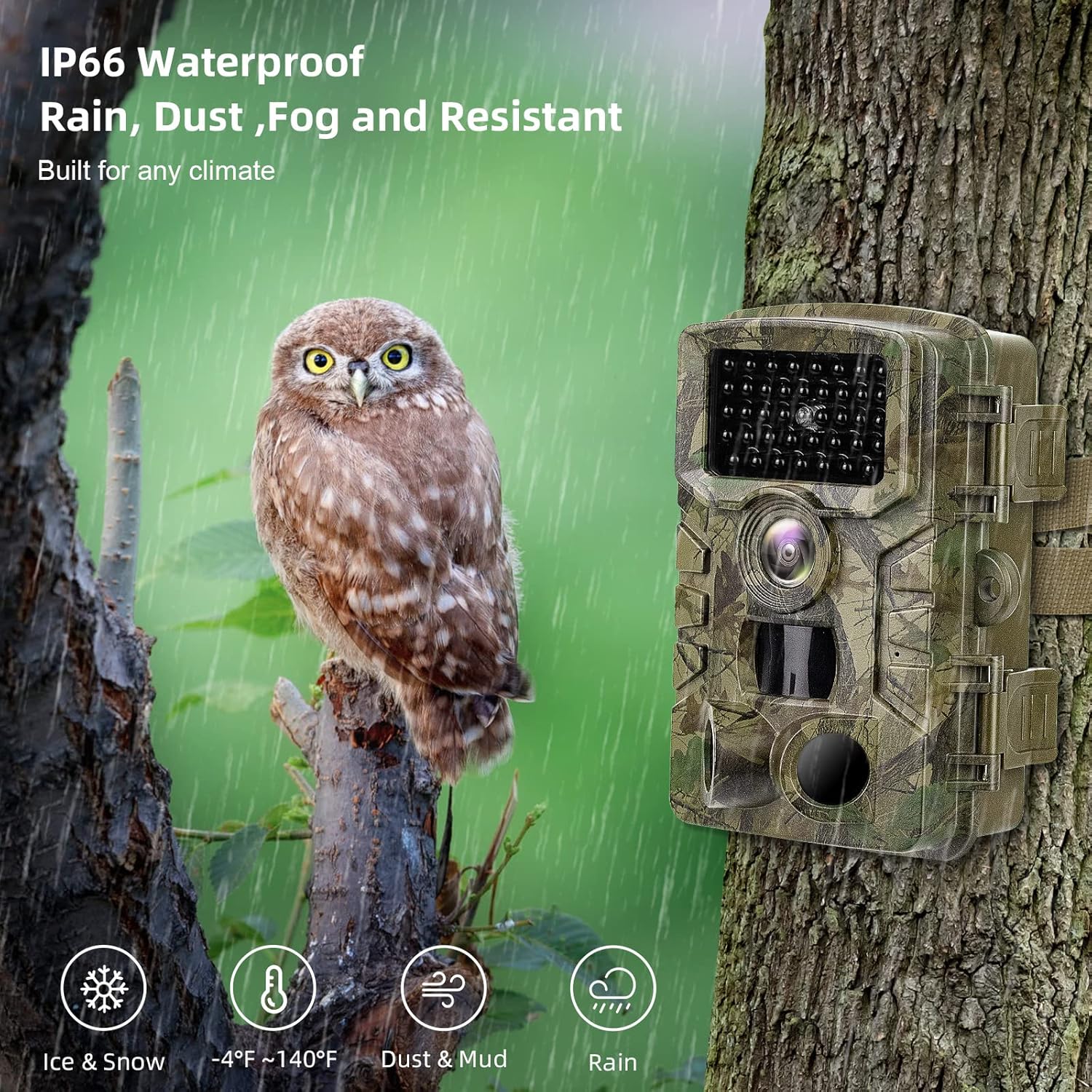
Image 6.1: The camera's IP66 waterproof and dustproof design for all-weather use.
7. දෝශ නිරාකරණය
ඔබේ කැමරාව සමඟ ගැටළු ඇති වුවහොත්, පහත සඳහන් පොදු ගැටළු සහ විසඳුම් වෙත යොමු වන්න:
| ගැටලුව | විය හැකි හේතුව | විසඳුම |
|---|---|---|
| කැමරාව ක්රියාත්මක නොවේ | Low or dead batteries; incorrect battery polarity; switch not in ON/TEST position. | Replace batteries; ensure correct polarity; set switch to ON or TEST. |
| No images/videos captured | SD card full or corrupted; incorrect mode setting; PIR sensitivity too low; camera not in ON mode. | Format or replace SD card; select appropriate mode (Photo/Video/Photo+Video); increase PIR sensitivity; ensure camera is in ON mode. |
| දුර්වල රූප/වීඩියෝ ගුණාත්මකභාවය | Dirty lens; low light conditions (for color images); subject too far or too close. | Clean the lens; ensure adequate lighting or rely on night vision; adjust camera placement. |
| Excessive false triggers | PIR sensitivity too high; camera facing moving branches or heat sources. | Decrease PIR sensitivity; reposition camera to avoid false triggers. |
8. පිරිවිතර
| විශේෂාංගය | විස්තර |
|---|---|
| Resolution (Photo) | 32MP |
| විසර්ජනය (වීඩියෝ) | 1520P |
| PIR සංවේදක | 3 (120° wide detecting range) |
| ප්රේරක වේගය | තත්පර 0.2 යි |
| හඳුනාගැනීමේ පරාසය | 80-100ft (approx. 24-30m) |
| IR LED | 40pcs Non-Glow Infrared LEDs |
| ජල ආරක්ෂිත ශ්රේණිගත කිරීම | IP66 |
| මෙහෙයුම් උෂ්ණත්වය | -20°C ~ 70°C (-4°F ~ 158°F) |
| ප්රදර්ශනය කරන්න | අඟල් 2.0 LCD |
| ගබඩා කිරීම | 512GB දක්වා මයික්රෝ SD කාඩ්පතට සහය දක්වයි (64GB ඇතුළත්) |
| බල සැපයුම | 8 AA බැටරි (ඇතුළත් කර නැත) |
| පොරොත්තු කාලය | මාස 8-10 |
| ග්රහණ ක්රම | ඡායාරූප, වීඩියෝ, ඡායාරූප + වීඩියෝ |
| විශේෂ ලක්ෂණ | වේලාව ශාamp, Operation hours, Time lapse, Loop recording |
9. වගකීම් සහ සහාය
VANBAR products are designed for durability and performance. For warranty information and technical support, please refer to the contact details provided on the product packaging or the official VANBAR webවෙබ් අඩවිය. වගකීම් හිමිකම් සඳහා මිලදී ගැනීමේ සාක්ෂියක් ලෙස ඔබේ මිලදී ගැනීමේ රිසිට්පත තබා ගන්න.


