1. නිෂ්පාදන අවසන්view
The Point Wired Mini Keyboard Pt-350 is a compact and versatile keyboard designed for both gaming and general typing. It features a high-quality build and a modern design, adhering to industry standards for reliable performance. This keyboard is an ideal choice for users seeking a durable and efficient input device.
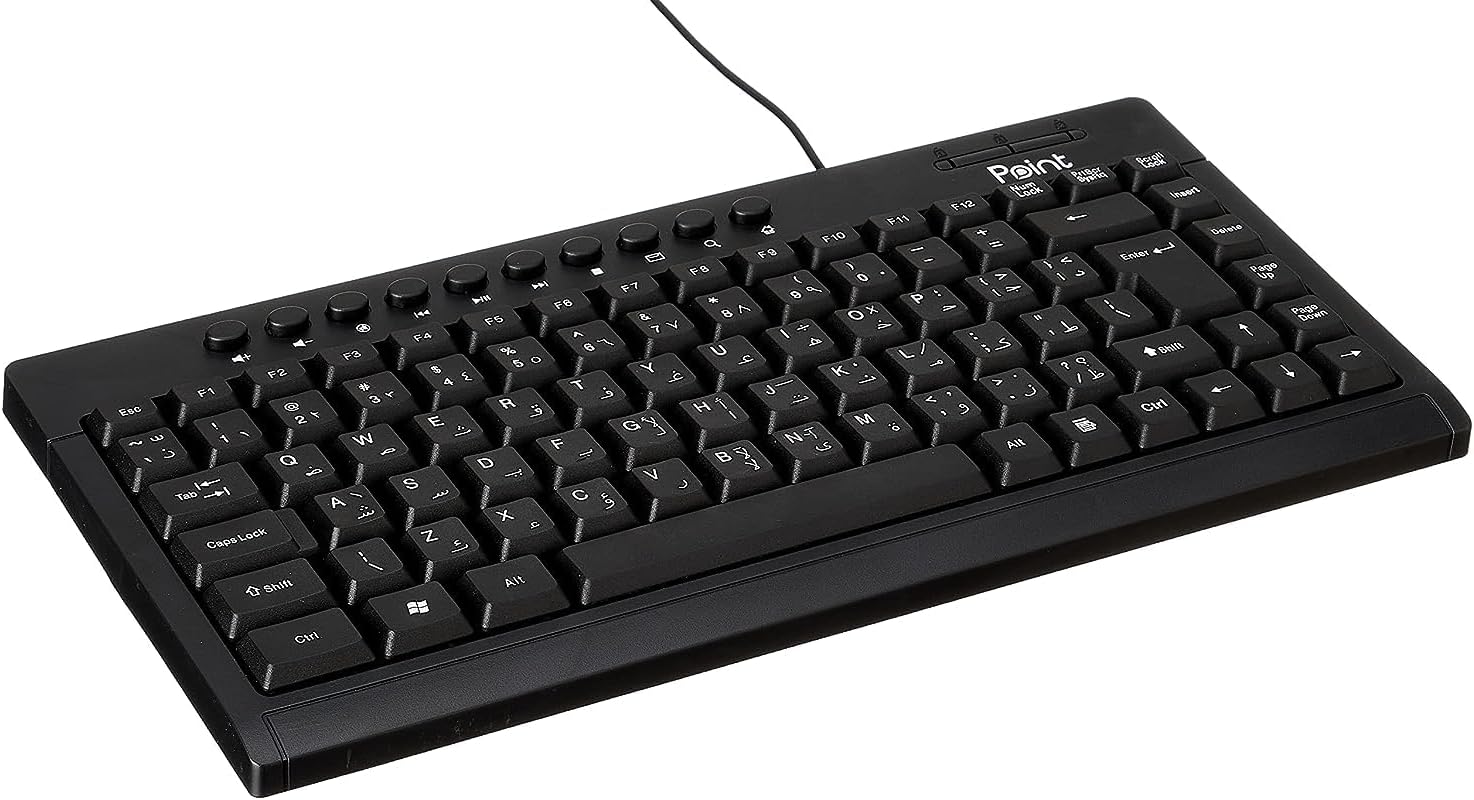
රූපය 1.1: කෝණික view of the Point Wired Mini Keyboard Pt-350, showcasing එහි සංයුක්ත නිර්මාණය සහ යතුරු පිරිසැලසුම.
ප්රධාන ලක්ෂණ:
- Wired connectivity for stable performance.
- Compact design suitable for various setups.
- Durable construction from high-quality plastic materials.
- Designed for both gaming and typing applications.
2. පැකේජ අන්තර්ගතය
සියලුම අයිතම පවතින බව සහතික කර ගැනීමට කරුණාකර පැකේජය ප්රවේශමෙන් පරීක්ෂා කරන්න:
- Point Wired Mini Keyboard Pt-350
- පරිශීලක අත්පොත (මෙම ලේඛනය)
3. පිහිටුවීම
Follow these steps to set up your Point Wired Mini Keyboard Pt-350:
- යතුරු පුවරුව ඉවත් කරන්න: යතුරු පුවරුව එහි ඇසුරුම්වලින් ප්රවේශමෙන් ඉවත් කරන්න.
- Identify the USB Connector: The keyboard comes with an integrated USB cable.
- ඔබේ පරිගණකයට සම්බන්ධ කරන්න: Locate an available USB port on your computer (desktop PC, laptop, etc.). Insert the keyboard's USB connector firmly into the USB port.
- ධාවක ස්ථාපනය (ප්ලග් සහ ප්ලේ): The keyboard is plug-and-play compatible. Your operating system (Windows, macOS, Linux) should automatically detect and install the necessary drivers. This process usually takes a few seconds.
- ක්රියාකාරීත්වය තහවුරු කරන්න: Once connected, open a text editor or any application that accepts text input and test the keys to ensure proper operation.

රූපය 3.1: ඉහළ-පහළ view of the keyboard, illustrating the key layout and integrated cable for connection.
4. මෙහෙයුම් උපදෙස්
The Point Wired Mini Keyboard Pt-350 operates like a standard computer keyboard. Below are general instructions and tips for use:
මූලික ටයිප් කිරීම:
- Simply press the desired keys to input characters, numbers, and symbols into your active application.
- භාවිතා කරන්න මාරු කරන්න key for uppercase letters and alternative symbols on keys.
- ද Caps Lock key toggles permanent uppercase typing.
- ද Backspace key deletes characters to the left of the cursor.
- ද ඇතුල් කරන්න key confirms input or moves to the next line.
ශ්රිත යතුරු (F1-F12):
The function keys (F1 through F12) perform various tasks depending on the active program or operating system. Some common uses include:
- F1: Often opens help for the active program.
- F2: Renames a selected item.
- F5: නැවුම් කරයි a web page or document.
- F11: Toggles full-screen mode in many browsers.
බහුමාධ්ය යතුරු:
The keyboard may include dedicated multimedia keys or secondary functions on the F-keys (accessed via the Fn key, if present). These typically control:
- Volume control (Mute, Volume Up, Volume Down)
- Media playback (Play/Pause, Stop, Previous Track, Next Track)
5. නඩත්තු කිරීම
නිසි නඩත්තුව ඔබේ යතුරුපුවරුවේ ආයු කාලය සහ ප්රශස්ත ක්රියාකාරිත්වය සහතික කරයි:
- පිරිසිදු කිරීම: දූවිලි හා සුන්බුන් එකතු වීම වැළැක්වීම සඳහා යතුරු පුවරුව නිතිපතා පිරිසිදු කරන්න. මෘදු, ලින්ට් රහිත රෙද්දක් භාවිතා කර තරමක් dampජලය හෝ මෘදු පිරිසිදු කිරීමේ ද්රාවණයකින් ආලේප කර ඇත. රළු රසායනික ද්රව්ය හෝ උල්ෙල්ඛ ද්රව්ය වලින් වළකින්න.
- දූවිලි ඉවත් කිරීම: Use compressed air to blow out dust and crumbs from between the keys.
- කාන්දුවීම් වළක්වන්න: Keep liquids away from the keyboard to prevent damage to internal components. In case of a spill, immediately disconnect the keyboard and allow it to dry completely before reconnecting.
- ගබඩා: භාවිතයේ නොමැති විට, යතුරු පුවරුව අධික උෂ්ණත්වයන්ගෙන් ඈත්ව පිරිසිදු, වියළි පරිසරයක ගබඩා කරන්න.
6. දෝශ නිරාකරණය
If you encounter issues with your Point Wired Mini Keyboard Pt-350, refer to the following common problems and solutions:
යතුරුපුවරුව ප්රතිචාර නොදක්වයි:
- USB සම්බන්ධතාවය පරීක්ෂා කරන්න: USB කේබලය ඔබේ පරිගණකයේ ක්රියාකාරී USB පෝට් එකකට ආරක්ෂිතව සම්බන්ධ කර ඇති බවට වග බලා ගන්න. වෙනත් USB පෝට් එකක් උත්සාහ කරන්න.
- පරිගණකය නැවත ආරම්භ කරන්න: සරල නැවත ආරම්භ කිරීමකින් බොහෝ විට සම්බන්ධතා ගැටළු විසඳා ගත හැකිය.
- වෙනත් පරිගණකයක පරීක්ෂණය: Connect the keyboard to another computer to determine if the issue is with the keyboard or your computer's setup.
- උපාංග කළමනාකරු (වින්ඩෝස්) පරීක්ෂා කරන්න: In Windows, go to Device Manager and check if the keyboard is listed under 'Keyboards' and if there are any error symbols. You might need to update or reinstall the driver.
Keys Not Working or Sticky:
- පිරිසිදු යතුරු: Dust, crumbs, or liquid residue can cause keys to stick or malfunction. Refer to the Maintenance section for cleaning instructions.
- භෞතික හානි: Inspect the keys for any visible physical damage.
Incorrect Character Output:
- භාෂා සැකසුම් පරීක්ෂා කරන්න: Ensure your operating system's keyboard language settings match the physical layout of your keyboard.
- Driver Issue: Reinstalling the keyboard driver might resolve this.
මෙම පියවරයන් උත්සාහ කිරීමෙන් පසුවද ගැටලුව දිගටම පවතින්නේ නම්, කරුණාකර පාරිභෝගික සහාය අමතන්න.
7. පිරිවිතර
Technical specifications for the Point Wired Mini Keyboard Pt-350:

රූපය 7.1: පැත්ත view of the keyboard, highlighting its profile and compact form factor.
| විශේෂාංගය | විස්තර |
|---|---|
| වෙළඳ නාමය | ලක්ෂ්යය |
| ආකෘතිය | Pt-350 |
| සම්බන්ධතා තාක්ෂණය | රැහැන්ගත |
| ගැළපෙන උපාංග | පරිගණකය |
| යතුරුපුවරු විස්තරය | බහුකාර්ය |
| නිර්දේශිත භාවිතයන් | පරිගණක ක්රීඩා |
| විශේෂ ලක්ෂණ | ක්රීඩා කිරීම |
| වර්ණය | කළු |
| ශෛලිය | නවීන |
| ද්රව්ය | ප්ලාස්ටික් |
| නැව්ගත කිරීමේ මානයන් | 34.5 x 26.4 x 3 සෙ.මී |
| බර | ග්රෑම් 800 කි |
| පළමු ලබා ගත හැකි දිනය | 4 සැප්තැම්බර් 2022 |
| ASIN | B0BD2DM9ZJ |
8. වගකීම් සහ සහාය
This product is covered by a standard manufacturer's warranty. Please refer to the warranty card included with your purchase for specific terms and conditions, including the warranty period and coverage details.
For technical support, troubleshooting assistance, or warranty claims, please contact Point customer service through the contact information provided on the product packaging or the official Point website. When contacting support, please have your product model (Pt-350) and purchase details ready.


