1. හැඳින්වීම
This manual provides essential information for setting up, operating, and maintaining your DOOGEE X98 Pro smartphone. Please read it carefully to ensure proper use and to maximize the device's performance and longevity.

රූපය 1: අවසන්view of DOOGEE X98 Pro key features.
2. පැකේජ අන්තර්ගතය
ඔබගේ නිෂ්පාදන පැකේජයේ සියලුම අයිතම ඇති බව තහවුරු කරගන්න:
- DOOGEE X98 Pro Mobile Phone
- USB Type-C කේබලය
- Protective Film (pre-applied or in box)
- SIM Card Pin Ejector
- 5V/2A චාජර්
- පරිශීලක අත්පොත (මෙම ලේඛනය)
3 උපාංග පිරිසැලසුම
Familiarize yourself with the physical components of your DOOGEE X98 Pro.

Figure 2: Rear design of the DOOGEE X98 Pro.
The device features a minimalist design with precision-engineered rounded edges for a comfortable grip. Key components include:
- බල බොත්තම: පැත්තේ පිහිටා ඇති අතර, උපාංගය සක්රිය/අක්රිය කිරීමට හෝ තිරය අවදි කිරීමට/නිද්රා තැබීමට භාවිතා කරයි.
- වෙළුම් බොත්තම්: Located near the power button, used to adjust media and call volume.
- USB Type-C Port: පහළින්, ආරෝපණය සහ දත්ත හුවමාරුව සඳහා.
- 3.5mm හෙඩ්ෆෝන් ජැක්: රැහැන්ගත හෙඩ්ෆෝන් සම්බන්ධ කිරීම සඳහා.
- Dual Rear Camera Module: Located on the back, includes the 12MP AI main camera and 2MP portrait camera with triple LED flash.
- ඉදිරිපස කැමරාව: Located at the top of the display, an 8MP AI Beautify camera.
- SIM/SD කාඩ් තැටි: On the side, for inserting Nano SIM cards and a microSD card.
4. පිහිටුවීම
4.1. SIM සහ SD කාඩ්පත් ඇතුළු කිරීම
- ඔබගේ දුරකථනයේ පැත්තේ SIM කාඩ්පත් තැටිය සොයා ගන්න.
- Insert the SIM ejector pin into the small hole on the tray to open it.
- තැටිය පරිස්සමෙන් එළියට ගන්න.
- Place your Nano SIM card(s) and/or microSD card into the designated slots on the tray. Ensure the gold contacts face downwards. The phone supports dual Nano SIMs or one Nano SIM and one microSD card up to 1TB.
- නිසි තැනට ක්ලික් වන තුරු තැටිය දුරකථනය තුළට මෘදු ලෙස තල්ලු කරන්න.
4.2. මූලික බලය සක්රිය කිරීම
- Press and hold the Power button on the side of the phone until the DOOGEE logo appears.
- භාෂා තේරීම, Wi-Fi සම්බන්ධතාවය, Google ගිණුම් සැකසුම සහ ආරක්ෂක සැකසුම් ඇතුළුව මූලික සැකසුම සම්පූර්ණ කිරීමට තිරයේ ඇති උපදෙස් අනුගමනය කරන්න.
4.3. බැටරිය ආරෝපණය කිරීම
Before first use, it is recommended to fully charge the device. Use the provided 5V/2A charger and Type-C USB cable.
- Connect the Type-C end of the USB cable to the phone's charging port.
- Connect the USB-A end of the cable to the power adapter.
- බල ඇඩැප්ටරය බිත්ති අලෙවිසැලකට සම්බන්ධ කරන්න.
- ආරෝපණ දර්ශකය තිරය මත දිස්වනු ඇත.
The 4200mAh battery supports 10W fast charging.
5. මෙහෙයුම් උපදෙස්
5.1. මූලික සංචාලනය
The DOOGEE X98 Pro runs on Android 12.0, offering an intuitive user experience. Navigation is primarily touch-based:
- තට්ටු කරන්න: අයිතමයක් තෝරන්න හෝ යෙදුමක් විවෘත කරන්න.
- ස්වයිප්: Scroll through lists, home screens, or app drawers.
- පින්ච්: ඡායාරූප විශාලනය කරන්න හෝ අඩු කරන්න සහ web පිටු.
- දිගු මුද්රණ යන්ත්රය: සන්දර්භීය මෙනු වෙත ප්රවේශ වන්න හෝ අයිකන ගෙන යන්න.
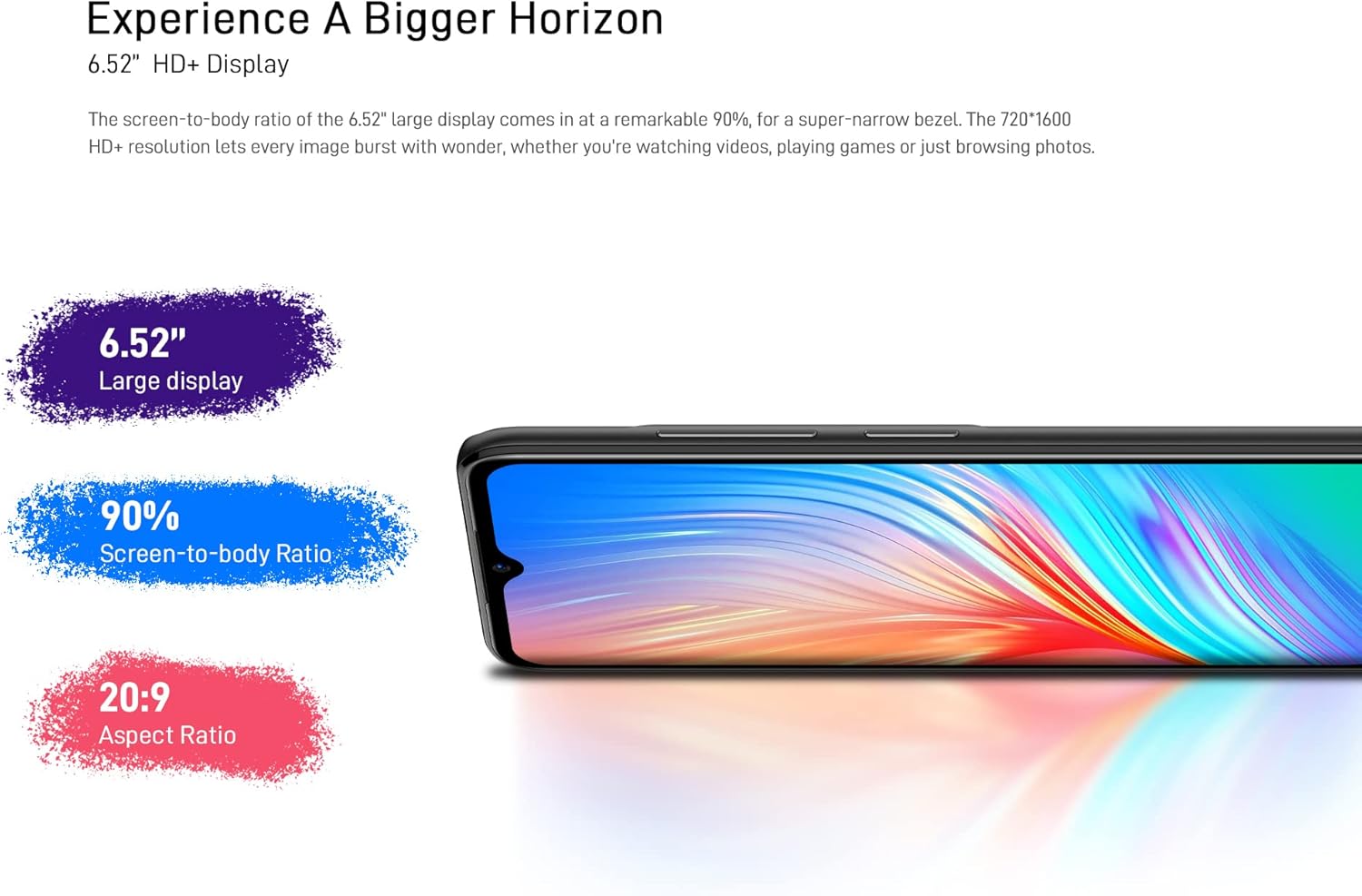
Figure 3: The 6.52-inch HD+ display.
5.2. මුහුණු අගුළු හැරීම
The device supports face recognition for quick and secure unlocking.
- වෙත යන්න සැකසීම් > ආරක්ෂාව > මුහුණු අගුළු ඇරීම.
- Follow the on-screen prompts to register your face.
- Ensure good lighting conditions during registration for optimal performance.
5.3. කැමරා භාවිතය
The DOOGEE X98 Pro features a 12MP AI Dual Rear Camera and an 8MP Front Camera.
Rear Camera (12MP AI Dual Camera)

Figure 4: Rear camera specifications.
විවිධ මාතයන් වෙත ප්රවේශ වීමට කැමරා යෙදුම විවෘත කරන්න:
- ඡායාරූපය: Standard mode for capturing still images. Features include AI Beauty, HDR, and a 78.1° visual angle with F1.8 aperture.
- ප්රතිමූර්තිය: Utilizes the 2MP portrait camera for depth effects.
- රාත්රී ප්රකාරය: Enhances clarity in low-light conditions.
- මන්දගාමී චලනය: මන්දගාමී චලිතයෙන් වීඩියෝ පටිගත කරයි.

රූපය 5: උදාample of Night Mode photography.
Front Camera (8MP AI Beautify)
The 8MP front camera is designed for clear selfies and video calls, featuring AI Beautify mode.
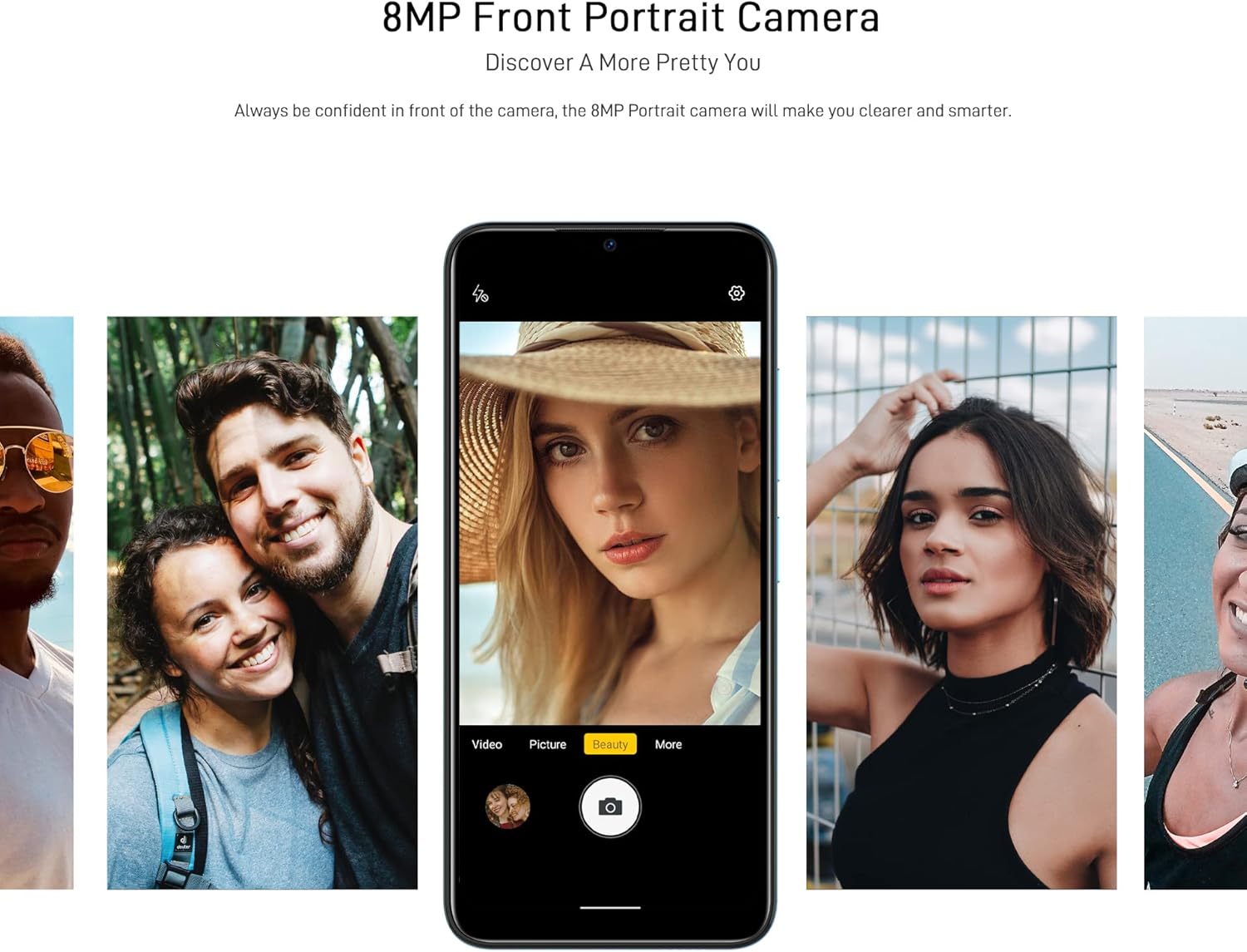
Figure 6: Front camera in use for portraits.
5.4. සම්බන්ධතාවය
- Wifi: හරහා රැහැන් රහිත ජාල වෙත සම්බන්ධ වන්න සැකසීම් > ජාලය සහ අන්තර්ජාලය > Wi-Fi. Supports 2.4G (b/g/n).
- බ්ලූටූත්: හරහා අනෙකුත් බ්ලූටූත් උපාංග සමඟ යුගල කරන්න සැකසීම් > සම්බන්ධිත උපාංග > බ්ලූටූත්. Supports BT5.0.
- ජංගම දත්ත: ජංගම දත්ත සක්රිය හෝ අක්රිය කරන්න හරහා සැකසීම් > ජාලය සහ අන්තර්ජාලය > ජංගම ජාලය. Supports 2G/3G/4G LTE.
- GPS: The device supports GPS, Glonass, Galileo, and Beido for accurate navigation.
- OTG: On-The-Go (OTG) functionality allows connecting USB peripherals like flash drives.
5.5. ගබඩා කළමනාකරණය
The phone comes with 64GB of internal storage, expandable up to 1TB using a microSD card. To manage storage, go to සැකසීම් > ගබඩා කිරීම.
6. නඩත්තු කිරීම
6.1. ඔබගේ උපාංගය පිරිසිදු කිරීම
ඔබගේ දුරකථනයේ තිරය සහ බඳ පිරිසිදු කිරීමට මෘදු, ලින්ට් රහිත රෙද්දක් භාවිතා කරන්න. රළු රසායනික ද්රව්ය හෝ උල්ෙල්ඛ ද්රව්ය භාවිතා කිරීමෙන් වළකින්න.
6.2. මෘදුකාංග යාවත්කාලීන
Regularly check for system updates to ensure your device has the latest features and security patches. Go to සැකසීම් > පද්ධතිය > පද්ධති යාවත්කාලීන කිරීම.
6.3. බැටරි රැකවරණය
- දුරකථනය අධික උෂ්ණත්වයකට නිරාවරණය කිරීමෙන් වළකින්න.
- බැටරිය නිතර නිතර සම්පූර්ණයෙන්ම බැස යාමට ඉඩ නොදෙන්න.
- මුල් හෝ සහතික කළ අනුකූල චාජරය සහ කේබලය පමණක් භාවිතා කරන්න.
7. දෝශ නිරාකරණය
If you encounter issues with your DOOGEE X98 Pro, try the following solutions:
- උපාංගය ක්රියාත්මක නොවේ: බැටරිය ආරෝපණය කර ඇති බවට වග බලා ගන්න. නැවත බලය ක්රියාත්මක කිරීමට උත්සාහ කිරීමට පෙර චාජරය සම්බන්ධ කර මිනිත්තු කිහිපයක් රැඳී සිටින්න.
- යෙදුම් බිඳ වැටීම හෝ කැටි වීම: Close the app and reopen it. If the issue persists, restart the phone. Clear the app's cache via සැකසීම් > යෙදුම් > [යෙදුම් නම] > ගබඩාව සහ හැඹිලිය > හැඹිලිය හිස් කරන්න.
- දුර්වල බැටරි ආයු කාලය: Reduce screen brightness, disable unused features like Wi-Fi or Bluetooth, and close background apps. Check battery usage in සැකසීම් > බැටරි බල තණ්හාවෙන් පෙළෙන යෙදුම් හඳුනා ගැනීමට.
- Connectivity issues (Wi-Fi/Bluetooth/Mobile Data): Toggle the respective connection off and on. Restart your phone or the router/paired device.
- Face Unlock not working: Ensure your face is well-lit and unobstructed. Re-register your face if necessary.
For persistent issues, consider performing a factory reset (සැකසීම් > පද්ධතිය > යළි පිහිටුවීමේ විකල්ප > සියලු දත්ත මකන්න (කර්මාන්තශාලා යළි පිහිටුවීම)). අවවාදයයි: මෙය ඔබගේ දුරකථනයේ ඇති සියලු දත්ත මකා දමයි. ඉදිරියට යාමට පෙර වැදගත් දත්ත උපස්ථ කරන්න.
8. පිරිවිතර
Detailed technical specifications for the DOOGEE X98 Pro:
| විශේෂාංගය | පිරිවිතර |
|---|---|
| ආකෘතිය | X98 Pro |
| මෙහෙයුම් පද්ධතිය | Android 12.0 |
| ප්රොසෙසරය | MediaTek Helio G25 Octa Core, 2.3 GHz, 12nm |
| GPU | IMG-GE8320, up to 650 MHz |
| RAM | 4GB |
| අභ්යන්තර ගබඩාව | 64GB |
| පුළුල් කළ හැකි ගබඩාව | TFlash/microSD card up to 1TB |
| ප්රදර්ශනය කරන්න | 6.52-inch HD+ Waterdrop Screen, 720*1600 resolution, 90% screen-to-body ratio |
| පසුපස කැමරාව | 12MP SONY AI Dual Camera (f/1.8, 78.1° visual angle) + 2MP Portrait Camera, Triple LED Flash |
| ඉදිරිපස කැමරාව | 8MP AI Beautify Camera |
| බැටරි | 4200mAh, 10W Type-C Fast Charge |
| SIM කාඩ්පත | Dual Nano SIM (or 1 Nano SIM + 1 microSD) |
| ජාල බෑන්ඩ්ස් | 2G GSM, 3G, 4G LTE |
| Wifi | 2.4G (b/g/n) |
| බ්ලූටූත් | BT5.0 |
| සංචලනය | GPS, Glonass, Galileo, Beido |
| සංවේදක | Face Unlock, G-sensor, Proximity Sensor, Ambient Light Sensor, Compass (Magnetic), Geomagnetism |
| වරායන් | Type-C, 3.5mm Headphone Jack |
| මානයන් | 165.3mm x 76.3mm x 8.8mm |
| බර | 205g (බැටරිය ඇතුළුව) |

Figure 7: MediaTek Helio G25 Octa-core Processor.

Figure 8: Optimized performance for gaming.
9 ආරක්ෂිත තොරතුරු
කරුණාකර පහත ආරක්ෂක මාර්ගෝපදේශ නිරීක්ෂණය කරන්න:
- උපාංගය ඔබම විසුරුවා හැරීම, අලුත්වැඩියා කිරීම හෝ වෙනස් කිරීම නොකරන්න.
- උපාංගය අධික උෂ්ණත්වයට, සෘජු හිරු එළියට හෝ අධික ආර්ද්රතාවයට නිරාවරණය කිරීමෙන් වළකින්න.
- Use only approved accessories (charger, cable, etc.).
- උපාංගය ජලය සහ අනෙකුත් දියර වලින් ඈත් කරන්න.
- දේශීය රෙගුලාසි වලට අනුව උපාංගය සහ එහි බැටරිය වගකීමෙන් යුතුව බැහැර කරන්න.
10. වගකීම් සහ සහාය
For warranty information, please refer to the warranty card included in your product package or visit the official DOOGEE website. For technical support or service inquiries, please contact DOOGEE customer service through their official channels.