1. හැඳින්වීම
This manual provides essential information for setting up, operating, maintaining, and troubleshooting your HP 17 Laptop, Model 17t. Please read these instructions carefully to ensure proper use and longevity of your device.
2. පෙට්ටියේ ඇති දේ
- HP 17 Laptop (Model 17t)
- 45 W ස්මාර්ට් ඒසී බල ඇඩැප්ටරය
- සාදන ලද HD Webcam with integrated dual-array digital microphones (integrated into laptop)
3. නිෂ්පාදන අවසන්view
The HP 17 Laptop features a 17.3-inch HD+ touchscreen display, powered by a 12th Gen Intel Core i7-1255U processor. It includes 64GB DDR4 RAM and a 2TB PCIe NVMe M.2 Solid State Drive for high performance and ample storage. Key features include Wi-Fi 6 connectivity, a backlit keyboard, and a fingerprint reader for enhanced security.
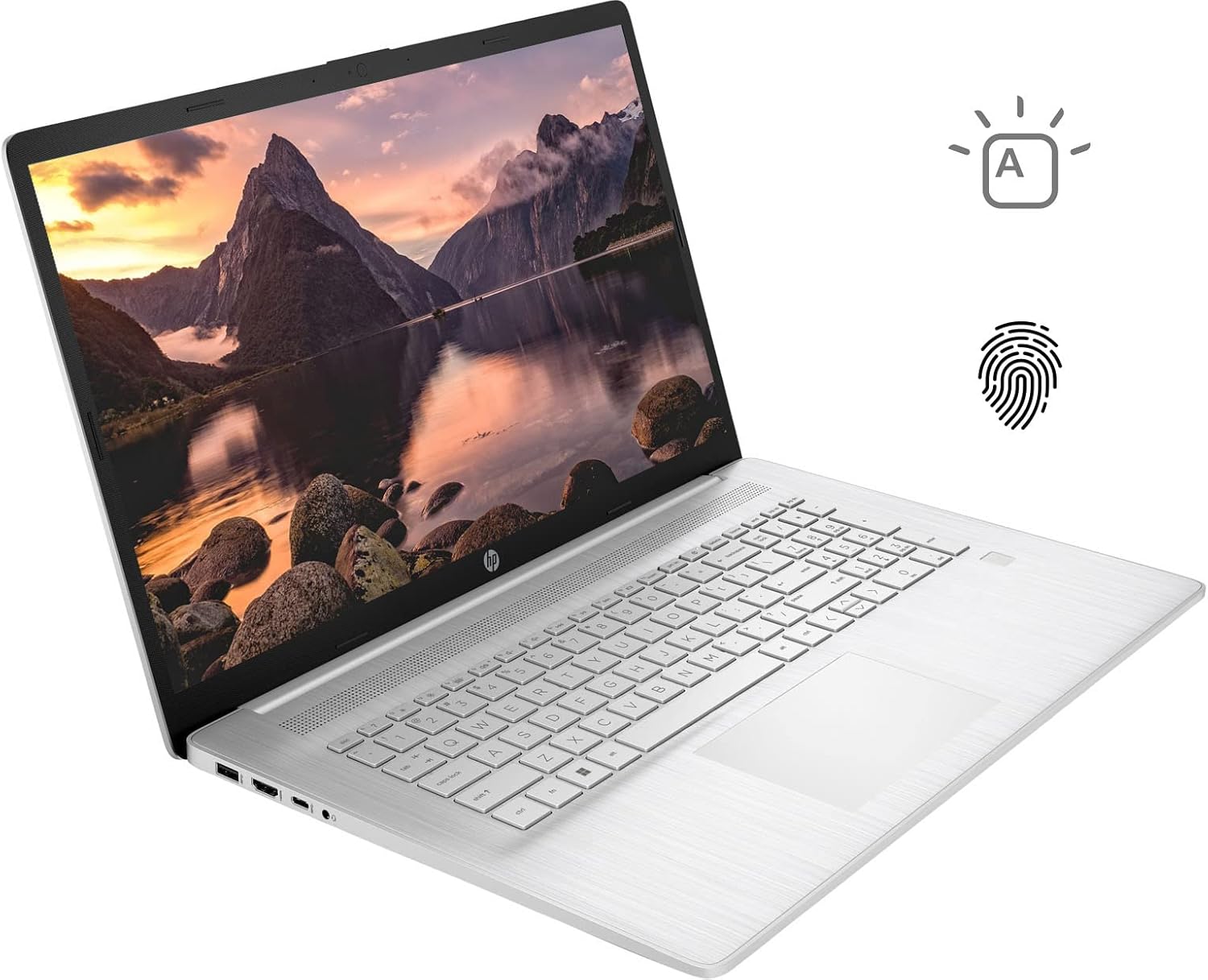
Figure 3.1: HP 17 Laptop with screen displaying a landscape image and keyboard visible.
3.1. වම් පැත්තේ තොටුපළවල්
The left side of the laptop provides essential connectivity options.
- USB Type-A Port: USB උපාංග සම්බන්ධ කිරීම සඳහා.
- HDMI වරාය: බාහිර සංදර්ශක වෙත සම්බන්ධ වීම සඳහා.
- USB Type-C Port: දත්ත හුවමාරුව සහ අනුකූල උපාංග සම්බන්ධ කිරීම සඳහා.
- හෙඩ්ෆෝන්/මයික්රොෆෝන් සංයුක්ත ජැක්: ශ්රව්ය ආදානය සහ ප්රතිදානය සඳහා.

Figure 3.2: Left side of the HP 17 Laptop, detailing the USB Type-A, HDMI, USB Type-C, and headphone/microphone combo ports.
3.2. දකුණු පැත්තේ තොටුපළවල්
The right side of the laptop includes additional ports and indicators.
- බල සම්බන්ධකය: AC බල ඇඩැප්ටරය සම්බන්ධ කිරීම සඳහා.
- ආරෝපණ දර්ශක ආලෝකය: ආරෝපණ තත්ත්වය පෙන්වයි.
- USB Type-A Port: USB උපාංග සම්බන්ධ කිරීම සඳහා.

Figure 3.3: Right side of the HP 17 Laptop, showing the power connector, charging indicator, and USB Type-A port.
4. පිහිටුවීම
4.1. මූලික බලය සක්රිය කිරීම
- Connect the 45 W Smart AC power adapter to the power connector on the right side of the laptop and then to a power outlet.
- ලැප්ටොප් පියන විවෘත කරන්න.
- සාමාන්යයෙන් යතුරුපුවරු තට්ටුවේ ඉහළ දකුණු පසින් පිහිටා ඇති බල බොත්තම ඔබන්න.
- භාෂාව, කලාපය, ජාල සම්බන්ධතාවය සහ පරිශීලක ගිණුම් නිර්මාණය ඇතුළුව Windows 11 Home සැකසුම සම්පූර්ණ කිරීමට තිරයේ ඇති උපදෙස් අනුගමනය කරන්න.
4.2. පර්යන්ත සම්බන්ධ කිරීම
Use the available USB ports (Type-A and Type-C) to connect external devices such as a mouse, external keyboard, or USB storage devices. The HDMI port allows connection to an external monitor or TV.
5. ඔබේ HP 17 ලැප්ටොප් පරිගණකය ක්රියාත්මක කිරීම
5.1. ස්පර්ශ තිර ක්රියාකාරිත්වය
The 17.3-inch HD+ display supports touch input. You can interact with Windows 11 and applications directly using your fingers for navigation, scrolling, and selection.
5.2. Backlit Keyboard
The keyboard features backlighting for use in low-light conditions. To toggle the backlight, press the F4 key. Repeated presses may cycle through different brightness levels or turn the backlight off.
5.3. ඇඟිලි සලකුණු කියවනය
For enhanced security and quick login, configure the integrated fingerprint reader through Windows Hello settings. Access these settings via සැකසීම් > ගිණුම් > පුරනය වීමේ විකල්ප.
5.4. රැහැන් රහිත සම්බන්ධතාව
The laptop supports Wi-Fi 6 and Bluetooth 5.2. To connect to a Wi-Fi network, click the network icon in the taskbar, select your desired network, and enter the password if required. Bluetooth devices can be paired via සැකසීම් > බ්ලූටූත් සහ උපාංග.
5.5. Webcam and Microphones
ඒකාබද්ධ HD webcam and dual-array digital microphones are suitable for video conferencing and online communication. Ensure privacy settings are configured correctly in Windows to control application access to the camera and microphone.
6. නඩත්තු කිරීම
6.1 පිරිසිදු කිරීම
- තිරය: මෘදු, ලින්ට් රහිත රෙද්දක් සැහැල්ලුවෙන් භාවිතා කරන්නampජලය හෝ තිර පිරිසිදු කරන්නෙකු සමඟ ආලේප කර ඇත. රළු රසායනික ද්රව්ය වලින් වළකින්න.
- යතුරුපුවරුව සහ චැසිය: මෘදු, වියළි රෙද්දක් භාවිතා කරන්න. සම්පීඩිත වාතය පිරවූ කෑන් එකක් යතුරු අතර ඇති දූවිලි ඉවත් කිරීමට උපකාරී වේ.
- පිරිසිදු කිරීමට පෙර ලැප්ටොප් පරිගණකය ක්රියා විරහිත කර පේනුවෙන් ඉවත් කර ඇති බවට වග බලා ගන්න.
6.2. බැටරි රැකවරණය
- අධික උෂ්ණත්වයෙන් වළකින්න.
- For optimal battery life, avoid constantly keeping the laptop at 100% charge or letting it fully discharge frequently.
- දිගු කාලයක් භාවිතා නොකළහොත් ලැප්ටොප් පරිගණකය අර්ධ ආරෝපණයක් (50% ක් පමණ) සහිතව ගබඩා කරන්න.
6.3. මෘදුකාංග යාවත්කාලීන
Regularly check for and install Windows updates via සැකසීම් > වින්ඩෝස් යාවත්කාලීන කිරීම. Also, ensure HP drivers and firmware are up to date using the HP Support Assistant application or HP's official webඅඩවිය.
7. දෝශ නිරාකරණය
7.1. ලැප්ටොප් පරිගණකය ක්රියාත්මක නොවේ
- AC ඇඩැප්ටරය ලැප්ටොප් පරිගණකයට සහ ක්රියාකාරී බල අලෙවිසැලකට ආරක්ෂිතව සම්බන්ධ කර ඇති බවට වග බලා ගන්න.
- Check the charging indicator light on the right side of the laptop. If it's not lit, try a different outlet or adapter if available.
- Perform a hard reset: Disconnect the AC adapter, press and hold the power button for 15 seconds, then reconnect the adapter and try to power on.
7.2. සංදර්ශක ගැටළු
- සංදර්ශකය නැත: If the laptop powers on but the screen remains black, try connecting an external monitor via HDMI to check if the issue is with the laptop's internal display.
- ස්පර්ශ තිරය ප්රතිචාර නොදක්වයි: Restart the laptop. If the issue persists, check for updated display drivers or run Windows Troubleshooter for hardware and devices.
7.3. Wi-Fi සම්බන්ධතා ගැටළු
- Windows සැකසුම් තුළ Wi-Fi සක්රීය කර ඇති බවට වග බලා ගන්න.
- ඔබේ රවුටරය සහ මොඩමය නැවත ආරම්භ කරන්න.
- Windows Network Troubleshooter එක ක්රියාත්මක කරන්න.
- ඔබගේ රැහැන් රහිත ඇඩැප්ටර ධාවක යාවත්කාලීන කරන්න.
8. පිරිවිතර
| මාදිලියේ නම | HP 17t Notebook |
| ප්රදර්ශනය කරන්න | 17.3" HD+ (1600 x 900) BrightView ස්පර්ශ තිරය |
| ප්රොසෙසරය | 12th Gen Intel Core i7-1255U (10 Cores, up to 4.70 GHz) |
| ග්රැෆික්ස් | Intel Iris Xe ග්රැෆික්ස් (ඒකාබද්ධ) |
| RAM | 64GB DDR4 |
| ගබඩා කිරීම | 2TB PCIe NVMe M.2 SSD |
| මෙහෙයුම් පද්ධතිය | Windows 11 Home |
| රැහැන් රහිත සම්බන්ධතාව | Wi-Fi 6 (2x2), බ්ලූටූත් 5.2 |
| වරායන් | 1x USB Type-C (5Gbps), 2x USB Type-A (5Gbps), 1x HDMI 1.4b, 1x Headphone/Microphone Combo |
| යතුරු පුවරුව | Backlit Keyboard, Numeric Keyboard |
| ආරක්ෂාව | ඇඟිලි සලකුණු කියවනය |
| කැමරාව | සාදන ලද HD Webcam with dual-array digital microphones |
| බැටරි | 3-cell, 41Wh Lithium-ion prismatic |
| බල ඇඩැප්ටරය | 45 W ස්මාර්ට් ඒසී බල ඇඩැප්ටරය |
| බර | රාත්තල් 5.25 (දළ වශයෙන් කිලෝග්රෑම් 2.38) |
| මානයන් (LxWxH) | 15.78 x 10.15 x 0.78 අඟල් (ආසන්න වශයෙන් 40.08 x 25.78 x 1.98 සෙ.මී.) |
| වර්ණය | රිදී |
9. වගකීම් සහ සහාය
වගකීම් තොරතුරු සඳහා, කරුණාකර ඔබේ නිෂ්පාදනය සමඟ ඇතුළත් කර ඇති ලියකියවිලි බලන්න හෝ නිල HP සහාය වෙත පිවිසෙන්න. website. If you encounter issues not covered in this manual or require further assistance, please contact HP customer support.
ඔබට නිල HP වෙබ් අඩවියෙන් සහාය සම්පත්, ධාවක සහ සම්බන්ධතා තොරතුරු සොයාගත හැකිය. webඅඩවිය: www.hp.com/support