හැඳින්වීම
ස්තූතියි, උදව් කළාටasing the ION Audio Power Glow 300. This powerful, portable, and versatile Bluetooth speaker system is designed to deliver high-quality audio with dynamic LED lighting, perfect for any event. With its built-in handles and wheels, it offers exceptional portability. Please read this manual carefully to ensure proper use and to maximize your experience with the Power Glow 300.
විශේෂාංග
- Bluetooth 5.0 Compatible: Stream your favorite music wirelessly from any Bluetooth-enabled device up to 100 feet.
- ION Sound XP APP: Control audio settings and lighting effects directly from your smartphone or tablet.
- ද්වි-Amplified 300-Watt Sound System: Features a 10-inch (254mm) woofer and a 1-inch (25.4mm) tweeter for lifelike sound reproduction.
- One-Touch User Interface: A simple control knob for all sound adjustments.
- නැවත ආරෝපණය කළ හැකි බැටරි: දීර්ඝ කාලීන භාවිතය සඳහා දිගුකාලීන බලයක් සපයයි.
- Wireless Stereo-Link: Connects wirelessly with additional compatible ION speakers for a wider soundstage.
- බිල්ට් හැන්ඩ්ල් සහ රෝද: Designed for easy transportation.
- Multi-Colored Lights: The woofer glows in multiple colors, synchronizing with the music.
- Multi-Channel Mixer: Includes a mixer with main volume control and XLR inputs.
- Aux Inputs: Easily connect non-Bluetooth devices.
- Echo Effect on Microphone: Enhance your karaoke performances.
- USB/SD කාඩ් නැවත ධාවනය: Conveniently play audio material recorded on other devices.
- මයික්රෆෝන ආදාන: Connect your microphone for endless fun.
පෙට්ටියේ ඇති දේ
- Power Glow 300 Speaker
- බල කේබලය
- පරිශීලක අත්පොත
සැලසුම
1. බැටරිය ආරෝපණය කිරීම
Before first use, fully charge the Power Glow 300's internal rechargeable battery. Connect the included power cable to the speaker's power input on the rear panel and plug it into a standard electrical outlet. The charging indicator light will show the charging status.
2. බල ගැන්වීම / අක්රිය කිරීම
Locate the power switch on the rear control panel. Flip the switch to the 'ON' position to power on the speaker. Flip it to 'OFF' to power down.
3. බ්ලූටූත් යුගලනය
- Ensure the Power Glow 300 is powered on.
- ඔබගේ බ්ලූටූත් උපාංගයේ (ස්මාර්ට්ෆෝන්, ටැබ්ලටය, ආදිය), බ්ලූටූත් සක්රීය කර පවතින උපාංග සොයන්න.
- Select 'ION Audio Power Glow 300' from the list of devices.
- Once paired, the speaker will indicate a successful connection (e.g., a chime or a steady Bluetooth indicator light).
For advanced control and settings, download the ION Sound XP APP ඔබගේ උපාංගයේ යෙදුම් ගබඩාවෙන්.
4. Physical Setup and Portability
The Power Glow 300 features built-in handles and wheels for easy transport. Simply extend the retractable handle located on the top of the unit and tilt the speaker to roll it to your desired location. The robust design ensures durability for outdoor and indoor use.

රූපය: පැත්ත view demonstrating the retractable handle and wheels for easy transport.
මෙහෙයුම් උපදෙස්
1. පාලන පැනලය අවසන්view
The main control panel is located on the rear of the speaker. It includes controls for playback, volume, inputs, and lighting.

රූපය: විස්තරාත්මක view of the rear control panel.
2. ශ්රව්ය ප්ලේබැක්
- බ්ලූටූත්: Once paired, play audio from your connected Bluetooth device. Use the speaker's play/pause, next, and previous track buttons, or control directly from your device.
- USB/SD කාඩ්පත: Insert a USB drive or SD card into the respective slots on the control panel. The speaker will automatically detect and play compatible audio files. ධාවන පථ සැරිසැරීමට පසුධාවන පාලන භාවිතා කරන්න.
- සහායක ආදානය: Connect non-Bluetooth devices using a standard 3.5mm audio cable or RCA cables to the Aux Inputs on the rear panel.
- මයික්රෆෝන ආදානය: Plug a microphone into the XLR or 1/4-inch input. Adjust the microphone volume using the dedicated knob. The echo effect can be applied for vocal enhancement.

Image: USB/SD Card Playback Interface.
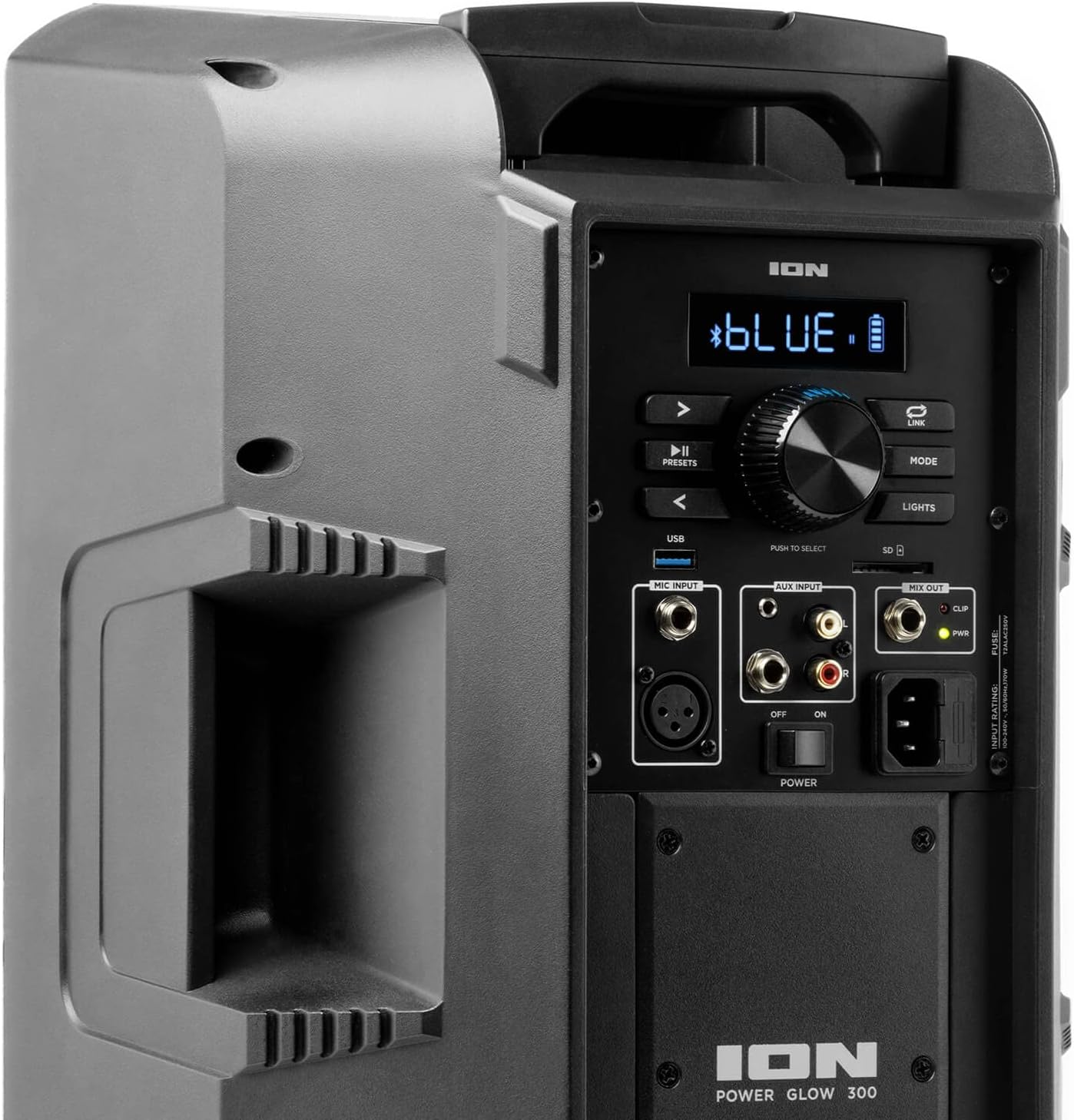
Image: Aux Inputs for external devices.
3. LED ආලෝකකරණ බලපෑම්
The Power Glow 300 features dynamic multi-colored LED lights on the woofer that can pulse and change with the beat of the music. Use the 'LIGHTS' button on the control panel or the ION Sound XP APP to cycle through different lighting modes or turn them off.

Image: Speaker with green LED lighting.
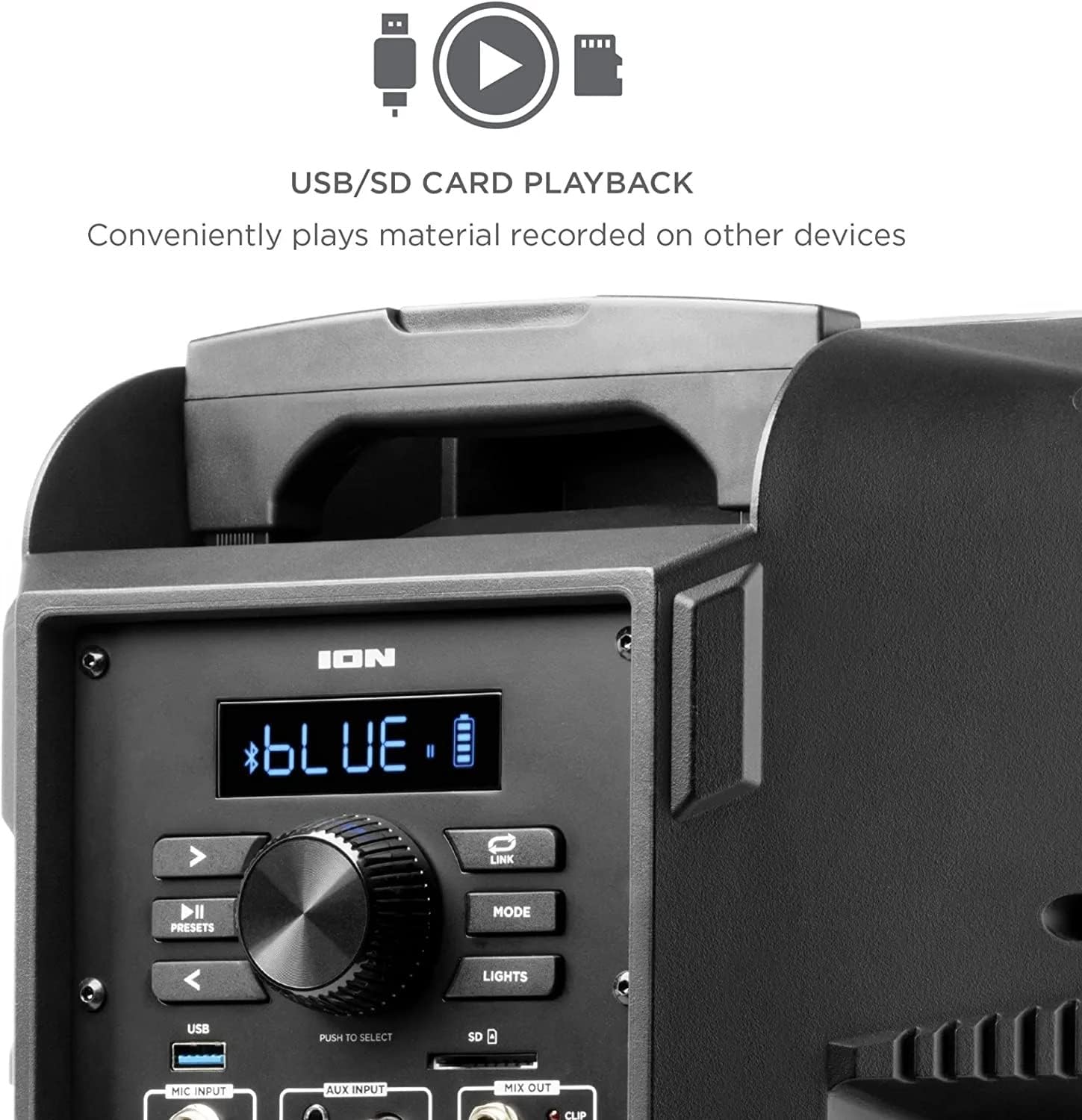
Image: Speaker with blue LED lighting.
4. Wireless Stereo-Link
To connect two Power Glow 300 speakers wirelessly for stereo sound, follow the instructions provided in the ION Sound XP APP or refer to the full product manual for detailed pairing steps.
නඩත්තු කිරීම
- පිරිසිදු කිරීම: Use a soft, dry cloth to clean the exterior of the speaker. Do not use harsh chemicals or abrasive cleaners.
- බැටරි සත්කාර: ප්රශස්ත බැටරි ආයු කාලයක් සඳහා, බැටරිය නිතර නිතර සම්පූර්ණයෙන්ම විසර්ජනය කිරීමෙන් වළකින්න. විශේෂයෙන් එය දිගු කාලයක් ගබඩා කර ඇත්නම්, ස්පීකරය නිතිපතා නැවත ආරෝපණය කරන්න.
- ගබඩා: සෘජු හිරු එළියෙන් සහ අධික උෂ්ණත්වයන්ගෙන් ඈත්ව සිසිල් වියළි ස්ථානයක ස්පීකරය ගබඩා කරන්න.
දෝෂගවේෂණය
- බලය නැත: Ensure the power cable is securely connected and the power switch is in the 'ON' position. Check the power outlet.
- ශබ්දයක් නැත: Verify that the volume is turned up on both the speaker and your audio source. Check all cable connections for auxiliary inputs. Ensure Bluetooth is properly paired.
- බ්ලූටූත් විසන්ධි කිරීම: Move your Bluetooth device closer to the speaker. Ensure no other devices are interfering with the Bluetooth signal. Try unpairing and re-pairing the device.
- විකෘති ශබ්දය: Reduce the volume on both the speaker and your audio source. Check for proper input levels.
- විදුලි පහන් ක්රියා නොකරයි: Check the 'LIGHTS' button on the control panel or within the ION Sound XP APP to ensure they are enabled.
If issues persist, please refer to the comprehensive troubleshooting guide on the ION Audio webවෙබ් අඩවිය හෝ පාරිභෝගික සහාය අමතන්න.
පිරිවිතර
| මාදිලියේ නම | පවර් ග්ලෝ 300 |
| ස්පීකර් වර්ගය | වූෆර් |
| ස්පීකර් උපරිම නිමැවුම් බලය | වොට් 300 |
| වූෆර් විෂ්කම්භය | අඟල් 10 |
| ට්වීටර් විෂ්කම්භය | මිලිමීටර් 25.4 යි |
| සම්බන්ධතා තාක්ෂණය | බ්ලූටූත් |
| රැහැන් රහිත සන්නිවේදන තාක්ෂණය | බ්ලූටූත් |
| බ්ලූටූත් පරාසය | අඩි 100 (මීටර් 30.48) |
| බලශක්ති ප්රභවය | බැටරි බලයෙන් |
| බැටරි වර්ගය | 1 ලිතියම් අයන (ඇතුළත්) |
| අයිතමයේ බර | රාත්තල් 26.3 කි |
| පැකේජ මානයන් | අඟල් 22 x 14.8 x 14.8 |
| ඇතුළත් සංරචක | Speaker, Power cable, User manual |
| UPC | 657768184574 |
| වගකීම් වර්ගය | සීමා සහිතයි |
වගකීම් සහ සහාය
The ION Audio Power Glow 300 comes with a Limited Warranty. For detailed warranty information, product registration, and technical support, please visit the official ION Audio webවෙබ් අඩවියට හෝ ඔවුන්ගේ පාරිභෝගික සේවා දෙපාර්තමේන්තුවට සම්බන්ධ වන්න. වගකීම් හිමිකම් සඳහා මිලදී ගැනීමේ සාක්ෂියක් ලෙස ඔබේ මිලදී ගැනීමේ රිසිට්පත තබා ගන්න.


