හැඳින්වීම
This manual provides detailed instructions for the proper use and maintenance of your AIWA HST-250BT Bluetooth Over-Ear Headphones. Please read this manual thoroughly before using the product to ensure optimal performance and longevity.
පෙට්ටියේ ඇති දේ
ඇසුරුම් ඉවත් කිරීමෙන් පසු, කරුණාකර පහත සඳහන් සියලුම අයිතම ඇති බවට වග බලා ගන්න:
- AIWA HST-250BT Bluetooth Over-Ear Headphones
- Braided nylon micro USB charging cable
- Aux cable 3.5mm stereo to 3.5mm stereo (1 meter length, high quality with metal plugs)
- Deluxe carrying case
- පරිශීලක අත්පොත (මෙම ලේඛනය)
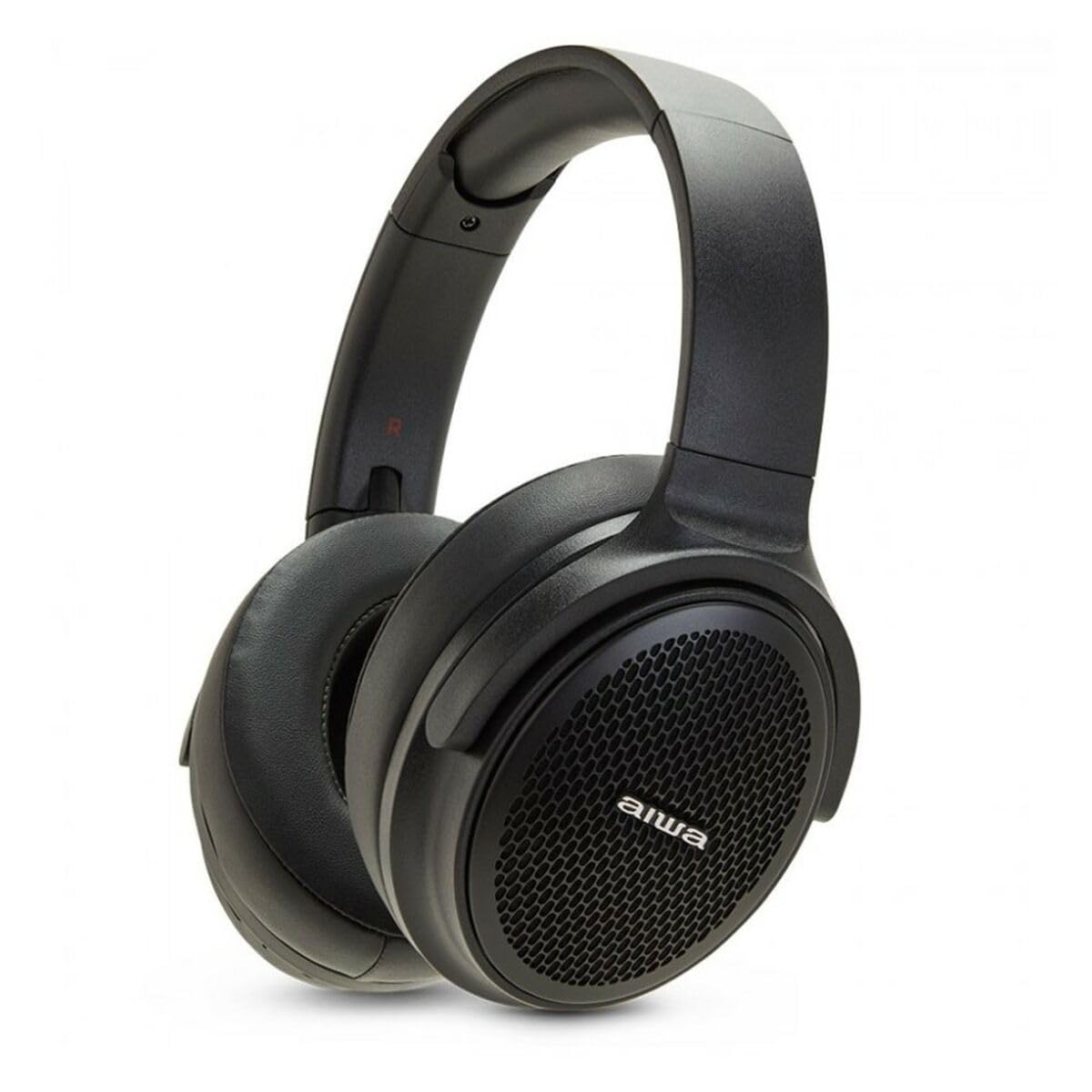
Image: The AIWA HST-250BT headphones shown with the braided micro USB charging cable, 3.5mm aux cable, and deluxe carrying case.
නිෂ්පාදන විශේෂාංග
- බ්ලූටූත් 5.0 සම්බන්ධතාව: For stable and efficient wireless connection.
- HyperBass Technology: Enhanced bass for a rich audio experience.
- රැහැන්ගත සහ රැහැන් රහිත ක්රියාකාරිත්වය: Use via Bluetooth or the included 3.5mm audio cable.
- මයික්රෝ එස්ඩී ස්ලොට්: මයික්රෝ SD කාඩ්පතකින් කෙලින්ම සංගීතය වාදනය කරන්න.
- ඒකාබද්ධ පාලන: Touch controls for music playback and call management.
- බිල්ට් මයික්රෆෝනය: හෑන්ඩ්ස්-ෆ්රී ඇමතුම් සඳහා.
- නැවත ආරෝපණය කළ හැකි බැටරි: Long-lasting battery with ultra-low power consumption.
- ජල ආරක්ෂිත නිර්මාණය: ඉසින සහ දහඩියෙන් ආරක්ෂාව සපයයි.
- සුවපහසු නිර්මාණය: Over-ear earpiece shape for extended wear.
සැලසුම
1. හෙඩ්ෆෝන් ආරෝපණය කිරීම
Before first use, fully charge your AIWA HST-250BT headphones. Use the provided micro USB charging cable.
- Connect the micro USB end of the cable to the charging port on the headphones.
- Connect the USB-A end of the cable to a USB power adapter (not included) or a computer's USB port.
- The LED indicator will illuminate to show charging status. It typically takes approximately 2 hours for a full charge.
- Once fully charged, the LED indicator will change or turn off (refer to the specific LED behavior in your product's quick start guide if available).
2. බ්ලූටූත් යුගලනය
Pair your headphones with your smart device for wireless audio.
- හෙඩ්ෆෝන් ආරෝපණය කර ක්රියා විරහිත කර ඇති බවට සහතික වන්න.
- Press and hold the power button on the headphones until the LED indicator flashes rapidly (usually blue and red), indicating pairing mode.
- On your smart device (smartphone, tablet, computer), go to the Bluetooth settings.
- බ්ලූටූත් ක්රියාත්මක කර පවතින උපාංග සොයන්න.
- Select "AIWA HST-250BT" from the list of found devices.
- Once paired, the LED indicator on the headphones will typically show a slow blue flash or solid blue light.
- මුරපදයක් ඉල්ලා සිටියහොත්, "0000" ඇතුළත් කරන්න.
සටහන: හෙඩ්ෆෝන් ක්රියාත්මක වූ විට අවසන් වරට යුගල කළ උපාංගයට ස්වයංක්රීයව නැවත සම්බන්ධ වීමට උත්සාහ කරයි.
මෙහෙයුම් උපදෙස්
බලය සක්රිය / අක්රිය
- බල ගැන්වීම: තත්පර 3ක් පමණ බල බොත්තම ඔබාගෙන සිටින්න.
- විදුලිය විසන්ධි කිරීම: තත්පර 5ක් පමණ බල බොත්තම ඔබාගෙන සිටින්න.
සංගීත වාදනය (බ්ලූටූත් ප්රකාරය)
- වාදනය/විරාමය: බහු ක්රියාකාරී බොත්තම වරක් ඔබන්න.
- ඊළඟ ධාවන පථය: ශබ්දය වැඩි කිරීමේ බොත්තම ඔබාගෙන සිටින්න.
- පෙර ධාවන පථය: Volume Down බොත්තම ඔබාගෙන සිටින්න.
- පරිමාව: Volume Up බොත්තම කෙටියෙන් ඔබන්න.
- ශබ්දය පහළට: ශබ්දය අඩු කිරීමේ බොත්තම කෙටියෙන් ඔබන්න.
ඇමතුම් කළමනාකරණය
- පිළිතුර/අවසන් ඇමතුම: බහු ක්රියාකාරී බොත්තම වරක් ඔබන්න.
- ඇමතුම ප්රතික්ෂේප කරන්න: බහුකාර්ය බොත්තම තත්පර 2ක් ඔබාගෙන සිටින්න.
- අවසාන අංකය නැවත අමතන්න: බහුකාර්ය බොත්තම දෙවරක් ඔබන්න.
Micro SD කාඩ්පත භාවිතා කිරීම
The headphones support direct playback from a Micro SD card.
- මයික්රෝ SD කාඩ්පතක් ඇතුළු කරන්න (සහාය දක්වන ශ්රව්ය සමඟ) files) into the designated slot on the headphones.
- The headphones will automatically switch to Micro SD playback mode or you may need to press a mode button (refer to specific button layout if available).
- Use the music playback controls (Play/Pause, Next/Previous Track, Volume) as described above.
රැහැන්ගත සම්බන්ධතාවය (AUX මාදිලිය)
For a wired connection, use the included 3.5mm audio cable.
- Connect one end of the 3.5mm audio cable to the AUX input port on the headphones.
- Connect the other end to the 3.5mm audio output jack of your audio source (e.g., smartphone, MP3 player).
- In AUX mode, controls on the headphones (like volume, play/pause) may not function, and you will need to control playback from your audio source.
නඩත්තු කිරීම
- පිරිසිදු කිරීම: මෘදු වියළි රෙද්දකින් හෙඩ්ෆෝන් පිස දමන්න. උල්ෙල්ඛ පිරිසිදු කරන්නන් හෝ ද්රාවක භාවිතා නොකරන්න.
- ගබඩා: Store the headphones in the provided deluxe carrying case when not in use to protect them from dust and damage.
- බැටරි සත්කාර: බැටරි ආයු කාලය දීර්ඝ කිරීම සඳහා, හෙඩ්ෆෝන් නිතර නිතර සම්පූර්ණයෙන්ම විසර්ජනය කිරීමෙන් වළකින්න. දිගු කාලයක් භාවිතා නොකළත්, නිතිපතා ඒවා ආරෝපණය කරන්න.
- ජල ප්රතිරෝධය: While waterproof, avoid submerging the headphones in water. Dry them thoroughly if they get wet.
දෝෂගවේෂණය
| ගැටලුව | විය හැකි හේතුව | විසඳුම |
|---|---|---|
| හෙඩ්ෆෝන් ක්රියාත්මක නොවේ. | අඩු බැටරි. | Charge the headphones fully using the provided USB cable. |
| උපාංගය සමඟ යුගල කළ නොහැක. | හෙඩ්ෆෝන් යුගල කිරීමේ මාදිලියේ නැත; උපාංගයේ බ්ලූටූත් ක්රියා විරහිතයි; උපාංගය බොහෝ දුරයි. | Ensure headphones are in pairing mode (flashing LED). Turn on Bluetooth on your device. Move device closer to headphones (within 10 meters). Forget previous pairings on your device and try again. |
| ශබ්දයක් නැත හෝ අඩු පරිමාවක් නැත. | හෙඩ්ෆෝන් හෝ උපාංගයේ ශබ්දය ඉතා අඩුයි; වැරදි ශ්රව්ය මූලාශ්රයක්; හෙඩ්ෆෝන් සම්බන්ධ කර නැත. | Increase volume on both headphones and connected device. Ensure headphones are properly paired or the AUX cable is fully inserted. Check if the correct audio output is selected on your device. |
| මයික්රෝ SD කාඩ් පත ක්රියා නොකරයි. | කාඩ්පත නිවැරදිව ඇතුළත් කර නැත; සහාය නොදක්වයි file format; card corrupted. | Reinsert the Micro SD card. Ensure audio files are in a supported format (e.g., MP3). Try a different Micro SD card. |
පිරිවිතර
| විශේෂාංගය | විස්තර |
|---|---|
| මාදිලියේ නම | එච්එස්ටී-250බීටී |
| සම්බන්ධතා තාක්ෂණය | රැහැන් රහිත (බ්ලූටූත්), රැහැන්ගත (3.5mm AUX) |
| රැහැන් රහිත සන්නිවේදන තාක්ෂණය | බ්ලූටූත් 5.0 |
| ඉයර්පීස් හැඩය | කනට උඩින් |
| ශ්රව්ය ධාවක වර්ගය | ගතික ධාවකය |
| පාලන ක්රමය | ස්පර්ශ කරන්න |
| විශේෂ ලක්ෂණ | HyperBASS, 10M Range, Call use, Rechargeable, Ultra low power consumption, Micro SD Slot, Waterproof |
| ආරෝපණ කාලය | ආසන්න වශයෙන් පැය 2 කි |
| ගැළපෙන උපාංග | ස්මාර්ට් උපාංග |
| අයිතමයේ බර | ග්රෑම් 100 (අවුන්ස 3.53) |
| නිෂ්පාදන මානයන් | අඟල් 19.69 x 19.69 x 11.02 |
| ද්රව්ය | නයිලෝන් |
| නිෂ්පාදකයා | AIWA |
ආරක්ෂිත තොරතුරු
Please observe the following safety guidelines for safe operation and to prevent damage to your device:
- හෙඩ්ෆෝන් අධික උෂ්ණත්වයන්ට, සෘජු හිරු එළියට හෝ අධික ආර්ද්රතාවයට නිරාවරණය නොකරන්න.
- ශ්රවණාබාධ වැළැක්වීම සඳහා දිගු කාලයක් සඳහා ඉහළ ශබ්ද මට්ටම්වලට සවන් දීමෙන් වළකින්න.
- හෙඩ්ෆෝන් විසුරුවා හැරීමට හෝ වෙනස් කිරීමට උත්සාහ නොකරන්න. මෙය වගකීම් අවලංගු කරන අතර හානි සිදු විය හැක.
- Keep the headphones away from children and pets.
- සපයා ඇති ආරෝපණ කේබලය හෝ සහතික කළ සමාන ආරෝපණ කේබලයක් පමණක් භාවිතා කරන්න.
- දේශීය රෙගුලාසි වලට අනුව වගකීමෙන් යුතුව නිෂ්පාදනය බැහැර කරන්න. ගෘහස්ථ අපද්රව්ය සමඟ බැහැර නොකරන්න.
වගකීම් සහ සහාය
AIWA products are designed and manufactured to the highest quality standards. For warranty information and technical support, please refer to the warranty card included with your purchase or visit the official AIWA webඅඩවිය.
For further assistance, you may contact AIWA customer support through their official channels.
Note: Specific warranty terms may vary by region. Please retain your proof of purchase for warranty claims.


