හැඳින්වීම
Thank you for choosing the Eureka AK10 Pro Cordless Vacuum Cleaner. This manual provides essential information for the safe operation, maintenance, and troubleshooting of your new appliance. Please read it thoroughly before first use and keep it for future reference.
The Eureka AK10 Pro is a high-performance cordless stick vacuum cleaner designed for efficient cleaning. It features a powerful 450W BLDC motor, delivering up to 29000 Pa of suction power. With a runtime of up to 60 minutes, a foldable tube for hard-to-reach areas, and an intelligent LED display, it is ideal for various cleaning tasks, including pet hair removal.
වැදගත් ආරක්ෂක උපදෙස්
විදුලි උපකරණයක් භාවිතා කරන විට, පහත සඳහන් දෑ ඇතුළුව සෑම විටම මූලික පූර්වාරක්ෂාවන් අනුගමනය කළ යුතුය:
- මෙම වැකුම් ක්ලීනර් භාවිතා කිරීමට පෙර සියලුම උපදෙස් කියවන්න.
- ප්ලග් ඉන් කර ඇති විට උපකරණය නොසලකා හරින්න එපා. භාවිතයේ නොමැති විට සහ සේවා කිරීමට පෙර අලෙවිසැලෙන් පේනුවෙන් ඉවත් කරන්න.
- එළිමහනේ හෝ තෙත් මතුපිට භාවිතා නොකරන්න.
- සෙල්ලම් බඩුවක් ලෙස භාවිතා කිරීමට ඉඩ නොදෙන්න. ළමුන් හෝ අසල භාවිතා කරන විට සමීප අවධානයක් අවශ්ය වේ.
- මෙම අත්පොතෙහි විස්තර කර ඇති පරිදි පමණක් භාවිතා කරන්න. නිෂ්පාදකයාගේ නිර්දේශිත ඇමුණුම් පමණක් භාවිතා කරන්න.
- හානියට පත් ලණුව හෝ ප්ලග් සමඟ භාවිතා නොකරන්න. උපකරණය නියමිත පරිදි ක්රියා නොකරන්නේ නම්, බිම හෙළා ඇත්නම්, හානි වී ඇත්නම්, එළිමහනේ හෝ ජලයට වැටී ඇත්නම්, එය සේවා මධ්යස්ථානයකට ආපසු යන්න.
- ලණුවකින් අදින්න හෝ රැගෙන නොයන්න, ලණුව හසුරුවක් ලෙස භාවිතා කරන්න, ලණුව මත දොරක් වසා දමන්න, හෝ තියුණු දාර හෝ කොන් වටා ලණුව අදින්න. ලණුව හරහා උපකරණ ධාවනය නොකරන්න. රත් වූ මතුපිටින් ලණුව ඈත් කරන්න.
- ලණුව ඇදගෙන පේනුව ගලවන්න එපා. විසන්ධි කිරීමට, ලණුව නොව ප්ලග් ග්රහණය කර ගන්න.
- තෙත් දෑතින් පේනු හෝ උපකරණ හසුරුවන්න එපා.
- කිසිම වස්තුවක් විවරයන් තුළට දමන්න එපා. අවහිර වූ විවරයක් සමඟ භාවිතා නොකරන්න; දූවිලි, ලින්ට්, හිසකෙස් සහ වාතය ප්රවාහය අඩු කළ හැකි කිසිවක් නොමැතිව තබා ගන්න.
- හිසකෙස්, ලිහිල් ඇඳුම්, ඇඟිලි සහ ශරීරයේ සියලුම කොටස් විවරයන් සහ චලනය වන කොටස් වලින් ඈත් කරන්න.
- සිගරට්, ගිනිකූරු හෝ උණු අළු වැනි දැවෙන හෝ දුම් පානය කරන කිසිවක් ගන්න එපා.
- පෙට්රල් වැනි දැවෙන හෝ දහනය කළ හැකි ද්රව අහුලා ගැනීමට හෝ ඒවා පවතින ප්රදේශ වල භාවිතා කිරීමට භාවිතා නොකරන්න.
- දූවිලි කෝප්පයක් සහ/හෝ පෙරහන් නොමැතිව භාවිතා නොකරන්න.
- පේනු විසන්ධි කිරීමට පෙර සියලුම පාලන අක්රිය කරන්න.
- පඩිපෙළ පිරිසිදු කිරීමේදී අමතර සැලකිල්ලක් දක්වන්න.
- ඔබේ උපකරණය සිසිල් වියළි ස්ථානයක ගෘහස්ථව ගබඩා කරන්න.
පැකේජයේ අන්තර්ගතය
ඇසුරුම් ඉවත් කිරීමේදී සියලුම අයිතම හොඳ තත්ත්වයේ පවතින බවට වග බලා ගන්න:
- Eureka AK10 Pro Main Unit
- මෝටර් සහිත කුඩා බුරුසුව
- 2-in-1 ක්රිවිස් මෙවලම
- වෝල් මවුන්ට්
- දිගු නළය
- බල ඇඩැප්ටරය / චාජර්
- පරිශීලක අත්පොත

Image: Eureka AK10 Pro main unit and included accessories.
සැකසීම සහ එකලස් කිරීම
1. Assembling the Vacuum Cleaner
- දිගු නළය නිසි තැනට ක්ලික් වන තුරු ප්රධාන ඒකකයට ඇතුළු කරන්න.
- Attach the floor brush head to the other end of the extension tube, ensuring it clicks securely.
- For handheld use, attach desired accessories (e.g., 2-in-1 crevice tool, mini motorized brush) directly to the main unit.
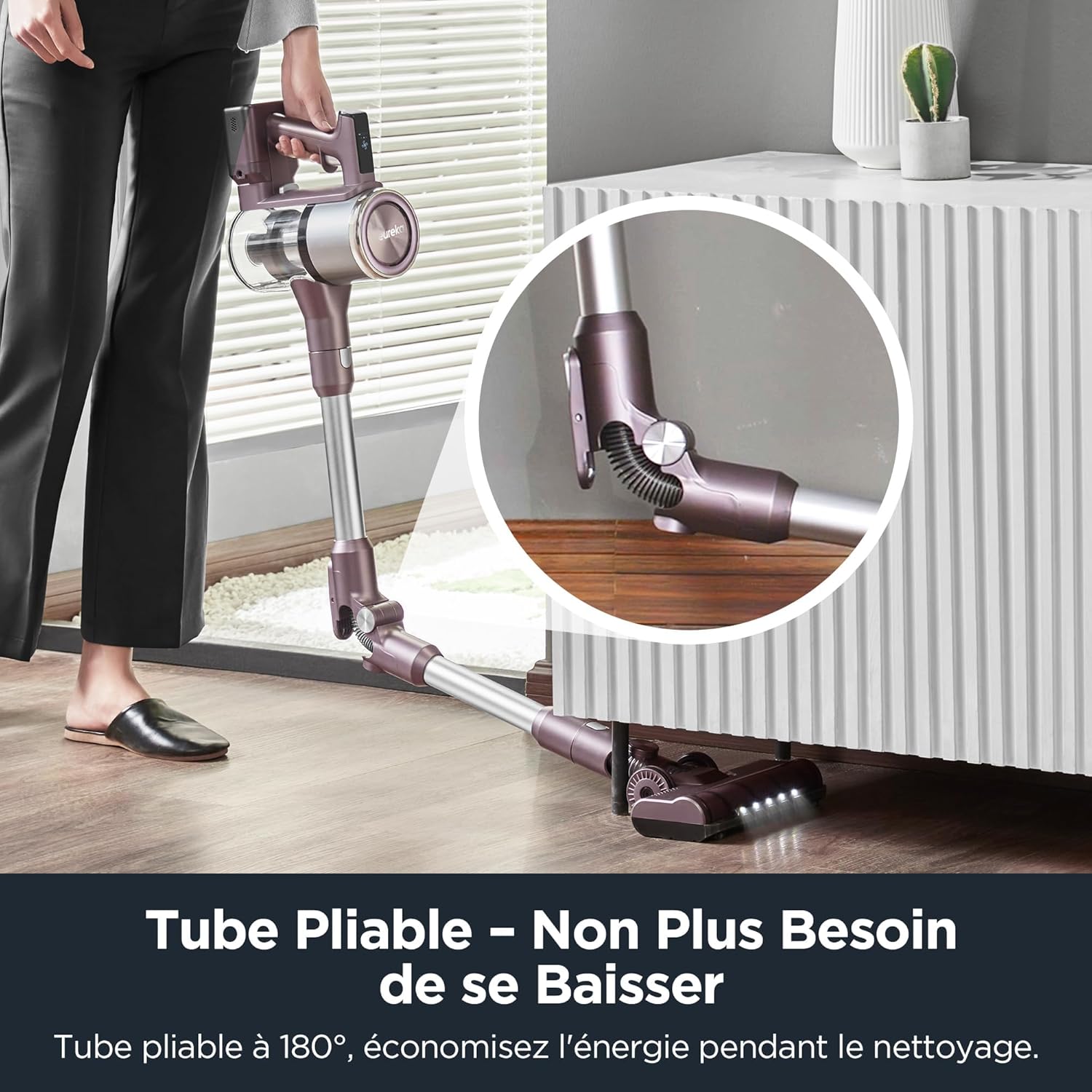
Image: Illustration of assembling the main unit, extension tube, and floor brush.
2. බැටරිය ආරෝපණය කිරීම
The Eureka AK10 Pro features a removable battery for convenient charging. Before first use, fully charge the battery.
- To charge the battery while attached to the vacuum: Connect the power adapter to the charging port on the main unit and plug it into a wall outlet.
- To charge the removable battery separately: Detach the battery from the main unit and connect the power adapter directly to the battery charging port. Plug into a wall outlet.
- The LED display will indicate charging status. A full charge takes approximately 3 to 3.5 hours.
Image: The removable battery being charged, both attached to the vacuum and separately.
මෙහෙයුම් උපදෙස්
1. බලය සක්රිය/අක්රිය සහ චූෂණ ක්රම
- වැකුම් ක්ලීනර් සක්රිය හෝ අක්රිය කිරීමට බල බොත්තම ඔබන්න.
- The intelligent LED display shows the current suction mode and battery level.
- Touch the LED screen to cycle through the three cleaning modes:
- පරිසර මාදිලිය: For light cleaning and maximum runtime (up to 60 minutes).
- සම්මත මාදිලිය: එදිනෙදා පිරිසිදු කිරීමේ කටයුතු සඳහා.
- බූස්ට් මාදිලිය: For stubborn dirt and deep cleaning, providing maximum suction power (29000 Pa).

Image: The intelligent LED display showing real-time cleaning visualization and touch control for speed adjustment.
2. Using the Foldable Tube
The unique foldable tube allows you to clean under low furniture without bending down.
- Press the hinge release button on the extension tube to fold it.
- Adjust the angle to reach under sofas, beds, and tables.
- Return the tube to its straight position until it locks for standard cleaning.
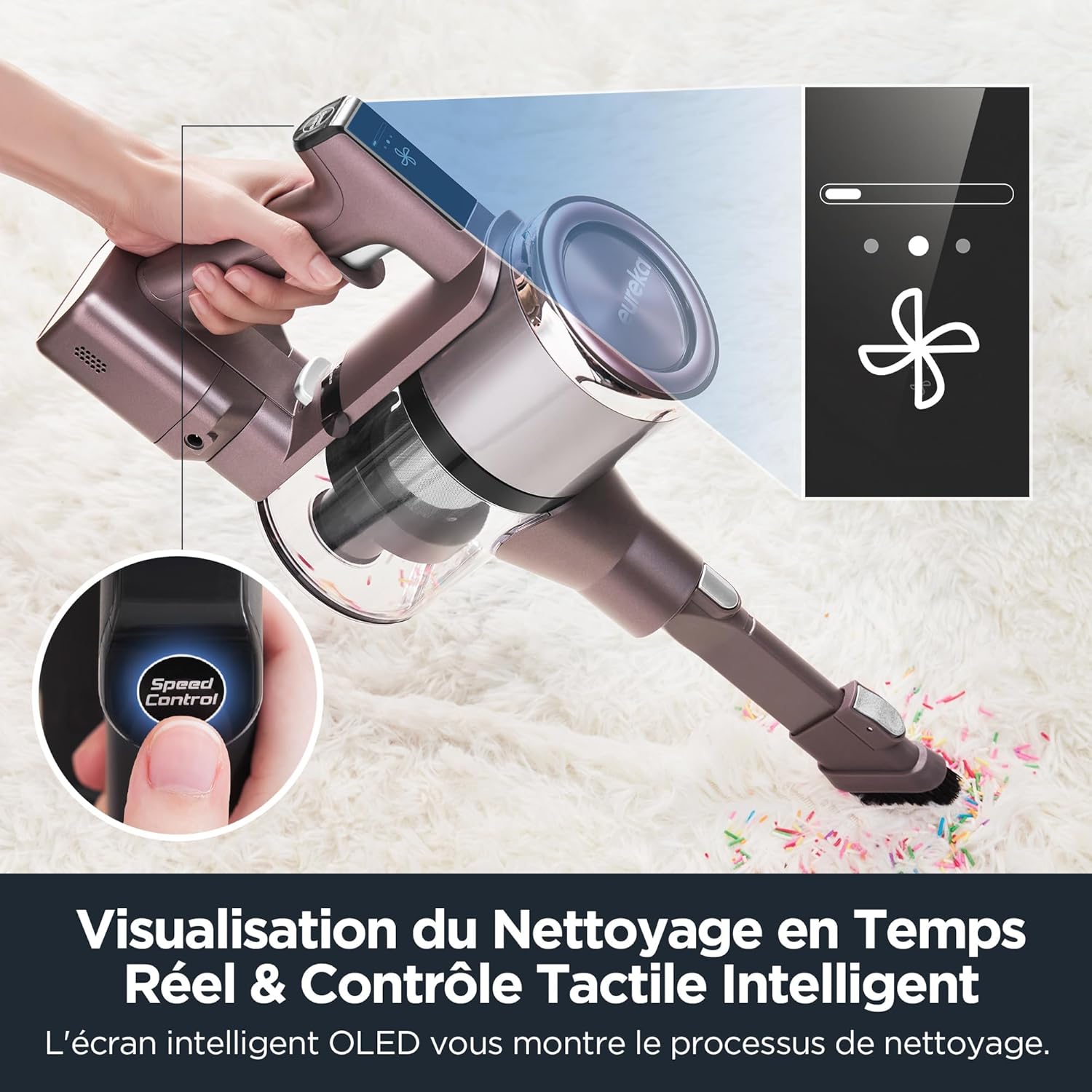
Image: The vacuum cleaner demonstrating the foldable tube feature for cleaning under furniture.
3 අමතර උපාංග භාවිතා කිරීම
The Eureka AK10 Pro comes with various attachments for specialized cleaning:
- Motorized Mini Brush: Ideal for removing pet hair and dust from upholstery, stairs, and car interiors. Attach directly to the main unit.
- 2-in-1 විවර මෙවලම: Use the narrow end for tight spaces and corners, or slide the brush attachment down for dusting surfaces.
- දිගු නල: Provides extended reach for high areas or floor cleaning.

Image: Various accessories including the 2-in-1 crevice tool and mini motorized brush, demonstrating their use for different cleaning needs.
නඩත්තු කිරීම
නිතිපතා නඩත්තු කිරීම ප්රශස්ත ක්රියාකාරිත්වය සහතික කරන අතර ඔබේ වැකුම් ක්ලීනර්හි ආයු කාලය දීර්ඝ කරයි.
1. කුණු බඳුන හිස් කිරීම
- ප්රධාන ඒකකයෙන් කුණු බඳුන වෙන් කිරීමට කුණු බඳුන මුදා හැරීමේ බොත්තම ඔබන්න.
- Hold the dustbin over a trash can and press the bottom release latch to empty its contents.
- Reattach the dustbin securely until it clicks.
2. පෙරහන් පිරිසිදු කිරීම
The Eureka AK10 Pro features a 5-stage high-efficiency filtration system, including a HEPA filter. Clean filters regularly to maintain suction power.
- Remove the dustbin and then carefully remove the filter components (pre-filter, mesh filter, HEPA filter).
- පෙරහන් වලින් ලිහිල් අපිරිසිදුකම් ඉවත් කරන්න.
- Rinse the washable filters under cold running water until the water runs clear. Do not use hot water or detergents.
- නැවත එකලස් කිරීමට පෙර අවම වශයෙන් පැය 24ක්වත් සියලුම පෙරහන් සංරචක සම්පූර්ණයෙන්ම වාතයේ වියළීමට ඉඩ දෙන්න. තෙත් පෙරහන් සමඟ රික්තය භාවිතා නොකරන්න.
- පෙරහන් සහ කුණු බඳුන ප්රතිලෝම අනුපිළිවෙලට නැවත එකලස් කරන්න.
3. බුරුසු රෝල් පිරිසිදු කිරීම
- Turn off the vacuum and detach the floor brush head.
- Locate the brush roll release tab or cover. Open it to access the brush roll.
- Remove any tangled hair or debris from the brush roll using scissors or a cleaning tool.
- බුරුසු රෝල නැවත ඇතුළු කර කවරය ආරක්ෂිතව වසා දමන්න.
දෝෂගවේෂණය
If you encounter issues with your Eureka AK10 Pro, refer to the following common problems and solutions:
| ගැටලුව | විය හැකි හේතුව | විසඳුම |
|---|---|---|
| රික්තය ක්රියාත්මක නොවේ. | බැටරිය ආරෝපණය වී නැත හෝ නිසි ලෙස ස්ථාපනය කර නැත. | Ensure the battery is fully charged and correctly inserted into the main unit. |
| අඩු චූෂණ බලය. | Dustbin is full, filters are clogged, or there is a blockage in the tube/brush head. | Empty the dustbin. Clean or replace filters. Check for and remove any blockages in the extension tube or brush head. |
| බුරුසු රෝල කැරකෙන්නේ නැත. | බුරුසු රෝල හිසකෙස්/සුන්බුන් සමඟ පැටලී හෝ අවහිර වී ඇත. | Turn off the vacuum and remove any obstructions from the brush roll. Ensure it is properly reinstalled. |
| කෙටි ධාවන කාලය. | Battery not fully charged or operating in Boost mode frequently. | Ensure the battery is fully charged. Use Eco or Standard mode for longer cleaning sessions. Battery capacity may decrease over time. |
මෙම විසඳුම් උත්සාහ කිරීමෙන් පසුවත් ගැටලුව පවතින්නේ නම්, කරුණාකර පාරිභෝගික සහාය අමතන්න.
පිරිවිතර
| විශේෂාංගය | විස්තර |
|---|---|
| වෙළඳ නාමය | යුරේකා |
| ආදර්ශ අංකය | AK10 Pro |
| බලය | වොට් 450 |
| වෙළුමtage | වෝල්ට් 29.6 |
| චූෂණ බලය | 29000 Pa (Boost Mode) |
| වේග ගණන | 3 (Eco, Standard, Boost) |
| ශබ්ද මට්ටම | ඩෙසිබල් 82 යි |
| ධාවන කාලය | මිනිත්තු 60 දක්වා (පරිසර මාදිලිය) |
| ආරෝපණ කාලය | පැය 3 සිට 3.5 දක්වා |
| විශේෂ ලක්ෂණ | 60-minute runtime in ECO mode, Removable battery, 5-stage filtration system, Foldable tube, Intelligent LED screen |
| පෙරහන් වර්ගය | HEPA පෙරණය |
| නිර්දේශිත මතුපිට | Carpet, Hard floors, Tile, Wood floors |
| බලශක්ති ප්රභවය | බැටරි බලයෙන් |
| ඇතුළත් සංරචක | Mini power brush, 2-in-1 crevice tool, Wall mount, Extension tube |
| අයිතමයේ බර | කිලෝ ග්රෑම් 3 යි |
| නිෂ්පාදන මානයන් (L x W x H) | 21.8 x 11 x 120 සෙ.මී |
වගකීම් සහ සහාය
Eureka products are manufactured to the highest quality standards. For information regarding warranty coverage, please refer to the warranty card included in your product packaging or visit the official Eureka webඅඩවිය.
For technical support, spare parts, or service inquiries, please contact Eureka customer service. Contact details can typically be found on the Eureka webවෙබ් අඩවියේ හෝ ඔබේ නිෂ්පාදන ලියකියවිලිවල.


